|

|
Processed through Paypal No account required. |








Buy our over-priced crap to help pay the bills.



|
|
Processed through Paypal No account required. |
| Files | ||||
| File Name | Rating | Downloads | ||
 |
Free Color Picker v1.2.1 Free Color Picker v1.2.1 A program that lets you capture the color of any pixel displayed on the screen. To facilitate color capturing, there is a screen magnifier in the center of the main window that displays an enlarged image around the current cursor position. Free Color Picker is a program that lets you capture the color of any pixel displayed on the screen. To capture a color, just move the cursor to the desired position and press the F4 key. The color below the cursor will be added to the color palette located in the right part of the main window. To facilitate color capturing, there is a screen magnifier in the center of the main window that displays an enlarged image around the current cursor position. The maximum magnification is 30x. Any captured color can be changed freely using the built-in color editor. In addition, the program allows easy modification of the entire color palette, sorting according to various criteria, generating random colors for given ranges of RGB component colors, searching for triad colors on a color wheel and many more. The most important features Capturing the color of the pixel under the cursor (F4 hotkey). Copy the color code under the cursor to the system clipboard in the format selected by the user (F3 hotkey). Screen magnifier that enlarges the screen content around the current cursor position with a maximum magnification of 30x. The ability to set the algorithm used for zooming. The default algorithm - Box - does not change the color values. The other algorithms use color interpolation - they calculate the colors of empty pixels created after enlarging the image based on the colors of neighboring pixels in the original image. The most accurate, but ... |
 |
3,429 | Jul 11, 2021 Pazera Software 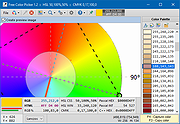 |
 |
GetPixelColor v3.55 GetPixelColor v3.55 👉 Instantly identify the color value of any pixel on your Windows desktop. GetPixelColor is a lightweight, portable utility that lets you quickly determine the exact color value of any pixel displayed anywhere on your Windows desktop. Whether you're a web designer, graphic artist, software developer, digital artist, or simply need to identify a specific color, GetPixelColor provides an easy way to retrieve precise color information with minimal effort. The program follows your mouse cursor in real time, displaying the selected pixel's color in multiple formats for use in graphics, web development, and design projects. Its compact interface requires no installation, making it ideal for keeping on a USB flash drive or using as a quick desktop utility. Despite its small size, GetPixelColor supports numerous interface languages and works across virtually all modern Windows versions. Features: • Instantly identify the color of any screen pixel • Live color detection as the mouse cursor moves • Displays precise color values for selected pixels • Simple, lightweight, and portable application • No installation required • Low system resource usage • Suitable for web design, graphic design, development, and troubleshooting • Supports numerous interface languages • Compatible with virtually all Windows desktop environments Supported operating systems: • Windows XP, Windows Vista, Windows 7, Windows 8, Windows 8.1, Windows 10, Windows 11, Windows Server 2003, Windows Server 2008, Windows Server 2012, Windows Server 2016, Windows Server 2019, Windows Server 2022 Supported languages: English, Arabic, Basque, Bulgarian, Catalan, Chinese (Simplified), Chinese (Traditional), Croatian, Czech, Danish, Dutch, Finnish, French, German, Greek, Hebrew, Hungarian, Italian, Japanese, Korean, Norwegian, Persian, Polish, Portuguese, Portuguese (Brazilian), Romanian, Russian, Slovak, Slovenian, Spanish, Swedish, Thai, Turkish, Ukrainian, Vietnamese Changes: v3.55 06-30-26 Improvements to GetPixelColor for all Windows operating systems. Language file update in the pixel query app. This download is for the Windows 64bit portable version (very bottom of page). If you need the Windows 32bit portable version, download here. Click here ... |
|
4,366 | Jul 08, 2026 Nenad Hrg 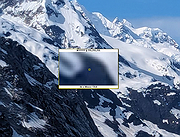 |
|
ImageGlass v10.0.6.906 ImageGlass v10.0.6.906 👉 A lightweight, versatile image viewer for Windows. ImageGlass is a feature-rich, simple-to-use image viewer with a clean, modern interface and support for over 90 image formats, including WEBP, GIF, SVG, PNG, JXL, HEIC, RAW formats and more. Features: • Supports over 90 common image formats • Fast image switching with a clean, minimal interface • Supports animated formats including GIF, WEBP, APNG and SVG • Multi-frame image support with frame navigation tools • Drag-and-drop and clipboard image opening • Six zoom modes including Auto Zoom, Lock Zoom, Scale to Width, Scale to Height, Scale to Fit and Scale to Fill • Full screen, frameless and window-fit viewing modes • Slideshow view with countdown timer • Fast thumbnail previews • Built-in color picker • EXIF metadata viewing with ExifGlass • Basic editing tools including rotate, flip, crop, resize and lossless compression • Custom themes, language packs, icon packs, layout and toolbar options • Keyboard and mouse action customization • External app integration through custom hotkeys • Color management and color channel viewing Supported operating systems: • Windows 10 64-bit version 1809 or later, Windows 11 64-bit Supported languages: Arabic, Armenian, Asturian, Azerbaijani, Belarusian, Bengali, Bulgarian, Catalan, Chinese Simplified, Chinese Traditional, Croatian, Czech, Danish, Dutch, Esperanto, Finnish, French, German, Greek, Hebrew, Hungarian, Icelandic, Indonesian, Irish, Italian, Japanese, Khmer, Korean, Kurmanji Kurdish, Kyrgyz, Lithuanian, Malay, Mongolian, Norwegian Bokmal, Persian, Polish, Portuguese, Brazilian Portuguese, Romanian, Russian, Serbian Cyrillic, Serbian Latin, Sinhala, Slovak, Slovenian, Spanish, Swedish, Tamil, Thai, Turkish, Ukrainian, Vietnamese Changes: v10.0.6.906 09-05-26 New • ImageGlass.SDK updated to 1.2.0 • Bumped plugin ABI version from 1.0.0 to 1.2.0 • Added IGHdrTransferFn.ScRgb photo metadata support for rendering HDR images from codec plugins • Added DecodeStaticRasterScaled API for requesting scaled thumbnail images from codec plugins • Added Linux AppImage package support Improvements • Updated Avalonia to 12.1.2 • Updated Magick.NET to 14.17.1 ... |
|
4,505 | Oct 06, 2026 Duong Dieu Phap 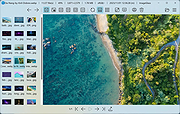 |
 |
Just Color Picker v6.1 Just Color Picker v6.1 Free portable offline color picker and color editor for web designers and digital artists Graphic designers, digital artists and webmasters can get artistic ideas and inspiration at any moment. They often notice colors and color combinations for their projects while doing something else. This is why a quick and convenient way of capturing those colors is essential. With Just Color Picker, identifying the colors, saving, editing and combining them into beautiful color combinations is super easy. Unlike many other apps, Just Color Picker was created by a person who actually uses it on an everyday basis. It is software for designers and digital artists created by a designer and a digital artist. Features: • Extensive range of color code formats: HEX, RGB, HSB/HSV, HSL, HWB, CMY and CMYK. • Averaged color sampling for easy color noise handling. • 3x, 9x and 15x magnifier and keyboard control of the mouse cursor movements for greater precision. • Screen freeze feature for sampling the color of the elements that change on mouse-hover. • Point lock feature for monitoring the color in the set screen location independent of the mouse cursor position. • Calculation of pixel distance between points. • Color list for saving, cataloguing and re-using the picked colors. • Ability to open, edit and save Adobe Photoshop .aco color swatches (Adobe color files) and GIMP .gpl palette files. • Interaction with the standard Windows and macOS color dialogs. • User comments and notes for picked colors. • Conversion of Hexadecimal and RGB color codes into the corresponding colors. • Red-Green-Blue (RGB), Cyan-Magenta-Yellow (CMY) and ... |
|
6,003 | Feb 14, 2025 Anny Studio 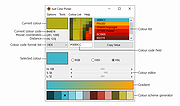 |
|
Screen Color Picker v2.0 Screen Color Picker v2.0 Screen Color Picker is a simple tool that lets you pick and retrieve data (HEX, RGB, CMYK, HSB, HSL) of any color on the screen. On program start, it will automatically move itself to the system tray. To pick a color from screen, just press the color pick hotkey (F8 by default). The color will be automatically copied to the clipboard. The output string to be copied can be defined in the settings. To open the settings window, click on the tray icon to see the program's menu, and then press "Settings". Use the wildcards given in the settings window to set the clipboard output string. Make sure to delimit each wildcard with a pipe | to bypass output glitches. For example, if you want to ouput a RGB color, write "%R, %G, %B". You can edit the last picked color either by clicking on the tray icon and then "Edit last pick", or just click on the color pick window that will show up on pick. The edited color will be automatically copied to clipboard after you close the color dialogue. Version 2.0 Full and clean remake of the tool Automatically starts in the system tray Automatically copies the color to the clipboard User-defined clipboard output string Full redesign and minimized GUI If the color pick hotkey isn't working in overlay or fullscreen applications or games, restart this tool as administrator. Windows XP Windows Vista Windows 7 Windows 8 Windows 10 Click here to visit the author's website. |
|
6,041 | Dec 08, 2019 2xDSoft 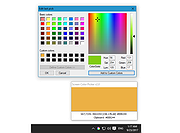 |
| Showing rows 1 to 5 of 5 | Showing Page 1 of 1 | 1 |
OlderGeeks.com Copyright (c) 2026
