|

|
Processed through Paypal No account required. |








Buy our over-priced crap to help pay the bills.



|
|
Processed through Paypal No account required. |
| Files | ||||
| File Name | Rating | Downloads | ||
 |
Kivo v0.1.0 Kivo v0.1.0 👉 Lightweight desktop teleprompter with smooth auto-scrolling. Kivo is a lightweight desktop teleprompter that provides a clean, always-on-top overlay for reading scripts during presentations, livestreams, video recordings, and other speaking engagements. It offers smooth automatic scrolling, adjustable speed controls, automatic reloading when the source text changes, and a distraction-free interface to help you stay focused on your content. Features: • Always-on-top frameless window • Modern translucent interface • Draggable overlay • Open plain text (.txt) files • Automatically reloads text when the file changes • Smooth teleprompter-style auto-scrolling • Adjustable scrolling speed • Pause and resume scrolling • Keyboard shortcuts for playback controls • Lightweight, distraction-free design Usage: • Run Kivo.exe • Select a text file of what you want to scroll on screen. Keyboard Shortcuts: • Esc - Close Kivo • Space - Pause/Resume scrolling • ↑ - Increase scrolling speed • ↓ - Decrease scrolling speed Supported operating systems: • Windows 10, Windows 11 Supported languages: English Changes: v0.1.0 06-27-26 First release. Initial MVP of Kivo. Added a frameless always-on-top window. Added a draggable overlay. Added a modern rounded translucent interface. Added text file loading. Added automatic file reloading. Added smooth teleprompter scrolling. Added adjustable scrolling speed. Added pause and resume functionality. Added keyboard shortcuts. Modularized the application into separate window and file selector components. Added the foundation for future settings, global hotkeys, and custom rendering. Note: This file has three hits on VirusTotal. We have confirmed these to be false positives. The file is safe. Click here to visit the author's website. |
 |
404 | Jul 01, 2026 Rajtilak Bhattacharjee  |
 |
StaticDesktopRuler v1.05 StaticDesktopRuler v1.05 👉 Add customizable on-screen guide rulers that make it easy to visually follow rows, columns, and align desktop objects. StaticDesktopRuler is a free, portable desktop utility that places one or more customizable rulers on your screen as visual reference guides. Its primary purpose is not measuring distances, but making it easier to keep your eyes on the correct row or column while working with large spreadsheets, databases, documents, source code, CAD drawings, image editors, and other information-dense applications. As shown in the example below, horizontal and vertical rulers can be positioned over a worksheet so you can instantly locate the exact cell where a row and column intersect, dramatically reducing the chance of reading or entering data on the wrong line. Each ruler can be customized with its own color, thickness, transparency, and ghost mode, allowing the guides to remain visible without blocking the content beneath them. Because it is portable, StaticDesktopRuler can be launched anywhere without installation. Features: • Place multiple horizontal and vertical guide rulers anywhere on the desktop • Easily follow spreadsheet rows and columns to the correct cell intersection • Reduce reading and data-entry mistakes in large worksheets and tables • Keep your place while reading databases, documents, logs, and source code • Customize each ruler's color, thickness, and transparency • Ghost mode keeps guides visible while allowing you to see and work through them • Portable application requiring no installation • Lightweight and uses very little system resources Supported operating systems: • Windows 7, Windows 8, Windows 8.1, Windows 10, Windows 11, Windows Server 2012, Windows Server 2016, Windows Server 2019, Windows Server 2022 Supported languages: • German, English, Traditional Chinese, Korean, French, Russian, Italian, Japanese, Spanish, Portuguese Changes: v1.05 07-25-26 • Minor adjustments to StaticDesktopRuler • New languages added for Static Desktop Ruler: Spanish and Portuguese • Many thanks to Pedro for the Spanish and Portuguese translations. This download is for the ... |
|
454 | Aug 04, 2026 Nenad Hrg 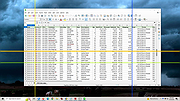 |
|
Valor Stream Overlay v0.9.9 Valor Stream Overlay v0.9.9 An overlay for Riot's Valorant game that displays your current rank, recent rank progression, and your current ranked points and ELO. From the author: "Hey everyone, this program was made after I was bothered every other second on what my rank was. I could have implemented a !rank command, but I thought of doing something unique. A program that checks your account every few seconds and sees your current rank and your point movement (unofficially). All of the code is open source, so anyone can check if the program is safe or not as you need to type in your Username and Password in the configuration file. As of writing this, there are no alternatives. I will say it now, I will not verify if alternatives are safe. I know my program is safe, and anyone can check if that statement is valid." Installation Step 1: Download Latest Version below. Step 2: Extract Zip file to your preferred location Step 3: Open your extracted folder and make your way over to the references folder, here you will find a TTF File (Font File) and a Config.Json. Open Config.Json with your preferred text editor. Step 4: Enter your Riot Games Username (the one you use to login, not in-game name) and your Riot Games Password. Step 5: Set your region, please refer to the table below for your region. If your country/region is not on this list, please try every location shown in the table. These prefixes will be set in the part of the config file below. { "region": "PREFIXHERE" } Step 6: Set your delay. This is how often your rank and ranked points update. Recommendation is 10-20 seconds. For example if your config file looks like this: { "username" : "ValorantAdmin", "password" : "Hunter2", "region" : "na", "refreshtime" : 10 } This means that my region is North America & the overlay will update ... |
|
3,746 | Dec 30, 2020 RumbleMike 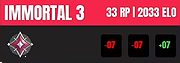 |
| Showing rows 1 to 3 of 3 | Showing Page 1 of 1 | 1 |
OlderGeeks.com Copyright (c) 2026
