|

|
Processed through Paypal No account required. |








Buy our over-priced crap to help pay the bills.



|
|
Processed through Paypal No account required. |
| Files | ||||
| File Name | Rating | Downloads | ||
 |
AnyViewer Free v5.8.0 WARNING: If someone you don’t know called you... or you dialed a number that suddenly appeared on your screen... and they told you to download this program... IT IS A SCAM. HANG UP IMMEDIATELY! AnyViewer Free v5.8.0 👉 Free remote desktop software for accessing and supporting computers from another computer, tablet, or phone. AnyViewer Free is remote desktop software for personal use that lets you remotely access and support devices, whether attended or unattended, from another computer, tablet, or smartphone. It is designed for fast remote control, stable connections, high-quality image display, remote file transfer, chat, multiple monitor support, screen mirroring, and secure remote sessions using end-to-end encryption. Features: • Remotely access personal devices from a PC, Mac, tablet, or smartphone • Supports attended and unattended remote access • Fast remote control with stable connection routing • High-quality image display with low latency • In-session and off-session remote file transfer • Chat during remote support sessions • Multiple monitor support • Display multiple remote screens in separate windows • Adaptive screen scaling • Mirror Android or iOS screens to a computer • Remote reboot and reconnect • Shortcuts to tools such as Command Prompt and Task Manager • Blacklist and whitelist access permissions by account or device ID • 256-bit asymmetric ECC end-to-end encryption • Two-factor authentication support Supported operating systems: • Windows 8.1, Windows 10, Windows 11 • Windows Server 2012 R2, Windows Server 2016, Windows Server 2019, Windows Server 2022 • macOS 10.15 or later • iOS 10.0 to iOS 16 • Android 6.0 or later Supported languages: English, French, German Changes: v5.8.0 07-07-26 Enhanced: Support for quick file transfer between My Devices on Windows. Simply drag and drop files into the Send Files area to send them directly to the target device without the need to open the File Transfer window. This download is for the Windows portable version (very bottom of page). All other download assets are below: Other Windows: AnyViewerSetup_x64.exe AnyViewerSetup.exe (32bit) macOS: AnyViewer.dmg iOS: App Store Android: AnyViewerSetup.apk Google Play Click here to visit the author's website. |
 |
1,294 | Sep 16, 2026 AOMEI Technology Co., Ltd 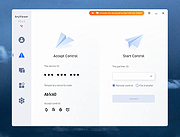 |
|
FastCopy v5.12.0 FastCopy v5.12.0 👉 High-speed file copy and backup software for Windows. FastCopy is a fast file copy and backup utility for Windows designed to maximize transfer performance by using multi-threaded read, write, and verify operations together with Overlapped I/O and Direct I/O. It supports Unicode file names, paths longer than MAX_PATH, and include or exclude filtering using UNIX-style wildcards. FastCopy is built to reduce the load on other running applications while delivering very high copy performance on modern storage devices. Features: • Fast file copy and backup software for Windows • Verification support for more reliable copying • Can record hash values for each file • Uses multi-threaded read, write, and verify processing • Uses Overlapped I/O and Direct I/O for high performance • Supports Unicode file names • Supports file paths longer than MAX_PATH (260 characters) • Supports include and exclude filters using UNIX-style wildcards • Lightweight design built with Win32 API only Supported operating systems: • Windows 7, Windows 8, Windows 8.1, Windows 10, Windows 11 • Windows Server 2012, Windows Server 2012 R2, Windows Server 2016, Windows Server 2019, Windows Server 2022, Windows Server 2025 Supported languages: • English, Japanese, Chinese Changes: v5.11.3 08-18-26 Added an option to Shell Extension to replace Explorer's standard drag & drop / paste with FastCopy. (Default: OFF) Various security enhancements. - Enabled CET Shadow Stack (/CETCOMPAT). - Enabled Control Flow Guard (/guard:cf). - Stricter DLL loading (added /DEPENDENTLOADFLAG:0x800). - (Already enabled: /GS, /NXCOMPAT (DEP), /SAFESEH (x86), /DELAYLOAD, /DYNAMICBASE, /HIGHENTROPYVA, SetDefaultDllDirectories) Note: This file has one hit on VirusTotal. We have confirmed this to be a false positive. The file is safe. Note: If you need the portable version, use the "Extract" button in the installer. Click here to visit the author's website. |
|
12,459 | Aug 21, 2026 SHIROUZU Hiroaki 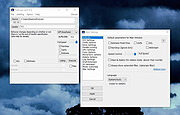 |
 |
Mirror v1.5.0 Mirror v1.5.0 Mirror copies a directory to another location. If the destination directory already exists, Mirror only copies the files that have been added, modified, or deleted compared to the source directory. Mirror is especially adapted to frequent backups. Compared to a classical directory copy, it saves time by only copying new or modified files. Moreover, when Mirror detects that a file is no more present in the source directory, it deletes it from the destination directory too. This saves disk space if you rename or move files. Mirror is a command line tool, without graphical interface. It can be easily used in scripts and BATCH files. How to install Mirror? ---------------------- Choose the EXE file matching your Windows version: - 64-bit: take Mirror64.exe; - 32-bit Windows NT/2000/XP/Vista/7/8: take MirrorNT.exe; - 32-bit Windows 95/98/ME: take Mirror9x.exe. Copy the file to C:\Windows for Mirror to be accessible without having to specify its full path. You can then launch Mirror from a console box. You can rename the file MirrorXX.exe you have chosen to Mirror.exe or any other name. How do I use Mirror? -------------------- Typical use: C:\MyFiles is the source directory E:\Backup\MyFiles is the destination directory Ensure the destination directory E:\Backup\MyFiles exists, by creating it if necessary. Mirror does not create the destination directory automatically to avoid mistakes. Then, open a console box (command.com ou cmd.exe) and type: mirror.exe C:\MyFiles E:\Backup\MyFiles You can automate the full procedure by creating a BATCH file (.bat extension) containing those two lines: @echo off mirror.exe C:\MyFiles E:\Backup\MyFiles Why has Mirror problems with modification times? ------------------------------------------------ When using Mirror with the source directory in a NTFS partition and the destination directory in a FAT16 or FAT32 partition, time precision issues may occur. Modification times in FAT partitions are rounded to the nearest 2 seconds, while modification times in NTFS partitions are very precise (100 nanoseconds). This limitation explains why files you just mirrored may not have exactly the same modification time. By default, Mirror tries to avoid time precision problems by considering that modification times having a difference less than ... |
|
4,207 | Jan 18, 2021 Guillaume Ryder 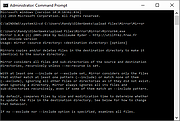 |
|
Submarine v0.3.8 Submarine v0.3.8 👉 An SSH and SFTP client that puts terminals, file transfers, tunnels, and server tools in one window. Submarine is a free, open-source client for connecting to and managing remote servers. Each server session can bring together a tabbed terminal, an SFTP file browser, port forwarding, saved commands, server information, and Docker tools. You can keep multiple sessions open, view two side by side, or pin terminals from different hosts to a monitoring wall. The SFTP browser shows local and remote files, supports drag and drop and bulk operations, and can open a remote file in your usual editor. When you save an edited file, Submarine uploads it back to the server. On desktop systems, Folder Mirror can synchronize a local folder with a remote folder, preview possible overwrites, and apply your chosen conflict rule. Saved server profiles and credentials are encrypted locally. Optional profile sync uploads the encrypted data so you can access your saved connections on another device. The Android app includes terminal, SFTP, port forwarding, server information, and Docker tools; Folder Mirror is limited to desktop systems. Features: • Open tabbed SSH terminals, including multiple shells for a server. • View two sessions side by side or arrange terminals from several hosts on the Wall. • Broadcast typed input to selected sessions. • Browse local and remote files with SFTP, drag and drop files, and select multiple files for bulk operations. • Edit remote files in your default editor and upload changes when you save. • Confirm overwrites before replacing files during uploads or downloads. • Create local, remote, and dynamic port forwarding tunnels, including SOCKS and HTTP proxy options. • Mirror a local folder to a remote server on desktop systems, with ... |
|
16 | Sep 29, 2026 Sina Xhpm 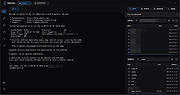 |
| Showing rows 1 to 4 of 4 | Showing Page 1 of 1 | 1 |
OlderGeeks.com Copyright (c) 2026
