|

|
Processed through Paypal No account required. |








Buy our over-priced crap to help pay the bills.



|
|
Processed through Paypal No account required. |
| Files | ||||
| File Name | Rating | Downloads | ||
 |
Equalizer APO v1.4.1 Equalizer APO v1.4.1 An open source parametric/graphic equalizer for Windows. It is implemented as an Audio Processing Object (APO) for the system effect infrastructure introduced with Windows Vista. Features: • virtually unlimited number of filters • works on any number of channels • very low latency, which makes it suited for interactive applications • low CPU usage • modular graphical user interface • VST plugin support • integrates into Voicemeeter Requirements: • Windows Vista or later (currently only Windows 7, 8, 8.1, 10 and 11 have been tested) • the application must not bypass the system effect infrastructure (APIs like ASIO or WASAPI exclusive mode can not be used) Changes: v1.4.1 Added: Update Checker that can be enabled in the installer. If enabled, will check for a new version daily and show a popup window when an update is available. Added: Support for ARM64 architecture (Windows on ARM). Same functionality as on 32 bit (now x86) and 64 bit (now x64) versions but limited VST support as native ARM64 VST plugins are needed. Improved: Updated to FFTW 3.3.10 and libsndfile 1.2.2. This download is for the Windows 64bit version (very bottom of page). If you need the Windows 32bit version, download here. If you need the Windows ARM64 version, download here. Click here to visit the author's website. |
 |
7,556 | Jan 24, 2025 Equalizer APO 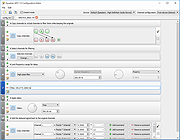 |
|
FineTune v1.9.0 FineTune v1.9.0 👉 Per-app volume control, audio routing, multi-device output and EQ for macOS. FineTune is a free and open-source macOS menu bar app that lets you control the volume of individual apps, boost quiet apps up to 4x, route apps to different speakers, use multi-device output, adjust input and output devices, and shape sound with a 10-band EQ and headphone correction. Features: • Per-app volume sliders and mute controls • Per-app volume boost with 2x, 3x and 4x gain presets • Global hotkeys for app volume up, app volume down, app mute and popup toggle • Configurable volume step size • Keyboard navigation for the menu bar popup • Multi-device output support • Route apps to different audio outputs • Auto-restore app volume, routing and EQ when devices reconnect • 10-band EQ with presets • Custom user EQ presets • AutoEQ headphone correction support • Loudness compensation using ISO 226:2023 equal-loudness contours • Input device and microphone level control • macOS alert volume control • Bluetooth device management from the menu bar • External monitor speaker control via DDC • Dynamic menu bar icon styles • Light and Dark theme support • Adjustable popup size: Compact, Comfortable or Spacious • URL schemes for automation Supported operating systems: • macOS 15.0 Sequoia or later Supported languages: English, Simplified Chinese Changes: v1.9.0 07-09-26 Pick your own icon for any device, and the menu bar icon stops nudging its neighbors. Two DDC fixes land alongside, including the crash on external-monitor volume changes that shipped in v1.8.0. New Features Choose Any Device's Icon Open edit mode in the popup and click a device's icon to pick a new one from a catalog of 85 symbols across five categories — Headphones & Earbuds, Speakers, Computers & Displays, Microphones, and Connectors & Other — or search by keyword ("soundbar", "projector", "aux"). A Suggested section leads with FineTune's automatic guess from the device's name and connection type, so the right ... |
|
824 | Oct 07, 2026 Ronit Singh 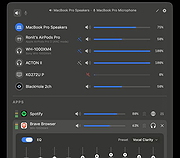 |
 |
MusicBee v3.6.9668 MusicBee v3.6.9668 👉 Powerful music manager and player for organizing, tagging, and enjoying your music collection. MusicBee is a feature-rich music management application designed to help you organize, find, play, and enhance your digital music library. It supports extensive tagging tools, automatic metadata retrieval, CD ripping, podcasts, internet radio, playlist management, and synchronization with supported devices. MusicBee also offers advanced audio features including WASAPI and ASIO output, DSP effects, gapless playback, customizable skins, and plugin support, making it suitable for both casual listeners and audiophiles alike. Features: • Organize and manage large music libraries • Automatic tagging with metadata and album artwork retrieval • Built-in CD ripping and audio file conversion • Support for podcasts, web radio, and SoundCloud integration • Create and manage smart playlists • 10-band and 15-band equalizer with DSP effects • WASAPI and ASIO audio output support • Gapless playback and volume normalization • Extensive skinning and plugin support • Synchronize music, playlists, podcasts, and audiobooks with supported devices • Customizable interface with multiple layouts and views • Support for numerous audio formats including MP3, FLAC, AAC, OGG, WAV, WavPack, Opus, and more Supported operating systems: • Windows 7, Windows 8, Windows 10, Windows 11 Supported languages: • Arabic, Czech, Dutch, English, English (US), French, German, Greek, Hungarian, Italian, Japanese, Korean, Polish, Portuguese (Brazil), Portuguese (Portugal), Russian, Simplified Chinese, Spanish, Swedish, Traditional Chinese, Turkish, Ukrainian Changes: v3.6.9668 06-20-26 Not provided. Click here to visit the author's website. |
|
6,994 | Jun 22, 2026 Steven Mayall 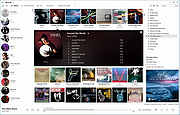 |
|
Peace Equalizer v1.6.7.10 Peace Equalizer v1.6.7.10 System-wide PC Audio Equalizer and Effects app for Windows 7 to 11 Peace equalizer is a Windows PC interface for Equalizer APO https://www.oldergeeks.com/downloads/file.php?id=1706 (MUST BE INSTALLED FIRST). Besides an system-wide audio equalizer on your Windows PC, Peace has an effects panel for balance, crossfeeding, delay, etc., a graph window and much more. In short: Peace is an equalizer and audio mixer for all your PC software on any Windows version from 7 to 11. Your configuration (e.g. EQ, preset, profile) can be saved and activated again by 1 click, hotkey, tray or desktop shortcut. Note: Your virus scanner may detect a virus in Peace.exe or PeaceSetup.exe. This is a false positive, more info on the forum. Install by running downloaded PeaceSetup.exe. Equalizer APO has to be installed first. After a Windows update a re-install of Equalizer APO might be needed. Features • up to 31 gain dB Equalizer sliders per channel/speaker (or unlimited if you will) • 9 speakers support (all, stereo, 5.1, 7.1 or your own setup) filter frequencies, dB gains, filter qualities can all be changed per slider • filters: peak, low/high pass and shelf, band, notch, all pass and many others • pre amplifying dB values for volume control (per channel/speaker) • graph of your filters per speaker • AutoEQ interface: easy equalizing for specific headphones • make, save and activate own equalizer configurations (presets) • select a device for your equalizer configuration • besides your own presets, there are dance, rock, classic, bass boost, etc. • effects like down/up mix, crossfeed, bass and treble, channel routing • control by Windows system tray, ... |
|
2,662 | Sep 10, 2024 Peter Verbeek 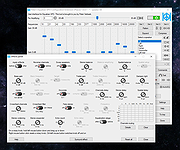 |
|
Qmmp v2.4.2 Qmmp v2.4.2 👉 A lightweight, Winamp-style audio player with broad format support, playlists, streaming, effects and plugins. Qmmp is a free, open-source audio player built with the Qt framework and designed for users who want a compact, highly configurable music player. Its classic skinned interface is similar to Winamp and XMMS, while an alternative interface based on standard Qt widgets is also included. Qmmp supports a wide variety of audio formats including MP3, Ogg Vorbis, Opus, FLAC, AAC, WMA, Musepack, WavPack, MIDI, SID, tracker modules and numerous chiptune formats. Additional formats can be handled through FFmpeg and libsndfile. Beyond basic music playback, Qmmp includes multiple playlists, a 10-band equalizer, ReplayGain, crossfade, lyrics, cover art, CUE sheets, internet radio streams, visualizations, audio conversion, recording, listening history and a media library. It can also use classic Winamp 2.x and XMMS skins. The modular plugin system provides support for additional input formats, output systems, DSP effects, visualizations and online services. Qmmp can submit listening history to Last.fm, Libre.fm and ListenBrainz and includes a stream browser for finding and playing online audio. Features: • Classic Winamp/XMMS-style skinned interface • Alternative interface using standard Qt widgets • Supports Winamp 2.x and XMMS skins • MP3 and MPEG Layer 2/3 playback • Ogg Vorbis and Ogg Opus support • Native FLAC and Ogg FLAC playback • AAC and ADTS AAC support • WMA and additional FFmpeg-supported formats • Musepack and WavPack support • PCM WAVE and other libsndfile-supported formats • MOD, S3M, IT, XM and other tracker modules • MIDI and SID playback • Extensive chiptune support including AY, GBS, GYM, HES, KSS, NSF, NSFE, SAP, SPC, VGM, VGZ and VTX • Audio CD playback • MP3, Vorbis, AAC and AAC+ internet streaming • Multiple playlists • M3U, PLS and XSPF playlist support • 10-band equalizer • ReplayGain playback support and ReplayGain scanner • Crossfade and extra stereo DSP effects • Sample-rate conversion • LADSPA effects • projectM visualization support • Spectrum analyzer • Lyrics display • ... |
|
2,794 | Sep 09, 2026 Qmmp Development Team  |
| Showing rows 1 to 5 of 5 | Showing Page 1 of 1 | 1 |
OlderGeeks.com Copyright (c) 2026
