|

|
Processed through Paypal No account required. |








Buy our over-priced crap to help pay the bills.



|
|
Processed through Paypal No account required. |
| Files | ||||
| File Name | Rating | Downloads | ||
 |
EaseUS Partition Master Free v20.2.0 EaseUS Partition Master Free v20.2.0 (This is the full package, not the downloader.) 👉 Free disk partition management and cloning software for Windows. EaseUS Partition Master Free is a user-friendly disk management utility designed to help home users organize, resize, clone, and manage storage devices without data loss. The free edition provides essential partitioning tools for managing HDDs, SSDs, USB drives, and external storage devices through an easy graphical interface suitable for beginners and advanced users alike. The software allows users to create, delete, format, resize, move, merge, and wipe partitions while helping optimize disk space usage and improve drive organization. EaseUS Partition Master Free also includes basic disk cloning capabilities, partition recovery tools, disk surface testing, and bootable media creation features for maintenance and troubleshooting tasks. Features: • Resize, move, merge, split, create, delete, and format partitions • Clone partitions and disks using the free disk clone feature • Convert file systems between FAT32 and NTFS without formatting • Support for HDD, SSD, USB flash drives, memory cards, and external drives • Migrate data between storage devices • Basic partition recovery tools for lost or deleted partitions • Create WinPE bootable media for maintenance and recovery tasks • Disk surface test and bad sector checking utilities • Wipe partitions and securely erase data • GPT and MBR disk support • Simple graphical interface with drag-and-drop partition management • Includes free toolbox utilities for disk and partition maintenance • Supports large-capacity modern storage drives Supported operating systems: • Windows 7, Windows 8, Windows 8.1, Windows 10, Windows 11 Supported languages: • English, Deutsch, Franηais, Espaρol, Italiano, Portuguκs, Nederlands, Polski, Dansk, Malay, العربية, ไทย, 日本語, 繁體中文, Русский, 한국어 Changes: v20.2.0 06-09-26 • Improved partition management stability and performance • Enhanced disk cloning compatibility • Updated interface and usability improvements • Fixed known bugs and minor issues Click here to visit the author's website. |
 |
21,006 | Jun 09, 2026 EASEUS 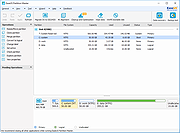 |
 |
Foxclone v55 Foxclone v55 👉 Simple Linux-based backup, restore and drive cloning tool. Foxclone is a Linux based image backup, restore and clone tool using a simple point and click interface. It takes images of partitions on your HDD or SSD and stores them for later restoration, with image files compressed to save space. Features: • Backup and restore Windows and Linux filesystems, such as NTFS and ext4 • Supports GPT and MBR/legacy/MSDOS partition tables • Automatically backs up the partition table and bootloader when a backup is taken • Clone directly from drive to drive • Clone to a drive from a full backup • Simple point and click interface • Compressed image files help save storage space • Bootable ISO designed to run from USB Supported operating systems: • Bootable 64-bit Linux live ISO • Backs up and restores Windows and Linux filesystems Supported languages: English Changes: v55 01-07-26 Fixes a bug specific to the noble version of the ISO where a clone drive-to-drive completes but the finish message shows failed. Burning the ISO to a USB Stick: To use Foxclone, you must first create a bootable USB flash drive from the downloaded ISO image. We recommend the following free utilities: • Rufus (Windows) – A fast and easy-to-use utility for creating bootable USB drives from ISO images. • balenaEtcher (Windows, Linux, macOS) – A simple cross-platform tool that writes ISO images to USB drives with minimal configuration. • Ventoy (Windows, Linux) – Allows multiple ISO files to be stored on a single USB drive. Simply copy the Foxclone ISO to the Ventoy USB drive and boot from it. After creating the USB drive, restart your computer, enter the boot menu or BIOS/UEFI setup, and select the USB device as the boot source. Foxclone will then load into its graphical interface, where you can create backups, restore images, or clone drives. This download is for the Linux-based ISO version (very bottom of page). ... |
|
498 | Jun 15, 2026 Andy Hardwick, Larry Hale  |
|
Hasleo Disk Clone v5.8.2.1 Hasleo Disk Clone v5.8.2.1 👉 Free Windows disk, partition, and system cloning software. Hasleo Disk Clone is a free and all-in-one disk cloning software for Windows that can migrate Windows to another disk, clone an entire disk, or clone a partition to another location quickly and efficiently. Features: • Migrate Windows to another disk without reinstalling Windows, apps, drivers, or user settings • Clone an entire disk to another disk • Clone individual partitions while keeping data intact • Resize and move destination partitions before cloning • Convert MBR to GPT or GPT to MBR during cloning • Sector-by-sector cloning support • Intelligent sector copy technology for faster cloning • Delta Clone support in paid editions • Rapid exFAT and ReFS cloning support • Multiple disk alignment modes • Native support for Windows X86, X64, and ARM64 • Create bootable WinPE media for cloning operations • Supports HDD, SSD, external HDD, Thunderbolt, dynamic disk, and more • Supports FAT12, FAT16, FAT32, NTFS, exFAT, ReFS, and other file systems in sector-by-sector mode Supported operating systems: • Windows Vista, Windows 7, Windows 8, Windows 8.1, Windows 10, Windows 11, Windows Server 2008 or later Supported languages: English, Arabic, Bulgarian, Chinese Traditional, Czech, Dutch, French, German, Hungarian, Italian, Japanese, Korean, Polish, Portuguese Brazilian, Russian, Simplified Chinese, Slovak, Slovenian, Spanish, Swedish, Turkish, Ukrainian Changes: v5.8.2.1 06-17-26 • Fixed an issue that caused disk enumeration to fail • Fixed an issue where WinPE created under Windows ARM64 26H1 did not work properly Click here to visit the author's website. |
|
4,677 | Sep 17, 2026 Hasleo Software 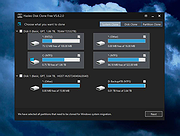 |
|
OpenTTD v15.3 OpenTTD v15.3 👉 An open-source transport simulation game based on Transport Tycoon Deluxe. OpenTTD is a business simulation game in which players build and manage transportation networks, including railways, roads, air routes, and shipping lines. Inspired by the classic Transport Tycoon Deluxe, it expands on the original with improved graphics support, enhanced gameplay mechanics, multiplayer capabilities, and extensive modding options. Players can transport passengers and cargo efficiently while growing their transport empire in a dynamic, evolving world. OpenTTD requires a base graphics set to run, which can be downloaded automatically on first launch or installed manually. Options include OpenGFX (graphics) or original Transport Tycoon Deluxe data files, which require owning the original game. Optional sound and music sets such as OpenSFX (sound) and OpenMSX (music) can also be installed via the in-game content download manager. Additional graphics, sound, and music content can be downloaded directly within the game. Transport Tycoon Deluxe can be purchased alongside OpenTTD on platforms like Steam and GOG. Features: • Build complex transport networks using trains, buses, trucks, ships, and aircraft • Open-source remake and expansion of Transport Tycoon Deluxe • Large maps with customizable terrain and industries • Advanced AI competitors and multiplayer support (LAN and online) • In-game content manager for downloading mods, graphics, sounds, and scenarios • Supports custom NewGRF files for extended gameplay features • Dynamic economy and cargo distribution systems • Cross-platform gameplay with consistent features across systems • Scenario editor and map generator • Support for high resolutions and modern UI scaling • Optional base graphics, sound, and music sets (OpenGFX, OpenSFX, OpenMSX) • Ability to use original Transport Tycoon Deluxe assets if owned Supported operating systems: • Windows 7, Windows 8, Windows 10, Windows 11 • macOS 10.13 or higher • Linux (various distributions) • FreeBSD Supported languages: English, French, German, Spanish, Italian, Dutch, Polish, Russian, Japanese, Chinese, Korean, Czech, Slovak, Hungarian, Portuguese, Swedish, Finnish, Norwegian, Danish, Turkish, Ukrainian, and many ... |
|
9,628 | Apr 07, 2026 OpenTTD Team  |
 |
RisohEditor v6.1.4 RisohEditor v6.1.4 👉 Free Win32 resource editor for editing resources in RC, RES, EXE, and DLL files. RisohEditor is a free resource editor for Win32 development that can edit, extract, clone, and delete resource data in RC, RES, EXE, and DLL files. It supports common Windows resources such as dialogs, menus, icons, cursors, string tables, and message tables, with Unicode support for international resources. Features: • Edit, extract, clone, and delete resource data • Supports RC, RES, EXE, and DLL files • Edit dialogs, menus, icons, cursors, string tables, and message tables • Full Unicode support • Can read resource.h header files • Supports GUI editing • Exported resources can be read by Visual C++ • Supports window class libraries • 32-bit and 64-bit support • Portable version uses an INI file instead of the registry Supported operating systems: • Windows XP, Windows Server 2003, Windows Vista, Windows 7, Windows 8.1, Windows 10 • ReactOS Supported languages: English, Chinese, Italian, Russian, Japanese, Korean, Portuguese, Ukrainian Changes: v6.1.4 08-13-26 Made configuration a property sheet. Accelerated OnDeleteRes. Prevented the tree view's drop-down arrow from appearing twice. Fixed MRadWindow index labels. Supported resource compression by WonRes. Improved UPX handling. Enhanced support for Help IDs. Improved MEditMenuDlg. Supported zooming of code editor. Fixed word wrap. Note: This file has four hits on VirusTotal. We have confirmed these to be false positives. The file is safe. This download is for the Windows portable version (very bottom of page). If you need the Windows 32bit installer version, download here. If you need the Windows 64bit installer version, download here. Click here to visit the author's website. |
|
3,777 | Aug 18, 2026 Katayama Hirofumi 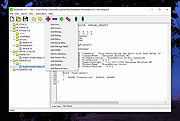 |
| Showing rows 1 to 5 of 5 | Showing Page 1 of 1 | 1 |
OlderGeeks.com Copyright (c) 2026
