|

|
Processed through Paypal No account required. |








Buy our over-priced crap to help pay the bills.



|
|
Processed through Paypal No account required. |
| Files | ||||
| File Name | Rating | Downloads | ||
 |
Flameshot v14.0.0 Flameshot v14.0.0 👉 Powerful open-source screenshot tool with built-in annotation and editing features. Flameshot is a free and open-source screenshot utility designed to make capturing and editing screenshots quick and easy. It provides a simple yet powerful interface that allows users to select a region of the screen, annotate it instantly, and save or share the result without needing additional image editing software. Flameshot launches a customizable capture interface that lets you draw, highlight, blur, crop, or add shapes and text directly on your screenshot before saving it. The tool is especially useful for creating tutorials, documentation, bug reports, and visual explanations. In addition to its annotation tools, Flameshot supports keyboard shortcuts, command-line usage, and integration with desktop environments. Screenshots can be copied directly to the clipboard, saved locally, or uploaded to online services depending on configuration. Features: • Interactive screenshot selection with an easy-to-use capture interface • Built-in annotation tools including arrows, shapes, lines, and text • Blur and highlight tools for emphasizing or hiding content • Instant screenshot editing without opening a separate program • Copy screenshots directly to clipboard or save to file • Keyboard shortcuts and command-line options for automation • Optional screenshot uploading and sharing features • Highly configurable behavior and interface settings Supported operating systems: • Windows 10, Windows 11 • macOS 10.15 or higher • Linux Supported languages: English, Spanish, French, German, Italian, Portuguese, Russian, Ukrainian, Polish, Czech, Dutch, Turkish, Chinese (Simplified), Chinese (Traditional), Japanese, Korean, Arabic Changes: v14.0.0 06-18-26 Translations update from Hosted Weblate by @weblate in #4330 Translations update from Hosted Weblate by @weblate in #4378 Translations update from Hosted Weblate by @weblate in #4379 Translations update from Hosted Weblate by @weblate in #4380 Fix hang caused by no Notifications service registered in DBus by @samwcoulter in #4357 bump CI to see if that picks up newer Qt in appimage by @borgmanJeremy in #4381 Translations update from Hosted Weblate by @weblate in #4383 Add support for logging ... |
 |
1,063 | Jul 16, 2026 Flameshot Contributors 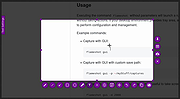 |
|
ItsPaint v0.16.1 ItsPaint v0.16.1 👉 A lightweight, free and open source MS Paint-style image editor for Mac. ItsPaint is a native image editor designed to provide the simple, quick drawing and editing experience of Microsoft Paint on macOS. It can create a blank canvas at any size, draw and paint with multiple tools, paste images directly onto the canvas, crop and resize artwork, annotate screenshots, remove backgrounds, add text and shapes, and export to numerous common image formats. It is intentionally lightweight, requires no account or subscription, contains no telemetry or networking code, and is released under the MIT license. Features: • Create blank canvases at custom sizes • Pencil, brush, highlighter and eraser drawing tools • Round, square, soft and spray brush tips • Draw lines, curves, arrows, rectangles, rounded rectangles, ellipses, triangles, diamonds, polygons, stars and speech bubbles • Solid, dashed and dotted shape outlines with optional fills • Add text with a contrasting rim that remains readable against light and dark backgrounds • Automatic numbered step badges for annotating instructions and screenshots • Pixelate areas for visual de-emphasis • Spotlight tool darkens everything outside a selected area • Clone tool copies pixels from one part of an image to another • Soften tool blends cloned or repaired areas into their surroundings • Instant Alpha selects connected pixels by color • One-command background removal without AI, cloud processing or an Internet connection • Capture a signature with a trackpad, mouse or tablet, or import one from an image • Rectangle, ellipse, lasso and Instant Alpha selection modes • Move selected pixels directly on the canvas • Paste images as floating objects that can be moved and scaled before committing • Automatically expands the canvas when pasted content is larger than the current image • Drag the current selection or entire canvas directly into another application or Finder • Pointer-centered zoom and pixel grid • Snap shapes, selections and pasted content to an 8, ... |
|
198 | Aug 13, 2026 Josh Lin 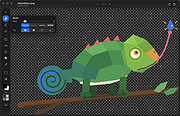 |
|
SnipSVG v2.3 SnipSVG v2.3 👉 A free screen capture and graphics editor built around sharp, fully editable SVG vector images. SnipSVG is a free screen capture and graphics editor for Windows and macOS that uses SVG vector images as its primary format. Unlike traditional JPG and PNG screenshots, SVG images remain sharp at any zoom level while individual elements remain editable. SnipSVG provides tools for capturing, cropping and annotating screenshots, obscuring sensitive information, adding formatted text, creating numbered documentation graphics and sharing finished images with other applications. It can also create animated and interactive SVG content using CSS and JavaScript. Features: • Capture and edit screenshots • Uses scalable SVG vector graphics as its primary image format • Keeps individual SVG elements separately editable • Maintains sharp image quality at different zoom levels and resolutions • Crop screenshots and physically resize large photos • Blur or obscure sensitive information in screenshots • Add HTML-formatted text to images • Add lines, arrows, shapes, highlights and other annotations • Auto-incrementing numbering tags for tutorials and documentation • Generate reference tables from numbered image tags • Integrated syntax highlighting for source code examples • Extract text from images using Windows OCR on Windows 10 and Windows 11 • Create animated SVG objects using CSS and JavaScript • Add interactive elements and hyperlinks to SVG images • Share images with HTML editors, word processors and other applications • Supports SVG and SnipX image formats • Integrates with the Help+Manual documentation authoring suite • Free for private and commercial use • Windows installer supports portable installation Supported operating systems: • Windows 7, Windows 8, Windows 10, Windows 11 • macOS 11 Big Sur or higher, Intel/Apple Silicon Supported languages: English, German, French Changes: v2.3 08-03-26 • Flipping of line and arrow objects did not work correctly when the line was rotated. • Full lasso selection on the canvas selected the picture frame, it now selects objects inside the picture frame (same as CTRL + A to select ... |
|
1,766 | Sep 14, 2026 EC Software GmbH 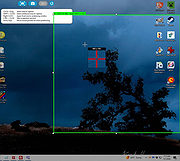 |
 |
ZoomIt v12.11 ZoomIt v12.11 👉 A free screen zoom, annotation, and recording tool for technical presentations and demos. ZoomIt is a screen zoom, annotation, and recording tool for technical presentations and demos. It can also snip screenshots to the clipboard or to a file, runs unobtrusively in the tray, and uses customizable hotkeys to zoom in on an area of the screen, move around while zoomed, and draw on the zoomed image. ZoomIt also supports touch and pen input for drawing on tablets. Features: • Screen zoom with customizable hotkeys for presentations and demos. • Drawing and annotation tools with adjustable pen color and size. • Draw-without-zoom mode for annotating the screen at native resolution. • Break timer with opacity, position, background image, sound, and workstation lock options. • Screenshot snipping to the clipboard or to PNG files, including cropped captures. • OCR text extraction from a selected screen region. • Screen recording to MP4 or GIF, including full screen, cropped, and window-targeted recording modes. • LiveZoom and LiveDraw modes for real-time zooming and on-screen drawing. • DemoType mode for simulated typing during demonstrations. • Panorama and scrolling screenshot support, improved break timer behavior, and trimming of existing MP4 clips. Supported operating systems: Windows 11 or Windows 10 version 2004 (20H1 / build 19041) or newer Requirements for macOS macOS 14 or newer. Xcode command-line tools. Screen Recording permission for capture. Microphone and Camera permissions are required only for those recording options. Supported languages: Operating System Language Changes: v12.11 07-09-26 Not provided. This download is for the Windows version (very bottom of page). If you need the macOS version, download here. Click here to visit the author's website. |
|
4,590 | Aug 12, 2026 Microsoft Corp. 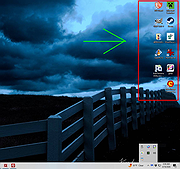 |
|
Zotero v10.0.1 Zotero v10.0.1 👉 A powerful free research assistant for collecting, organizing, annotating, citing and sharing research. Zotero is a free, open-source research and reference manager designed to help you collect, organize, annotate, cite and share research sources. It can manage books, journal articles, reports, web pages, artwork, films, letters, manuscripts, recordings, legal materials and many other types of sources. Each item can contain detailed bibliographic metadata as well as attached PDFs, files, web snapshots, links and notes. The Zotero Connector integrates with supported web browsers to capture research directly from websites. When Zotero recognizes a book, article or other source, it can automatically create the appropriate library item, fill in available metadata, download a full-text PDF when available and attach related links or supplemental files. Zotero can also create items directly from ISBNs, DOIs and PubMed IDs. Research can be organized into collections and tagged for easier retrieval. An item can appear in multiple collections without creating duplicate copies, and saved searches automatically update as new matching material is added. Zotero also provides synchronization between computers and shared group libraries for collaborative research. Features: • Collect books, journal articles, reports, web pages, artwork, films, letters, manuscripts, recordings, legal materials and many other types of research sources • Automatically capture bibliographic information from supported websites using the Zotero Connector • Automatically download full-text PDFs when they are available while saving sources • Save web pages as locally stored snapshots for later viewing, including while offline • Add sources automatically using ISBN, DOI or PubMed ID identifiers • Attach PDFs, images, audio, video and other files to library items • Create rich-text notes attached to individual sources or independent notes • Organize research into collections and subcollections without duplicating library items • Assign unlimited tags to items and use colored tags for quick identification • Quickly search metadata, tags and full-text content • Use advanced searches for ... |
|
150 | Aug 28, 2026 Digital Scholar 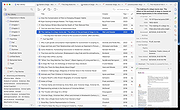 |
| Showing rows 1 to 5 of 5 | Showing Page 1 of 1 | 1 |
OlderGeeks.com Copyright (c) 2026
