|

|
Processed through Paypal No account required. |








Buy our over-priced crap to help pay the bills.



|
|
Processed through Paypal No account required. |
| Files | ||||
| File Name | Rating | Downloads | ||
 |
AppNetworkCounter v1.61 AppNetworkCounter v1.61 👉 View network usage and bandwidth for every application on Windows. AppNetworkCounter is a simple Windows utility that counts and displays TCP/UDP bytes and packets sent and received by every application on your system. It shows received bytes, sent bytes, receive speed, send speed, IPv4 and IPv6 traffic totals, packet counts, and application version details such as product name, product version, file description, and company name. Features: • Displays network usage per application • Shows sent and received TCP/UDP bytes • Shows sent and received packet counts • Displays receive and send speeds • Tracks IPv4 and IPv6 traffic separately • Shows maximum and average receive/send speeds • Includes first and last activity time columns • Can group results by application name or process ID • Option to hide inactive items • Option to show a total line for all applications • Tray icon support • Export reports to text, CSV, HTML, XML, and JSON • Command-line report saving options • Portable; no installation required Supported operating systems: • Windows XP, Windows Vista, Windows 7, Windows 8, Windows 10, Windows 11 • 32-bit and 64-bit Windows supported • Administrator elevation required on Windows Vista and later Supported languages: English, Arabic, Brazilian Portuguese, Czech, Dutch, French, German, Greek, Hungarian, Italian, Japanese, Persian, Polish, Romanian, Russian, Simplified Chinese, Slovak, Spanish, Traditional Chinese, Turkish Changes: v1.61 08-23-26 Added 'Process Command-Line' column, which displays the full command-line string of every process (Only when the 'Group By' option is 'Process ID'). Added 'Keep Selected Item Visible' option. When it's turned on, the selected item always remains visible. 👉 This download is for the Windows 64bit version (very bottom of page). All other download assets are below: Other Windows: appnetworkcounter.zip (32bit) Click here to visit the author's website. |
 |
6,274 | Oct 13, 2026 Nir Sofer 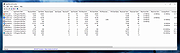 |
 |
BrowserDownloadsView v1.51 BrowserDownloadsView v1.51 👉 View and export download history from Chrome, Firefox, and compatible browsers. BrowserDownloadsView is a Windows utility that displays details of downloaded files from Chrome and Firefox web browsers, including filename, download URL, web page URL, start time, end time, download duration, download size, web browser, and more. It can load download lists from the current system, all user profiles, remote computers, external drives, or specified browser profile folders. Features: • View browser download history from Chrome, Firefox, Edge, Brave, Opera, Vivaldi, SeaMonkey, Yandex, Waterfox, Pale Moon, and other compatible browsers • Load downloads from current user, all users, remote computer, external drive, or selected profile folders • Display filename, URLs, times, duration, size, browser, profile, and other download details • Export selected or full download lists to text, CSV, tab-delimited, HTML, XML, or JSON • Calculate MD5, SHA1, SHA256, or SHA512 hashes for downloaded files • Open download URLs, source web pages, filenames, file folders, and file properties • Copy downloaded files to another folder • Filter downloads by time range • Check downloaded files with VirusTotal using SHA256 hash • Command-line options for loading sources, sorting, selecting columns, and saving reports • Portable freeware with no installation required Supported operating systems: • Windows XP, Windows Vista, Windows 7, Windows 8, Windows 10, Windows 11 • 32-bit and 64-bit systems Supported languages: English, Brazilian Portuguese, Dutch, French, German, Greek, Hungarian, Italian, Japanese, Korean, Persian, Romanian, Russian, Simplified Chinese, Slovak, Spanish, Traditional Chinese, Turkish Changes: v1.51 07-10-25 You can now choose the desired encoding (ANSI, UTF-8, UTF-16) to save the csv/xml/text/html files. (Options -> Save File Encoding ) This download is for the Windows 64bit version (very bottom of page). If you need the Windows 32bit version, download here. Click here to visit the author's website. |
|
4,759 | May 31, 2026 Nir Sofer 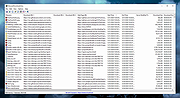 |
 |
Cherrytree v1.7.2.1 Cherrytree v1.7.2.1 👉 A powerful hierarchical note-taking application with rich text, syntax highlighting, embedded files, tables, code boxes and extensive organization tools. Cherrytree is a hierarchical note-taking application designed for organizing notes, documentation, research, code snippets, ideas and other information in a structured tree. It combines rich text editing with syntax highlighting, images, tables, code boxes, mathematical equations, embedded files and extensive linking and search capabilities. Documents can be stored in a single XML or SQLite file or as multiple files and directories. Features: • Hierarchical tree structure for organizing notes and documents into nodes and subnodes • Rich text editing with foreground and background colors, bold, italic, underline, strikethrough and monospace formatting • Multiple heading levels plus subscript and superscript formatting • Syntax highlighting supporting numerous programming and scripting languages • Code boxes for keeping source code and other preformatted content inside notes • Insert images directly into notes • Resize and rotate inserted images • Save embedded images as PNG files • Render LaTeX mathematical equations within notes • Embed files directly inside documents and save them back to disk when needed • Create tables directly inside notes • Import and export table data using CSV • Bulleted, numbered and to-do lists • Multi-level lists with indentation support • Hyperlinks to websites, files and folders • Internal links between Cherrytree nodes • Anchors for linking directly to specific locations within notes • Powerful search and replace functions • Search across multiple nodes • Search node names and tags using multiple words • Tree node tags for additional organization and searching • Spell checking support • Automatic URL recognition • Insert current date and time into notes • Insert today's or tomorrow's node • Word count in the status bar, including selected text, code boxes and tables • Node sorting tools for organizing large trees • Drag and drop nodes within the tree • Import content from several other note-taking applications and document formats • Export notes to PDF • Export content ... |
|
7,780 | Sep 23, 2026 Giuseppe Penone 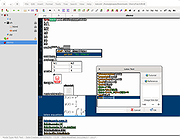 |
|
DriveImage XML 2.60 DriveImage XML 2.60 DriveImage XML is an easy to use and reliable program for imaging and backing up partitions and logical drives. Image creation uses Microsoft's Volume Shadow Services (VSS), allowing you to create safe "hot images" even from drives currently in use. Images are stored in XML files, allowing you to process them with 3rd party tools. Never again be stuck with a useless backup! Restore images to drives without having to reboot. DriveImage XML is now faster than ever, offering two different compression levels. DriveImage XML runs under Windows XP, Windows Server 2003, Vista, Windows 7, Windows 8, and Windows 10 only. The program will backup, image and restore drives formatted with FAT 12, 16, 32 and NTFS. Testimonials & Reviews See what our customers and the press have to say View Products View all our products Buy Now! Order our products online now! How-to-Guides Step-by-step solutions for common problems. Documentation View the software help files and other resources. Contact Us For Technical Support and all other inquiries. Languages Last updated: November 3, 2016 DriveImage XML V2.60 Free Download DriveImage XML English (1.78MB) Image and Backup logical Drives and Partitions File Size:1.78 MB Price: Private Edition Free - Commercial Edition - Buy Now Go! System Requirements: Pentium Processor - 256 MB RAM Windows XP, 2003, Vista, Windows 7, Windows 8, Windows 10 Product Highlights Backup logical drives and partitions to image files Browse images, view and extract files Restore images to the same or a different drive Copy directly from drive to drive ... |
|
9,910 | Jul 06, 2017 Runtime Software 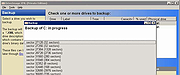 |
|
Kate v26.07.70 Kate v26.07.70 👉 Advanced multi-document text editor and source code editor for programmers. Kate is a feature-rich text editor developed by the KDE community. Designed for programmers, system administrators, and power users, it provides advanced editing capabilities including syntax highlighting, code folding, project management, powerful search and replace functions, session management, and integrated terminal access. Kate can open and edit multiple documents simultaneously using tabs and split views, making it ideal for managing large projects and working across numerous files at once. Kate supports hundreds of programming and markup languages through its extensive syntax highlighting engine and includes Language Server Protocol (LSP) integration for code completion, diagnostics, symbol navigation, and other modern development features. Its plugin architecture allows users to extend functionality with tools such as file browsers, document previews, external command execution, and Git integration. Kate is available for Linux, Windows, and macOS, providing a consistent editing experience across platforms. Features: • Multi-document and multi-window editing interface • Tabbed and split-view editing • Syntax highlighting for over 300 file formats • Code folding and bracket matching • Language Server Protocol (LSP) support • Intelligent code completion and symbol navigation • Powerful search and replace tools • Regular expression support • Session management for restoring workspaces • Project management tools • Embedded terminal window • Git integration and developer-focused plugins • Multiple cursors and selections • Vi/Vim input mode • Automatic file encoding detection • Support for local and remote file editing via network protocols • Markdown, HTML, and SVG preview support through plugins • Extensive customization options and plugin architecture Supported operating systems: • Windows 10, Windows 11 • macOS 13 Ventura or higher • Linux distributions supporting KDE Gear 26.07.70 Supported languages: Arabic, Basque, Catalan, Chinese (Simplified), Chinese (Traditional), Czech, Danish, Dutch, English, Finnish, French, Galician, German, Greek, Hebrew, Hungarian, Italian, Japanese, Korean, Norwegian Bokmεl, Polish, Portuguese, Portuguese (Brazilian), Romanian, Russian, Slovak, Slovenian, Spanish, Swedish, Turkish, Ukrainian, and many additional KDE translation languages. Changes: v26.07.70 Not provided. This download is ... |
|
2,631 | Jun 16, 2026 Kate KDE Team 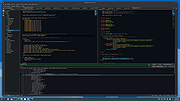 |
|
mDNSView v1.00 mDNSView v1.00 👉 Scan and view mDNS records published by devices on your local network. mDNSView is a simple Windows utility from NirSoft that displays mDNS records published by devices connected to your local network. For every discovered mDNS record, it shows the device IP address, name, record type, and record value. Features: • Displays mDNS records from devices on your local network • Shows IP address, name, record type, and record value • Supports A, AAAA, TEXT, PTR, and SRV record types • Start a scan with the toolbar button or F5 key • Export results to CSV, tab-delimited, XML, HTML5, or JSON • Copy selected records to the clipboard • Portable; no installation or extra DLL files required Supported operating systems: • Windows XP, Windows Vista, Windows 7, Windows 8, Windows 10, Windows 11 • 32-bit and 64-bit systems Supported languages: English, Dutch, French, German, Hungarian, Italian, Russian, Traditional Chinese Changes: v1.00 05-23-26 Initial release. Note: This file has multiple hits on VirusTotal because it's new and because it sniffs your network for information. We have determined these to be fair warnings but as long as you are the one using it, the file is safe. Click here to visit the author's website. |
|
532 | Jun 03, 2026 Nir Sofer 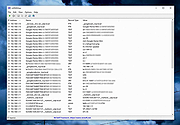 |
|
MiTeC XML Viewer v6.0.0 32bit MiTeC XML Viewer v6.0.0 32bit Full featured XML Viewer. Description Hierarchical and text preview Text searching Base64 decoding Attribute listing Image interpretation Web and Content preview Very fast SAX parser Large files up to available memory Simple XML Editor with xml validation Target platforms Windows 2000 Windows XP Windows 2003 Windows Vista Windows 7 Windows Server 2008 Windows 8 Windows 8.1 Windows Server 2012 Windows Server 2012 R2 Windows 10 Licence Free to use for private, educational and non-commercial purposes. Click here to visit the author's website. |
|
4,995 | Feb 03, 2020 MiTeC 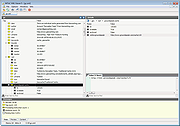 |
|
MiTeC XML Viewer v6.0.0 64bit MiTeC XML Viewer v6.0.0 64bit Full featured XML Viewer. Description Hierarchical and text preview Text searching Base64 decoding Attribute listing Image interpretation Web and Content preview Very fast SAX parser Large files up to available memory Simple XML Editor with xml validation Target platforms Windows 2000 Windows XP Windows 2003 Windows Vista Windows 7 Windows Server 2008 Windows 8 Windows 8.1 Windows Server 2012 Windows Server 2012 R2 Windows 10 Licence Free to use for private, educational and non-commercial purposes. Click here to visit the author's website. |
|
5,136 | Feb 03, 2020 MiTeC |
|
Quiz/Survey/Test v3.12.11 Quiz/Survey/Test v3.12.11 👉 Free open source assessment platform for creating, delivering, and grading quizzes, surveys, and exams. Quiz/Survey/Test (QST) is a free, open source assessment platform that allows educators, businesses, government agencies, training organizations, and certification providers to create, administer, and grade quizzes, surveys, tests, and examinations from a single web-based interface. Whether you need a quick classroom quiz, employee training assessments, customer surveys, or secure high-stakes certification exams, QST provides the tools to build, manage, and analyze every stage of the testing process. Quiz/Survey/Test supports everything from a single instructor managing one class to enterprise and government deployments serving thousands of simultaneous users. Its multi-tenant architecture allows multiple organizations or departments to operate independently from the same installation, making it ideal for schools, universities, corporations, and hosted training providers. The software includes an extensive question bank with reusable questions, randomized test generation, adaptive testing, automatic grading, detailed reporting, and a built-in GradeBook that tracks student performance over time. Questions can include formatted text, images, multimedia, mathematical formulas, and chemistry equations using the integrated equation editor. Numerous import and export options make it easy to migrate content from other learning platforms or share tests with colleagues. Security is also a major focus. Quiz/Survey/Test supports secure browser sessions through XTRASecure, role-based permissions, user authentication, accessibility improvements, audit logging, and centralized management tools. Because it is self-hosted, organizations retain complete ownership of their testing data while avoiding recurring cloud subscription costs. Features: • Create quizzes, surveys, examinations, certifications, and assessments from one integrated platform. • Multi-tenant architecture supports multiple schools, departments, or organizations. • Build and organize reusable question banks with categories and pools. • Randomize questions, answers, and test versions to reduce cheating. • Adaptive testing with branching based on previous responses. • Automatic grading for supported question types with manual grading for essays. • Integrated GradeBook with student progress tracking and detailed statistics. • ... |
|
2,958 | Jul 30, 2026 Bob Smith 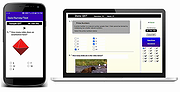 |
| Showing rows 1 to 9 of 9 | Showing Page 1 of 1 | 1 |
OlderGeeks.com Copyright (c) 2026
