|

|
Processed through Paypal No account required. |








Buy our over-priced crap to help pay the bills.



|
|
Processed through Paypal No account required. |
| Files | ||||
| File Name | Rating | Downloads | ||
 |
Delta v0.1.8 Delta v0.1.8 👉 Disk space analyzer with historical snapshot comparison. Delta is a disk space analysis tool that allows you to scan your drives, save storage snapshots, and compare changes over time. It helps you quickly identify which folders and files have grown or shrunk between scans. Designed to work fully offline, Delta stores scan data locally and focuses on lightweight performance with a modern user interface. Features: • Scan drives and analyze folder and file size usage • Save disk usage snapshots for historical tracking • Compare past and current scans to detect size changes • Fully offline operation with no telemetry • Lightweight application built with Rust and Tauri • Modern interface powered by React Supported operating systems: • Windows 10, Windows 11, Linux Supported languages: English Changes: v0.1.8 05-31-26 • Bug fixes • Added sorting improvements • UI changes Note: This file has one hit on VirusTotal. We have confirmed this to be a false positive. The file is safe. This download is for the Windows 64bit setup version (very bottom of page). All other download assets are below: Other Windows: delta_0.1.8_x64_en-US.msi Linux: delta-disk-analyzer_0.1.8_amd64.deb delta-disk-analyzer-0.1.8-1.x86_64.rpm delta-disk-analyzer_0.1.8_amd64.AppImage Click here to visit the author's website. |
 |
799 | Jul 11, 2026 Austin Bian 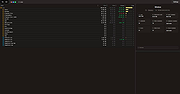 |
|
LibreWolf v153.0.4-1 LibreWolf v153.0.4-1 👉 Privacy-focused Firefox-based web browser with hardened security settings and built-in content blocking. LibreWolf is a custom and independent version of Firefox focused on privacy, security, and user freedom. It is designed to increase protection against tracking and fingerprinting techniques through privacy and security oriented settings and patches. It also removes telemetry, data collection, and various annoyances while disabling anti-freedom features such as DRM. LibreWolf includes uBlock Origin, uses privacy-respecting search engines, and stays aligned with current Firefox stable releases for up-to-date security and stability. Features: • No telemetry, experiments, adware, or unnecessary distractions • Includes uBlock Origin with custom default filter lists • Uses privacy-respecting search engines such as DuckDuckGo, Searx, and Qwant • Enables Total Cookie Protection and anti-fingerprinting protections • Deletes cookies and website data on close • Disables WebGL, form autofill, form history, link prefetching, and speculative connections • Enables HTTPS-Only mode and stricter TLS/SSL negotiation rules • Disables Firefox Sync unless explicitly enabled by the user • Removes Pocket and Mozilla VPN ads • Disables DRM by default • Provides a LibreWolf-specific UI for privacy and security controls • Open source and community-driven project Supported operating systems: • Windows 10 or later, Windows 11 • macOS • Linux • OpenBSD Supported languages: English, Additional languages via Firefox language packs Changes: v153.0.4-1 08-12-26 Upstream release based on Firefox 153.0.4. Notable Changes: • Search engines have moved away from using policies and now use the bundled remote-settings dump. • The included search engines have been overhauled. This may cause the default search engine for some users to reset to DuckDuckGo No-AI. • Fixed slow startup that some users experienced when starting a session. Infrastructure Changes: • Migration to LibreWolf's own Forgejo instance at librewolf.dev has begun. • Releases will continue to be published to Codeberg during the transition to give downstream packagers time to update. • The signing key for RPM releases has been changed to LibreWolf's repository signing key. This download is for the ... |
|
3,513 | Aug 13, 2026 LibreWolf Core Contributors  |
|
Mozilla Firefox Portable v155.0.1 Mozilla Firefox Portable v155.0.1 👉 Take the full Firefox web browser, along with your bookmarks, passwords and settings, anywhere you go. Mozilla Firefox Portable is the popular Firefox web browser packaged by PortableApps.com to run from a USB flash drive, portable hard drive, cloud folder or local folder without a traditional installation. Your bookmarks, saved passwords, extensions, preferences and other personal browser data stay with the portable package, making it easy to carry your familiar Firefox environment between Windows computers. It provides the same Firefox browsing experience, privacy protections, customization, extension support and web standards compatibility as the regular desktop browser while adding the portability provided by the PortableApps.com Launcher. It can also integrate with the PortableApps.com Platform for convenient launching and automatic updates. Features: • Runs from removable drives, cloud folders or local folders without a traditional Firefox installation • Carries your bookmarks, saved passwords, preferences and other Firefox profile data with you • Works with the PortableApps.com Platform for easy launching and automatic updates • Built-in Enhanced Tracking Protection helps block trackers while browsing • Supports Firefox extensions and themes for extensive customization • Includes private browsing for sessions that do not retain local browsing history • Built-in password management and synchronization through a Mozilla account • Supports tab organization, containers and vertical tabs • Built-in translation capabilities for supported languages • PDF viewing and printing are built directly into the browser • Developer Tools provide debugging, inspection and web development features • Supports modern web technologies including WebAssembly, WebRTC, WebTransport and HTTP/3 • Open source and based on Mozilla Firefox • Can coexist with an installed copy of Firefox Supported operating systems: • Windows 10, Windows 11 • WINE (64-bit only) Supported languages: Afrikaans, Arabic, Asturian, Basque, Belarusian, Bulgarian, Breton, Catalan, Chinese (Simplified), Chinese (Traditional), Croatian, Czech, Danish, Dutch, English, Estonian, Finnish, French, Frisian, Gaelic (Scotland), Galician, German, Greek, Hebrew, Hungarian, Icelandic, Indonesian, Irish, Italian, Japanese, Korean, Lithuanian, Norwegian ... |
|
11,463 | Sep 13, 2026 Mozilla & John T. Haller 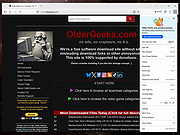 |
|
Mozilla Firefox v155.0.1 Mozilla Firefox v155.0.1 👉 A fast, customizable web browser with strong privacy protections, security features and a huge library of extensions. Mozilla Firefox is a free, open-source web browser developed by Mozilla with an emphasis on privacy, security, performance and user control. Firefox includes built-in tracking protection, private browsing, password management, tab organization, synchronization across devices and extensive customization through themes and add-ons. Its independent Gecko browser engine provides an alternative to Chromium-based browsers, while frequent security and feature updates keep the browser current with modern web standards. Features: • Enhanced Tracking Protection blocks many social media trackers, cross-site tracking cookies, fingerprinters and cryptominers • Private Browsing automatically removes browsing information such as cookies and history when sessions are closed • Built-in password manager saves and securely fills website logins • Firefox Sync can synchronize bookmarks, passwords, history, open tabs and settings across devices • Extensive add-on support lets you expand Firefox with thousands of extensions and themes • Customizable toolbar and browser interface • Picture-in-Picture lets you watch videos in a floating window while browsing other pages • Reader View removes distracting page elements for easier reading • Built-in PDF viewer lets you view and work with PDF documents without additional software • Tab search and management tools make large numbers of open tabs easier to handle • Automatic updates deliver security fixes and browser improvements • Developer tools provide inspectors, debugging, network analysis and responsive-design testing • Supports modern web standards using Mozilla's independent Gecko browser engine • Import tools help transfer bookmarks, passwords and other browser data from other browsers • Available for Intel, AMD and ARM-based systems depending on operating system Supported operating systems: • Windows 10, Windows 11 • macOS 10.15 or higher • Linux 64-bit, Linux ARM64/AArch64 Supported languages: English (US) Changes: v155.0.1 09-04-26 Fixed Firefox becoming unresponsive on some pages that use CSS blur and backdrop filters together. Fixed the sidebar not reappearing after restarting Firefox when the "Hide ... |
|
12,770 | Sep 13, 2026 Mozilla |
|
Open DroneLog v3.3.0 Open DroneLog v3.3.0 👉 Open-source drone flight logging, fleet tracking, and operational management platform. Open DroneLog is an open-source drone flight logging and fleet management platform built to help drone pilots, hobbyists, and commercial operators maintain accurate and organized flight records. It provides a centralized system where users can log detailed flight information, manage aircraft and equipment inventories, track battery usage cycles, and maintain pilot credentials and documentation. Open DroneLog is designed as a web-based application that can be self-hosted, allowing full control over your operational data. By keeping all records in one place, it simplifies compliance, improves maintenance tracking, and helps ensure that drones and related equipment remain airworthy and properly documented. Its structured layout makes it easy to review flight history, analyze usage trends, and maintain a complete operational logbook. Which drones and flight logs are supported? Open DroneLog supports all DJI drones that generate .txt flight logs including DJI Mini, Mavic, Air, and Phantom series. It also supports Litchi CSV exports with automatic metric/imperial unit detection. Features: • Detailed flight logging with customizable flight records • Centralized drone fleet management • Equipment and component tracking • Battery cycle tracking and usage monitoring • Pilot management with record keeping • Maintenance and service history tracking • Organized digital logbook for compliance and auditing • Web-based interface accessible from modern browsers • Self-hosted deployment for full data ownership • Open-source project with publicly available source code Supported operating systems: • Windows, macOS, and Linux as a desktop application. You can also deploy it as a self-hosted web app using Docker on any server or NAS device. Supported languages: • English Changes: v3.3.0 05-01-26 What's New Proxy Configuration Support for DJI Keychain Implemented asynchronous keychain fetching using the reqwest library. This allows the application to respect and utilize system-level proxy configurations, resolving connectivity issues in restricted network environments. (Discussion #184) HTML Report Generation for single flights Added a new HTML report generation export option and ... |
|
711 | Jul 06, 2026 Arpan Ghosh 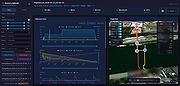 |
|
ScreenArc v1.4.1 ScreenArc v1.4.1 👉 Create polished screen recordings with automatic cinematic zooming and mouse tracking. ScreenArc is a free and open-source screen recorder and editor designed to turn ordinary screen captures into polished videos. It automatically follows mouse activity and creates smooth cinematic zoom and pan effects, making it particularly useful for software demonstrations, tutorials, presentations, product walkthroughs, and instructional videos. Record your screen, edit the resulting footage, adjust its appearance, and export the finished project without having to build every movement and zoom manually. Features: • Record your screen for tutorials, demonstrations, presentations, and other projects • Automatic cinematic zoom and pan effects • Mouse tracking automatically follows activity on the screen • Smooth focus and zoom animations based on mouse activity • Built-in video editing tools for refining recordings • Timeline-based editing for working with captured footage • Webcam recording and overlay support • Customize video frames and backgrounds • Add colors, gradients, wallpapers, and shadows to recordings • Multiple aspect ratios for traditional, square, and vertical videos • Save styling choices as reusable presets • Export completed recordings as video • Cross-platform desktop application • Free and open-source software released under the GNU GPL v3 Supported operating systems: • Windows, version not specified by author • macOS 12.3 or higher • Linux x64 with X11 display server, Wayland is not currently supported Supported languages: English Changes: v1.4.1 07-22-26 Bug Fixes: • Overwrite stale recording outputs. This download is for the Windows version (very bottom of page). All other download assets are below: macOS: ScreenArc-1.4.1-universal.dmg ScreenArc-1.4.1-universal-mac.zip 1) After downloading and attempting to open the app, you'll see a security warning 2) Close the warning dialog 3) Open System Settings > Privacy & Security 4) Scroll down to the "Security" section 5) Click "Open Anyway" next to the warning about ScreenArc 6) Click "Open" in the confirmation dialog Linux: ScreenArc-1.4.1-linux-x64.AppImage ScreenArc-1.4.1-linux-x64.zip ScreenArc-1.4.1-linux-x64.deb ScreenArc-1.4.1-linux-x64.rpm Click here to visit the ... |
|
851 | Sep 14, 2026 Tam Nguyen  |
|
Super Productivity v18.19.0 Super Productivity v18.19.0 👉 A privacy-focused task manager with time tracking and Pomodoro timer. Super Productivity is an open-source productivity app designed to help users manage tasks, track time, and improve focus using built-in techniques like the Pomodoro timer. It integrates with popular issue tracking platforms such as Jira, GitHub, and GitLab, making it especially useful for developers and teams. The application emphasizes privacy by storing all data locally with no required sign-up or cloud dependency. Features: • Task management with subtasks, attachments, and notes • Built-in Pomodoro timer and break reminders • Time tracking with detailed statistics and reports • Integration with Jira, GitHub, GitLab, and other issue trackers • Offline-first design with local data storage • Distraction blocking and focus mode • Daily schedule planning and timeboxing • Keyboard shortcuts and command palette • Data import/export and backup support • Cross-platform synchronization options (optional) • Customizable themes and dark mode • Open-source with no ads or tracking Supported operating systems: • Windows 10, Windows 11 • macOS 11 or higher • Linux (AppImage, Snap, Flatpak, Debian/Ubuntu) • Android • iOS Supported languages: English, German, Spanish, French, Italian, Portuguese, Russian, Chinese, Japanese, Korean Changes: v18.19.0 08-07-26 Highlights Added search to global settings and a ? keyboard shortcut cheat sheet (#9302, #9318). Added crash-safe local drafts for project notes (#8982). Added interval recurrence phrases such as @every 2 weeks and @every 2 fridays (#9328). Added URL scheme actions for creating and completing tasks (#9121). Completed translations across all locales (#9360). Security and sync Enforced encrypted-only SuperSync uploads when E2EE is required and stopped clients from accepting plaintext downloads when encrypted sync is expected (GHSA-vrc7-775g-ggqc, #8903, #9457). Added diagnostics and recovery guidance for encrypted-operation integrity failures (#9331, #9439, #9444). Prevented stale-key uploads after server state replacements (#8730, #9330). Resolved ... |
|
694 | Aug 12, 2026 Super Productivity Org  |
|
Tor Browser v15.0.25 Tor Browser v15.0.25 👉 Privacy-focused web browser that routes traffic through the Tor network to help prevent tracking, surveillance, and censorship. Tor Browser is a privacy-focused web browser based on Mozilla Firefox ESR that has been heavily modified for use with the Tor network. It routes your traffic through the Tor network to help hide your real IP address, resist online tracking and browser fingerprinting, and protect against surveillance and censorship. By default, it does not keep browsing history, and cookies are only valid for a single session unless you request a new identity. Features: • Routes internet traffic through the Tor network using multiple relays to conceal your real IP address • Uses layered (onion) encryption so each relay only knows the previous and next step in the circuit • Blocks third-party trackers and isolates cookies to prevent cross-site tracking • Automatically clears cookies and browsing data when the browser is closed • Does not retain browsing history by default for increased privacy • Resists browser fingerprinting by standardizing browser characteristics across users • Includes built-in HTTPS enforcement to help ensure encrypted connections when available • Provides “New Identity” feature to quickly reset your session and obtain a new Tor circuit • Includes “New Circuit for this Site” option to change exit nodes for specific websites • Offers multiple security levels (Standard, Safer, Safest) to reduce attack surface • Disables potentially unsafe browser features like certain scripts and media formats at higher security levels • Helps bypass censorship and access blocked websites through the Tor network • Protects against local network surveillance and ISP monitoring • Includes Tor network configuration options for censored regions (bridges, Snowflake, etc.) • Sandboxed design helps isolate web content from the underlying operating system • Regularly updated with Firefox ESR security patches and Tor-specific hardening • Open-source project with publicly auditable code • Designed to minimize data leaks such as DNS requests outside the ... |
|
7,085 | Oct 14, 2026 The Tor Project  |
| Showing rows 1 to 8 of 8 | Showing Page 1 of 1 | 1 |
OlderGeeks.com Copyright (c) 2026
