|

|
Processed through Paypal No account required. |








Buy our over-priced crap to help pay the bills.



|
|
Processed through Paypal No account required. |
| Files | ||||
| File Name | Rating | Downloads | ||
 |
AllThreadsView v1.00 AllThreadsView v1.00 👉 View all running Windows threads from every process in one table. AllThreadsView is a lightweight portable utility from NirSoft that displays every running thread from every active process on your Windows computer in a single, continuously updated list. Instead of examining one process at a time, you can instantly see detailed information for all system and application threads, making it much easier to troubleshoot performance problems, investigate application behavior, or inspect low-level process activity. Features: • Displays all running threads from every active process • Shows Thread ID, Process ID, Process Name and Process Path • Displays thread creation time, duration, kernel time and user time • Shows thread priority, base priority and wait reason • Displays the thread start address • Automatically refreshes the thread list • Option to display only active threads • Export selected or all items to TXT, CSV, HTML, XML and JSON • Portable application requiring no installation Supported operating systems: • Windows XP, Windows Vista, Windows 7, Windows 8, Windows 10 • Windows 11 • 32-bit and 64-bit editions Supported languages: English, Arabic, Basque, Bulgarian, Catalan, Czech, Danish, Dutch, Finnish, French, German, Greek, Hungarian, Italian, Japanese, Korean, Persian, Polish, Portuguese, Portuguese (Brazil), Romanian, Russian, Simplified Chinese, Slovak, Slovenian, Spanish, Swedish, Traditional Chinese, Turkish, Ukrainian Changes: v1.00 06-28-26 • First release. This download is for the Windows 64bit version (very bottom of page). If you need the Windows 32bit version, download here. Click here to visit the author's website. |
 |
4,620 | Jun 29, 2026 Nir Sofer 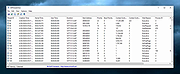 |
 |
AppControl v1.3.0.335b AppControl v1.3.0.335b 👉 Historical Task Manager with powerful application control, privacy monitoring, and system insights. AppControl is a free Windows system monitoring and application management utility developed by Jon Hundley and the AppControl team. Rather than only showing what your computer is doing right now, AppControl continuously records system activity for up to 72 hours, allowing you to review past CPU, GPU, memory, disk, temperature, and application activity to identify exactly what happened when your PC slowed down, overheated, or behaved unexpectedly. AppControl also extends far beyond the capabilities of the standard Windows Task Manager by providing detailed information about running processes, historical hardware usage, application launches, privacy events, and system activity. It can alert you when new or unsigned applications run, when software accesses your webcam, microphone, or location, and allows you to permanently disable unwanted applications or block entire publishers with custom rules. Built-in plain-language descriptions explain what Windows processes and executables actually do, making it easier to understand what's happening on your PC without searching the web Features: • Historical CPU, GPU, memory, disk, and temperature monitoring • Review up to 72 hours of recorded system activity • Timeline graphs with click-and-drag zoom • Monitor application launches, updates, and system events • Alerts for new, unusual, or unsigned applications • Privacy alerts for webcam, microphone, and location access • Permanently disable unwanted applications • Block entire software publishers • Plain-language descriptions of running processes and executables • Command-line monitoring tool for Windows Terminal, PowerShell, and Command Prompt • Automatic light and dark theme support • Custom notification options • Search and investigate running applications quickly Supported operating systems: • Windows 10 • Windows 11 Supported languages: English, German, Spanish, Japanese, French, Polish, Russian, Dutch, Serbian (Cyrillic), Italian, Turkish, Chinese Changes: v1.3.0.335b 05-14-26 Added range selection and zooming on timeline graphs. Added a command-line monitoring tool for Windows Terminal, PowerShell, and Command Prompt. Added an automatic theme that matches Windows light or dark mode. Added ... |
|
821 | Jun 27, 2026 Jon Hundley and Team 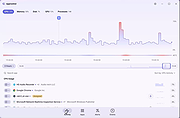 |
|
DDS v2012-11-20-01 DDS v2012-11-20-01 👉 Generate detailed diagnostic logs for malware troubleshooting and system analysis. DDS is a lightweight diagnostic utility created by sUBs that gathers extensive information about a Windows computer without making permanent changes to the system. It is widely used by malware removal specialists and technical support forums to generate detailed reports containing running processes, startup entries, services, installed software, network settings, browser information, restore points, security software status, and numerous other system details. Rather than attempting to detect or remove malware, DDS focuses on collecting information that allows an experienced analyst to identify suspicious activity, unwanted startup items, rootkit indicators, or other system problems. When the scan is complete, DDS automatically creates two text reports, DDS.txt and Attach.txt, which can be uploaded to security forums or shared with a technician for analysis. The utility is completely portable, requires no installation, and performs no registry modifications or permanent file creation during its operation. Features: • Creates comprehensive DDS.txt and Attach.txt diagnostic reports • Lists active processes, services, drivers, and startup entries • Displays installed applications and Windows configuration details • Reports browser settings and Internet Explorer information • Shows antivirus, firewall, and security software status • Lists System Restore points and disk partition information • Includes optional MBR checking and extended search options • Portable executable requiring no installation • Makes no permanent files or registry changes • Designed for malware investigation and technical support Supported operating systems: • Windows XP, Windows Vista, Windows 7 (32-bit and 64-bit) Supported languages: • English Changes: v2012-11-20-01 • Latest publicly released version. Click here to visit the author's website. |
|
7,180 | Jun 30, 2026 sUBs 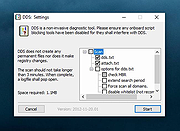 |
|
ESET SysInspector v2.1.5.0 ESET SysInspector v2.1.5.0 👉 Free PC diagnostic tool for inspecting system issues, suspicious files, processes, services, registry entries and network connections. ESET SysInspector is an easy to use diagnostic tool that helps troubleshoot a wide range of system issues. It captures critical and detailed information about your computer and is useful for tracking down malicious code, suspicious unsigned files, software problems, hardware incompatibilities, driver issues, broken registry entries and suspicious network connections. Features: • Captures detailed system information for troubleshooting • Helps inspect running processes and services • Identifies suspicious and unsigned files • Helps diagnose software issues and hardware incompatibility • Checks for outdated or malfunctioning drivers • Helps identify unpatched operating system issues • Reports broken registry entries • Helps detect suspicious network connections • Color-coded risk levels help prioritize severe issues • Processes and network tree view • Regular expression filtering for log results • Light and dark mode support Supported operating systems: • Windows 10, Windows 11, Windows Server 2016, Windows Server 2019, Windows Server 2022 Supported languages: Several languages Changes: v2.1.5.0 Improved: Error codes on app exit Improved: File details for registry subsection Improved: Filtering functionality Added: Option to copy registry path Added: Modal window for viewing registry Added: Selecting lines with typed letter Fixed: Handling Livegrid settings Fixed: Minor UI bugs Updated: Modules with the latest improvements This download is for the Windows 64bit version (very bottom of page). If you need the Windows 32bit version, download here. If you need the Windows ARM64 version, download here. Click here to visit the author's website. |
|
4,965 | May 19, 2026 ESET, spol. s r.o. 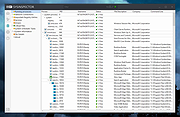 |
|
Feex v0.19.12 Feex v0.19.12 👉 A free Windows utility for monitoring, diagnosing, understanding and maintaining your PC. Feex is a free Windows system utility that combines PC monitoring, diagnostics and maintenance tools in a single application. It provides real-time information about CPU, GPU, memory, disks and other system activity while helping identify applications and processes that may be consuming excessive resources. Feex goes beyond basic system monitoring by keeping useful historical information about your computer. It can analyze startup programs, monitor boot speed over time and help identify common Windows problems and changes that may be affecting performance. Detailed hardware and system information is available to help you understand the components and configuration of your PC. Built-in maintenance tools can help clean caches and unnecessary files, locate duplicate files and perform Windows maintenance and performance tasks. When Feex proposes meaningful changes to the system, it explains what will be affected and asks for approval before proceeding. Privacy is an important part of Feex's design. System understanding and history are stored locally on the PC, and the program can continue operating without an Internet connection. File discovery uses metadata such as filenames, types, sizes and dates rather than reading the contents of documents, emails or chats. Feex does not collect passwords or browsing history, capture the screen, log keystrokes, record audio or video, or inspect the contents of network traffic. It is not intended to replace antivirus software and can be used alongside Windows Defender or other security software. Features: • Monitors CPU, GPU, RAM, disk and overall system activity • Identifies resource-heavy applications and processes • Analyzes programs configured to run at startup • Monitors boot speed and maintains boot history • Provides detailed hardware and system information • Detects common Windows issues • Cleans caches and unnecessary files • Detects duplicate files • Provides Windows maintenance and performance tools • Keeps historical information about system behavior • ... |
|
393 | Sep 04, 2026 Feex 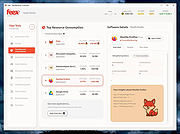 |
|
Internet Processes Viewer v3.8.5.0 Internet Processes Viewer v3.8.5.0 Retrieves detailed snapshots of your computer’s active TCP and UDP network connections along with the owning processes and users each time you run it. It gives quick results with a level of detail helpful when analyzing Cybersecurity incidents and troubleshooting network applications. SHA-256: 814fa4d55277e46a81ca07c110977191f521499989acbee2bff7e41d0b2d1c28 This application may be used at no cost after reading and accepting the built-in EULA. Typical write access to your interactive user's HKCU Software registry is required for the product license acceptance. Uniquely identify executable modules used in creating and maintaining suspicious network connections. Provide .csv reports from the application running on an endpoint of interest to your Cybersecurity support team. Intended target audience: Cybersecurity, Network, Systems Analysts, and similar technical users. Click the question mark in the upper right hand corner of the program for full instructions on it's use. Minimum system requirements Microsoft Windows 10 or 11 and .NET 6 Click here to visit the author's website. |
|
4,121 | Jun 13, 2022 Steve Chaison Software 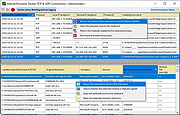 |
|
ProcessTCPSummary v1.25 ProcessTCPSummary v1.25 👉 Displays a detailed summary of TCP connections and listening UDP ports for every running Windows process. ProcessTCPSummary is a small portable network monitoring utility from NirSoft that displays a summary of processes that currently have TCP connections or listening UDP ports. For each process, it shows the total number of TCP connections, connection counts broken down by status such as Established, Listening, SYN-Sent and SYN-Received, IPv4 and IPv6 connection counts, commonly used port numbers and other connection details. When run as Administrator, it can also display TCP/UDP bytes sent and received by each process along with current sending and receiving speeds. The program requires no installation or additional DLL files. Simply extract the downloaded archive and run ProcessTCPSummary.exe. Information can also be exported from the command line to text, tab-delimited, CSV, JSON, HTML or XML files. Features: • Displays all processes with active TCP connections or listening UDP ports • Shows the total number of TCP connections for each process • Breaks TCP connections down by status, including Established, Listening, SYN-Sent and SYN-Received • Shows separate IPv4 and IPv6 TCP connection counts • Displays commonly used port numbers for each process • Shows TCP and UDP bytes sent and received when run as Administrator • Displays current network send and receive speeds • Can display the full paths of system processes when run as Administrator • Supports sorting by individual or multiple columns • Can save results as text, tab-delimited, CSV, JSON, HTML or XML files • Includes command-line options for unattended exporting and sorting • Supports a configurable system tray icon and Always On Top mode • Can start hidden when used with the tray icon option • Includes a black-background display option • Portable and requires no installation or additional DLL files Supported operating systems: • Windows XP, Windows Vista, Windows 7, Windows 8, Windows 8.1, Windows 10, Windows 11 • 32-bit and 64-bit Windows supported Supported ... |
|
6,226 | Sep 04, 2026 Nir Sofer 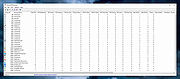 |
|
VT Uploader v1.26.4.12 VT Uploader v1.26.4.12 👉 A portable Windows utility for uploading files to VirusTotal and viewing detailed scan reports. VT Uploader is a portable Windows client for working directly with the VirusTotal service. It lets you upload and scan files, look up existing reports using MD5, SHA-1 or SHA-256 hashes, analyze executable files belonging to running processes and work with files stored in supported antivirus quarantine areas. Important: VT Uploader requires your own VirusTotal API key to access VirusTotal services. You can obtain a free API key by creating a free VirusTotal Community account. Once you have your key, enter it in VT Uploader's settings before scanning files or retrieving reports. Files can be selected normally, dragged and dropped onto the program, sent through the Windows Explorer Send to menu or supplied by pasting a path from the clipboard. VT Uploader calculates MD5, SHA-1 and SHA-256 hashes and can use them to determine whether VirusTotal already has a report for the file before uploading it. VT Uploader can display VirusTotal detection results and the verdicts returned by individual antivirus engines. It also provides options for viewing raw JSON reports, requesting a reanalysis and opening the complete report on the VirusTotal website. The program can also analyze executables associated with currently running processes and access files from supported antivirus quarantine locations. Privacy-related options include warnings before opening file types that could contain personal information. When settings are stored in the Windows Registry, the VirusTotal API key is encrypted. VT Uploader is portable, requires no installation or additional frameworks and is available in separate 32-bit and 64-bit versions. Features: • Upload files to VirusTotal for malware analysis • Retrieve existing VirusTotal reports • Calculate MD5, SHA-1 and SHA-256 file hashes • Look up reports using file hashes • Analyze executable files belonging to running processes • Access files stored in supported antivirus quarantine areas • Drag and ... |
|
420 | Aug 07, 2026 Denis Anisimov 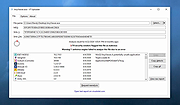 |
| Showing rows 1 to 8 of 8 | Showing Page 1 of 1 | 1 |
OlderGeeks.com Copyright (c) 2026
