|

|
Processed through Paypal No account required. |








Buy our over-priced crap to help pay the bills.



|
|
Processed through Paypal No account required. |
| File - Download Audio Fake Detector PRO v7.7 | ||||||||
| Description | ||||||||
|
A plea... Deanna and I have been running this site since 2008 and lately we're seeing a big increase in users (and cost) but a decline in percentage of users who donate. Our ad-free and junkware-free download site only works if everyone chips in to offset the revenue that ads on other sites bring in. Please donate at the bottom of the page. Every little bit helps. Thank you so much. Sincerely, your Older Geeks: Randy and Deanna Always scroll to the bottom of the page for the main download link. We don't believe in fake/misleading download buttons and tricks. The link is always in the same place. Audio Fake Detector PRO v7.7 👉 Detects fake high-quality audio files by identifying lossy-to-lossless transcodes using advanced spectral and statistical analysis. Audio Fake Detector PRO detects fake “high quality” audio files, including lossy sources such as MP3 or AAC that have been transcoded or disguised as lossless formats like WAV or FLAC. Audio Fake Detector PRO uses a hybrid analysis engine combining spectrogram-based detection and statistical verification depending on the file type. Lossy formats are analyzed using frequency cutoff behavior, abrupt endings, stereo anomalies, and majority-vote segment analysis, while lossless formats are verified using auCDtect statistical analysis. Each audio file is divided into multiple segments and independently evaluated to reduce false positives and false negatives caused by mixed-quality content. Detailed reports are generated in several formats, and suspicious files can automatically be moved into a dedicated folder while preserving the original folder structure. 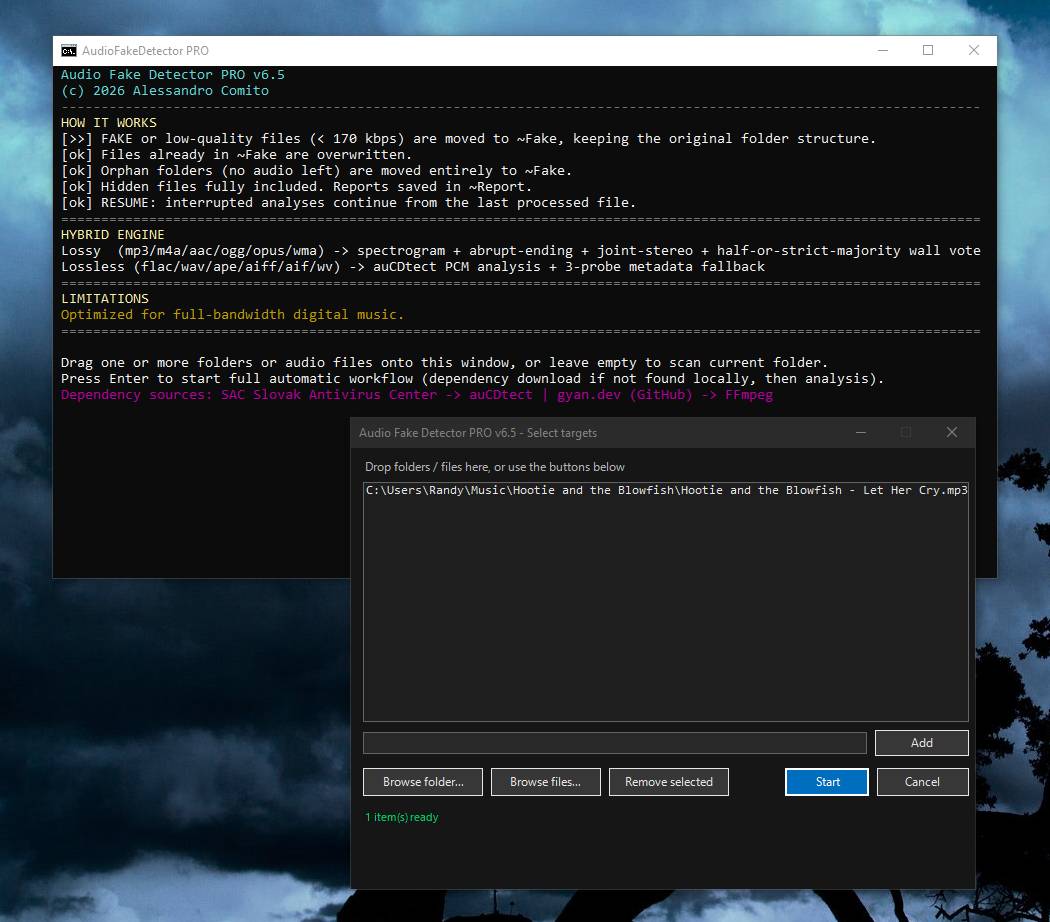 Features: • Detects lossy-to-lossless and lossy-to-lossy transcodes • Hybrid analysis engine using spectrogram and statistical methods • Multi-segment majority voting system for improved accuracy • Spectral cutoff and compression artifact detection • Joint stereo anomaly detection • Automatic download and use of ffmpeg, ffprobe, and auCDtect • Metadata recovery with multi-step fallback analysis • Fast spectrogram processing with optimized implementation • Intelligent segment selection to reduce processing overhead • Generates reports in LOG, CSV, and HTML formats • Moves suspicious files to ~Fake while preserving folder structure • Supports hidden files and batch folder analysis A file is classified as FAKE in the following cases: • Bitrate < 170 kbps (pre-filter) • Lossy formats (MP3/M4A/AAC/OGG/OPUS/WMA) with a hard cutoff ≤ 16.5 kHz • Lossless formats (FLAC/WAV/APE/AIFF/WV) showing strong MPEG artifacts (auCDtect ≥ 80%) • Lossless files with abnormal spectrogram cutoff behavior • Mixed-source encoding or inconsistencies between segments Note: • Automatically downloads required tools on first run: ffmpeg and ffprobe (audio decoding and analysis), and auCDtect (lossless audio verification) Note: It is designed for modern digital music collections and large batches of audio files, including long recordings. It may be less accurate on audio with naturally limited frequency range (speech, very old recordings, acoustic material). Supported operating systems: • Windows 10, Windows 11 Supported languages: English Changes: v7.7 06-26-26 [fix] Fixed a false positive affecting Hi-Res files (96 kHz and 176.4 kHz) with a spectral cutoff around 40 kHz. These files were previously classified as FAKE with the misleading reason "upsampled from 96 kHz source" - a contradiction for native 96 kHz files and factually incorrect for 176.4 kHz files. A spectral cutoff around 40 kHz is a legitimate characteristic of: Vinyl rips (analogue roll-off from the phono preamp or ADC) DSD-to-PCM conversions (noise-shaping filters typically roll off between 40 and 50 kHz) No standard lossy codec, CD-quality source (44.1/48 kHz), or other low-resolution source produces a cutoff in this range, making the previous FAKE verdict a false positive. Hi-Res files are now classified as follows: Cutoff ≤ 28 kHz: FAKE (CD or lossy source; existing detection unchanged) Cutoff > 28 kHz: OK (genuine Hi-Res; analogue roll-off and DSD filtering accepted as legitimate ultrasonic signatures) Note: Users who previously received FAKE verdicts on 96 kHz vinyl rips or 176.4 kHz DSD-to-PCM files should re-scan those files with this version. [fix] Fixed the lower boundary of the 192 kHz detection block. The previous condition (>= 88200 Hz) incorrectly matched 96 kHz files (96000 >= 88200). The condition has been corrected to > 96000 Hz, ensuring 96 kHz files follow the standard Hi-Res detection path as intended. Applies to both Standard and Portable editions. [msg] Corrected a misleading resume message. The previous text: "previously processed file(s) found back in the source folder (restored from ~Fake)" implied the user had manually moved files out of the ~Fake folder. In reality, the files were simply found outside ~Fake after an interrupted session. The new message is: "previously processed file(s) from the interrupted session found outside ~Fake - re-queued for analysis" Applies to both Standard and Portable editions. [msg] Added an explanatory note before the Resume previous analysis? (Y/N) prompt whenever the current file selection differs from the saved session (for example, 1 file currently selected versus 7 files in the interrupted session). The note clearly explains what Y and N will do without implying the user made a mistake. Applies to both Standard and Portable editions. [fix] Fixed a resume bug where answering N to the Resume previous analysis? prompt caused the tool to discard the current file selection ($script:SpecificFiles = $null) and perform a full rescan of the root folder. This could unintentionally process unrelated files instead of respecting the original selection (for example, a single file dragged onto the tool). The current file selection is now preserved and used for the new analysis. Applies to both Standard and Portable editions. 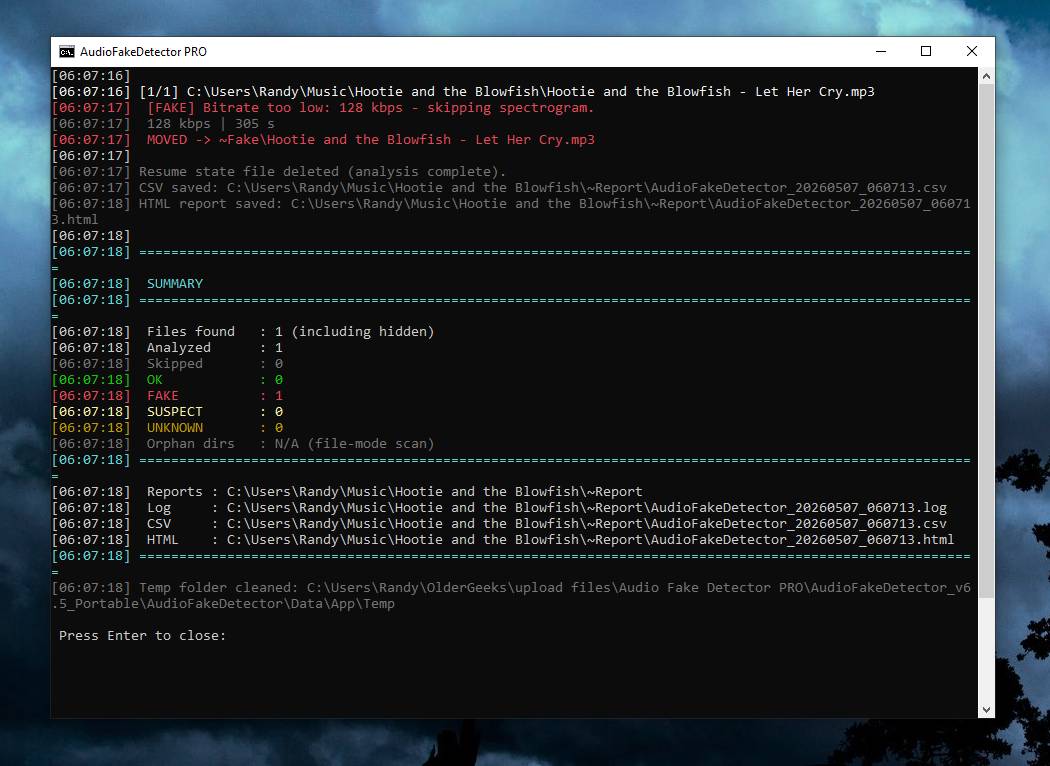 Note: This file has one hit on VirusTotal. We have confirmed this to be a false positive. The file is safe. Click here to visit the author's website. Continue below for the main download link. |
||||||||
| Downloads | Views | Developer | Last Update | Version | Size | Type | Rank | |
| 756 | 2,951 | Alessandro Comito | Jun 27, 2026 - 12:14 | 7.7 Update: 2026-06-26 | 129.5KB | ZIP |  , out of 8 Votes. , out of 8 Votes. |
|
| File Tags | ||||||||
| Audio Fake Detector PRO audio analysis fake audio detector audio verification detection audio mp3 authenticity checker flac tool spectral lossless tool mp3 upscaling Fakin' The Funk alternative | ||||||||
Click to Rate File Share it on Twitter → Tweet
|


