|

|
Processed through Paypal No account required. |








Buy our over-priced crap to help pay the bills.



|
|
Processed through Paypal No account required. |
| Files | ||||
| File Name | Rating | Downloads | ||
 |
Audio Fake Detector PRO v8.5 Audio Fake Detector PRO v8.5 👉 Detects fake high-quality audio files by identifying lossy-to-lossless transcodes using advanced spectral and statistical analysis. Audio Fake Detector PRO detects fake “high quality” audio files, including lossy sources such as MP3 or AAC that have been transcoded or disguised as lossless formats like WAV or FLAC. Audio Fake Detector PRO uses a hybrid analysis engine combining spectrogram-based detection and statistical verification depending on the file type. Lossy formats are analyzed using frequency cutoff behavior, abrupt endings, stereo anomalies, and majority-vote segment analysis, while lossless formats are verified using auCDtect statistical analysis. Each audio file is divided into multiple segments and independently evaluated to reduce false positives and false negatives caused by mixed-quality content. Detailed reports are generated in several formats, and suspicious files can automatically be moved into a dedicated folder while preserving the original folder structure. Features: • Detection of fake 320 kbps MP3 files • Detection of fake lossless audio (FLAC, WAV, APE, AIFF, WV) • Hi-Res / Ultra-Hi-Res PCM analysis (up to 384 kHz and beyond) and native • DSD support (.dsf, .dff), with DSD-to-PCM noise-shaping recognition to avoid false positives on genuine SACD/DSD-derived content • Spectral cutoff and compression artifact detection • Multi-segment frequency analysis • Joint stereo anomaly detection • Selectable lossless verification engines: LAC 2.0.5 + FLAD, AudioAuditorCLI + FLAD, or FlacCompagnonCLI + FLAD • Statistical validation using LAC (Lossless Audio Checker), FLAD, AudioAuditorCLI, and FlacCompagnonCLI for lossless PCM verification • Automatic dependency management (FFmpeg, FFprobe, FLAD, and AudioAuditorCLI when selected) • High-performance spectrogram processing • Detailed reporting: LOG - CSV On selection window, click to cycle: [CSV ( )] → [CSV (,)] → [CSV (;)] → [CSV ( )] • Moves detected files to the ~Fake folder while preserving the original directory structure A file is classified as FAKE in the following cases: • Bitrate < 170 kbps (pre-filter) • Lossy formats (MP3/M4A/AAC/OGG/OPUS/WMA) with a hard cutoff ... |
 |
807 | Oct 12, 2026 Alessandro Comito 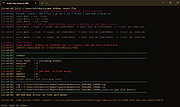 |
|
ClickPaste v1.4.4 ClickPaste v1.4.4 👉 Automatically type saved text into any field. Even ones that block normal paste operations. ClickPaste is a lightweight open-source utility that lets you store frequently used text snippets and insert them into any application quickly and easily. Instead of repeatedly typing the same phrases, commands, login names, or responses, ClickPaste allows you to maintain a list of reusable text entries and insert them whenever needed. Unlike traditional clipboard tools that paste text, ClickPaste simulates keyboard typing (keystrokes) to enter the text into the active field. This makes it especially useful for situations where standard paste operations are disabled—such as password fields, login forms, or secure input boxes that block clipboard pasting. Features: • Store and manage reusable text snippets • Automatically type text into the active field using simulated keystrokes • Works with fields that block clipboard pasting such as password boxes • Helps eliminate repetitive typing and reduce typing mistakes • Useful for support responses, commands, login names, and form entries • Lightweight and simple interface Supported operating systems: • Windows 10, Windows 11 Supported languages: English Changes: v1.4.4 05-05-26 Fix missing .cab file in installer, so the MSI can work (as a treat). Fixing #42 Click here to visit the author's website. |
|
804 | Jul 13, 2026 Collective-Software 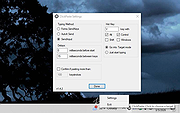 |
 |
EntropyVerify v1.0.0 EntropyVerify v1.0.0 👉 Portable, high-performance storage validation utility for verifying drive capacity and integrity. EntropyVerify is an open source, cross-platform storage validation utility written in Rust. Designed as a modern alternative to H2testw, it verifies the true capacity and integrity of storage devices by writing hardware-accelerated, incompressible AES-CTR data and validating it using BLAKE3 block checksums. The program is optimized for modern high-speed NVMe SSDs while remaining compatible with virtually any storage device. It features a real-time terminal dashboard, detailed verification reports, built-in safeguards to prevent accidental testing of system drives, and configurable command-line options for advanced users. Features: • Verifies the true capacity and integrity of storage devices. • High-performance asynchronous I/O for Windows and Linux. • Hardware-accelerated AES-128-CTR data generation. • BLAKE3 block-level integrity verification. • Real-time terminal dashboard with throughput graphs, progress bars, and ETA. • Automatically detects CPU topology and assigns worker threads to physical cores. • Built-in safety checks to prevent overwriting system drives and protected mount points. • Supports write-only and verify-only testing modes. • Generates detailed Markdown verification reports. • Automatically removes test files after a successful validation pass while retaining failed data for analysis. • Interactive controls for pausing, resuming, changing displayed units, and aborting tests. Supported operating systems: • Windows 10, Windows 11 Supported languages: • English Changes: v1.0.0 06-23-26 • Initial public release. • Introduced high-performance storage validation with asynchronous I/O. • Added hardware-accelerated AES-CTR data generation and BLAKE3 verification. • Added interactive terminal dashboard, Markdown reporting, and built-in safety protections. Click here to visit the author's website. |
|
475 | Jun 23, 2026 blamie 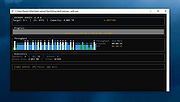 |
|
FineTune v1.9.0 FineTune v1.9.0 👉 Per-app volume control, audio routing, multi-device output and EQ for macOS. FineTune is a free and open-source macOS menu bar app that lets you control the volume of individual apps, boost quiet apps up to 4x, route apps to different speakers, use multi-device output, adjust input and output devices, and shape sound with a 10-band EQ and headphone correction. Features: • Per-app volume sliders and mute controls • Per-app volume boost with 2x, 3x and 4x gain presets • Global hotkeys for app volume up, app volume down, app mute and popup toggle • Configurable volume step size • Keyboard navigation for the menu bar popup • Multi-device output support • Route apps to different audio outputs • Auto-restore app volume, routing and EQ when devices reconnect • 10-band EQ with presets • Custom user EQ presets • AutoEQ headphone correction support • Loudness compensation using ISO 226:2023 equal-loudness contours • Input device and microphone level control • macOS alert volume control • Bluetooth device management from the menu bar • External monitor speaker control via DDC • Dynamic menu bar icon styles • Light and Dark theme support • Adjustable popup size: Compact, Comfortable or Spacious • URL schemes for automation Supported operating systems: • macOS 15.0 Sequoia or later Supported languages: English, Simplified Chinese Changes: v1.9.0 07-09-26 Pick your own icon for any device, and the menu bar icon stops nudging its neighbors. Two DDC fixes land alongside, including the crash on external-monitor volume changes that shipped in v1.8.0. New Features Choose Any Device's Icon Open edit mode in the popup and click a device's icon to pick a new one from a catalog of 85 symbols across five categories — Headphones & Earbuds, Speakers, Computers & Displays, Microphones, and Connectors & Other — or search by keyword ("soundbar", "projector", "aux"). A Suggested section leads with FineTune's automatic guess from the device's name and connection type, so the right ... |
|
826 | Oct 07, 2026 Ronit Singh 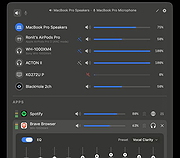 |
| Showing rows 1 to 4 of 4 | Showing Page 1 of 1 | 1 |
OlderGeeks.com Copyright (c) 2026
