|

|
Processed through Paypal No account required. |








Buy our over-priced crap to help pay the bills.



|
|
Processed through Paypal No account required. |
| File - Download Like A Nerd v2.0 | ||||||||
| Description | ||||||||
|
Always scroll to the bottom of the page for the main download link. We don't believe in fake/misleading download buttons and tricks. The link is always in the same place. Like A Nerd v2.0 A free Context Menu manager that adds Command Prompt, PowerShell, Windows Terminal, and Git Bash shortcuts with admin/user options to folders and drives. 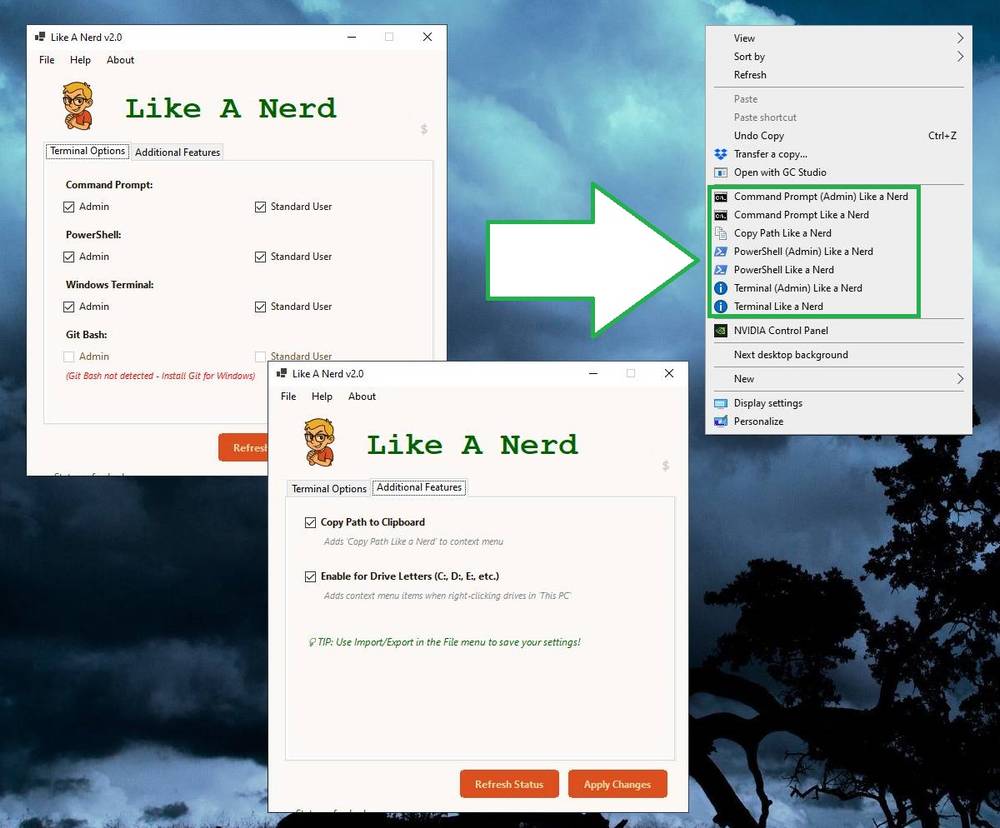 Like A Nerd is a powerful and portable Windows context menu manager that adds convenient terminal access directly to Windows Explorer. Perfect for developers, system administrators, IT professionals, and power users who frequently need quick command-line access. Right-click on any folder, drive letter, or empty space in Windows Explorer to instantly open Command Prompt, PowerShell, Windows Terminal, or Git Bash - with or without administrator privileges! Features: Terminal Options: • Command Prompt (Admin & Standard User) • PowerShell (Admin & Standard User) • Windows Terminal (Admin & Standard User) • Git Bash (Admin & Standard User) - requires Git for Windows Additional Features: • Copy full folder path to clipboard with one click • Context menu items on folders, empty space, AND drive letters • All items positioned at bottom of context menu for consistency • Professional interface with custom branding • Portable single-file executable - no installation required • Self-contained - includes all dependencies, no .NET required Smart Detection: • Automatically detects Git Bash installation • Shows current registry status for all items • Refresh button to verify applied changes Perfect for: • Developers who need quick command-line access • System administrators managing Windows servers • IT professionals troubleshooting systems • Power users who prefer keyboard and terminals • Anyone who works with Git repositories • Network administrators accessing multiple drives Use: • Simply check the desired options, click Apply Changes, and enjoy streamlined access to your favorite command line tools right from Windows Explorer's context menu! Supported operating systems: • Windows 10 (1607+) or Windows 11 Changes: v2.0 12-24-25 Added non-admin terminal versions Added Git Bash support with auto-detection Added Copy Path to Clipboard feature Added drive letter support (C:, D:, E:, etc.) Added Import/Export settings functionality Redesigned interface with tabbed layout Enhanced help system with detailed instructions Updated About dialog with version info Click here to visit the author's website. Continue below for the main download link. |
||||||||
| Downloads | Views | Developer | Last Update | Version | Size | Type | Rank | |
| 1,258 | 4,655 | OlderGeeks.com | Dec 24, 2025 - 15:20 | 2.0 | 70.27MB | EXE |  , out of 22 Votes. , out of 22 Votes. |
|
| File Tags | ||||||||
| v2.0 Like A Nerd | ||||||||
Click to Rate File Share it on Twitter → Tweet
|


