|

|
Processed through Paypal No account required. |








Buy our over-priced crap to help pay the bills.



|
|
Processed through Paypal No account required. |
| File - Download Clmn v1.0.4 | ||||||||
| Description | ||||||||
|
Always scroll to the bottom of the page for the main download link. We don't believe in fake/misleading download buttons and tricks. The link is always in the same place. Clmn v1.0.4 Just Columns and Tasks Clmn is a beautiful native task board app for macOS. It is thoughtfully simple and incredibly efficient; offering just the right amount of functionality without any unnecessary frills. Clmn is specifically designed for professionals who primarily work on laptops. 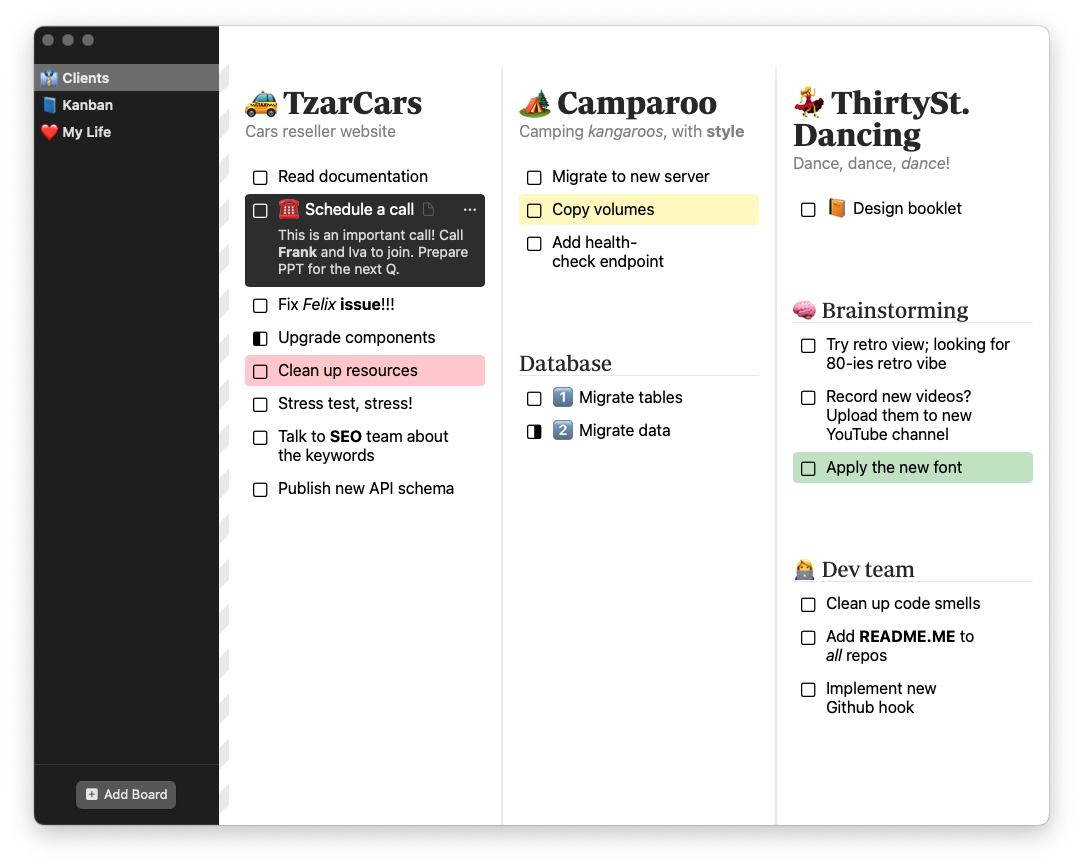 Multiple columns at once Visibility is essential. Clmn displays multiple task columns simultaneously, providing an overview of all tasks within the same domain. Tasks within a list may be further organized into groups. Lists + Groups + Tasks == Get Things Done. Nothing fancy, just enough There is nothing fancy about Clmn. A task is simply a task, and that’s all. Everything else distracts from the focus. Clmn offers just enough functionality: • Order tasks in lists and groups. • Complete a task. Click • Mark tasks as in progress. ⌘ + Click • Cancel a task. ⌥ + Click • Drag’n’drop tasks around the board. • Coloured backgrounds for tasks. • Select a task and show notes with details. • Use markdown for all text. • Link to tasks using URLs. • Use keyboard: ⌘ + ⏎ to save, Esc to dismiss. Click here to visit the author's website. Continue below for the main download link. |
||||||||
| Downloads | Views | Developer | Last Update | Version | Size | Type | Rank | |
| 925 | 4,111 | Igor Spasić and Veljko Tekelerović | Jul 31, 2024 - 11:13 | 1.0.4 | 1.9MB | DMG |  , out of 39 Votes. , out of 39 Votes. |
|
| File Tags | ||||||||
| Clmn v1.0.4 | ||||||||
Click to Rate File Share it on Twitter → Tweet
|


