|

|
Processed through Paypal No account required. |








Buy our over-priced crap to help pay the bills.



|
|
Processed through Paypal No account required. |
| File - Download PDF Link Editor v1.6.3 | ||||||||
| Description | ||||||||
|
Always scroll to the bottom of the page for the main download link. We don't believe in fake/misleading download buttons and tricks. The link is always in the same place. PDF Link Editor v1.6.3 PDF Link Editor is a small and smart application intents to do more for you when editing PDF hyperlinks. As we all know, it is not quite convenient for users to edit multiple links in PDF with Acrobat. PDF Link Editor contains the wonderful features that enables you to edit, add, replace, remove and extract PDF links in batch mode. With its intuitive and elegant interface design, it is quite easy to access no matter you are novice or expert. All-In-One Application. Small and Smart. Replace Hundreds of PDF Links in One Click. Add or Insert Hundreds of PDF Links in One Click. Clear or Extract All Hyperlinks in One PDF in No Time. Standalone and Run Smoothly Without Any Adobe Plugin Installed. Compatible with All Adobe PDF Versions. All-In-One Application. Small and Smart. As an all-in-one pdf link editor tool, PDF Link Editor offers you the possibilities to edit, replace, clear or extract links in one PDF document conveniently. Upload any PDF document you desire and this smart tool will display all links and anchors in a Gridview. No need to search before editing and replacing anymore! In addition, it is so small in size (<10MB) that it can achieve without requiring too much space. Replace Hundreds of PDF Links in Batch. Feel tedious to search and replace pdf links one by one by using general PDF tools? Boost your productivity by using this smart pdf link editor. PDF Link Editor could search all hyperlinks effectively and list them orderly after you have added one PDF file. You can manage all of these links and anchors intuitively. Select the desired links, enter the link you want to change to. Then, click one button and this tool will export the PDF with all links changed. Add or Insert PDF Links in Batch. No need to search every word or sentence and draw a rectangle to insert a hyperlink in PDF file manually. Make use of the Batch-Add-Hyperlinks feature of PDF Link Editor and boost your productivity and save your time. PDF Link Editor will search and mark every anchor you want and insert the URL you have input in the text box. Equipped with a strong engine, PDF Link Editor will complete the process in its fastest speed. Try it now and forget those repetitive and monotonous work. Clear or Extract All Hyperlinks. It is not a challenge for PDF Link Editor to remove or extract all links within one PDF. These features are quite useful for users who would like to remove all hyperlinks for some purposes, or extract all links out for storage. The process is simple and easy to achieve. Add your PDF file, click the "Clear links" or "Extract links" and then set the target folder to export a new PDF. All done! Walk through the tutorial below for more information. Standalone and Run Without Adobe. You may wonder if this powerful application needs Adobe products or plugins installed. The answer is negative. Equipped with its own tech-base and optimized codes, PDF Link Editor could run in high performance without any Adobe products like Reader or Acrobat or plugins installed. It should be also mentioned that this smart tool supports all Adobe PDF versions including the latest one. So feel free to use it and start replacing pdf links now. 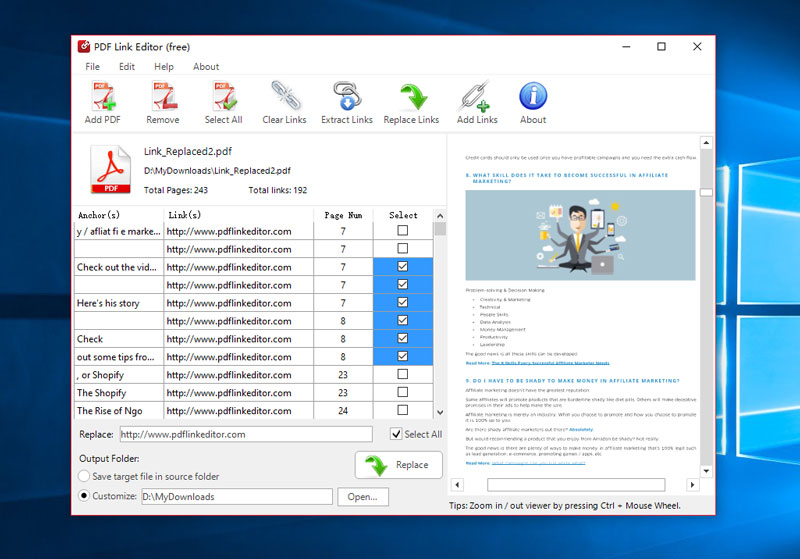 Click here to visit the author's website. Continue below for the main download link. |
||||||||
| Downloads | Views | Developer | Last Update | Version | Size | Type | Rank | |
| 6,061 | 12,150 | PDF Link Editor | Oct 23, 2019 - 20:41 | 1.6.3 | 6.85MB | EXE |  , out of 79 Votes. , out of 79 Votes. |
|
| File Tags | ||||||||
| PDF Link v1.6.3 Editor | ||||||||
Click to Rate File Share it on Twitter → Tweet
|


