|

|
Processed through Paypal No account required. |








Buy our over-priced crap to help pay the bills.



|
|
Processed through Paypal No account required. |
| Files | ||||
| File Name | Rating | Downloads | ||
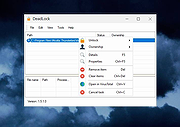 |
DeadLock v1.5.1 DeadLock v1.5.1 👉 Unlock files and folders that Windows refuses to release. DeadLock can be used to unlock files and folders that are locked by the system or other applications. This is especially useful when Windows will not let you delete, move, copy or rename something because it claims the file is still in use. DeadLock can unlock files and folders, take ownership, and help remove stubborn items without digging through Task Manager or command-line tools. DeadLock also supports command-line arguments, so advanced users can unlock files or folders directly from PowerShell or CMD without opening the full graphical interface. It is open source, lightweight, free to use and designed specifically for Windows. Features: • Unlock files and folders locked by Windows or other applications • Delete, move or copy locked files and folders • Take full ownership of stubborn files and folders • Command-line support for PowerShell and CMD use • Optional Windows Explorer integration • Theme and preference settings • Optional automatic update functionality • Open-source GPL-3.0 licensed software • No ads, trackers or user data collection Supported operating systems: • Windows 7 SP1, Windows 8, Windows 8.1, Windows 10, Windows 11 • Windows Server 2008 R2 SP1, Windows Server 2012, Windows Server 2012 R2, Windows Server 2016, Windows Server 2019, Windows Server 2022, Windows Server 2025 Supported languages: English, Chinese Simplified, Chinese Traditional, Russian, Bulgarian Changes: v1.5.1 02-15-26 Create Chinese simp. locale. Create a language file for Traditional Chinese. Fix Chinese Traditional locale. Updated russian translate. Added OS + updated link to HTTPS. Create bg.xml. Note: This file has two hits on VirusTotal. We have confirmed these to be false positives. The file is safe. Click here to visit the author's website. |
 |
7,682 | Jun 11, 2026 CodeDead |
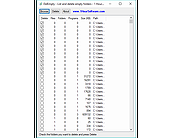 |
DelEmpty v1.2 DelEmpty v1.2 This program will find empty folders on any drive or single folder you choose to scan. It will list the empty folders and check them for deletion by the user. Features: - Show filecount, foldercound, programcount and size of files and subfolders. - Sort by files, size or path. - Doubleclick to explore a folder. Click here to visit the author's website. |
|
5,720 | Dec 21, 2021 Skrommel's One Hour Software |
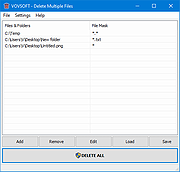 |
Delete Multiple Files v1.1 Delete Multiple Files v1.1 Batch delete tool Bulk delete utility Vovsoft Delete Multiple Files enables batch file/folder deletion through a simple process. It permits you to get rid of multiple files or folders from your computer without the need to go through and manually delete them. It presents a simplified user interface without overly complex settings. Multiple file eraser When you want to get rid of many files on your computer, you typically need to browse any location and manually erase the items. Alternatively, you can try "Delete Multiple Files", an application that does exactly what its title suggests. The overall look and feel of this software utility is minimalist, as its GUI is not cluttered with redundant menus and buttons. Instead, you get a simple window where you can add files or folders you want to remove, along with some additional features meant to simplify the whole process. Delete files or folders from different places on the computer The application is meant to allow you to efficiently add the items you want to delete and complete the job with minimal hassle. It supports drag'n'dropping of the selected items for removal. It can be used for individual files, folders, subfolders, or recursive subfolders. You can choose between "Send to Recycle Bin" and "Permanently Delete" options. You can also specify file mask when dealing with directories. It is the perfect addition to your toolset without wasting time when multiple files need to be deleted. It can come in handy when you want to save both time and energy when removing numerous files at the same time. Supports: Windows 10/8.1/8/7/Vista/XP (32-bit and 64-bit) Language: English, Deutsch, Español, Français, Italiano, Magyar, Nederlands, Polski, Português, Pусский, Shqip, Slovenščina, Svenska, Türkçe, български, العربية, 中文, 日本語, 한국어 License: Freeware — no nags, no ads, fully functional Note from the OlderGeeks: There are some false ... |
|
3,270 | Dec 21, 2021 Vovsoft |
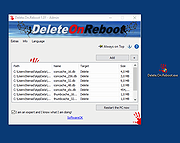 |
Delete.On.Reboot v3.44 Delete.On.Reboot v3.44 A free program to delete locked files, directories and subfolders on Windows restart. Unlike the aggressive approach of deleting locked files with ThisIsMyFile, this is the regular procedure; provided by Microsoft on all Windows OS, but here you can still also move the files to a directory for example to check the possible culprits files. easy to use! Delete at restart key features: • Administrative Explorer • Administrative Explorer with System Rights • Move and Delete on Restart • Remove Windows Standard Delete Jobs • Very small program • Low CPU usage • Optional translation function • Portable • Multilanguage Optional Optionally, you can add the freeware tool to the Explorer context menu via the Extras menu, all objects in the list view will be deleted from the Windows PC when restarting. If necessary, objects that should not be deleted can be removed from the list view so that they are not deleted when the Windows PC restarts. Optionally in the download area is the installable and portable version. Changes: v3.44 12-03-25 • Optimization and various fixes for the Delete on Reboot app in Windows 11 and 10. • Language file updates in the Delete.On.Reboot Tool for MS Windows. Supported operating systems: Windows XP, Vista, 7, 8, 10, 11 Supported languages: German English French Russian Polish Korean Chinese-Traditional Greek Japanese Italian Swedish Norwegian Danish Irish Vietnamese Dutch Spanish Portuguese Afrikaans Hindi Hebrew Finnish Czech Persian Arabic Spanish-VE Malay Indonesian Filipino Simplified-Chinese Hungarian Bulgarian Bosnian This download is for the Windows 64bit version (very bottom of page). If you need the Windows 32bit version, download here. Click here to visit the author's website. |
|
5,312 | Dec 04, 2025 Nenad Hrg |
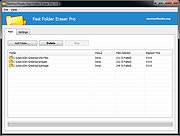 |
Fast Folder Eraser Pro v3.8 Fast Folder Eraser Pro v3.8 Quickly delete folders with a large number of files. Fast Folder Eraser Pro is a useful Windows OS utility designed to quickly delete folders with a large number of files, without degrading the system performances and maintaining the PC usable, so you can continue to use the PC normally without worrying about interrupting your work. Folders are erased much faster than Windows, the files are not sent to the recycle bin, they are deleted directly using native Windows OS APIs. For Windows XP, Vista, 7, 8, 10, 11 (32\64-bit) If you have ever tried to delete a large folder structure with thousands of files inside, you probably noticed that Windows OS can take some time and may slow down the system performances. With this tool large folders are deleted much faster, files are deleted directly, and you can also filter files to delete and reduce the memory usage during deletion. This is the tool you need to delete large folders on Windows. Features Delete Large Folders Quickly delete complicated folder structures and folders with a lot of files. File Wiping Algorithms You can select to permanently delete files so they can't be recovered. Work in Background Delete folders in the background so you can work on the PC while deleting files. Filter File Deletion Filter files to delete by file extension, wildcard, file age, modification date, etc. View Failed Deletions View a list of files that failed the deletion because they are locked or in use. Reduce Memory Usage You can reduce even more the memory usage during the deletion process. Command-Line Included there is also the standalone command-line version. No Spyware\Adware The program is free from spyware, adware or other pests, nothing extra is installed. Free to Use This software is completely free to use for anyone, at home and at work. Click here to visit the author's website. |
|
3,187 | Mar 06, 2022 NoVirusThanks |
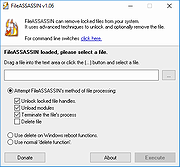 |
FileASSASSIN 1.06 FileASSASSIN 1.06 FileASSASSIN can eradicate any type of locked files from your computer. If you use a computer, you've probably come across at least one of the following messages: Cannot delete file: Access is denied Make sure the disk is not full or write-protected and that the file is not currently in use The source or destination file may be in use The file is in use by another program or user These messages commonly appear when you're trying to delete files deposited by a malware infection, though occasionally a file just goes on lockdown. Whatever the reason for the file, FileASSASSIN can remove it Advanced programming techniques unload modules, close remote handles, and terminate processes in order to remove the particular locked file. Warning: Please use caution with FileASSASSIN as deleting critical system files may cause system errors. Usage Start FileASSASSIN and select a file by dragging it onto the text area or selecting it using the (...) button. Select a removal method from the list Click Execute and the removal process will commence |
|
9,914 | Dec 21, 2021 Malwarebytes |
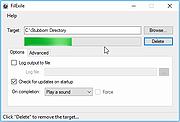 |
FilExile 3.00 FilExile 3.00 Simple program intended to delete and remove stubborn directories and files that cannot be removed by other means either because the path is too long, the name is invalid, or any of other errors that can be incurred upon file or directory deletion. Features GUI Interface Safety features to prevent deletion of important directories Logging Update check Multi-threading Command-line arguments Delete individual files Shell extension Romanian, Italian, Spanish, French, Vietnamese, and German languages |
|
6,045 | Jan 12, 2022 inufreak483 |
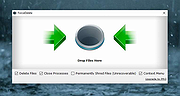 |
ForceDelete v1.1 ForceDelete v1.1 Delete files and folders that cannot be deleted without terminating processes on Windows. Sometimes you may get the error message "cannot delete file: access is denied" or "the file is used by another program" while you are failing to delete files and folders on Windows. That means those files and folders were locked in Windows and cannot be deleted in a regular way. You can use ForceDelete to fix these issues and delete files and folders forcibly. ForceDelete is a handy and useful Windows utility that unlocks and deletes files or folders which are used by other processes and cannot be deleted. The best part of this small tool is, ForceDelete has an option allows users to delete locked files and folders without terminating the processes. You would be able to delete files are in use but prevent all other data in the process loss. Simply uncheck the "Close Processes" option then drag the files and folders you want to delete and drop them onto the window, ForceDelete will delete these files without close the processes and programs are using them. Besides, ForceDelete also adds 2 shortcuts into the context menu and then you can easily unlock or delete files by right mouse button menu. The "Shred Files" option is available for users who want to permanently delete files and folders from the hard drive. Please note that if you delete files and folders with this option enabled, all removed data would be unrecoverable. ForceDelete also supports batch command line mode. You can run forcedelete.exe from the command line to batch delete files and folders. Usage example: forcedelete.exe [file1] [file2] ... The "file1" and "file2" could be a file or a folder. The program would delete all files or folders you added into the parameters. What Files Can ForceDelete Delete • "Cannot delete ... |
|
3,607 | Mar 24, 2024 AutoClose |
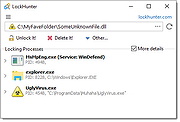 |
LockHunter Portable v3.4.3 LockHunter Portable v3.4.3 A foolproof, portable file unlocker tool. It is a free tool to delete files blocked by something you do not know. LockHunter is useful for fighting against malware, and other programs that are blocking files without a reason. Unlike other similar tools it deletes files into the recycle bin so you may restore them if deleted by mistake. Key Features Shows processes locking a file or folder Gives you detailed information on the process Allows to unlock, delete, copy or rename a locked file Can delete a file at next OS restart Allows to kill locking process Allows to remove locking processes from hard drive Can unload DLLs from processes Integrates in to Explorer menu It deletes files into the recycle bin, so you may restore them if deleted by mistake Supports both 32 and 64 bit Windows Click here to visit the author's website. |
|
7,079 | May 24, 2022 Crystal Rich Ltd. |
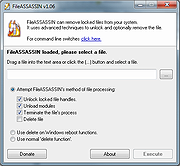 |
Malwarebytes FileASSASSIN v1.06 Malwarebytes FileASSASSIN v1.06 FileASSASSIN can eradicate any type of locked files from your computer. If you use a computer, you've probably come across at least one of the following messages: Cannot delete file: Access is denied Make sure the disk is not full or write-protected and that the file is not currently in use The source or destination file may be in use The file is in use by another program or user These messages commonly appear when you're trying to delete files deposited by a malware infection, though occasionally a file just goes on lockdown. Whatever the reason for the file, FileASSASSIN can remove it Advanced programming techniques unload modules, close remote handles, and terminate processes in order to remove the particular locked file. Warning: Please use caution with FileASSASSIN as deleting critical system files may cause system errors. Usage Start FileASSASSIN and select a file by dragging it onto the text area or selecting it using the (...) button. Select a removal method from the list Click Execute and the removal process will commence |
|
6,982 | Jan 12, 2022 Malwarebytes |
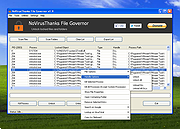 |
NoVirusThanks File Governor (PORTABLE) v2.3.0.0 NoVirusThanks File Governor (PORTABLE) v2.3.0.0 NoVirusThanks File Governor is an advanced program which allows for files and folders within the system to be unlocked so that normal file I/O operations can be completed when normally they would not be able to be due to operating system restrictions for files currently in use. Once a file or folder is unlocked you will be able to force-close the file’s handle, rename, delete, etc. I am sure that at least one time, you have run into a situation where you wanted to delete a file, but Windows wouldn’t allow you to do it because the file was already in use by another program or because the access to the file you wanted to delete was denied for some reasons. In this case you should know these messages: The source or destination file may be in use Cannot delete file: Access is denied The file is in use by another program or user There has been a sharing violation Make sure the disk is not full or write-protected You can use NoVirusThanks File Governor to safely close all the opened handles of a file or to safely close all the opened files inside a folder so that you will be able to delete the files and the folder without problems. This tool is useful also to unlock files locked by malware or unload malicious DLL files. Key features and characteristics Unblock files and folders locked by other applications Terminate processes that lock a file or folder Scan files and folders for locked objects Close opened handles and unload loaded DLL modules Unload DLL modules loaded in running processes Unlock all locked objects with a single mouse click Scan files and folders ... |
|
7,625 | Jan 12, 2022 NoVirusThanks Company |
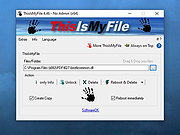 |
ThisIsMyFile v4.51 ThisIsMyFile v4.51 👉 Easily unlock or delete locked files and folders on Windows. ThisIsMyFile is a lightweight Windows utility designed to help users unlock, delete, rename, or move files that are locked or in use by the operating system or another application. When Windows refuses to delete or modify a file because it is currently being used, ThisIsMyFile can identify the process that is locking the file and allow you to release the lock so the file operation can proceed. The program provides a simple and portable interface where you can drag and drop a locked file to quickly determine which process is using it. From there, you can unlock the file, terminate the locking process, or delete the file immediately or at the next system restart. ThisIsMyFile is especially useful for troubleshooting stubborn files, removing leftovers from uninstalled software, or handling files that Windows reports as “access denied” or “in use.” ThisIsMyFile does not require installation and can be run directly as a portable tool, making it convenient for technicians and advanced users who need a quick way to deal with locked files without installing additional software. Features: • Unlock files that are currently in use by Windows or other programs • Identify the process that is locking a file or folder • Delete, move, or rename locked files • Option to delete files immediately or on next system restart • Drag-and-drop support for quick file analysis • Portable application with no installation required • Simple and lightweight interface designed for fast troubleshooting Supported operating systems: • Windows 7, Windows 8, Windows 10, Windows 11 Supported languages: German, English, French, Spanish, Hungarian, Turkish, Czech, Chinese Traditional, Russian, Romanian, Polish, Greek, Dutch, Portuguese, Korean, Chinese Simplified, Brazilian Portuguese, Arabic, Italian, Spanish Venezuela, Hindi, Thai, Vietnamese, Welsh, Persian, Hebrew, Malay, Indonesian, Filipino, Norwegian, Ukrainian Changes: v4.51 04-24-26 • Minor bug fixes in the ThisIsMyFile application for Windows 11 ... |
|
7,201 | May 01, 2026 Nenad Hrg |
| Showing rows 1 to 12 of 12 | Showing Page 1 of 1 | 1 |
OlderGeeks.com Copyright (c) 2026
