|

|
Processed through Paypal No account required. |








Buy our over-priced crap to help pay the bills.



|
|
Processed through Paypal No account required. |
| Files | ||||
| File Name | Rating | Downloads | ||
 |
Android Webcam System v1.0.6 Android Webcam System v1.0.6 👉 Turn an Android phone into a high-quality Windows webcam over USB or Wi-Fi. Android Webcam System is a free and open-source webcam solution that uses an Android smartphone as a webcam for a Windows computer. The system consists of the AWA Android app, which streams video from the phone, and the AWC desktop client, which receives the stream and provides a virtual webcam device that can be selected by compatible Windows applications. Everything operates locally without requiring a cloud streaming service. The project supports both USB and Wi-Fi connections. USB provides lower latency and improved stability without requiring Wi-Fi, while wireless mode lets the phone and computer communicate over the same local network. The Android app supports resolutions from 480p through 4K and allows switching between the phone's front and rear cameras. The virtual webcam can be used with programs such as Zoom, Microsoft Teams, Google Meet, Discord, OBS Studio and Skype, as well as other Windows programs capable of selecting a webcam device. Features: • Turns an Android smartphone into a Windows webcam • Includes AWA, a Kotlin-based Android camera and streaming application • Includes AWC, the desktop client that receives the phone's video stream • Creates a virtual webcam device for compatible Windows applications • Supports USB and Wi-Fi connections • USB mode offers lower latency and improved connection stability • Wi-Fi mode provides completely wireless operation over the local network • Supports 480p, 720p, 1080p and 4K video resolutions • Supports front and rear Android cameras • Displays real-time connection status • Provides desktop connection statistics • Designed for low battery usage on the Android device • Works with Zoom, Microsoft Teams, Google Meet, Discord, OBS Studio and Skype • Can be used by other applications that support standard webcam devices • Uses a fully local, serverless architecture • No cloud video relay is required • No advertisements • Free and open-source under the ... |
 |
272 | Aug 09, 2026 Soubhagyajit Borah 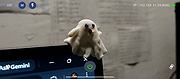 |
|
ScreenArc v1.4.1 ScreenArc v1.4.1 👉 Create polished screen recordings with automatic cinematic zooming and mouse tracking. ScreenArc is a free and open-source screen recorder and editor designed to turn ordinary screen captures into polished videos. It automatically follows mouse activity and creates smooth cinematic zoom and pan effects, making it particularly useful for software demonstrations, tutorials, presentations, product walkthroughs, and instructional videos. Record your screen, edit the resulting footage, adjust its appearance, and export the finished project without having to build every movement and zoom manually. Features: • Record your screen for tutorials, demonstrations, presentations, and other projects • Automatic cinematic zoom and pan effects • Mouse tracking automatically follows activity on the screen • Smooth focus and zoom animations based on mouse activity • Built-in video editing tools for refining recordings • Timeline-based editing for working with captured footage • Webcam recording and overlay support • Customize video frames and backgrounds • Add colors, gradients, wallpapers, and shadows to recordings • Multiple aspect ratios for traditional, square, and vertical videos • Save styling choices as reusable presets • Export completed recordings as video • Cross-platform desktop application • Free and open-source software released under the GNU GPL v3 Supported operating systems: • Windows, version not specified by author • macOS 12.3 or higher • Linux x64 with X11 display server, Wayland is not currently supported Supported languages: English Changes: v1.4.1 07-22-26 Bug Fixes: • Overwrite stale recording outputs. This download is for the Windows version (very bottom of page). All other download assets are below: macOS: ScreenArc-1.4.1-universal.dmg ScreenArc-1.4.1-universal-mac.zip 1) After downloading and attempting to open the app, you'll see a security warning 2) Close the warning dialog 3) Open System Settings > Privacy & Security 4) Scroll down to the "Security" section 5) Click "Open Anyway" next to the warning about ScreenArc 6) Click "Open" in the confirmation dialog Linux: ScreenArc-1.4.1-linux-x64.AppImage ScreenArc-1.4.1-linux-x64.zip ScreenArc-1.4.1-linux-x64.deb ScreenArc-1.4.1-linux-x64.rpm Click here to visit the ... |
|
851 | Sep 14, 2026 Tam Nguyen 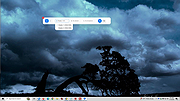 |
 |
Zoom Investment Portfolio Manager v2.7.4 Zoom Investment Portfolio Manager v2.7.4 Portfolio Manager for your listed Stocks and Shares Investments or trading positions. Provides a database front-end to free Yahoo and Bloomberg financial information services. Multi-currency support with market values recalculated back into your home currency. Robust and scalable open source SQL database with unlimited numbers of Portfolios containing unlimited numbers of Positions. Watch list Simple or detailed cash accounting. Reporting by spreadsheet export. Open source and freeware. No subscription, no data harvesting, no advertising, no nasties. Licensed for personal and commercial use. Funded solely by donation. Please donate to encourage continuing support and development if you find this software useful. Features Multinational and multicurrency Robust data storage Send reports to spreadsheet Unlimited portfolios and transactions 32 bit version. Compatible with Windows 32 and 64 License GNU General Public License version 3.0 (GPLv3), GNU Library or Lesser General Public License version 3.0 (LGPLv3), Creative Commons Attribution Non-Commercial License V2.0 This download is for the 64bit version. If you need the 32bit version, download here. Version 2.7.4 uses Bloomberg instead of Yahoo to show the stock market index as the Yahoo page was causing the program to freeze. 2.7 brings two significant improvements: 1. A new method of updating prices and stock data which replaces the laborious cycling through web pages. The AlphaAdvantage price updating option is removed from the software however your API Key is remembered in your database should it be necessary to revert to this in the future. You are requested not to update prices too frequently in case the service becomes blocked. Once an hour should be sufficient for most purposes. You will not become richer by frequently updating your prices! 2. Foreign currency conversion is now handled for individual positions rather than per portfolio. As a result, you can have stocks denominated in multiple currencies ... |
|
6,335 | Jan 15, 2021 leskaye 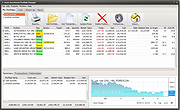 |
|
ZoomIt v12.11 ZoomIt v12.11 👉 A free screen zoom, annotation, and recording tool for technical presentations and demos. ZoomIt is a screen zoom, annotation, and recording tool for technical presentations and demos. It can also snip screenshots to the clipboard or to a file, runs unobtrusively in the tray, and uses customizable hotkeys to zoom in on an area of the screen, move around while zoomed, and draw on the zoomed image. ZoomIt also supports touch and pen input for drawing on tablets. Features: • Screen zoom with customizable hotkeys for presentations and demos. • Drawing and annotation tools with adjustable pen color and size. • Draw-without-zoom mode for annotating the screen at native resolution. • Break timer with opacity, position, background image, sound, and workstation lock options. • Screenshot snipping to the clipboard or to PNG files, including cropped captures. • OCR text extraction from a selected screen region. • Screen recording to MP4 or GIF, including full screen, cropped, and window-targeted recording modes. • LiveZoom and LiveDraw modes for real-time zooming and on-screen drawing. • DemoType mode for simulated typing during demonstrations. • Panorama and scrolling screenshot support, improved break timer behavior, and trimming of existing MP4 clips. Supported operating systems: Windows 11 or Windows 10 version 2004 (20H1 / build 19041) or newer Requirements for macOS macOS 14 or newer. Xcode command-line tools. Screen Recording permission for capture. Microphone and Camera permissions are required only for those recording options. Supported languages: Operating System Language Changes: v12.11 07-09-26 Not provided. This download is for the Windows version (very bottom of page). If you need the macOS version, download here. Click here to visit the author's website. |
|
4,603 | Aug 12, 2026 Microsoft Corp. 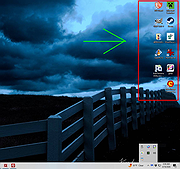 |
| Showing rows 1 to 4 of 4 | Showing Page 1 of 1 | 1 |
OlderGeeks.com Copyright (c) 2026
