|

|
Processed through Paypal No account required. |








Buy our over-priced crap to help pay the bills.



|
|
Processed through Paypal No account required. |
| Files | ||||
| File Name | Rating | Downloads | ||
 |
FleshNote v1.2.0 FleshNote v1.2.0 👉 A minimalist writing and worldbuilding app for novelists who want to finish their draft. FleshNote is an advanced writing tool built for novelists and worldbuilders, combining a manuscript editor with planning tools like timelines, entity tracking, plot mapping, export options, and specialized focus modes designed to keep writers moving forward. Features: • Smart Janitor assistant for passive local analysis of spelling, passive voice, weak adverbs, and show-don't-tell patterns • Hardcore sprint modes including Hemingway Mode, Zen Mode, Kamikaze Mode, and Fog Mode • Entity inspector for tracking character knowledge, goals, and narrative deception • Timeline and plot planner for mapping story beats, arcs, and foreshadowing • World history timeline for organizing backstory events before the main story begins • Unified manager for characters, locations, twists, and quick notes with inline tagging • Export support for PDF, DOCX, and EPUB output • Sketchboards, fictional calendars, relationship tracking, annotations, footnotes, writing prompts, achievements, and other quality-of-life tools Supported operating systems: • Windows, Linux Supported languages: English Changes: v1.2.0 04-26-26 New Features Location Name Generator Naming locations is hard. That's why i built this tool that will attempt to give you a decent starting point based on your answers Context-Aware Naming: The generator looks at your location's geography, history, and founder to propose names that feel earned. A coastal village might become Morskie-klify, while a site of an ancient magic disaster might evolve into something more cryptic. Cultural Roots: Full support for English, Polish and Hungarian naming traditions. The system understands complex rules like adjective gender matching (Stary Las vs Stara Gσra) and correct grammatical possessives, so your world feels linguistically consistent. Evolutionary "Drift": Use the "Phonetic Drift" slider to simulate the passing of centuries. At higher settings, names start to slur and shift, mimicking how real-world languages evolve over generations. Character Name Generator Creating names for specific genres is now ... |
 |
791 | Aug 03, 2026 ArtFacility 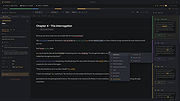 |
 |
FocusWriter v1.9.0 FocusWriter v1.9.0 👉 A simple, distraction-free word processor designed for focused writing. FocusWriter is a full-screen, distraction-free word processor that hides toolbars and menus so you can concentrate completely on your writing. It creates a clean workspace where the interface stays out of your way, helping you stay immersed in your words. With support for themes, timers, alarms, and daily goals, FocusWriter is ideal for novelists, students, bloggers, and anyone who wants a clutter-free writing environment. FocusWriter allows you to customize backgrounds, fonts, colors, and layouts to create a writing space that suits your style. Despite its minimal interface, it includes powerful features such as spell checking, document statistics, and support for multiple file formats. Sessions can be tracked with timers and daily progress goals to keep your productivity on target. Features: • Full-screen, distraction-free writing interface • Customizable themes with backgrounds, fonts, and colors • Daily writing goals with live progress tracking • Timers and alarms to manage writing sessions • Spell checking support • Live statistics including word count and paragraph count • Support for TXT, RTF, and ODT file formats • Automatic document saving • Typewriter sound effects (optional) • Multiple open documents with quick switching Supported operating systems: • Windows 7, Windows 8, Windows 10, Windows 11 Supported languages: English, German, Spanish, French, Italian, Portuguese, Dutch, Russian, Polish, Chinese, Japanese, Korean, and others Changes: v1.9.0 01-05-25 • Updated Qt framework • Improved compatibility with newer operating systems • Minor bug fixes and performance improvements This download is for the Windows portable version (very bottom of page). If you need the Windows Installer version, download here. Click here to visit the author's website. |
|
8,170 | Jun 27, 2026 Graeme Gott 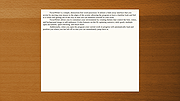 |
 |
KeenWrite v3.6.5 KeenWrite v3.6.5 👉 A free, open-source Markdown text editor for creating beautifully typeset documents and PDFs. KeenWrite is a cross-platform desktop Markdown editor designed for producing professional-quality documents with advanced typesetting capabilities. It combines a distraction-free writing environment with powerful features such as real-time preview, variable interpolation, mathematical notation using TeX syntax, and support for diagrams and structured content. KeenWrite focuses on technical writing, academic work, and long-form documents by enabling structured content and high-quality exports. Markdown documents can be converted into XHTML and then rendered into beautifully formatted PDFs using the ConTeXt typesetting engine and optional theme packs. The editor supports advanced syntax extensions, allowing writers to integrate variables, data, charts, and equations directly into their documents. The application includes a customizable interface with detachable panels, document outline navigation, integrated file management, and themeable skins for light or dark environments. KeenWrite also supports diagram creation (such as Mermaid and GraphViz), interactive statistics, and real-time math rendering, making it particularly useful for researchers, technical authors, and documentation writers. Interpolated variable replacement Features: • Cross-platform Markdown editor with live preview • Export Markdown documents to XHTML and high-quality PDF • Variable interpolation system for reusable content • Real-time math rendering using TeX notation • Diagram support including Mermaid, GraphViz, UML, and sequence diagrams • Built-in document statistics and word frequency analysis • Interactive document outline and integrated file manager • Customizable interface with detachable tabs and UI skins • Support for advanced Markdown extensions and Pandoc attributes • Dark mode and customizable visual themes Supported operating systems: • Windows 7, Windows 8, Windows 10, Windows 11 • macOS, • Linux, FreeBSD, Unix-like systems Supported languages: English, Korean, Japanese, Chinese, Simplified Chinese KeenWrite requires Java 17 or newer to run. If Java is not installed on your system, download and install the Java Runtime Environment before launching the program. Download Java Runtime Environment (JRE) See user manual for installation instructions: keenwrite-manual.pdf This download is ... |
|
878 | Mar 10, 2026 White Magic Software, Ltd. 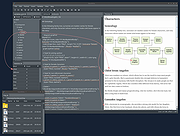 |
|
KeyNote NF v2.1.7.01 KeyNote NF v2.1.7.01 👉 Tabbed notebook and information manager for Windows. KeyNote NF is a flexible, tabbed notebook application that allows you to organize notes in a tree-structured format within multiple tabs. Based on the original KeyNote application, it has been enhanced and modernized while maintaining a lightweight and portable design. Notes can be stored in rich text format, supporting formatting, images, tables, and links, making it suitable for everything from quick reminders to complex documentation. KeyNote NF supports virtual nodes, linking, and powerful search capabilities across all notes. It can store notes in a single file for easy backup and portability, and offers encryption options to protect sensitive information. The program is designed for users who want a fast, structured, and highly customizable note management system without unnecessary bloat. Features: • Tabbed interface with tree-structured notes • Rich text editing with formatting, images, and tables • Virtual nodes for dynamic content organization • Powerful search across all notes • Internal and external linking support • Single-file storage for easy backup and portability • Optional encryption for protected notes • Customizable interface and behavior • Portable version available Supported operating systems: • Windows 7, Windows 8, Windows 10, Windows 11 Supported languages: • English Changes: v2.1.7.01 03-21-26 (Please, remember to make backups of .knt files. Recommended option: New: Shift + 'View|Encrypted content' -> highlight encrypted nodes [#985] New advanced search token, '*?' -> allows restricting searches/filters to encrypted nodes [#985] Information about tags of the protected nodes is now hidden when the encrypted content is 'closed' Improvements and fixes related to advanced search tokens in Find All/Tree filtering FIXED: Incorrect loading of ANSI plain texts with DBCS encoding in the editor in certain situations [#990] Fixed: Double click word to select only the word, without space(s) (It was partially resolved) [#951] This ... |
|
2,163 | Jul 05, 2026 Daniel Prado Velasco 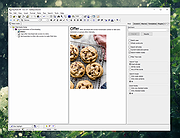 |
|
Mini Diarium v0.6.3 Mini Diarium v0.6.3 👉 An encrypted offline journal app for private daily writing. Mini Diarium is a private offline journal app designed for users who want to keep a personal diary without relying on cloud services, online accounts, or telemetry. It stores your entries locally in an encrypted SQLite database and encrypts each entry with AES-256-GCM before it is written to disk, helping keep your writing under your control. Mini Diarium is built for daily journaling with a rich text editor, auto-save, calendar navigation, writing statistics, automatic backups, and import/export tools. It can import from Mini Diary, Day One, and jrnl, and export your journal to JSON or Markdown so your data is never locked in. It also supports password-based protection and optional key file authentication for an added layer of security. Features: • Offline-only journal with no cloud, no telemetry, and no network calls • AES-256-GCM encryption for entries stored on disk • Local-first encrypted SQLite database storage • Rich text editor with bold, italic, headings, lists, spellcheck, and auto-save • Calendar navigation for quickly jumping between entry dates • Import support for Mini Diary JSON, Day One JSON and TXT, and jrnl JSON • Export support for JSON and Markdown • Automatic backups of the encrypted database • Writing statistics including word count, streaks, active days, and total entries • Optional key file authentication in addition to password-based access • Keyboard shortcuts for faster journal navigation • Open source under the MIT License Supported operating systems: • Windows • macOS • Linux Supported languages: English Changes: v0.6.3 07-27-26 This release completes the in-app navigation migration with header day controls and a ⋮ menu, adds timeline display preferences and a donation page, and fixes Linux spell check. Internally, the backend is now a three-crate open-core workspace with a sealed API faηade, and the Microsoft Store update pipeline is live. Added Website donation page: added a donation page at mini-diarium.com/donate/, reachable from ... |
|
774 | Jul 29, 2026 Francisco J. Revoredo 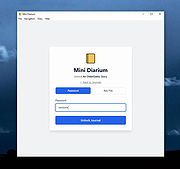 |
|
ResophNotes v1.8.1 ResophNotes v1.8.1 👉 A fast, lightweight Windows note-taking program with Simplenote synchronization, Markdown support, tags and powerful keyboard controls. ResophNotes is a free note-taking program for Windows designed to make creating, finding and managing text notes quick and uncomplicated. Notes can be kept locally or synchronized online with Simplenote, allowing them to be accessed from other devices using compatible Simplenote applications. It supports Markdown with HTML preview, tags, pinned notes, internal links, global keyboard shortcuts and optional storage of each note as an individual plain-text file. Deleted notes can be restored or permanently removed, and nearly every function can be controlled from the keyboard. A dark mode is also available. The developer warns that Simplenote may stop supporting synchronization with third-party applications, so Simplenote syncing should currently be used with caution. Features: • Simple, fast note creation and management • Synchronizes notes online with Simplenote • Access synchronized notes from other devices through Simplenote • HTTPS proxy support for Simplenote connections • Dark mode support • Global hotkey for quickly creating a new note • Global hotkey for restoring ResophNotes when minimized • Markdown text-to-HTML conversion with preview • Automatically recognizes HTTP links and email addresses • Internal note linking using wikilinks • Optional individual .txt files for storing notes • Complete keyboard control with numerous shortcuts • Single Note Mode for distraction-free note viewing and editing • Simplenote pinned-note support • Simplenote tag support • Search notes quickly from the keyboard • Import existing .txt files • Email notes directly from the program • Print notes • Insert the current timestamp with a keyboard shortcut • Restore deleted notes • Permanently delete unwanted notes • Free to use Supported operating systems: • Windows 10, Windows 11 (64-bit) Supported languages: English Changes: v1.8.1 08-14-26 Added Dark mode. Built using Microsoft Visual Studio Community 2026. Uses Qt 5.15.2. Updated OpenSSL library for connection issues. Click here to visit the author's website. |
|
79 | Sep 15, 2026 C.Y. Yen 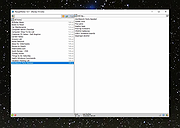 |
|
TabStick-1.2.0-win-x64-portable.zip TabStick v1.2.0 👉 A lightweight note-taking program that attaches colorful index tabs directly to your application windows. TabStick lets you place quick notes on the edge of an application window, keeping reminders and information beside the program where they are needed. Choose a tab from the color palette, attach it to a window and begin typing. Notes can be organized directly inside each tab and customized with different colors, sizes, text settings and display themes. TabStick is available as an installer or a portable download that can be extracted and run without installation. Features: • Attaches index-style notes directly to application windows • Keeps related notes beside the program where they are needed • Creates new notes by selecting a color from the tab palette • Supports quick text entry and organization within each note • Customizable application and tab sizes • Adjustable text size and line spacing • Multiple note colors • Custom note colors • Light and dark display modes • Configurable palette appearance • Changeable interface language • Available as an installer or portable program • Simple interface designed for fast note-taking Supported operating systems: • Windows 10 64-bit, Windows 11 64-bit Supported languages: Not Found Changes: v1.2.0 Not Found Click here to visit the author's website. |
|
238 | Aug 05, 2026 TabStick 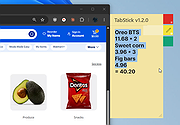 |
|
TheSage v7.74 TheSage v7.74 👉 A powerful English dictionary and thesaurus with advanced word search and language reference tools. TheSage is a Windows dictionary and thesaurus designed as a comprehensive lexical reference system for the English language. It combines dictionary definitions, examples, pronunciations, etymologies, and a multifaceted thesaurus in one portable application. The program also includes advanced lookup tools such as wildcard and anagram search, phonetic search, rhyme assistance, concordances, online search, and word list management, making it useful for casual users, writers, translators, researchers, and language learners. Features: • Comprehensive English dictionary with definitions, examples, pronunciations, and etymologies • Multifaceted thesaurus with synonyms, antonyms, hypernyms, hyponyms, meronyms, holonyms, and more • Multiple dictionary viewing modes including e-paper, classic, and retro views • Wildcard search with standard and regex support • Anagram search for finding words from letter patterns • Phonetic wildcard search with standard and regex options • Rhyme assistant with full, assonant, and consonant rhyme support • Etymologer with keyword and sense search tools • Concordancer for definition and example searching • Online search integration and word list manager • Portable version available • Runs locally and does not require an Internet connection for dictionary use Supported operating systems: • Windows 10, Windows 11 Supported languages: • English Changes: v7.74 03-24-26 - Updated: Dictionary engine v7.44.6065 - Updated: Internal browser v1.0.3856.49 - New: One-click Word capture library v1.08 Database: - Added: ~195,000 words (as a corpus) in etymologies, transcriptions, definitions, examples, and thesaurus entries - Updated: BibliothecaAI 13.2k/1.82b-experimental Click here to visit the author's website. |
|
2,580 | Mar 27, 2026 Sequence Publishing 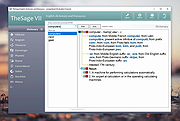 |
|
WordWeb Free v10.61 WordWeb Free v10.61 Comprehensive offline English dictionary and thesaurus for Windows. WordWeb Free is a powerful offline English dictionary and thesaurus that provides fast definitions, synonyms, related words, and pronunciation guidance directly from your desktop. It integrates seamlessly with almost any Windows program, allowing you to look up words instantly with a simple keyboard shortcut. WordWeb Free works without an internet connection, making it ideal for writers, students, and professionals who need quick and reliable word references. It includes a full dictionary and thesaurus for American, British, Canadian, Australian, Indian, and global English, along with usage examples and related words to help you better understand context and meaning. WordWeb Free also supports clickable links between words, so you can easily explore related terms and expand your vocabulary efficiently. Features: • Fast offline English dictionary and thesaurus • Full dictionary and thesaurus for American, British, Canadian, Australian, Indian, and global English • Extensive definitions and synonyms • Usage examples and related words • One-click lookup from almost any Windows program • Keyboard shortcut integration • Pronunciation guidance • Hyperlinked word navigation • Optional additional dictionaries and word lists Supported operating systems: • Windows 10, Windows 11 Supported languages: English (American, British, Canadian, Australian, Indian, Global) Changes: v10.61 03-10-26 Hundreds of new words, senses and derived forms Revisions and updates to many senses Added Copy menu item to copy definitions and examples Click here to visit the author's website. |
|
10,630 | Mar 13, 2026 Antony Lewis 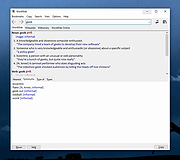 |
|
Zotero v10.0.1 Zotero v10.0.1 👉 A powerful free research assistant for collecting, organizing, annotating, citing and sharing research. Zotero is a free, open-source research and reference manager designed to help you collect, organize, annotate, cite and share research sources. It can manage books, journal articles, reports, web pages, artwork, films, letters, manuscripts, recordings, legal materials and many other types of sources. Each item can contain detailed bibliographic metadata as well as attached PDFs, files, web snapshots, links and notes. The Zotero Connector integrates with supported web browsers to capture research directly from websites. When Zotero recognizes a book, article or other source, it can automatically create the appropriate library item, fill in available metadata, download a full-text PDF when available and attach related links or supplemental files. Zotero can also create items directly from ISBNs, DOIs and PubMed IDs. Research can be organized into collections and tagged for easier retrieval. An item can appear in multiple collections without creating duplicate copies, and saved searches automatically update as new matching material is added. Zotero also provides synchronization between computers and shared group libraries for collaborative research. Features: • Collect books, journal articles, reports, web pages, artwork, films, letters, manuscripts, recordings, legal materials and many other types of research sources • Automatically capture bibliographic information from supported websites using the Zotero Connector • Automatically download full-text PDFs when they are available while saving sources • Save web pages as locally stored snapshots for later viewing, including while offline • Add sources automatically using ISBN, DOI or PubMed ID identifiers • Attach PDFs, images, audio, video and other files to library items • Create rich-text notes attached to individual sources or independent notes • Organize research into collections and subcollections without duplicating library items • Assign unlimited tags to items and use colored tags for quick identification • Quickly search metadata, tags and full-text content • Use advanced searches for ... |
|
184 | Aug 28, 2026 Digital Scholar 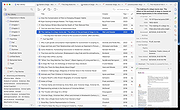 |
| Showing rows 1 to 10 of 10 | Showing Page 1 of 1 | 1 |
OlderGeeks.com Copyright (c) 2026
