|

|
Processed through Paypal No account required. |








Buy our over-priced crap to help pay the bills.



|
|
Processed through Paypal No account required. |
| Files | ||||
| File Name | Rating | Downloads | ||
 |
Bforartists 4 v4.2.0 Bforartists 4 v4.2.0 All in one, Free and Open Source 3D creation What is Bforartists? Bforartists is a complete, free and open source 3D suite to create CG content. It offers you the full 3D art pipeline to create game graphics, pre-rendered movies and stills. From modeling, sculpting, texturing, rigging, animation, rendering, up to post processing. Bforartists stands for “Be For Artists”. A reminder to develop for the user, not the programmer. Bforartists is a fork of the popular open source 3D software Blender. Developed by some 3D enthusiasts to make Blender even better. The primary goal of the Bforartists fork is to deliver a refined graphical UI and a better usability. This means a complete switch in the usage philosophy away from the hotkey centered usage towards a user friendly and intuitive graphical UI. Bforartists is fully compatible with the Blender files and addons. Every feature that works in Blender should also work in Bforartists. Also, every release is always up to date with the newest Blender version. The toolset is the same. Where we differ the most is the GUI and the handling. You can switch from Blender to Bforartists to Blender without problems. You won’t loose anything. Why choose Bforartists, and not Blender? Because the UI is streamlined, cleaner, better organized, has colored icons, left aligned text, and much more of all those things that makes a good UI and the life easier. Bforartists is fully compatible with Blender. You can use both asides to make yourself a picture. The files are transferable. So try it, you loose nothing. For a deeper description of the differences have a look at the comparison page: The differences to Blender The main differences between Bforartists and Blender: • An own keymap, which is reduced to just the necessary hotkeys and a navigation that can be purely done ... |
 |
2,985 | Aug 11, 2024 Bforartists Developers 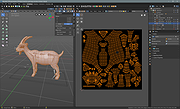 |
 |
Mass Image Compressor v4.2.0 Mass Image Compressor v4.2.0 Optimize, resize, convert and watermark images and videos of entire folders. Mass Image Compressor is a fast, lightweight batch image processing tool that compresses, resizes, watermark and converts images to popular formats like WebP, AVIF, JPEG, PNG, and GIF—reducing file size while preserving quality. Just drag and drop the files and folder and it will compress all images. Best for website image optimization, photographs, game assets, animated image compression. Windows: macOS: Windows Features • Bulk Operation: Works on one or more images and on entire folder (and its sub-folders) • Image: Convert, Resize, Optimize, Watermark • Extremely Ease of use: Drag & Drop folder & files • Supports input images in all major formats including JPG/JPEG, PNG, WEBP, GIF, TIFF, AVIF, HEIC, JP2, BMP, as well as RAW image formats from leading camera brands like Sony (ARW), Adobe (DNG), Nikon (NEF), Canon (CR2, CR3, CRW), Kodak (DCR, KDC), Minolta (MRW), Olympus (ORF), Fujifilm (RAF), Pentax (PEF), Panasonic (RW2), Samsung (SRW), Epson (ERF), Hasselblad (3FR), and Mamiya (MOS, MEF). • Output Format Supported: JPEG, PNG, WebP, AVIF, GIF • Supports input and output of animated PNG, GIF, WebP! • Blazing fast and high quality compression • Preserves image metadata (EXIF Tags, XMP and IPTC data), ability to skip sensitive metadata • Output file name manipulation (suffix, prefix, replace on file names) • File name and file size based filter to exclude/include files for compression macOS Features • ... |
|
1,236 | Dec 15, 2025 COGNIRUSH LABS LLP 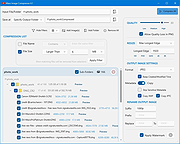 |
| Showing rows 1 to 2 of 2 | Showing Page 1 of 1 | 1 |
OlderGeeks.com Copyright (c) 2026
