|

|
Processed through Paypal No account required. |








Buy our over-priced crap to help pay the bills.



|
|
Processed through Paypal No account required. |
| Files | ||||
| File Name | Rating | Downloads | ||
 |
Colour Contrast Analyser (CCA) v3.3.0 Colour Contrast Analyser (CCA) v3.3.0 Helps determine the legibility of text and the contrast of visual elements, such as graphical controls and visual indicators. Free color contrast checker tool that allows you to easily determine the contrast ratio of two colors simply using an eyedrop tool. The CCA enables you to optimize your content–including text and visual elements–for individuals with vision disabilities like color-blindness and low-vision impairments. Features • Compliance indicators for Web Content Accessibility Guidelines 2.1 (WCAG 2.1) • Multiple ways to select colors: you can manually enter CSS color formats, use an RGB Slider, or opt for the color picker tool • Color Blindness Simulator • Support for alpha transparency on foreground colors WCAG Color Contrast The Web Content Accessibility Guidelines (WCAG) define the different levels of contrast ratios depending on the level of success criteria. Below is helpful information for comparing the results from our tool to the level of success criteria you hope to achieve. Learn more about WCAG color contrast. • WCAG 2.0 level AA requires a contrast ratio of at least 4.5:1 for normal text and 3:1 for large text. • WCAG 2.1 requires a contrast ratio of at least 3:1 for graphics and user interface components. • WCAG Level AAA requires a contrast ratio of at least 7:1 for normal text and 4.5:1 for large text. This download is for the Windows version. If you need the macOS version, download here. Click here to visit the author's website. |
 |
2,193 | May 04, 2023 TPGi 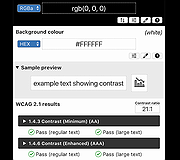 |
|
F3D v3.3.0 F3D v3.3.0 Fast and minimalist 3D viewer F3D (pronounced /fɛd/) is a fast and minimalist 3D viewer desktop application. It supports many file formats, from digital content to scientific datasets (including glTF, USD, STL, STEP, PLY, OBJ, FBX, Alembic), can show animations and support thumbnails and many rendering and texturing options including real time physically based rendering and raytracing. It is fully controllable from the command line and support configuration files. It can provide thumbnails, support interactive hotkeys, drag&drop and integration into file managers. F3D also contains the libf3d, a simple library to render meshes, with C++ and Python Bindings, as well as experimental Java and Javascript bindings. User Documentation https://f3d.app/doc/user/README_USER.html Changes v3.3.0 For F3D users: Created a F3D web application based on WebAssembly: https://f3d.app/viewer BEHAVIOR CHANGE: Added a CLI option --recursive-dir-add to control if directory should be added recursively, off by default Complete rework of the cheatsheet with for a nicer, cleaner look (thanks @Ni-g-3l !) [Linux] Added support for using F3D offscreen without GLX lib being present on the syste Added support for identifying non-supported files and not loading them at all Added support for skipping unsupported files when loading multiple files Added --remove-empty-file-groups to control if scene without files should be removed Added --watch support for yet-to-exists files Added a remove_current_file_group command Added --axes-grid CLI option to show grid axes (thanks @ArchiePayne !) Added an bind Ctrl+X to control the visibility of grid axes (thanks @YashSaini99 !) Added proper parsing for transform2D options (thanks @samoncrief !) Added --multi-file-regex CLI option to group files based on their names (thanks @snoyer !) ... |
|
1,686 | Nov 21, 2025 Michael Migliore and Mathieu Westphal 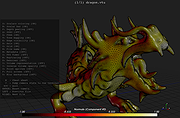 |
|
Safe Exam Browser v3.3.0 Safe Exam Browser v3.3.0 A web browser environment to carry out online exams safely. The software changes any computer into a secure workstation. It regulates the access to any utilities and prevents students from using unauthorized resources. Features Web browser environment to carry out online exams safely Full-screen or browser window mode (without any navigation elements) Disables shortcuts and operating system functions like Task Manager (Ctrl-Alt-Del / Cmd-Alt-Esc), program switcher (Alt-Tab, Win-Tab / Cmd-Tab), Print Screen / Screenshot etc. which should not be available during an exam Prevents students from surfing the internet during an exam Compatible with basically all web-based exam systems, additional integration with learning management systems Moodle, ILIAS and others Possibility to permit controlled use of additional external applications Current versions supports Windows 7, Windows 8.1, Windows 10, Mac OS X 10.7 up to macOS 10.13 High Sierra and iOS 9.3.5 to iOS 11. SEB 2.x can be started or reconfigured for each exam just by clicking a special link in some regular web browser or in an e-mail Detection if SEB is running on a virtual machine, monitoring which processes are permitted or prohibited to be running during the exam Easy installation and deployment: Create .seb configuration files with which SEB can be configured/reconfigured after installation Supported operating systems: Windows 8.1 Window 10 macOS 11 Big Sur macOS 10.15 Catalina macOS 10.14 Mojave macOS 10.13 High Sierra macOS 10.12 Sierra OS X 10.11 El Capitan This download is for the Windows version. If you need the MacOS version, download here. Click here to visit the author's website. |
|
4,877 | Sep 14, 2021 ETH Zurich 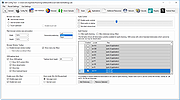 |
 |
Writemonkey v3.3.0 Writemonkey v3.3.0 A zenware writing application with an extremely stripped down user interface, leaving you alone with your thoughts and your words. It is light, fast and free. With an array of innovative tools under the hood and full Markdown* support, it helps you write better. Writemonkey 3 is a new incarnation of the original Windows only application that has been around since 2006. 10 years old and still kicking. It is quite possible that WM was the first text editor for writers with full markdown support. It was also among first distraction free editors out there. Features: NO DISTRACTIONS Full-screen editing. Get free from your computer and its distractions. Writemonkey's full-screen mode hides it all away leaving just you and your text behind. Do more with less! SMALL, FAST, STABLE No installation necessary. Just copy files and directories in any folder on your machine. Writemonkey is very fast and responsive. The main executable is less than 1,6 MB in size. PORTABLE Put Writemonkey installation on USB key and use it on any Windows computer. COMPLETELY CUSTOMIZABLE Choose your own ui language (separate download), colors, fonts, page layout and many other aspects of the program. Customize info bar with the info items you want. Scale up your text for easy reading, save different profiles … STANDARD AND CLEAN TEXT FORMAT For maximum portability your work is stored in standard text files. Writemonkey is fully UTF-8 compatible and will recognize virtually all international characters. Supports other encoding standards ‒ Unicode, ANSII MARKUP SUPPORT Writemonkey supports Markdown Extra, Textile and WikiCreole markup standards. MARKUP HIGHLIGHTING Highlighting helps you visually discern semantic chunks of texts (headings, block quotes, lists and comments). Writemonkey suports Markdown. Start any paragraph with two slashes "//" and the whole paragraph will be regarded as a comment. It will be dimmed on the screen and excluded from word count and all other statistics. CSS TEMPLATES ... |
|
9,377 | Jan 06, 2025 pomarancha 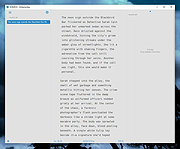 |
| Showing rows 1 to 4 of 4 | Showing Page 1 of 1 | 1 |
OlderGeeks.com Copyright (c) 2026
