|

|
Processed through Paypal No account required. |








Buy our over-priced crap to help pay the bills.



|
|
Processed through Paypal No account required. |
| Files | ||||
| File Name | Rating | Downloads | ||
 |
Audacity v4.0.1 Audacity v4.0.1 👉 Free, open-source, multi-track audio editor and recorder for recording, editing, mixing and producing audio. Audacity is a powerful, free and open-source audio editor and recorder for Windows, macOS and Linux. It can handle everything from quick voice recordings and simple edits to multi-track music production, podcast creation, audio restoration and more involved sound projects. Audacity provides a visual waveform-based editing environment where audio can be recorded, cut, copied, moved, trimmed and arranged across multiple tracks. Music, speech, sound effects and other recordings can be combined into a single project, with precise control over individual clips and their placement on the timeline. The program includes a wide collection of audio processing tools for adjusting volume, compression, equalization, pitch and tempo. Noise removal and repair tools can help clean up recordings, while delay, reverb, distortion, modulation, fading and other effects provide additional options for shaping sound. Real-time effects can be applied without permanently altering the original audio, allowing settings to be adjusted while continuing to work on a project. Effects can be applied to individual tracks or to the master output. Audacity also includes a plugin manager for enabling, disabling and organizing available effects. Audacity supports third-party plugins and includes support for VST3 and Nyquist effects. Optional FFmpeg support expands compatibility with additional audio formats. Finished projects can be exported to common formats such as WAV, MP3, FLAC and Ogg. The program is useful for recording microphones and other audio sources, digitizing older recordings, cleaning up noisy audio, editing interviews, assembling podcasts, creating sound effects, working with music and preparing finished audio for publishing or archiving. Features: • Record live audio through microphones, mixers and other input devices • Edit and arrange multiple audio tracks within a single project • Cut, copy, paste, trim, split and move audio clips ... |
 |
11,300 | Oct 02, 2026 Audacity 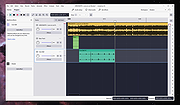 |
|
Avance Logic ALS100 plus+ sound drivers for Windows 95 and 98 Avance Logic ALS100 plus+ sound drivers for Windows 95 and 98 als100.exe |
 |
9,921 | May 22, 2009 Avance Logic |
 |
AZTECH SYSTEMS 14.4 FAX MODEM SOUND CARD ISA AZTECH SYSTEMS 14.4 FAX MODEM SOUND CARD ISA driver for Windows 95/98 2316fd95.zip |
|
9,695 | Mar 30, 2009 AZTECH SYSTEMS |
|
AZTECH SYSTEMS 14.4 FAX MODEM SOUND CARD ISA AZTECH SYSTEMS 14.4 FAX MODEM SOUND CARD ISA driver for Windows 95/98 2316fd95.zip |
|
9,694 | Mar 30, 2009 AZTECH SYSTEMS |
|
EarTrumpet v2.3.0.0 EarTrumpet v2.3.0.0 👉 A free, powerful per-app volume mixer and audio device controller for Windows. Features • Visualize audio with multi-channel aware peaking • Standalone volume mixer • Move apps between playback devices • Default playback device management • Automatic updates via the Microsoft Store • Support for light/dark mode and all accent colors • Configurable hotkeys • Modern context menus • Growing multilingual support Supported operating systems: Windows 10/11 Supported languages: Chinese (Simplified), Chinese (Traditional), Chinese (Traditional, Hong Kong SAR), English (United States), French, German, Spanish, Italian, Portuguese, Dutch, Afrikaans, Amharic, Arabic, Norwegian, Czech, Polish, Swedish, Romanian, Turkish, Japanese, Korean, Russian, Thai, Vietnamese Changes: v2.3.0.0 06-11-25 Added setting to turn on/off ability to change volume with the scroll wheel anywhere (thanks @Tester798!) Added setting to turn on/off ability to change volume with the scroll wheel when hovering over the EarTrumpet icon (thanks @Tester798!) Added new community settings area Added new community setting to turn on/off use of a logarithmic volume scale (thanks @yonatan-mitmit!) Added legacy shortcuts to the context menu pointing to [App volume and device preferences] / [Volume mixer] Added ability to use the Windows key in shortcuts (thanks @iamevn!) Added linguistic display name sorting for audio devices (thanks @Tester798!) Added a workaround for Windows Search (CortanaUI) showing a default asset (X) icon Fixed an issue where installation of EarTrumpet via AppInstaller would fail if the Visual C++ libs package was not installed Fixed an issue where EarTrumpet tooltips were not updating live while scrolling the mouse ... |
|
1,407 | Jun 02, 2026 File-New-Project 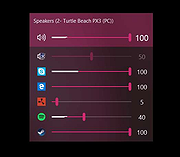 |
|
ocenaudio v3.20.4 ocenaudio v3.20.4 👉 Fast, cross-platform audio editor for recording, editing, analyzing, and exporting audio files. ocenaudio is a cross-platform, easy to use, fast, and functional audio editor designed for people who need to edit and analyze audio files without complications. It supports audio editing and analysis across major desktop platforms, offers real-time effect previews, multi-selection editing, and tools for working with audio in a responsive interface. Features: • Cross-platform audio editor for Windows, macOS, and Linux • Multi-selection editing for working on different parts of an audio file at the same time • Real-time effect preview to hear changes while adjusting controls • Support for VST effects for expanded audio processing • Spectral analysis and waveform editing tools • Responsive interface that keeps working while opening, saving, or applying effects • Recording, editing, and exporting tools for common audio workflows • Annotation tracks, region editing, channel routing, and trim/split tools in v3.18.0 Supported operating systems: • Windows 10, Windows 11 • macOS 13.3 or higher • macOS 10.14 to 14 (legacy build) • Debian 11, Debian 12, Debian 13 • Ubuntu 20.04, Ubuntu 22.04, Ubuntu 24.04 • Fedora 39, Fedora 40 • Rocky Linux 9.3 • openSUSE Leap 15 • Arch Linux Supported languages: English, Portuguese, French, German, Spanish, Italian, Japanese, Hungarian, Simplified Chinese Changes: v3.20.4 08-13-26 Adds copy, paste and drag of audio directly between two ocenaudio windows Improves VST plugin support on Linux: VST3 editors now open correctly, standard system folders are recognized and JACK is loaded on demand, including through PipeWire Fixes crashes and noise caused by VST and VST3 plugins Fixes plugins that changed the system decimal separator, corrupting parameters and presets Fixes crashes with ASIO devices on Windows when disconnecting the device during recording Other bug fixes and improvements This download is for the Windows 64Bit portable version (very bottom of page). All other download assets are below: Other Windows: ocenaudio_windows64_3.20.4.exe macOS: ocenaudio_universal_3.20.4.dmg ocenaudio_universal_legacy_3.20.4.dmg Linux: ocenaudio_debian13_3.20.4.deb ocenaudio_debian12_3.20.4.deb ocenaudio_debian11_3.20.4.deb ocenaudio_ubuntu24.04_3.20.4.deb ocenaudio_ubuntu22.04_3.20.4.deb ocenaudio_ubuntu20.04_3.20.4.deb ocenaudio_fedora40_3.20.4.rpm ocenaudio_fedora39_3.20.4.rpm ocenaudio_archlinux_3.20.4.pkg.tar.zst ocenaudio_opensuse15_3.20.4.rpm ocenaudio_rockylinux9.3_3.20.4.rpm ocenaudio_3.20.4.AppImage Click here to visit the author's website. |
|
7,141 | Aug 13, 2026 ocenaudio Development Team 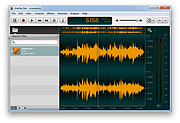 |
|
opti 82c925 soundcard driver for Windows 98 Model Name opti 82c925 soundcard Model Number opti 82c925-Analog Devivec-AD1845JP Operating System Windows 98 FCC Number : DXLSK81 |
|
10,053 | Aug 04, 2012 Analog Devices |
|
Paul's Extreme Sound Stretch v2.2-2 Paul's Extreme Sound Stretch v2.2-2 This is a program for stretching the audio. It is suitable only for extreme sound stretching of the audio (like 50x) and for applying special effects by "spectral smoothing" the sounds. It can transform any sound/music to a texture. The program is Open-Source and it's released under the version 2 of the General Public License. You can download the source code for Linux or the Windows binaries. Please note that this is suitable only for extreme time stretching (e.g. if have a melody of 3 minutes and you want to listen it in 3 hours). If you want "less extreme" time stretching, you can use a program which contains the SoundTouch library. Features It produces high quality extreme sound stretching. While most sound stretching software sounds bad when trying to stretch the sounds a lot, this one is optimized for extreme sound stretching. So, the stretch amount is unlimited. You can play the stretched sound in real-time (including the possibility to "freeze" the sound) or you can render the whole sound or a part of it to audio files It has many post-processing effects, like: filters, pitch/frequency shifters Support for WAV, OGG VORBIS files and MP3 files It is a Free Software Usage Before starting, you need to open a WAV, OGG VORBIS or MP3 file. You can open it by using the file menu, by launching the program with a command-line argument or (on linux systems) by drag a file from explorer and drop it on the filename bar(under the menu). The main window has two main controls: the stretch amount and the audio window. The stretch amount There are three modes: The "Stretch" mode - may stretch up to 10,000 times ... |
|
6,149 | Jun 19, 2019 Nasca Octavian PAUL 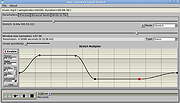 |
|
Sound Player Lilith v2019.01.01 Sound Player Lilith v2019.01.01 An ultra light, portable, skinnable music player that features a playlist editor, tag editor and audio converter. Lilith Audio Player plays MP3s, WMA, Ogg Vorbis, Monkeys Audio, WAV, and many more. It comes with a 10-band audio equalizer, CD text support, native VST plugin/WASAPI/ASIO support, 64fp pipeline, a convenient GUI, and consuming a very little amount of memory, it even does automatic latency compensation allowing the use of any linear phase EQ without any glitch. uLilith does much more than just play audio files, however. Lilith also allows users rip tracks from CDs and to convert audio files between a handful of formats. The program is portable, no installation required - just unzip and run it on the nearest PC. Supported operating systems: Windows (All) This download is for the 64bit version. If you need the 32bit version, download here. Use 7-Zip to unzip this file. Click here to visit the author's website. |
|
1,224 | Jun 06, 2025 Project9k 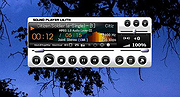 |
|
Sound Recorder v1.0 Sound Recorder v1.0 Sometimes you just want to record audio. No installing over-feature packed software. Just a tiny, portable audio recorder like this one. Vovsoft Sound Recorder can record audio from the current input device (microphone) and from the current output device (loopback recording) by using WASAPI. You don't have to hold up a microphone to your computer's speakers to record its audio. Even if you don't have a "Stereo Mix" option on your PC, you can easily record the sound coming from any Windows PC as WAV file. This utility can come in handy when you are only interested in quickly capturing the sounds of your microphone or the music played by your PC even if you do not have your speakers connected to the machine. Supports: Windows Windows 10/8.1/8/7 (32-bit and 64-bit) Language: English License: Freeware Sound Recorder 1.0 March 5, 2021 First public release Click here to visit the author's website. |
|
3,637 | Mar 25, 2021 Vovsoft 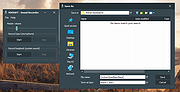 |
|
SoundPro Sound Pro ht 1869v Driver SoundPro Sound Pro ht 1869v Driver. Drivers for Sound Pro HT 1869v for Windows 98. May work with other versions of Windows. |
|
9,679 | Mar 29, 2009 Sound Pro |
|
SoundVolumeView v2.53 SoundVolumeView v2.53 👉 View and change Windows sound volume from a GUI or command line. SoundVolumeView is a simple tool for Windows that displays general information and current volume levels for all active sound components on your system, and allows you to mute and unmute them instantly. SoundVolumeView can also save a sound profile to a file, including current volume levels, mute/unmute states, and default sound devices, then restore those same settings later. It also includes extensive command-line support for saving and loading profiles, changing volume, muting, unmuting, enabling, disabling, and setting audio devices without displaying the user interface. Features: • View all active sound components on your system • See current volume levels and mute status • Mute or unmute sound components instantly • Save and restore complete sound profiles • Change volume from the GUI or command line • Set default sound devices • Enable or disable audio devices • Create desktop shortcuts for common sound actions • Export sound item information to text, CSV, HTML, XML, or JSON • Supports 32-bit and 64-bit Windows Supported operating systems: • Windows Vista, Windows 7, Windows 8, Windows Server 2008, Windows 10, Windows 11 Supported languages: Arabic, Brazilian Portuguese, Dutch, Finnish, French, German, Greek, Hungarian, Italian, Japanese, Korean, Persian, Polish, Portugal Portuguese, Romanian, Russian, Simplified Chinese, Slovak, Spanish, Swedish, Traditional Chinese, Turkish Changes: v2.53 Fixed the /SetAllowExclusive and /SetExclusivePriority commands to set the value correctly. 👉 This download is for the Windows 64bit version (very bottom of page). All other download assets are below: Other Windows: soundvolumeview.zip (32bit) Click here to visit the author's website. |
|
6,314 | Sep 18, 2026 Nir Sofer 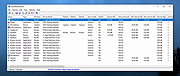 |
|
Totem's Sound Totem's Sound This is the story of the Norwegian explorer Johan Adrian Jacobsen. From 1881 to 1883 he travelled along the northwestern coasts of the Americas. Commissioned by a support comitee, he purchased and catalogued an immense number of artefacts and objects from local tribes for the German Humboldt Foundation. Totem's Sound is based on his personal accounts. Well, almost. Enjoy a day of Johan's journey, featuring great outdoor activities such as canoe races, collecting clams, not getting eaten by a giant grizzley and of course fish oil binge drinking. Get in contact with the local tribes, that are struggling to preserve their ways of life and their cultures in a rapidly changing world. Credits Totem's Sound was conceived and produced by gold extra with the support of Causa Creations in the framework of the Humboldt Lab Dahlem, a project by the Kulturstiftung des Bundes in collaboration with the Foundation Preussischer Kulturbesitz Berlin. As part of Rehersal Stage 4 - Travelogue Totem's Sound is being shown in the Museum Dahlen from 23.09.2014 to 08.02.2015. Developer: Adeline Ducker (Art), Tilmann Hars (Code & Design), Georg Hobmeier (Text & Design), Brian Main (additional Art), Karl Zechenter (Music, Sound & Research) Libraries: vrld (hump), kadoba (atl), markngo (atc), Xelu (Key-art) Fonts: LastPriestess, Pixel UniCode by ivancr72 Tested by the amazing Patrick Borgeat, Steven Colling, Henning Thiele, Kasia Zielinska + Timo Rostasy Thanks to: Harald Hackl (Yurp.at), Schwerpunkt Wissenschaft und Kunst Salzburg, Filipe Canha |
 |
7,165 | Aug 02, 2016 Gee D 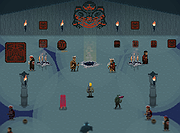 |
| Showing rows 1 to 13 of 13 | Showing Page 1 of 1 | 1 |
OlderGeeks.com Copyright (c) 2026
