|

|
Processed through Paypal No account required. |








Buy our over-priced crap to help pay the bills.



|
|
Processed through Paypal No account required. |
| Files | ||||
| File Name | Rating | Downloads | ||
 |
Borderless v1.0.4.0 Borderless v1.0.4.0 👉 Automatically control borderless, fullscreen, and custom window layouts in Windows. Borderless is a free, open-source Windows utility that automatically applies and maintains customized window layouts for games and applications. Create rules that identify programs by their window title, executable name, or both, and Borderless automatically applies your chosen settings whenever a matching window appears. Despite its name, Borderless does considerably more than simply remove window borders. Rules can maximize a window to its current monitor, position and resize it to custom dimensions, keep it always on top, control the mouse cursor, remove standard window menus, and mute a program when it loses focus. This can be particularly useful with games that lack a proper borderless-windowed mode, older software that doesn't remember its window position, and programs you always want opened on a particular part of the screen. Features: • Automatically applies window rules to games and applications • Converts matching windows to a borderless layout • Matches applications using window titles, executable names, or both • Supports regular expressions for flexible window-title matching • Includes a live process picker for quickly selecting running applications • Reapplies selected window settings while Borderless is running • Prevents applications from simply restoring borders after they are removed • Maximizes windows to the current monitor • Supports custom window positions and dimensions • Keeps selected windows always on top • Locks the mouse cursor to the focused window • Releases the cursor when switching away with Alt+Tab • Hides the mouse cursor while a selected window is focused • Restores the cursor when focus moves away from the window • Removes standard window menu bars when configured • Mutes an application's audio while it is in the background • Allows individual rules to be enabled or disabled • Shows live rule status information • Provides configurable defaults for newly created rules • Runs from the Windows system tray • Can start automatically with Windows • Can ... |
 |
204 | Aug 13, 2026 Venipa 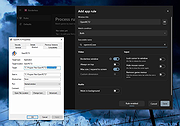 |
|
Converseen v0.15.2.6 Converseen v0.15.2.6 👉 Free and open source batch image converter and resizer. Converseen is a powerful, free, and open source image processing tool that allows you to convert, resize, rotate, and flip large batches of images quickly and efficiently. Built on top of the ImageMagick library, it supports over 100 image formats and provides an easy-to-use interface for handling bulk image operations without requiring advanced technical knowledge. With Converseen, you can process entire folders of images at once, applying consistent transformations such as resizing dimensions, adjusting resolution, or converting file formats. It is especially useful for photographers, designers, and anyone needing to optimize or standardize image collections for web or storage use. Features: • Batch conversion and processing of multiple images • Resize images by dimensions or percentage • Convert between over 100 supported image formats • Rotate and flip images • Compress and reduce image file sizes • Rename output files with customizable patterns • Set output directory for processed images • Change image resolution (DPI) • Preview images before processing • Multithreaded processing for faster performance • Built on the ImageMagick library for broad format support Supported operating systems: • Windows 10, Windows 11 • Linux • macOS Supported languages: English, Italian, Spanish, French, German, Portuguese, Russian, Chinese Changes: v0.15.2.6 07-07-26 - Updated French translation - Various Bugfixes This download is for the Windows 64bit portable version (very bottom of page). All other download assets are below: Other Windows: Converseen-0.15.2.6-1-win64-setup.msi converseen-0.15.2.6-1-win32-portable.zip macOS: converseen-0.15.2.6-1_beta_macos-x86_64.zip Linux: Converseen-0.15.2.6-1-anylinux-x86_64.AppImage Converseen-0.15.2.6-1-anylinux-aarch64.AppImage Click here to visit the author's website. |
|
3,533 | Jul 11, 2026 Francesco Mondello 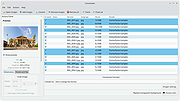 |
 |
EaseUS Partition Master Free v20.2.0 EaseUS Partition Master Free v20.2.0 (This is the full package, not the downloader.) 👉 Free disk partition management and cloning software for Windows. EaseUS Partition Master Free is a user-friendly disk management utility designed to help home users organize, resize, clone, and manage storage devices without data loss. The free edition provides essential partitioning tools for managing HDDs, SSDs, USB drives, and external storage devices through an easy graphical interface suitable for beginners and advanced users alike. The software allows users to create, delete, format, resize, move, merge, and wipe partitions while helping optimize disk space usage and improve drive organization. EaseUS Partition Master Free also includes basic disk cloning capabilities, partition recovery tools, disk surface testing, and bootable media creation features for maintenance and troubleshooting tasks. Features: • Resize, move, merge, split, create, delete, and format partitions • Clone partitions and disks using the free disk clone feature • Convert file systems between FAT32 and NTFS without formatting • Support for HDD, SSD, USB flash drives, memory cards, and external drives • Migrate data between storage devices • Basic partition recovery tools for lost or deleted partitions • Create WinPE bootable media for maintenance and recovery tasks • Disk surface test and bad sector checking utilities • Wipe partitions and securely erase data • GPT and MBR disk support • Simple graphical interface with drag-and-drop partition management • Includes free toolbox utilities for disk and partition maintenance • Supports large-capacity modern storage drives Supported operating systems: • Windows 7, Windows 8, Windows 8.1, Windows 10, Windows 11 Supported languages: • English, Deutsch, Franηais, Espaρol, Italiano, Portuguκs, Nederlands, Polski, Dansk, Malay, العربية, ไทย, 日本語, 繁體中文, Русский, 한국어 Changes: v20.2.0 06-09-26 • Improved partition management stability and performance • Enhanced disk cloning compatibility • Updated interface and usability improvements • Fixed known bugs and minor issues Click here to visit the author's website. |
|
20,748 | Jun 09, 2026 EASEUS 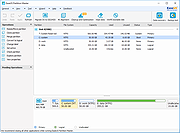 |
|
FastStone Image Viewer v8.4 FastStone Image Viewer v8.4 👉 Fast, stable image browser, editor and batch converter. FastStone Image Viewer is a fast, stable, user-friendly image browser, converter and editor. It includes image viewing, management, comparison, red-eye removal, emailing, resizing, cropping, retouching and color adjustments. Its full-screen mode gives quick access to EXIF information, thumbnail browsing and major tools through hidden edge toolbars. It also includes a high quality magnifier, musical slideshow with 150+ transition effects, lossless JPEG transformations, drop shadows, image annotation, scanner support, histogram display, batch conversion and batch renaming. Features: • Windows Explorer-like image browser and viewer • Supports BMP, JPEG, HEIC, WEBP, GIF, PNG, PCX, PDF, PSD, EPS, TIFF, WMF, ICO, CUR, TGA and many RAW camera formats • Full-screen viewer with zoom support and fly-out menu panels • Resize, rotate, crop, sharpen, blur, color correction, curves and levels tools • Clone Stamp, Healing Brush and red-eye removal • Draw text, lines, highlights, rectangles, ovals and callouts • Compare up to 4 images side-by-side • Batch convert and batch rename files • Slideshow with music and 150+ transition effects • Scanner support with batch scanning to PDF, TIFF, JPEG and PNG • Contact sheet creation, printing tools and image emailing • Portable version available Supported operating systems: • Windows XP, Windows Vista, Windows 7, Windows 8, Windows 10, Windows 11 Supported languages: Bulgarian, Chinese (Simplified), Chinese (Traditional), Czech, Danish, Dutch, Finnish, French, German, Hungarian, Italian, Japanese, Korean, Norwegian (Norsk bokmεl), Polish, Portuguese, Russian, Spanish, Swedish, Ukrainian Changes: v8.4 05-29-26 Added support for PDF format, including the ability to view multiple PDF files in the Compare Images tool Added support for JPEG XL (.jxl) format Other improvements and bug fixes This download is for the Windows portable version (very bottom of page). If you need the Windows installable version, download here. Click here to visit the author's website. |
|
11,601 | Jun 01, 2026 FastStone Soft 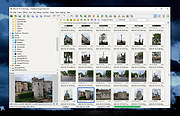 |
|
ImageConverter v1.6.0 ImageConverter v1.6.0 👉 Change image formats in one click. ImageConverter lets you quickly convert image files by dragging them into the list and clicking Convert. It supports multiple popular formats, resizing by width, high-compression JPG saving with MozJPEG, and can recognize images by file signature even when they do not have an extension. Features: • Change various image formats • Save JPG with higher compression using MozJPEG • Resize images by specifying the width • Supports PDF, SVG, AI, PSD, PNG, JPG, GIF, WEBP, and TGA • Recognizes images with file signature information even without an extension • Simple drag-and-convert workflow Supported operating systems: • Windows 10, Windows 11 Supported languages: English, German, Esperanto, French, Italian, Japanese, Polish, Portuguese, Russian, Slovak, Swedish, Thai, Turkish, Vietnamese, Chinese Changes: v1.6.0 05-20-26 • Fixed inconsistent default value when setting image width • Improved PDF conversion stability to prevent occasional freezes and leftover files Usage: • Drag the image files you want to change into the list. • Click the Convert button below. Click here to visit the author's website. |
|
1,053 | May 28, 2026 kilho.net 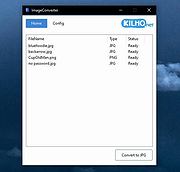 |
|
ImageGlass v9.5.0.515 ImageGlass v9.5.0.515 👉 A lightweight, versatile image viewer for Windows. ImageGlass is a feature-rich, simple-to-use image viewer with a clean, modern interface and support for over 90 image formats, including WEBP, GIF, SVG, PNG, JXL, HEIC, RAW formats and more. Features: • Supports over 90 common image formats • Fast image switching with a clean, minimal interface • Supports animated formats including GIF, WEBP, APNG and SVG • Multi-frame image support with frame navigation tools • Drag-and-drop and clipboard image opening • Six zoom modes including Auto Zoom, Lock Zoom, Scale to Width, Scale to Height, Scale to Fit and Scale to Fill • Full screen, frameless and window-fit viewing modes • Slideshow view with countdown timer • Fast thumbnail previews • Built-in color picker • EXIF metadata viewing with ExifGlass • Basic editing tools including rotate, flip, crop, resize and lossless compression • Custom themes, language packs, icon packs, layout and toolbar options • Keyboard and mouse action customization • External app integration through custom hotkeys • Color management and color channel viewing Supported operating systems: • Windows 10 64-bit version 1809 or later, Windows 11 64-bit Supported languages: Arabic, Armenian, Asturian, Azerbaijani, Belarusian, Bengali, Bulgarian, Catalan, Chinese Simplified, Chinese Traditional, Croatian, Czech, Danish, Dutch, Esperanto, Finnish, French, German, Greek, Hebrew, Hungarian, Icelandic, Indonesian, Irish, Italian, Japanese, Khmer, Korean, Kurmanji Kurdish, Kyrgyz, Lithuanian, Malay, Mongolian, Norwegian Bokmal, Persian, Polish, Portuguese, Brazilian Portuguese, Romanian, Russian, Serbian Cyrillic, Serbian Latin, Sinhala, Slovak, Slovenian, Spanish, Swedish, Tamil, Thai, Turkish, Ukrainian, Vietnamese Changes: v9.5.0.515 05-14-26 New features • Added DPI to image information tags, kudo to @Poley4229 for #2299 • Added setting to auto-switch to sibling directory when reaching the end of image list, kudo to @ThingOfNull for #2298 Improvements • Updated Magick.NET to v14.13.0 Bugfixes • Fixed: App window shrank progressively every time it was opened on a secondary monitor (#2061) • Fixed: Error when opening ImageGlass from Windows Search results (#2189) This download is for the Windows 64bit version (very bottom of ... |
|
4,452 | May 28, 2026 Duong Dieu Phap 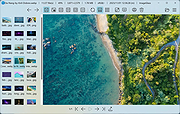 |
|
Sizer v4.0 dev673 Sizer v4.0 dev673 👉 Precisely resize and position application windows with customizable presets and hotkeys. Sizer is a lightweight window management utility that lets you instantly resize and reposition application windows to exact dimensions. Originally created for web designers and developers needing consistent browser sizes, it has evolved into a flexible productivity tool for anyone who regularly arranges windows on one or more monitors. Instead of manually dragging window borders, Sizer can snap windows to predefined sizes and positions with a click or keyboard shortcut. Sizer 4 has been completely rewritten for improved compatibility with modern Windows applications while reducing the intrusive techniques used by previous versions. It supports customizable hotkeys, advanced sizing macros and mathematical expressions, grouped menu layouts, portable operation, and easy import/export of configuration files. Power users can automate complex desktop layouts by positioning multiple windows simultaneously using macros and expressions. Features: • Resize any window to exact predefined dimensions • Move windows to precise screen locations • Assign global hotkeys to resizing actions • Launch the sizing menu with Ctrl+Win+Z or a custom shortcut • Create custom window size and position presets • Use mathematical expressions for dynamic sizing • Automate layouts with powerful window macros • Resize and reposition multiple windows simultaneously • Organize presets into cascading menu groups • Import and export configuration settings • Run as a portable application without installation • Improved compatibility with modern Windows applications • Supports high-DPI displays with DPI-aware rendering • Right-click window borders or restore buttons for quick access • Stable, lightweight design with minimal system impact Supported operating systems: • Windows 10, Windows 11 (64-bit) Supported languages: English Changes: v4.0 dev673 11-26-25 Introduced the special macro variable $_count that holds the number of wildcard matches. Note: This file has one hit on VirusTotal. We have confirmed this to be a false positive. The file is safe. Click here to visit the author's website. |
|
1,792 | Jul 27, 2026 Brian Apps 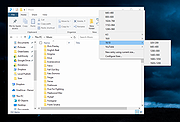 |
| Showing rows 1 to 7 of 7 | Showing Page 1 of 1 | 1 |
OlderGeeks.com Copyright (c) 2026
