|

|
Processed through Paypal No account required. |








Buy our over-priced crap to help pay the bills.



|
|
Processed through Paypal No account required. |
| Files | ||||
| File Name | Rating | Downloads | ||
 |
Fungible v1.6.4 Fungible v1.6.4 👉 A personal finance application that helps you track spending, budgets, and net worth with local data storage. Fungible is an open source personal finance manager that provides both a traditional terminal interface and a modern graphical desktop interface for managing your finances. It allows you to import transactions from financial institutions, categorize income and expenses, create budgets, monitor account balances, and visualize your financial health through charts and reports. Whether you prefer working from the command line or using the graphical interface, Fungible stores your financial data locally on your computer, giving you full control over your information while helping you organize day-to-day finances. Features: • Track checking, savings, credit card, investment, and other financial accounts • Import financial transactions from supported bank export formats • Categorize transactions with customizable categories • Create and monitor monthly budgets • View spending trends and financial reports • Track income, expenses, and overall net worth • Powerful transaction filtering and search tools • Local data storage for improved privacy and control • Cross-platform desktop application with Electron-based graphical interface • Open source software Supported operating systems: • Windows 10 or higher • macOS 13 Ventura or higher • Linux (64-bit distributions supported through official releases) Supported languages: • English Changes: v1.6.4 06-13-26 • Added a new Electron-based graphical user interface. • Added cross-platform desktop packaging and development release workflow. • Documented the filter panel and updated filter keys. • Fixed renderer sandbox and Plaid callback host issues. • Fixed stale result handling in GUI pattern matching. This download is for the Windows 64bit version (very bottom of page). All other download assets are below: macOS: fungible-1.6.4-mac-arm64.dmg fungible-1.6.4-mac-arm64.zip fungible-1.6.4-mac-x64.dmg fungible-1.6.4-mac-arm64.zip Linux: fungible-1.6.4-linux-amd64.deb fungible-1.6.4-linux-x86_64.AppImage Click here to visit the author's website. |
 |
522 | Jun 19, 2026 Thomas Funk 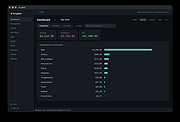 |
|
GnuCash v5.17 GnuCash v5.17 👉 Free, professional-grade personal and small-business accounting software. GnuCash is a free and open-source financial management application designed for individuals, families, and small businesses. Built on double-entry accounting principles, it provides an accurate and reliable way to track bank accounts, credit cards, investments, income, expenses, and business finances. Its familiar checkbook-style register makes entering transactions straightforward while maintaining the integrity expected from professional accounting software. Whether you're balancing your household budget, managing investment portfolios, or keeping books for a small business, GnuCash offers powerful reporting, scheduled transactions, account reconciliation, and support for importing financial data from many banks. It also includes customizable reports and graphs to help you understand your financial health over time. Features: • Double-entry accounting system • Checkbook-style transaction register • Track bank accounts, cash, credit cards, loans, and investments • Support for stocks, bonds, mutual funds, and other securities • Small business accounting with customer, vendor, invoice, bill, and tax features • Scheduled and recurring transactions • Transaction matching and reconciliation • Import QIF, OFX, and HBCI financial data • Budget creation and tracking • Detailed financial reports and graphs • Multi-currency support with exchange rate tracking • Split transactions and account hierarchies • Search and filter transactions • Export reports and financial data • Open source and actively maintained Supported operating systems: • Windows 8, Windows 10, Windows 11 • macOS 10.13 (Intel) or higher • macOS 11 (Apple Silicon) or higher • Legacy versions available below. Supported languages: Arabic, Brazilian Portuguese, Bulgarian, Catalan, Chinese (Simplified), Chinese (Traditional), Croatian, Danish, Dutch, English, Finnish, French, German, Hebrew, Hindi, Hungarian, Italian, Japanese, Latvian, Lithuanian, Marathi, Polish, Portuguese, Russian, Serbian, Spanish, Tamil, Telugu, Turkish, Ukrainian, Urdu, Chinese (Simplified Han script), Czech, Dutch, English (Australia), English (New Zealand), English (United Kingdom), German, Hungarian, Italian, Norwegian Bokmεl, Portuguese, Portuguese (Brazil), Russian, Spanish, Swedish Changes: v5.17 09-27-26 Bug 797872 - Multiple check printing results in nothing sent to print queue after first check ... |
|
7,696 | Sep 29, 2026 GnuCash Team 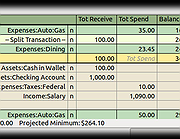 |
|
Microsoft Money Plus Home & Business Sunset v17.0.150.3817 Microsoft Money Plus Home & Business Sunset v17.0.150.3817 👉 Free offline software for managing personal finances, small-business expenses, and invoices. Microsoft Money Plus Home & Business Sunset combines personal financial management with tools for keeping track of small-business finances. Organize accounts, record income and expenses, monitor spending, manage investments, and create financial reports. The Home & Business edition also includes invoicing tools for preparing customer invoices with your business information. Money Invoice Designer lets you customize invoices with your business name, address, and logo. Financial information is organized into sections for accounts, bills, reports, and investments, helping you review household and business activity in one application. The Sunset edition was released after Microsoft discontinued the Money product line. It removes the activation requirement, allowing installation and reinstallation without contacting an activation server. You can install it as a standalone program without owning an earlier edition. Features: • Manage personal and business financial accounts. • Record income, expenses, deposits, and payments. • Organize transactions into spending categories. • Create budgets and monitor spending. • Review account balances and cash flow. • Generate financial reports. • Track investments and manually update investment prices. • Create customer invoices with Money Invoice Designer. • Customize invoices with your business name, address, and logo. • Use Insights alerts to monitor upcoming bills, spending, and cash flow. • Import OFX or QIF statement files downloaded separately from your financial institution. • Open and convert compatible files from earlier U.S. editions of Microsoft Money. • Protect Money data files with a standard Money password. • Access a local Help file. • Install and reinstall without product activation. Important information: This is discontinued software. ... |
|
191 | Oct 06, 2026 Microsoft Corp. 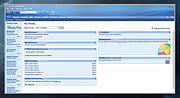 |
|
Microsoft Money Plus Sunset Deluxe v17.0.120.3817 Microsoft Money Plus Sunset Deluxe v17.0.120.3817 👉 Free personal finance management software for tracking accounts, budgets, and investments. Microsoft Money Plus Sunset Deluxe is a discontinued but still widely used personal finance application from Microsoft, released as a free version after the product line was retired. It allows users to manage bank accounts, track spending, create budgets, monitor investments, and generate detailed financial reports—all without requiring online services. This “Sunset” edition removes all online features such as automatic bank downloads and bill pay services, allowing the program to function indefinitely without activation or Microsoft services. It is especially useful for users who prefer a local, offline financial tracking solution or who need continued access to existing Money data files. Microsoft Money Plus Sunset Deluxe supports importing and working with existing Money files, providing a familiar interface for long-time users while maintaining core functionality for managing personal finances. Features: • Manage bank accounts, credit cards, and cash accounts • Track income, expenses, and spending categories • Create and monitor budgets • View financial summaries and reports • Manage investments and track portfolio performance • Import and use existing Microsoft Money data files • Offline functionality with no activation required • Simplified interface based on Microsoft Money Plus More Information: • Microsoft Money Plus Sunset Deluxe is provided as-is with no support or updates from Microsoft • All online services have been permanently removed and are not available • Designed primarily for users of earlier Microsoft Money versions needing continued access • Cannot download transactions, stock quotes, or perform online bill payments • No activation is required, and the software will not expire Supported operating systems: • Windows XP, Windows Vista, Windows 7, Windows 8, Windows 10, Windows 11 Supported languages: English Changes: v17.0.120.3817 Not Provided Click here to visit the author's website. |
|
18,250 | Jul 29, 2026 Microsoft Corp. 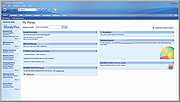 |
 |
Money Manager Ex v1.9.3 Money Manager Ex v1.9.3 👉 Free, open-source personal finance software for tracking accounts, budgets, cash flow, assets and expenses. Money Manager Ex is a free, open-source personal finance application designed to help users organize their finances with a clear and easy-to-use interface. It allows you to monitor bank accounts, credit cards, investments, assets and recurring expenses while keeping all financial information stored locally for improved privacy and control. Money Manager Ex is suitable for both beginners and advanced users who want a lightweight but powerful alternative to online financial services. The software includes budgeting tools, customizable reports, reminders, transaction scheduling and multi-account management to help track spending habits and improve financial planning. The application supports multiple currencies, encrypted databases, portable operation and import/export tools for transferring data between financial applications. Its built-in reporting engine provides charts and summaries that make it easier to analyze income, expenses and long-term financial trends. Advanced users can also create custom reports using SQL, HTML, LUA and JavaScript. Money Manager Ex stores data in an SQLite database and works entirely offline, giving users full control over their financial records without relying on cloud synchronization or subscriptions. The software is actively maintained by an open-source community and is available for Windows, macOS and Linux systems. Features: • Track checking, savings, cash, credit card, stock investment and asset accounts • Organize transactions with unlimited nested categories and tags • Schedule recurring bills, deposits and transfers with reminders • Create detailed budgets and monitor spending habits • Generate financial reports with charts, graphs and summaries • Supports multiple currencies and exchange rates • Import transactions from CSV, QIF and OFX files • Export financial data to CSV, QIF and HTML formats • Portable mode available for Windows systems • SQLite database with AES encryption support • Split transactions across multiple categories • Search and filter transaction history quickly • Reconcile bank statements and account balances • Create ... |
|
11,313 | Aug 11, 2026 Money Manager EX 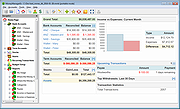 |
| Showing rows 1 to 5 of 5 | Showing Page 1 of 1 | 1 |
OlderGeeks.com Copyright (c) 2026
