|

|
Processed through Paypal No account required. |








Buy our over-priced crap to help pay the bills.



|
|
Processed through Paypal No account required. |
| Files | ||||
| File Name | Rating | Downloads | ||
 |
Open-Shell v4.4.198 Open-Shell v4.4.198 Bring back the classic Windows Start menu and shell experience. Open-Shell is an open-source continuation of the popular Classic Shell project, designed to restore familiar Windows interface elements that many users prefer over the newer default layouts found in modern versions of Windows. It gives users deep control over the Start menu appearance and behavior while adding classic Explorer enhancements that improve usability and workflow efficiency. Open-Shell can replicate the appearance and functionality of classic Start menus from Windows 7, Windows XP and even older Microsoft operating systems while still supporting the latest versions of Windows 10 and Windows 11. Users can customize nearly every aspect of the Start menu, including styles, skins, icons, button graphics, menu behavior, search settings, animations and shortcuts. Beyond the Start menu itself, Open-Shell includes Explorer enhancements such as a customizable toolbar, additional status bar information and improved file management conveniences. The software is lightweight, fast and designed to integrate naturally into Windows without consuming excessive system resources. The project is maintained by the open-source community and continues to receive updates for compatibility with new Windows releases and user-requested improvements. Features: • Restore classic-style Start menus on Windows 10 and Windows 11 • Multiple Start menu layouts inspired by Windows 7, XP and Classic styles • Highly customizable skins, themes and Start button replacements • Drag-and-drop organization for Start menu items • Fast application and file search functionality • Customizable menu behavior, animations and hotkeys • Explorer toolbar with common file operation buttons • Enhanced Explorer status bar information • Optional classic copy and file operation interface • Extensive settings for power users and advanced customization • Lightweight and low system resource usage • Community-maintained open-source project • Supports Windows ARM systems • Backup and restore Start menu configuration settings • Multi-language interface support Supported operating systems: • Windows 7 • Windows 8 • Windows 8.1 • Windows 10 • Windows 11 • Windows on ARM Supported languages: English, German, French, Spanish, ... |
 |
7,089 | Jun 05, 2026 Open-Shell 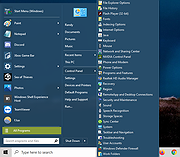 |
 |
Run-Command v6.41 Run-Command v6.41 👉 Enhanced Windows Run dialog replacement with extended command execution features. Run-Command is a small but powerful alternative to the standard Windows Run dialog. It provides extended functionality for executing commands, opening programs, launching system tools, and accessing frequently used folders more efficiently. Designed as a portable utility, Run-Command enhances productivity by offering customizable favorites, command history, and quick access to administrative tools. It is lightweight, requires no installation, and is suitable for both everyday users and advanced system administrators. Features: • Alternative to the standard Windows Run dialog • Favorites menu for frequently used commands • Command history with quick recall • Run programs with administrative privileges • Drag & drop support • Portable – no installation required • Multilingual user interface • Small size and low system resource usage Supported operating systems: • Windows 7, Windows 8, Windows 8.1, Windows 10, Windows 11 • Windows Server 2012, Windows Server 2016, Windows Server 2019 Supported languages: • German, English, Greek, Russian, Simplified Chinese, French, Persian, Swedish, Romanian, Arabic (Iraq), Hungarian, Italian, Portuguese (Brazil), Dutch, Spanish (Venezuela), Indonesian, Polish, Traditional Chinese, Japanese, Taiwanese Chinese, Czech, Korean, Ukrainian, Portuguese (Portugal), Turkish, Thai, Filipino, Finnish, Norwegian, Bosnian, Croatian, Serbian, Bulgarian Changes: v6.41 05-06-26 • Improvements to the Run command as an alternative to the Windows Run dialog, including enhancements to the interpretation of Windows Run commands. • Updated language files, along with various minor adjustments and optimizations within the alternative Run dialog for MS Windows. This download is for the Windows 64bit version (very bottom of page). If you need the Windows 32bit version, download here. Click here to visit the author's website. |
|
10,836 | May 07, 2026 Nenad Hrg 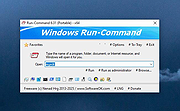 |
|
Tablacus Explorer v26.6.11 Tablacus Explorer v26.6.11 👉 Customizable tabbed file manager with extensive add-on support. Tablacus Explorer is a portable, open source tabbed file manager for Windows that supports add-ons, multiple languages, Unicode, customizable menus, keys, mouse gestures, aliases, and extra columns such as total file size and labels. It is designed for users who want a highly flexible alternative to standard Windows File Explorer. Features: • Tabbed interface • Add-on support • Completely portable with no installation required • Multiple language and Unicode support • Extra columns including total file size and label • Customizable associations, menus, keys, mouse gestures, and aliases • Open source • Available in both 32-bit and 64-bit versions Supported operating systems: • Windows XP, Windows Vista, Windows 7, Windows 8, Windows 8.1, Windows 10, Windows 11 Supported languages: English, Japanese, Spanish, Korean, German, Greek, French, Italian, Portuguese, Russian, Simplified Chinese, Traditional Chinese, Turkish Changes: v26.6.11 06-11-26 • Added ARM64 support. (Backup recommended) • Added an ARM64 version of Tablacus Explorer. • The developer does not have a Windows ARM device, so this build has not been tested by the developer. • Windows ARM users can download tearm_260611.zip, extract it over their existing installation, and run TEARM64.exe. • The developer is requesting feedback from ARM64 users about whether the build works correctly or if any problems occur. Click here to visit the author's website. |
|
7,004 | Aug 14, 2026 Gaku 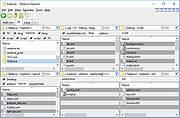 |
|
TED Notepad v6.4.1 TED Notepad v6.4.1 👉 Small, fast and powerful plain-text editor packed with advanced text-processing tools. TED Notepad is a free plain-text editor and Notepad replacement for Windows, built for users who want speed, portability and serious text manipulation without a bulky interface. It includes hundreds of tools for editing, sorting, filtering, transforming, searching and cleaning text, while staying small, quick to launch and easy to carry as a portable utility. Features: • Free, small and portable text editor with no installation required • New 64-bit version for working with very large files • Tested with huge files, including multi-gigabyte documents • 457 text-processing functions and editor features • Grep, Sort, Cut, Unique, RegEx, Shuffle, Tr and Reverse tools • Search and replace with regular expressions • Selection and search match highlighting • Search and Replace history • Line numbers, line lengths and visible spaces/tabs/newlines • Multi-level Undo and Redo • Auto-save, recovery and backup options • UTF-8 and Unicode auto-recognition • Multiple permanent clipboards and clipboard append tools • Word and line auto-completion • Portable INI file settings Supported operating systems: • Windows 11, Windows 10, Windows 8, Windows 7, Windows Vista, Windows XP, Windows Server 2008, Windows Server 2003, Windows 2000 Supported languages: English Changes: v6.4.1 06-04-26 Introducing a 64-bit version. Added selection highlighter for all occurrences of selected text. Added settings for minimum selection length, match case and highlighter color. Added search highlighter for all Search Bar matches. Added total occurrence count in the Search Bar. Added Search history and Replace history. Added positive and negative look-ahead and look-behind assertions in Regular Expressions. Added setting to include seconds when inserting date/time. Added setting to disable the "Exit without saving" hotkey. Added Session Hard to Close option. Fixed multiple Search Bar, RegEx, Grep, Filters, Sort, Columns, Status Bar and clipboard issues. Improved Unicode file detection, DPI awareness, search routines, clipboard handling and settings validation. This download is for the Windows Unicode 64bit Installer version (very bottom of page). All other download assets are ... |
|
6,246 | Jun 09, 2026 Medvedik, Juraj Simlovic 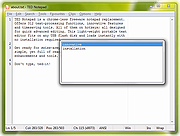 |
| Showing rows 1 to 4 of 4 | Showing Page 1 of 1 | 1 |
OlderGeeks.com Copyright (c) 2026
