|

|
Processed through Paypal No account required. |








Buy our over-priced crap to help pay the bills.



|
|
Processed through Paypal No account required. |
| Files | ||||
| File Name | Rating | Downloads | ||
 |
FluentTaskScheduler v1.9.0 FluentTaskScheduler v1.9.0 👉 A modern, fluent UI-based task scheduler for Windows. FluentTaskScheduler is a Windows task scheduling utility that provides a clean and modern interface for creating, managing, and monitoring scheduled tasks. Built with a fluent design approach, it simplifies interaction with the Windows Task Scheduler by offering an intuitive graphical interface while still exposing advanced configuration options. It is designed for both casual users and advanced users who want more control over automation without navigating the default Windows scheduler. Features: • Create, edit, and delete scheduled tasks with ease • Modern fluent UI design for improved usability • View detailed task information and status • Support for triggers, actions, and conditions • Simplified interface compared to Windows Task Scheduler • Lightweight and easy to use Supported operating systems: • Windows 10, Windows 11 Supported languages: English Changes: v1.9.0 07-26-26 New Features Task Chaining (Completion Actions): Chain tasks together and configure a task to automatically start other tasks when it succeeds or fails, right from a new "Completion Actions" section in the task editor. FluentTaskScheduler watches the Task Scheduler event log in real time (no polling) and includes built-in loop protection so you can't accidentally chain a task into itself. Global & Per-Task Snooze: Need a break? Hit "Snooze All Tasks" to pause task execution app-wide for 30 minutes, 1 hour, 3 hours, until your next reboot, or a custom time. You can also now snooze individual tasks (including a working custom time option). Optionally suspends scheduled triggers at the OS level too, and un-suspends exactly what it suspended when the snooze ends. Dashboard Analytics: The Dashboard got a serious upgrade: a 24-hour execution heatmap, a health-score ring, average/longest run duration, and a live, filterable execution log (Success / Failed / Snoozed). Task Template Library: 17 ready-to-deploy templates (temp cleanup, restore points, ... |
 |
1,107 | Sep 16, 2026 TRGamer-tech 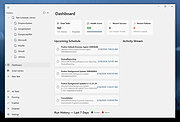 |
|
OpenPets-3.1.0-win-x64-portable.exe OpenPets v3.1.0 👉 An open source desktop companion with AI coding agent integration and an expandable plugin platform. OpenPets is an open source desktop companion that places an animated pet on your desktop while providing an extensible plugin platform for productivity, reminders, focus sessions, mini games, launch shortcuts, hydration nudges, and virtual pet interactions. It can optionally integrate with AI coding agents through the Model Context Protocol (MCP), allowing your pet to react to coding activity while keeping prompts, code, logs, URLs, secrets, and other sensitive information private through local sanitization and filtering. The application is designed with a sandboxed plugin system that enables developers to create custom companion behaviors using the OpenPets Plugin SDK. Features: • Animated desktop companion with idle animations and interactive behaviors • Extensible plugin platform with official and third-party plugins • Plugin SDK for developing custom companion features • Built-in focus timers, reminders, mood check-ins, mini games, hydration nudges, and virtual pet stats • Optional integration with Claude Code, Cursor, OpenCode, Pi, and other MCP-compatible AI coding agents • Sandboxed plugin runtime with permissions, quotas, storage, scheduling, notifications, and audio support • Local-only communication with AI integrations for improved privacy • Dynamic filtering that redacts file paths, URLs, secrets, and code snippets from generated speech • Tray-based desktop application • Multiple desktop pet support Supported operating systems: • Windows 10, Windows 11 • macOS • Linux Supported languages: • English Changes: v3.1.0 06-13-26 Fixed desktop install flow regressions for catalog plugin installs. Catalog installs no longer fail because of stale catalog hashes. Improved catalog and manifest validation for more reliable plugin installation. Improved install failure handling with clearer error messages and redaction of local filesystem paths. Plugin install prompts now display translated plugin names correctly. Newly installed plugins are automatically enabled after approval. Added XS pet scale support. Updated Wayland and desktop validation to fix compositor and desktop integration regressions. This download is for the Windows portable version (very bottom of page). All ... |
|
489 | Jun 19, 2026 Boring Dystopia Development  |
 |
SideSlide v6.50 SideSlide v6.50 👉 A powerful, customizable desktop workspace, launcher and information organizer that stays hidden until you need it. SideSlide is a free desktop assistant designed to keep your Windows desktop organized and clutter-free while providing instant access to programs, files, folders, websites, commands, RSS feeds, notes, reminders, pictures and other frequently used information. Its customizable workspace can dock to any screen edge and remain tucked away until needed, giving you a large organizational area without permanently consuming desktop space. The workspace uses flexible containers that can be resized, detached, folded, shrunk and arranged however you prefer. Containers can hold shortcuts, notes, RSS feeds, reminders and other content, allowing large collections of information to remain accessible without covering the desktop. SideSlide also includes extensive keyboard navigation and launching features for users who prefer working without the mouse. When the workspace is collapsed, SideSlide can display a Dock Strip containing useful system information and live weather. The workspace can quickly expand again when you need access to its contents. SideSlide can also be used portably from a USB drive. Its configuration files are kept together, and the portable version can continue working even when the removable drive letter changes. Features: • Fully customizable desktop workspace that remains hidden until needed • Dock the workspace to any edge of the screen • Dock Strip displays system information and live weather while the main workspace is collapsed • Create shortcuts to programs, files, folders, commands and websites • Add RSS news feeds directly to the workspace • Built-in RSS reader with filtering and Subject Tracker capabilities • Create resizable, detachable, foldable and shrinkable containers • Containers can extend beyond the visible screen area • Create colorful notes that can be searched, edited in bulk and individually customized • Encrypt notes and automatically re-encrypt them after editing • Create ... |
|
6,529 | Sep 02, 2026 Northglide 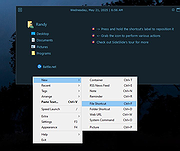 |
|
Simple Sticky Notes v6.9 Simple Sticky Notes v6.9 👉 Free desktop sticky notes with reminders, checklists, and powerful customization. Simple Sticky Notes is a free desktop note-taking application that lets you create colorful sticky notes directly on your Windows desktop. It provides a clean, intuitive interface for capturing reminders, to-do lists, ideas, and important information while keeping them easily accessible. Notes are automatically saved, support rich text formatting, and can be customized with different colors, themes, fonts, transparency levels, and sizes. Simple Sticky Notes also includes alarms and reminders, checklists with hierarchical checkboxes, notebooks for organizing related notes, a note explorer for searching and managing all notes, and options to print, export, or share notes. Additional features such as dark mode, backup and restore, and automatic updates make it a capable alternative to the built-in Windows Sticky Notes application. Features: • Create unlimited desktop sticky notes • Rich text formatting • Colorful notes with adjustable transparency • Custom themes and appearance options • Checklists with hierarchical checkboxes • Alarms and reminders • Note Explorer for searching and organizing notes • Notebooks for grouping notes • Print, export, and share notes • Dark mode support • Automatic saving of notes • Backup and restore functionality • Automatic updates Supported operating systems: • Windows 7, Windows 8, Windows 8.1, Windows 10, Windows 11, Windows 10 Arm64, Windows 11 Arm64 Supported languages: • English, French, German, Spanish, Italian, Japanese, Portuguese, Danish, Dutch, Swedish, Russian, Simplified Chinese, Turkish Changes: v6.9 02-22-26 New: Checking/unchecking a parent checkbox now checks/unchecks all indented child items Improved checkbox indent/outdent with Tab and Backspace Improved overall stability and performance Fixed some translation issues in Chinese and Japanese Fixed minor bugs reported by users Updated the SQLite database engine to version 3.51.0 Click here to visit the author's website. |
|
10,091 | Jul 19, 2026 Simnet Ltd. 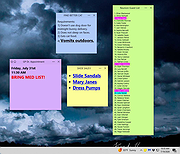 |
|
TabStick-1.2.0-win-x64-portable.zip TabStick v1.2.0 👉 A lightweight note-taking program that attaches colorful index tabs directly to your application windows. TabStick lets you place quick notes on the edge of an application window, keeping reminders and information beside the program where they are needed. Choose a tab from the color palette, attach it to a window and begin typing. Notes can be organized directly inside each tab and customized with different colors, sizes, text settings and display themes. TabStick is available as an installer or a portable download that can be extracted and run without installation. Features: • Attaches index-style notes directly to application windows • Keeps related notes beside the program where they are needed • Creates new notes by selecting a color from the tab palette • Supports quick text entry and organization within each note • Customizable application and tab sizes • Adjustable text size and line spacing • Multiple note colors • Custom note colors • Light and dark display modes • Configurable palette appearance • Changeable interface language • Available as an installer or portable program • Simple interface designed for fast note-taking Supported operating systems: • Windows 10 64-bit, Windows 11 64-bit Supported languages: Not Found Changes: v1.2.0 Not Found Click here to visit the author's website. |
|
250 | Aug 05, 2026 TabStick 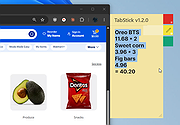 |
| Showing rows 1 to 5 of 5 | Showing Page 1 of 1 | 1 |
OlderGeeks.com Copyright (c) 2026
