|

|
Processed through Paypal No account required. |








Buy our over-priced crap to help pay the bills.



|
|
Processed through Paypal No account required. |
| Files | ||||
| File Name | Rating | Downloads | ||
 |
StaticDesktopRuler v1.06 StaticDesktopRuler v1.06 👉 Add customizable on-screen guide rulers that make it easy to visually follow rows, columns, and align desktop objects. StaticDesktopRuler is a free, portable desktop utility that places one or more customizable rulers on your screen as visual reference guides. Its primary purpose is not measuring distances, but making it easier to keep your eyes on the correct row or column while working with large spreadsheets, databases, documents, source code, CAD drawings, image editors, and other information-dense applications. As shown in the example below, horizontal and vertical rulers can be positioned over a worksheet so you can instantly locate the exact cell where a row and column intersect, dramatically reducing the chance of reading or entering data on the wrong line. Each ruler can be customized with its own color, thickness, transparency, and ghost mode, allowing the guides to remain visible without blocking the content beneath them. Because it is portable, StaticDesktopRuler can be launched anywhere without installation. Features: • Place multiple horizontal and vertical guide rulers anywhere on the desktop • Easily follow spreadsheet rows and columns to the correct cell intersection • Reduce reading and data-entry mistakes in large worksheets and tables • Keep your place while reading databases, documents, logs, and source code • Customize each ruler's color, thickness, and transparency • Ghost mode keeps guides visible while allowing you to see and work through them • Portable application requiring no installation • Lightweight and uses very little system resources Supported operating systems: • Windows 7, Windows 8, Windows 8.1, Windows 10, Windows 11, Windows Server 2012, Windows Server 2016, Windows Server 2019, Windows Server 2022 Supported languages: • German, English, Traditional Chinese, Korean, French, Russian, Italian, Japanese, Spanish, Portuguese Changes: v1.06 08-26-26 • StaticDesktopRuler language file update • Minor fine-tuning in StaticDesktopRuler for all Windows operating systems. 👉 This download is for the Windows portable version (very bottom of page). All other download ... |
 |
611 | Oct 04, 2026 Nenad Hrg 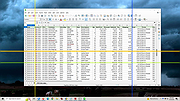 |
|
TheSage v7.74 TheSage v7.74 👉 A powerful English dictionary and thesaurus with advanced word search and language reference tools. TheSage is a Windows dictionary and thesaurus designed as a comprehensive lexical reference system for the English language. It combines dictionary definitions, examples, pronunciations, etymologies, and a multifaceted thesaurus in one portable application. The program also includes advanced lookup tools such as wildcard and anagram search, phonetic search, rhyme assistance, concordances, online search, and word list management, making it useful for casual users, writers, translators, researchers, and language learners. Features: • Comprehensive English dictionary with definitions, examples, pronunciations, and etymologies • Multifaceted thesaurus with synonyms, antonyms, hypernyms, hyponyms, meronyms, holonyms, and more • Multiple dictionary viewing modes including e-paper, classic, and retro views • Wildcard search with standard and regex support • Anagram search for finding words from letter patterns • Phonetic wildcard search with standard and regex options • Rhyme assistant with full, assonant, and consonant rhyme support • Etymologer with keyword and sense search tools • Concordancer for definition and example searching • Online search integration and word list manager • Portable version available • Runs locally and does not require an Internet connection for dictionary use Supported operating systems: • Windows 10, Windows 11 Supported languages: • English Changes: v7.74 03-24-26 - Updated: Dictionary engine v7.44.6065 - Updated: Internal browser v1.0.3856.49 - New: One-click Word capture library v1.08 Database: - Added: ~195,000 words (as a corpus) in etymologies, transcriptions, definitions, examples, and thesaurus entries - Updated: BibliothecaAI 13.2k/1.82b-experimental Click here to visit the author's website. |
|
2,580 | Mar 27, 2026 Sequence Publishing 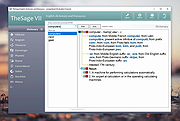 |
|
Unicodia — encyclopedia of characters v3.2.3 Unicodia — encyclopedia of characters v3.2.3 👉 A fast, searchable encyclopedia of Unicode characters with detailed technical information. Unicodia is a comprehensive Unicode character reference designed for developers, typographers, linguists, and anyone who works with extended character sets. It allows users to explore the full Unicode standard through an intuitive interface, offering instant search, categorized browsing, and in-depth character metadata. Unicodia makes it easy to locate, inspect, and copy symbols, scripts, emojis, and historical characters for use in documents, code, and design projects. Features: • Browse the complete Unicode character set by block and category • Instant search by character name, code point, or description • Detailed character metadata including properties and classifications • One-click copy of characters to the clipboard • Supports modern scripts, symbols, emojis, and historic writing systems • Clean, readable interface optimized for reference use • Fully usable offline after installation Supported operating systems: • Windows 7, Windows 8, Windows 10, Windows 11 Supported languages: English Changes: v3.2.3 06-13-26 📚 TEXT [en] #609 Grammar check done! Really need retranslation: 1) more neutral Kayah Li; 2) Khitans were defeated by KOREANS! [en] Wrote "Kyivan/Kievan" (more correct now / used by Unicode) 🐞 PROGRAM [3.1.8] In SignWriting, the style was not applied Click here to visit the author's website. |
|
2,446 | Jun 18, 2026 Mikhail Merkuryev 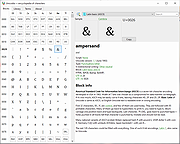 |
 |
Windows Commands Reference vWS16 Windows Commands Reference vWS16 A PDF containing an overview and alphabetical listing of Windows commands. Use this PDF to find the documentation resources and other technical information that you need to learn about the command shell, and to automate command-line tasks by using scripts or scripting tools. Windows Server 2008, Windows Server 2008 R2, Windows Server 2012, Windows Server 2012 R2, Windows Server 2016 Date Published: 4/18/2018 Click here to visit the author's website. |
|
6,504 | Nov 15, 2019 Microsoft Corp. 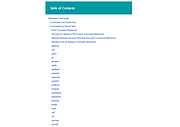 |
 |
Zotero v10.0.1 Zotero v10.0.1 👉 A powerful free research assistant for collecting, organizing, annotating, citing and sharing research. Zotero is a free, open-source research and reference manager designed to help you collect, organize, annotate, cite and share research sources. It can manage books, journal articles, reports, web pages, artwork, films, letters, manuscripts, recordings, legal materials and many other types of sources. Each item can contain detailed bibliographic metadata as well as attached PDFs, files, web snapshots, links and notes. The Zotero Connector integrates with supported web browsers to capture research directly from websites. When Zotero recognizes a book, article or other source, it can automatically create the appropriate library item, fill in available metadata, download a full-text PDF when available and attach related links or supplemental files. Zotero can also create items directly from ISBNs, DOIs and PubMed IDs. Research can be organized into collections and tagged for easier retrieval. An item can appear in multiple collections without creating duplicate copies, and saved searches automatically update as new matching material is added. Zotero also provides synchronization between computers and shared group libraries for collaborative research. Features: • Collect books, journal articles, reports, web pages, artwork, films, letters, manuscripts, recordings, legal materials and many other types of research sources • Automatically capture bibliographic information from supported websites using the Zotero Connector • Automatically download full-text PDFs when they are available while saving sources • Save web pages as locally stored snapshots for later viewing, including while offline • Add sources automatically using ISBN, DOI or PubMed ID identifiers • Attach PDFs, images, audio, video and other files to library items • Create rich-text notes attached to individual sources or independent notes • Organize research into collections and subcollections without duplicating library items • Assign unlimited tags to items and use colored tags for quick identification • Quickly search metadata, tags and full-text content • Use advanced searches for ... |
|
184 | Aug 28, 2026 Digital Scholar 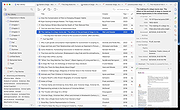 |
| Showing rows 1 to 5 of 5 | Showing Page 1 of 1 | 1 |
OlderGeeks.com Copyright (c) 2026
