|

|
Processed through Paypal No account required. |








Buy our over-priced crap to help pay the bills.



|
|
Processed through Paypal No account required. |
| Files | ||||
| File Name | Rating | Downloads | ||
 |
Ping Alert v5.6 Ping Alert v5.6 Setup any number of consecutive PING loss to get alert - PING monitor your internet or LAN servers with SMS / Mail / Sound alerts when get consecutive PING loss. Setup consecutive 1 or 2 or 3,..10..20..100.... ping loss to send you alert Alert you once only when PING normal -> PING consecutive loss -> PING normal status changed - It does not keep sending you alerts when it remains PING loss. Let you know when it is abnormal and when it is back exactly. Alerts include SMS, Email and Sound. SMS and Email alerts send out from our server and has option to email additional alert via Local/ Gmail/ Yahoo/ Hotmail SMTP server at the same time to ensure you can receive alerts independent of our servers. I am Alive mail notification - Has option to setup mailing you the current monitoring log periodically to let you know monitoring program is up and running Save PING loss data to log file and separate the log files by date automatically. Different alert text for different host - Set up different text for different host alert message Allow to limit SMS sending a day - Cap # of SMS sending to avoid large SMS alert when abnormal situation happened. if you set max. # is 10 then the 10th SMS will have 10/10 in the end. No SMS alert but you still can get mail alert. Counter will be reset at 00:00 to let you get SMS alert next day Not only monitor PING timeout but also monitor all other PING situation - Also include host is "Request Time Out","Dest Network ... |
 |
6,633 | Dec 29, 2020 SMS4Mail 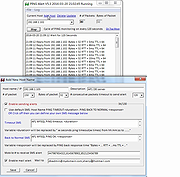 |
|
Ping GUI v1.1.0.3 Ping GUI v1.1.0.3 PingGUI is a tool to ping one or multiple ip addresses and websites. Multiple destinations can be pinged simultaneously. The ping time will be shown in a graph and as text. Features: - ping ip addresses and websites - ping multiple destinations simulaneously - scan ip address range like 192.168.178.* - destinations can be saved in a list - timeout value can be entered - ping times (roundtrip) are shown in a graph and as text - destination(s) can be pinged continuously (a delay time can be entered) - connections can be kept alive - a trace route (tracert) can be done on multiple hosts by 1 click - an ip configuration (ipconfig) can be done by 1 click - results can be written to text or cvs file - using the settings window the default settings can be changed such as window size Version 1.1.0.3 - changed: new executable compiled to reduce the number of false positives - improved: minor optimization Click here to visit the author's website. |
|
6,092 | Dec 16, 2019 Peter Verbeek 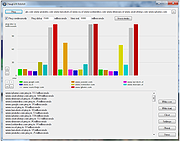 |
 |
Ping Monster v1.8 Ping Monster v1.8 This is a freeware ping monitor tool, with some alert actions like: send email, sound alert, http post. Features ICPM Ping monitoring hosts Config time interval between pings Email Alert Sound Alert HTTP Post Alert Log file Click here to visit the author's website. |
|
6,401 | Mar 20, 2019 Eduardo Zola 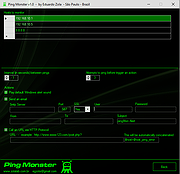 |
 |
Ping Pong v1.0 Ping Pong v1.0 Show those kids that Pong wasn't as easy as they think it was. Plays in your web browser. A Pong clone that gets faster and faster and faster... Controls: Use your UP and DOWN arrow keys. Click here to visit the author's website. |
|
817 | Aug 03, 2025 AbhinavTheDev  |
|
Ping Tracer v1.9 Ping Tracer v1.9 Ping Tracer continuously pings each network host between your computer and a given destination, helping identify the source of connectivity problems. This program helps to visually determine the origin of connection problems. The latency over time is shown on graphs, and each instance of packet loss is marked in red. A common use for such a tool is to monitor your connection to a multiplayer game server so you know who to blame when you experience lag. For example, if you experience a terrible moment of lag and you see that every node beyond your router is showing elevated latency or packet loss, then the lag was on your end. Typically, a poorly performing node will affect your connection to every node after it. I built this program for personal use, and decided to share it for free as an open source project. As such, it is light on features and polish. Something you should be aware of is that when you attempt to "Graph every node leading to the destination", a trace route operation is performed in order to discover the hosts that will be monitored. The trace route operation is not optimized for speed, and will take many seconds to complete in most cases. The trace route operation attempts to contact each host (a.k.a. network node) only once. Any host that fails to respond during the trace route operation will not be monitored. The trace route operation is ended if 5 consecutive hosts fail to respond. This usually indicates that the destination host was already passed by and did not respond to the trace ping. Some hosts respond to the traceroute but do not respond to direct pings. Technically it would still be possible to monitor these ... |
|
3,636 | Mar 04, 2021 bp2008 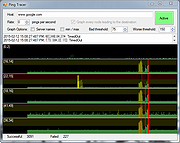 |
|
Venmon v2.37 Venmon v2.37 👉 Compact system monitoring and multi-ping tool for Windows. Venmon is a system resource monitoring and multi-ping tool for Windows. It can monitor system memory, processor, battery life, uptime, idle time, graphic cards, network traffic, event logs, and drives while using minimal processing power and memory. It displays real-time statistics, can run in portable mode from a USB drive, and does not require the installation of runtime modules. System The main screen of Venmon displays a general system summary, memory usage, processor usage, battery status, uptime, and idle time. System events will report activities such as Page file changes, battery activity (percentage charged/plugged/unplugged/charging/not charging), allocated memory changes, and report periods of long idle times. Long idle times can be used to see when someone last used the computer. Features: • Monitors memory, processor, battery life, uptime, idle time, graphics cards, network traffic, event logs, and drives • Displays real-time system statistics with low resource usage • Includes a multi-ping tool with support for up to 1024 automated pings by IP address or host name • Provides history graphs and event logging for system, storage, network, and ping activity • Supports portable use from a USB drive with settings saved locally • Includes Event Viewer, drive monitoring, network monitoring, and system tray features • Portable Supported operating systems: • Windows 7, Windows 8, Windows 10, Windows 11 • Windows Server 2000, Windows Server 2003, Windows Server 2008, Windows Server 2012, Windows Server 2016, Windows Server 2019, Windows Server 2022, Windows Server 2025 Supported languages: English, German Changes: v2.37 11-02-25 • Added Control + Mouse Wheel Down while hovering over Mini Window to make font size smaller • Added Control + Mouse Wheel Up while hovering over Mini Window to make font size bigger • Added Control + Mouse Wheel Down while hovering over Ping List to make font size smaller • Added Control + Mouse Wheel Up while hovering ... |
|
885 | Mar 12, 2026 Ventural 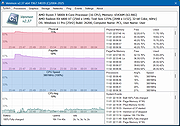 |
| Showing rows 1 to 6 of 6 | Showing Page 1 of 1 | 1 |
OlderGeeks.com Copyright (c) 2026
