|

|
Processed through Paypal No account required. |








Buy our over-priced crap to help pay the bills.



|
|
Processed through Paypal No account required. |
| Files | ||||
| File Name | Rating | Downloads | ||
 |
OpenCloseDriveEject v3.55 OpenCloseDriveEject v3.55 👉 Quickly open, close, and safely eject drives and removable media in Windows. OpenCloseDriveEject is a small Windows tool that lets you open and close DVD, CD, and Blu-ray drives, and safely eject removable storage like USB, SD, and SSD devices. It can run as a portable app, includes optional To-Tray/hidden startup behavior, and also offers command-line options for simple automation. Features: • Open and close optical drive trays (CD, DVD, Blu-ray) • Safely eject removable media (USB, SD, SSD, external drives) • Portable application, no installation required • Command-line support (start hidden, start to tray, custom INI path) • Optional start minimized or in system tray • Multilingual interface Supported operating systems: • Windows XP, Windows Vista, Windows 7, Windows 8.1, Windows 10, Windows 11 • Windows Server 2012, Windows Server 2016, Windows Server 2019, Windows Server 2022, Windows Server 2025 Supported languages: German, English, French, Greek, Traditional Chinese, Bulgarian, Korean, Russian, Japanese, Polish, Turkish, Italian, Dutch, Swedish, Norwegian, Portuguese, Danish, Irish, Thai, Spanish (Venezuela), Persian, Arabic, Hebrew, Finnish, Czech, Simplified Chinese, Bosnian, Croatian, Serbian, Catalan Changes: v3.55 05-02-26 • Important tests of the OpenCloseDriveEject app for the next MS Windows 11 build • Update of the OpenCloseDriveEject.exe language files A simple example of using the "Open Close Eject the Drive Tool" This download is for the Windows 64bit portable version. If you need the Windows 32bit portable version, download here. Click here to visit the author's website. |
 |
5,532 | Jul 11, 2026 Nenad Hrg 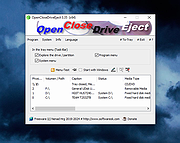 |
|
Original HP LightScribe Software Collection v1.18.27.10 Original HP LightScribe Software Collection v1.18.27.10 👉 Complete collection of the original official HP LightScribe software for Windows and macOS. Original HP LightScribe Software Collection contains the original Hewlett-Packard LightScribe software needed to create professional-looking laser-etched labels directly onto specially coated LightScribe CDs and DVDs. Unlike adhesive labels, LightScribe technology uses the optical drive's laser to permanently burn text and graphics onto the label side of compatible media. This collection includes the final official Windows and macOS releases of the core LightScribe software along with portable Windows editions of the two labeling applications. These programs continue to work with supported LightScribe drives even though the technology has been discontinued. This collection includes: LightScribe System Software The required driver package that enables Windows or macOS to recognize and communicate with LightScribe-compatible optical drives. This software must be installed first before any LightScribe labeling application will function. LightScribe Simple Labeler A lightweight labeling application designed for quickly creating professional text labels. It allows you to add titles, subtitles, and circular text with minimal effort and is ideal for users who simply want clean, readable disc labels. LightScribe Template Labeler A more advanced labeling application that includes numerous professionally designed templates. Users can customize layouts with text, graphics, backgrounds, and decorative elements while maintaining compatibility with LightScribe media. Features: • Complete official LightScribe software collection • Includes all essential Windows LightScribe applications • Includes official macOS releases • Portable Windows editions included • Simple Labeler for fast text-based labels • Template Labeler with professionally designed layouts • Official LightScribe System Software driver package • Compatible with LightScribe-enabled optical drives • Creates permanent laser-etched disc labels • No internet connection required after installation Supported operating systems: • Windows 2000, Windows XP, Windows Vista, Windows 7, Windows 8, Windows 10, Windows 11 • macOS 10.3.9 (Panther), macOS 10.4 (Tiger) or later (for the included Mac installers) Supported languages: English Changes: Collection of the final official Hewlett-Packard LightScribe software releases. Contents of this download: Windows Installers • ... |
|
450 | Jul 15, 2026 Hewlett-Packard 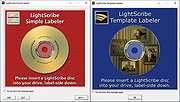 |
 |
Red Burner .NET v19.5.0.0 Red Burner .NET v19.5.0.0 Lightweight optical disc burning software for CD, DVD and Blu-ray media. Red Burner .NET is a standalone disc burning tool for creating and working with optical discs, disc images and optical drives. It supports CD, DVD and Blu-ray burning, image burning and conversion, rewritable media, M-Disc, DVD-RAM and an integrated virtual drive emulator. Features: • Burn audio, video and data CD, DVD and Blu-ray discs • Supports single, double, triple and quad layer media • Burn M-Disc, rewritable discs and DVD-RAM • Create, burn and convert disc images • Browse disc images with the internal image browser • Integrated virtual drive emulator • Supports ISO, BIN/CUE, IMG/CCD, NRG, CDI, PDI, B5I, B6I and GI image formats • Lightweight standalone design • Fast burning algorithm • Code-signed files • Donationware Supported operating systems: • Windows 7 or later Supported languages: • English Changes: v19.5.0.0 Not provided. Click here to visit the author's website. |
|
902 | Jun 05, 2026 OMID SOFT 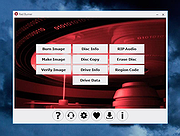 |
| Showing rows 1 to 3 of 3 | Showing Page 1 of 1 | 1 |
OlderGeeks.com Copyright (c) 2026
