|

|
Processed through Paypal No account required. |








Buy our over-priced crap to help pay the bills.



|
|
Processed through Paypal No account required. |
| Files | ||||
| File Name | Rating | Downloads | ||
 |
Dangerzone v0.11.0 Dangerzone v0.11.0 👉 Convert potentially dangerous documents into safe PDFs without exposing your computer to malicious content. Dangerzone is a free and open source document sanitization tool from the Freedom of the Press Foundation that lets you safely open PDFs, office documents, images and other potentially untrusted files. Instead of opening the original document directly, Dangerzone places it inside an isolated sandbox with no network access, converts each page into raw pixel data, and then reconstructs those pixels into a new, safe PDF. This process removes active content and other potentially malicious elements while preserving the document's visual appearance. Dangerzone supports more than 20 document types, including PDF files, major office-suite formats and common image formats. Because document processing takes place inside an isolated environment without network access, malicious content that might exploit the document converter is prevented from communicating with the outside world. Everything is processed locally on your computer. Features: • Converts potentially dangerous documents into safe PDF files • Uses an isolated sandbox to process untrusted documents • Renders document pages into raw pixel data before reconstructing them as PDFs • Removes potentially dangerous active content during conversion • Prevents the conversion sandbox from accessing the network • Processes documents locally on your computer • Supports more than 20 document and image formats • Supports PDFs and major office-suite document formats • Supports common image formats • Can process multiple documents • Allows additional documents to be added to an ongoing conversion • Supports converting another set of documents after completing a batch • Supports OCR processing • Free and open source under the AGPLv3 license • Maintained by the Freedom of the Press Foundation Supported operating systems: • Windows 10, Windows 11 • macOS, latest three supported releases, Intel and Apple Silicon • Ubuntu 22.04, Ubuntu 24.04, Ubuntu 25.10, Ubuntu 26.04 • Debian 12, Debian 13, Debian 14 • Fedora 43, Fedora 44 • Tails, current release • Qubes OS using a ... |
 |
2,266 | Sep 02, 2026 Micah Lee  |
|
Foxit Reader Portable v2026.1.1 Foxit Reader Portable v2026.1.1 👉 Lightweight and feature-rich PDF reader you can take anywhere. Foxit Reader Portable is a compact, portable version of the popular Foxit PDF Reader that lets you view, annotate, fill out, and sign PDF documents without installing anything on your system. Designed to run from a USB drive or other portable media, it allows you to carry your PDF viewer and personal settings with you and use it on any compatible Windows computer. Foxit Reader Portable offers fast performance, a clean interface, and strong compatibility with standard PDF documents. It supports advanced features such as commenting, highlighting, form filling, digital signatures, and secure document viewing. Its small footprint and portability make it ideal for users who need a powerful PDF solution on the go. Features: • View, print, and search PDF documents • Add comments, highlights, and annotations • Fill out and save PDF forms • Support for digital signatures and document security • Tabbed interface for working with multiple PDFs • Fast startup and lightweight performance • Portable, no installation required Supported operating systems: • Windows 7, Windows 8, Windows 10, Windows 11 Supported languages: English, Deutsch (German), Espaρol (Spanish), Portuguκs (Portuguese), Franηais (French), Русский (Russian), Italiano (Italian), Nederlands (Dutch), 日本語 (Japanese), العربية (Arabic), 한국어 (Korean), 繁體中文 (Traditional Chinese) Changes: v2026.1.1 04-27-26 New Features and Improvements in Foxit PDF Reader 2026.1.1.36485 Upgrade the real-time PDF collaboration service - now powered by Foxit Document Management System (DMS) in certain regions, delivering a more efficient workflow and a smoother, seamless user experience. Issues Addressed in Foxit PDF Reader 2026.1.1.36485 Fixed some security and stability issues. Click here for details. Click here to visit the author's website. |
|
7,901 | Jun 27, 2026 Foxit Software Incorporated & PortableApps.com (Vic Saville)  |
|
GenOffice v0.11.0 GenOffice v0.11.0 👉 A free, open-source office suite with six editors and optional AI assistance. GenOffice brings document writing, spreadsheets, presentations, PDF editing, HTML and Markdown together in one desktop workspace. It opens and saves native Microsoft Office files, including .docx, .xlsx and .pptx, and lets you work with your files locally. The suite includes Docs for word processing, Sheets for spreadsheets, Slides for presentations, PDF for editing and conversion, HTML for pages and reports, and Markdown for formatted notes. Its file engines preserve untouched portions of Office files rather than rebuilding everything each time you save. An optional AI assistant can work directly with your document. Ask it to rewrite a passage, build spreadsheet formulas, create a presentation or explain information in a file. Changes can be reviewed through snapshots, differences and rollback controls, with tracked revisions available in Docs. The office applications are free, with no ads or watermarks. AI features (optional) use Genspark credits or your own API provider, whose usage charges may apply. Opening, editing, saving and PDF-to-Office conversion run locally. Complex formatting can vary, so review important documents before sharing them. Features: • Six editors in one workspace: Docs, Sheets, Slides, PDF, HTML and Markdown. • Native Office formats: Open and save .docx documents, .xlsx workbooks and .pptx presentations. • Document editing: Work with styles, tables, images, headers, footers, comments and tracked changes. • Spreadsheet tools: Use live formulas, charts, pivot tables, slicers, conditional formatting and formula tracing. • Presentation editing: Work with slide masters, layouts, smart guides and image cropping. • PDF editing: Edit text and images directly within pages, and work with annotations and forms. • Local PDF conversion: Convert PDF files into editable Word, Excel or PowerPoint files without AI credits. • ... |
|
87 | Oct 01, 2026 Genspark 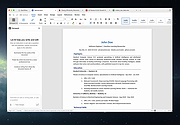 |
|
LibreOffice Portable v26.2.4 LibreOffice Portable v26.2.4 👉 LibreOffice Portable can run from a cloud folder, external drive, or local folder without installing into Windows. LibreOffice Portable is a full-featured office suite -- including a word processor, spreadsheet, presentation tool, drawing package and database -- that's compatible with Microsoft Office, Word Perfect, Lotus and other office applications. It's easy-to-use and feature-rich, performing nearly all of the functions you'd expect in an office suite, but at no cost. Additional functionality including the Base database and document creation wizards is enabled by installing the jPortable portable Java runtime environment. Features: • Portable version runs without installation from USB or external drive • Includes Writer (word processor), Calc (spreadsheet), Impress (presentations), Draw (vector graphics), Base (database), and Math (formula editor) • Compatible with Microsoft Office file formats (DOCX, XLSX, PPTX) • Supports OpenDocument Format (ODF) as its native standard • Built-in PDF export and document signing • Extensive formatting, styles, and templates for professional documents • Macro support and scripting for automation • Extensions and add-ons available to expand functionality • Multi-language interface and spellchecking support • Cross-platform compatibility with consistent interface • Offline use with no cloud dependency • Regular updates from The Document Foundation Supported operating systems: Windows 7, 8, 10, 11 and WINE Supported languages: English, Afrikaans, Albanian, Amharic, Arabic, Armenian, Assamese, Asturian, Azerbaijani, Basque, Belarusian, Bengali, Bosnian, Breton, Bulgarian, Burmese, Catalan, Chinese (Simplified), Chinese (Traditional), Croatian, Czech, Danish, Dutch, Dzongkha, English (UK), Esperanto, Estonian, Finnish, French, Galician, Georgian, German, Greek, Gujarati, Hebrew, Hindi, Hungarian, Icelandic, Indonesian, Irish, Italian, Japanese, Kannada, Kazakh, Khmer, Korean, Kurdish, Lao, Latvian, Lithuanian, Macedonian, Maithili, Malayalam, Marathi, Mongolian, Nepali, Norwegian (Bokmεl), Norwegian (Nynorsk), Occitan, Odia, Persian, Polish, Portuguese, Portuguese (Brazil), Punjabi, Romanian, Russian, Sanskrit, Scottish Gaelic, Serbian (Cyrillic), Serbian (Latin), Sinhala, Slovak, Slovenian, Spanish, Swedish, Tamil, Telugu, Thai, Tibetan, Turkish, Ukrainian, Urdu, Uyghur, Uzbek, Vietnamese, Welsh Writer Edit all kinds of documents Writer has all the features you need ... |
|
9,500 | Jul 26, 2026 The Document Foundation & PortableApps.com 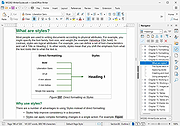 |
|
LibreOffice Productivity Suite v26.8.0 LibreOffice Productivity Suite v26.8.0 👉 Free and powerful open-source office suite for documents, spreadsheets, presentations, and more. LibreOffice is a full-featured, open-source productivity suite that includes applications for word processing, spreadsheets, presentations, drawings, databases, and mathematical formulas. Designed as a powerful alternative to commercial office software, LibreOffice offers broad file format compatibility, including native support for OpenDocument Format (ODF) and strong interoperability with Microsoft Office file types. LibreOffice includes Writer for documents, Calc for spreadsheets, Impress for presentations, Draw for vector graphics and diagrams, Base for database management, and Math for formula editing. It provides a customizable interface, extensive template support, advanced formatting tools, and a large extension ecosystem to expand functionality. Writer Edit all kinds of documents Writer has all the features you need from a modern, full-featured word processing and desktop publishing tool. It's simple enough for a quick memo, but powerful enough to create complete books with contents, diagrams, indexes, and more. You're free to concentrate on your message, while Writer makes it look great. Calc The spreadsheet for everyone Calc is the free spreadsheet program you've always needed. Newcomers find it intuitive and easy to learn, while professional data miners and number crunchers appreciate the comprehensive range of advanced functions. Built-in wizards guide you through choosing and using a comprehensive range of advanced features. Or you can download templates from the LibreOffice template repository, for ready-made spreadsheet solutions. Impress Presentations done right In Impress, creating and editing slides is very versatile thanks to different editing and view modes: Normal (for general editing), Outline (for organizing and outlining your text content), Notes (for viewing and editing the notes attached to a slide), Handout (for producing paper-based material), and Slide Sorter (for a thumbnail sheet view that lets you quickly locate and order your slides). Draw Eye-popping graphic documents Draw lets you produce anything from a quick sketch to a complex plan, and ... |
|
12,590 | Aug 30, 2026 The Document Foundation |
|
Microsoft Windows and Office ISO Download Tool v8.46 Microsoft Windows and Office ISO Download Tool v8.46 Note: This tool now opens an ad window that says you must donate or volunteer to close it. You can minimize this window and continue to use the tool but please consider donating to their project. This tool allows an easy and comfortable way to download genuine Windows 7, Windows 8.1 and Windows 10 disk images (ISO) directly from Microsoft's servers, as well as Office 2010, Office 2013, Office 2016, Office 2019, Expression Studio and Office for Mac. In the past, Microsoft provided disk images for many of their products through their subcontractor "Digital River". These downloads were pulled in early 2014. Afterwards, Microsoft made a limited selection of downloads available on their TechBench site. Our tool is based on TechBench, and makes a range of hidden products available for download. Requirements: Windows 7 or newer, .NET Framework 4.x, Internet Explorer 8 or newer. Version 8.46 (8 January 2021): Added new builds for Office 2019 for Mac; added new Insider and developer versions up to build 21286; ISO Tools with full SHA256 support for MSDN metadata dump (and MD5 support for old Digital River downloads); many small bugfixes under the hood. Click here to visit the author's website. |
|
10,686 | Aug 15, 2021 Jan Krohn 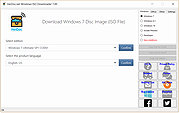 |
 |
PropertySystemView v1.22 PropertySystemView v1.22 👉 View and edit Windows file and window properties with ease. PropertySystemView is a lightweight portable utility that allows you to view and modify the properties of files and Windows using the Windows Property System. It can edit metadata stored in media files, Office documents, images, and other supported file types, including fields such as Title, Comments, Authors, Tags, Date Taken, Media Created, Date Imported, Content Created Date, and many more. It also supports working with Windows properties, such as setting the System.AppUserModel.ID property of a window to customize taskbar behavior. The program supports both an easy-to-use graphical interface and a powerful command-line mode for automation. Features: • View and modify Windows Property System metadata for supported files. • Edit media, image, and Microsoft Office document properties. • Modify timestamps such as Media Created, Date Taken, and Date Imported. • View and edit Windows window properties. • Add, edit, and remove supported properties. • Drag-and-drop file loading. • Browse and display all properties available on your system. • Powerful command-line interface for scripting and automation. • Portable application with no installation required. • Available in both 32-bit and 64-bit versions. Supported operating systems: • Windows Vista, Windows 7, Windows 8, Windows 8.1, Windows 10, Windows 11 (32-bit and 64-bit) Supported languages: English, Brazilian Portuguese, Dutch, French, German, Hungarian, Italian, Japanese, Persian, Russian, Simplified Chinese, Slovak, Traditional Chinese, Turkish Changes: v1.22 07-11-26 Added 'Black Background' option (under the View menu). When enabled, the main table is displayed with a black background and white text instead of the default system colors. This download is for the Windows 64bit version (very bottom of page). If you need the Windows 32bit version, download here. Click here to visit the author's website. |
|
4,736 | Jul 17, 2026 Nir Sofer 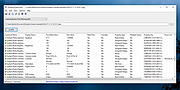 |
|
Windows and Office Genuine ISO Verifier v11.23.45.24 Windows and Office Genuine ISO Verifier v11.23.45.24 Free program to verify Windows and Office ISO and EXE file hashes and compares them with the official file hashes from MSDN and VLSC. The program is free. No need to install, just run the application. Windows and Office Genuine ISO Verifier is a lightweight piece of software that enables you to determine whether you have a genuine copy of Windows or with minimal effort. Straightforward installation and intuitive interface Since the application comes in a portable package, the setup is a quick matter of decompressing the archive in the desired location on your hard disk. However, in case you are having a hard time accessing the file, then you should consider Unblocking the tool from Properties in the context menu. Even though it is not exactly eye-candy, the interface is user-friendly and unlikely to cause you any real troubles while navigating. In fact, the UI is comprised of a single, medium-size window that features very intuitive fields. Consequentially, functionality-wise, using the tool entails specifying the input file and the app does the rest of the job automatically. It supports numerous versions and languages of Office and Windows The strong point of the program stems from the fact that it is designed to recognize a vast array of hashes that are associated with Microsoft's operating system and Office bundle. To be more precise, the utility can compare file SHA-1 to relatively old Microsoft releases, such as Office 95 and Windows XP. On a side note, in case you already performed a scan for the file using other third party software solutions, then you can add the SHA-1 in the dedicated field and determine the authenticity of the file on the spot. Then again, verifying an ISO file is not a lengthy process and should not take too much of ... |
|
982 | Nov 20, 2024 Nebojša Vučinić 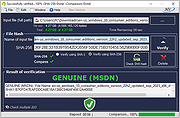 |
| Showing rows 1 to 8 of 8 | Showing Page 1 of 1 | 1 |
OlderGeeks.com Copyright (c) 2026
