|

|
Processed through Paypal No account required. |








Buy our over-priced crap to help pay the bills.



|
|
Processed through Paypal No account required. |
| Files | ||||
| File Name | Rating | Downloads | ||
 |
FastCopy v5.11.2 FastCopy v5.11.2 👉 High-speed file copy and backup software for Windows. FastCopy is a fast file copy and backup utility for Windows designed to maximize transfer performance by using multi-threaded read, write, and verify operations together with Overlapped I/O and Direct I/O. It supports Unicode file names, paths longer than MAX_PATH, and include or exclude filtering using UNIX-style wildcards. FastCopy is built to reduce the load on other running applications while delivering very high copy performance on modern storage devices. Features: • Fast file copy and backup software for Windows • Verification support for more reliable copying • Can record hash values for each file • Uses multi-threaded read, write, and verify processing • Uses Overlapped I/O and Direct I/O for high performance • Supports Unicode file names • Supports file paths longer than MAX_PATH (260 characters) • Supports include and exclude filters using UNIX-style wildcards • Lightweight design built with Win32 API only Supported operating systems: • Windows 7, Windows 8, Windows 8.1, Windows 10, Windows 11 • Windows Server 2012, Windows Server 2012 R2, Windows Server 2016, Windows Server 2019, Windows Server 2022, Windows Server 2025 Supported languages: • English, Japanese, Chinese Changes: v5.11.2 12-10-25 • Improved copy performance in some environments • Fixed issue with timestamp handling under specific conditions • Fixed minor bugs Note: If you need the portable version, use the "Extract" button in the installer. Click here to visit the author's website. |
 |
12,001 | Mar 27, 2026 SHIROUZU Hiroaki 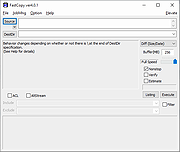 |
 |
Long Path Fixer v0.9.0.0 32bit Long Path Fixer v0.9.0.0 32bit Got a "Path Too Long" error in Windows? Try this free utility for moving, copying, renaming and deleting files and folders with Very Long Paths. What does it do? Simply put, Long Path Fixer is a program enables you to "get at" files and folders that Windows Explorer refuses to reach, that is, anything with a path longer than the Windows API can handle (MAX_PATH: 259 actual characters). With Long Path Fixer, you can effortlessly manipulate files and folders with paths of up to 32,767 characters in length. No destination is "Too Long"! How does it work? Long Path Fixer presents you with a simple list of files and folders in the current directory (including "hidden" files and folders). You can drag and drop files or folders onto it and it will navigate directly to path of whatever you dropped. From there, you simply click on the file or folder you want to move, copy, delete, and hit the appropriate button; Move, Copy or Delete. All these options are also available from the context (right-click) menu, as well as rename (I may add a button for that!), delete to recycle bin, copy the path and so on. Just like Explorer windows, F5 refreshes the list. The top item "●●" enables you to go UP, as if you hadn't guessed! There is a drop-down menu at the top with all your available drives listed, so you can start navigating from there, use your up/down arrow keys to switch drives and so on. Having said that, it's usually easier to drag-and-drop items directly from Explorer. Note: if you drag a shortcut, Long Path Fixer will automatically resolve the shortcut to its real location. If you would prefer to have it open at the actual .lnk file's directory, hold drown the <Ctrl> key whilst dropping the item ... |
|
4,515 | Jan 12, 2022 corz.org 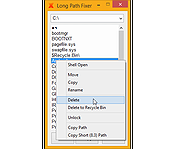 |
|
Long Path Fixer v0.9.0.0 64bit Long Path Fixer v0.9.0.0 64bit Got a "Path Too Long" error in Windows? Try this free utility for moving, copying, renaming and deleting files and folders with Very Long Paths. What does it do? Simply put, Long Path Fixer is a program enables you to "get at" files and folders that Windows Explorer refuses to reach, that is, anything with a path longer than the Windows API can handle (MAX_PATH: 259 actual characters). With Long Path Fixer, you can effortlessly manipulate files and folders with paths of up to 32,767 characters in length. No destination is "Too Long"! How does it work? Long Path Fixer presents you with a simple list of files and folders in the current directory (including "hidden" files and folders). You can drag and drop files or folders onto it and it will navigate directly to path of whatever you dropped. From there, you simply click on the file or folder you want to move, copy, delete, and hit the appropriate button; Move, Copy or Delete. All these options are also available from the context (right-click) menu, as well as rename (I may add a button for that!), delete to recycle bin, copy the path and so on. Just like Explorer windows, F5 refreshes the list. The top item "●●" enables you to go UP, as if you hadn't guessed! There is a drop-down menu at the top with all your available drives listed, so you can start navigating from there, use your up/down arrow keys to switch drives and so on. Having said that, it's usually easier to drag-and-drop items directly from Explorer. Note: if you drag a shortcut, Long Path Fixer will automatically resolve the shortcut to its real location. If you would prefer to have it open at the actual .lnk file's directory, hold drown the <Ctrl> key whilst dropping the item ... |
|
5,134 | Jan 12, 2022 corz.org |
 |
Thoth v3.2.0 Thoth v3.2.0 👉 A local-first AI assistant focused on privacy, autonomy, and on-device intelligence. Thoth is a free and open source local-first AI assistant designed to keep your models, data, and workflows on your own machine instead of in the cloud. It combines autonomous tool use, long-term memory, voice input and text-to-speech, vision and screen capture, health and habit tracking, workflows and scheduling, messaging channels, and file and data handling into a native desktop app. Thoth is built to give users personal AI sovereignty with local inference, local storage, opt-in online tools, and no subscriptions or telemetry. Features: • Local-first AI assistant with on-device inference, storage, and privacy-focused design • Autonomous ReAct agent with 20 integrated tools and 45 operations • Long-term memory with semantic recall across conversations • Voice input and offline text-to-speech with multiple English voice options • Vision support for webcam capture, screenshots, and image analysis • Habit and health tracking for medications, symptoms, exercise, mood, sleep, and more • Workflows and scheduling for reusable multi-step prompt sequences • Messaging channel support through Telegram bot and email integration • Gmail and Google Calendar integration with permission controls • File, chart, and structured data support including PDF, CSV, Excel, JSON, and Plotly charts • Native desktop app with first-run setup wizard, system tray support, and model selection • Supports curated local models including Qwen, Llama, Gemma, Mistral, DeepSeek, Phi, and more Supported operating systems: • Windows 10, Windows 11 • macOS 12 or higher Supported languages: Not Found Changes: v3.2.0 03-16-26 Automatic conversation summarization for effectively unlimited conversation length. Complete rewrite of the memory deduplication system to prevent duplicates and incorrect updates. Added deterministic deduplication using exact normalized-subject SQL lookups. Added cross-category deduplication for background extraction. Added source tracking for memories with live and extraction tagging. Added active thread exclusion to avoid race conditions during background extraction. Extended update_memory() to accept optional subject, tags, category, and source arguments. Added duplicate consolidation utility for near-duplicate memories. Added memory IDs ... |
 |
478 | Mar 17, 2026 Siddharth Sachar 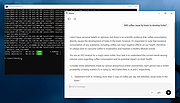 |
| Showing rows 1 to 4 of 4 | Showing Page 1 of 1 | 1 |
OlderGeeks.com Copyright (c) 2026
