|

|
Processed through Paypal No account required. |








Buy our over-priced crap to help pay the bills.



|
|
Processed through Paypal No account required. |
| Files | ||||
| File Name | Rating | Downloads | ||
 |
KillerPDF v1.4.1 KillerPDF v1.4.1 👉 Portable PDF editor for viewing, annotating, editing, merging, splitting, signing, and printing PDF files on Windows. KillerPDF is a portable PDF editor for field techs that lets you view, annotate, merge, split, edit text, draw, sign, search, and print PDF files without an Adobe subscription, installer, account, or telemetry. It is distributed as a single Windows executable and is designed to run locally without requiring a separate runtime install. Features: • High-quality PDF rendering via PDFium • Merge multiple PDFs into one file • Split selected pages into a new PDF • Drag-and-drop page reordering • Inline text editing with font matching against the original document • Add text boxes to PDF pages • Freehand drawing tools with adjustable size and color • Highlight overlays with adjustable color, size, and opacity • Draw and save reusable signatures • Place saved signatures anywhere on a page • Full-text search with highlighted results • Drag-select to copy text from PDF pages • Print with annotations flattened into the output • No installer, no admin rights, no account, and no config files Supported operating systems: • Windows 10, Windows 11 (64-bit) Supported languages: English Changes: v1.4.1 05-21-26 Added Page number jump box in toolbar. Type a page number and press Enter to navigate directly to that page. Signature auto-selects after placing so you can immediately reposition or resize without switching tools. Zoom to Width / Fit Page now re-applies when the window is resized. Middle mouse button panning. Hold middle mouse and drag to pan the view in any direction. Multi-page grid view toggle (toolbar button left of the zoom dropdown). Switch between seeing all pages in a scrollable grid and a focused single-page view. Defaults to grid view on open. Ctrl+S saves directly to the current file without a dialog. Ctrl+Shift+S opens Save ... |
 |
557 | May 22, 2026 SteveTheKiller 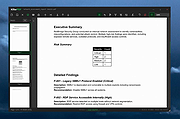 |
|
KillerScan v1.4.0 KillerScan v1.4.0 👉 Fast portable network scanner for field techs and administrators. KillerScan is a fast network scanner built for field techs that combines ARP and ping discovery, TCP port probing, active fingerprinting, vendor lookup, and weighted-score device classification in a single portable Windows executable. It is designed to quickly identify devices on a subnet, gather service and fingerprint details such as HTTP, SSH, TLS, NetBIOS, and SNMP data, and help you classify systems like Windows PCs, Linux servers, printers, NAS devices, cameras, and other network hardware without requiring a separate runtime installation. Features: • ARP cache and parallel ping sweep discovery for quickly finding live devices • TCP port scanning across 24 common service ports • Active fingerprinting with HTTP title and server header detection • SSH banner, TLS certificate subject, NetBIOS name, SNMP sysDescr, and ICMP TTL collection • MAC OUI vendor identification using the IEEE registry • Weighted-score classifier for identifying hypervisors, Windows systems, Linux servers, printers, NAS devices, cameras, IoT hardware, mobile devices, Home Assistant systems, and more • Right-click actions to copy IP, MAC, or hostname values • Quick launch options for RDP, SSH, and browser access • Manual device type override options • CSV and HTML export Supported operating systems: • Windows 10 (x64), Windows 11 (x64) Supported languages: English Changes: v1.4.0 05-16-26 Added Portable mode detection: app launches directly; if running outside the install location a PORTABLE badge and Install button appear in the status bar Custom themed install confirmation dialog Film grain overlay on the results area background Changed Scan button switched to outlined style matching killertools.net TextBox inputs now visually distinct from card surfaces (darker bg, visible border) Network info bar labels each value: local:, gw:, dns: prefixes in dim green Column headers: reduced height, transparent background, cleaner minimal ... |
|
524 | May 22, 2026 SteveTheKiller 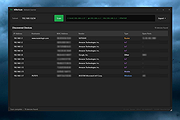 |
| Showing rows 1 to 2 of 2 | Showing Page 1 of 1 | 1 |
OlderGeeks.com Copyright (c) 2026
