|

|
Processed through Paypal No account required. |








Buy our over-priced crap to help pay the bills.



|
|
Processed through Paypal No account required. |
| Files | ||||
| File Name | Rating | Downloads | ||
 |
AnyViewer Free v5.8.0 WARNING: If someone you don’t know called you... or you dialed a number that suddenly appeared on your screen... and they told you to download this program... IT IS A SCAM. HANG UP IMMEDIATELY! AnyViewer Free v5.8.0 👉 Free remote desktop software for accessing and supporting computers from another computer, tablet, or phone. AnyViewer Free is remote desktop software for personal use that lets you remotely access and support devices, whether attended or unattended, from another computer, tablet, or smartphone. It is designed for fast remote control, stable connections, high-quality image display, remote file transfer, chat, multiple monitor support, screen mirroring, and secure remote sessions using end-to-end encryption. Features: • Remotely access personal devices from a PC, Mac, tablet, or smartphone • Supports attended and unattended remote access • Fast remote control with stable connection routing • High-quality image display with low latency • In-session and off-session remote file transfer • Chat during remote support sessions • Multiple monitor support • Display multiple remote screens in separate windows • Adaptive screen scaling • Mirror Android or iOS screens to a computer • Remote reboot and reconnect • Shortcuts to tools such as Command Prompt and Task Manager • Blacklist and whitelist access permissions by account or device ID • 256-bit asymmetric ECC end-to-end encryption • Two-factor authentication support Supported operating systems: • Windows 8.1, Windows 10, Windows 11 • Windows Server 2012 R2, Windows Server 2016, Windows Server 2019, Windows Server 2022 • macOS 10.15 or later • iOS 10.0 to iOS 16 • Android 6.0 or later Supported languages: English, French, German Changes: v5.8.0 07-07-26 Enhanced: Support for quick file transfer between My Devices on Windows. Simply drag and drop files into the Send Files area to send them directly to the target device without the need to open the File Transfer window. This download is for the Windows portable version (very bottom of page). All other download assets are below: Other Windows: AnyViewerSetup_x64.exe AnyViewerSetup.exe (32bit) macOS: AnyViewer.dmg iOS: App Store Android: AnyViewerSetup.apk Google Play Click here to visit the author's website. |
 |
1,311 | Sep 16, 2026 AOMEI Technology Co., Ltd 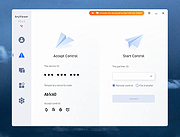 |
|
BBM (BlackBerry Messenger) for iOS 1.0.0.70 BBM (BlackBerry Messenger) for iOS 1.0.0.70 The OFFICIAL version of BBM™ from BlackBerry is now here for iOS. Get the free BBM app for the best way to stay connected with friends and family. Chat with friends on Android, BlackBerry and iPhone: • BBM is always on and always connected – no app to open • Know when messages have been delivered (D’s) and read (R’s) • Share photos, files, documents, voice notes and more • See when contacts are responding to your message • Emoticons for every mood and emotion let you express yourself BBM lets you protect your privacy. You control it: • You chose how to share your information - BBM uses PINs instead of phone numbers or email addresses so that it's more private, and you always control who can contact you • You chose your contacts – 2-way opt-in means you have control over who is able to message you Chat and Share with many at once: • Groups – BBM groups help you share pictures, lists, and appointments with group members. You can even be in a group with people who aren't part of your own BBM contact list. • Multi-person chats – Invite multiple contacts to have a chat together. • Broadcast messages – Send a message to multiple BBM contacts at one time. Create your own BBM profile: • Post a profile picture using images, pictures or even animated pictures (GIFs). • Update your status to let people know what you’re up to or how you feel |
 |
11,714 | Oct 22, 2013 BlackBerry Limited |
|
Google Chrome for iOS Google Chrome for iOS Browse fast with Chrome, now available on your iPhone, iPod touch and iPad. Sign in to sync your personalized Chrome experience from your computer, and bring it with you anywhere you go. Search fast • Search and navigate fast, directly from the same box. Choose from results that appear as you type. Simple, intuitive experience • Open and quickly switch between an unlimited number of tabs. On your iPhone and iPod touch, flip through tabs the way you would fan a deck of cards. On iPad, swipe from edge to edge to switch tabs. Sign in • Sign in to Chrome to sync your open tabs, bookmarks, passwords, and omnibox data from your computer to your iPhone, iPod touch, or iPad. Pick up right where you left off. • Send pages from Chrome on your computer to your iPhone, iPod touch, or iPad with one click and read them on the go, even if you’re offline. Privacy • Open a tab in Incognito* to browse without saving your history. |
|
12,557 | Oct 24, 2013 Apple |
|
HopToDesk v1.46.50 WARNING: If someone you don’t know called you... or you dialed a number that suddenly appeared on your screen... and they told you to download this program... IT IS A SCAM. HANG UP IMMEDIATELY! HopToDesk v1.46.50 👉 Free and secure remote desktop software with screen sharing, remote control, file transfer, and live chat. HopToDesk is a free remote desktop tool that lets you share your screen, remotely control computers and devices, transfer files, and chat during support sessions. It is free for personal and commercial use, open source, and uses end-to-end encryption for screen sharing, chats, and file transfers. Features: • Remote desktop control • Screen sharing • File transfer • Live chat • End-to-end encrypted traffic • Free for personal and commercial use • Open source • Portable mode on Windows • Installed mode with background service support • Unattended access with permanent password • Direct IP access • IP whitelisting • SOCKS5 proxy connections • Remote terminal • Port forwarding • Camera / view-only mode • Quick Support mode • Address book and tags • LAN discovery • Multiple screen support • Remote printing on Windows and macOS • Audio streaming • Session recording • Screenshots • Switch sides during a session • Privacy mode on Windows and macOS • Two-factor authentication • Clipboard sync permission control • File transfer permission control • Remote restart permission control • TCP tunneling permission control • Wake On LAN permission support Supported operating systems: • Windows XP, Windows 7 or newer • macOS 10.14 Mojave or newer • Ubuntu 18.04 or newer, Debian 9 or newer, CentOS 7 or newer, openSUSE 42/15 or equivalent, Fedora, Manjaro, AppImage, Flatpak • FreeBSD 13 or newer • Raspberry Pi 2 and newer • ChromeOS devices compatible with Google Play • Android 5.0 or newer • iOS 11.0 or newer Supported languages: English, French, Spanish, Portuguese, German, Dutch, Polish, Czech, Norwegian, Swedish, Russian, Turkish, Hebrew, Arabic, Bahasa, Vietnamese, Simplified Chinese, Traditional Chinese, Japanese, Korean, Thai Changes v1.46.50 09-12-2026 Wayland, Windows Server and other Linux improvements, translation updates. This download is for the Windows 64bit version (very bottom of ... |
|
4,657 | Sep 16, 2026 HopToDesk 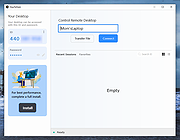 |
|
iDescriptor v0.5.0 iDescriptor v0.5.0 👉 Free, open-source, cross-platform iDevice management tool. Itunes? We don't need no stinkin' iTunes! iDescriptor is a free, open-source, and cross-platform iDevice management tool for working with supported Apple devices from Windows, macOS, and Linux. It provides a modern interface for connecting to devices over USB, browsing files, managing photos, viewing live screens, using AirPlay, checking cable information, discovering devices on the local network, and performing certain device actions. The project also includes tools such as App Store app downloading and installation, virtual location simulation, SSH terminal access for jailbroken devices, and developer disk image management. Features: • USB connection support for Windows, macOS, and Linux • AirPlay screen casting to your computer • Download and install apps directly from the Apple Store • Virtual location simulation for supported iOS versions • iFuse filesystem mounting on Windows and Linux • Gallery access and wireless gallery import • File Explorer for browsing device files • Cable authenticity and connection information • Network device discovery on the local network • SSH terminal access for jailbroken devices • Query MobileGestalt for hardware and software details • Live wired screen viewing • Developer disk image management • Device actions including restart, shutdown, and recovery mode entry Supported operating systems: • Windows • macOS • Linux Supported languages: English Changes: v0.5.0 04-19-26 BUG FIX: Fixed an issue where exporting more than 240 files would fail (#77) IMPROVEMENT: AirPlay now uses legacy ports by default on Linux (thanks @medaminezghal, #73) Warning (macOS): If you encounter a "damaged" error when opening the app on macOS, run the following command in Terminal: xattr -c ~/Applications/iDescriptor.app This occurs because macOS blocks apps that are not signed with an Apple Developer ID. Clearing extended attributes bypasses this restriction. Alternatively, you can remove only the quarantine attribute: xattr -dr com.apple.quarantine /Applications/iDescriptor.app This download is for the Windows installer version (very bottom of page). All other download assets are below: Other Windows: iDescriptor-v0.5.0-Windows_x86_64.portable.zip macOS: iDescriptor-v0.5.0-Apple_Silicon.dmg iDescriptor-v0.5.0-Apple_Intel.dmg Linux: iDescriptor-v0.5.0-Linux_x86_64.AppImage.zip Click here to visit the author's website. |
|
1,018 | Jul 29, 2026 uncor3 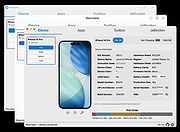 |
|
LocalSend v1.18.2 LocalSend v1.18.2 👉 Fast, private file sharing between nearby devices without the cloud. LocalSend is a free and open-source, cross-platform application for securely transferring files, folders, photos, videos, documents, text and other data between devices connected to the same local network. It provides an AirDrop-style experience that works across Windows, macOS, Linux, Android and iOS without requiring an account, an Internet connection or an external server. Devices running LocalSend automatically discover one another on the local network, allowing you to select what you want to send, choose a nearby device and begin the transfer. Data stays on your local network instead of being uploaded to a cloud service, and transfers are protected using HTTPS encryption. LocalSend can transfer any file type and is designed to take advantage of the speed of your local Wi-Fi or wired network without artificial bandwidth limits. It can also send text messages and links between devices, making it useful for quickly moving clipboard-style information from a phone to a computer or between computers. Files are saved to the receiving device's Downloads folder by default, although the destination can be changed in LocalSend's settings. Frequently used devices can be marked as favorites, and LocalSend can be configured to automatically accept transfers from trusted favorite devices. The application also includes a Share via Link feature for making selected files available through a web browser on the local network. Recent versions can receive files through links as well. No account or login is required, and LocalSend contains no advertising or tracking. Features: • Transfers files directly between nearby devices over the local network • Works across Windows, macOS, Linux, Android and iOS • No Internet connection, cloud storage or external server required • No account, registration or login required • Automatic discovery of nearby LocalSend devices • Send individual files, multiple files and folders • Supports photos, videos, documents and other file ... |
|
2,120 | Sep 29, 2026 LocalSend 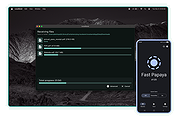 |
|
Nearby Glasses v1.0.8 Nearby Glasses v1.0.8 👉 Detects nearby smart glasses using Bluetooth Low Energy signals. Nearby Glasses is a free, open-source utility designed to detect nearby smart glasses by passively scanning Bluetooth Low Energy (BLE) advertising data. The app identifies supported smart glasses using Bluetooth manufacturer identifiers and can notify you when a compatible device is detected within range. Detection is based solely on publicly broadcast BLE advertising frames and does not establish a connection with other devices or transmit any of your data. The developer notes that false positives and missed detections are possible, as some non-glasses devices may use the same manufacturer identifiers. The project is licensed under the GNU AGPL v3.0 and is available for both Android and iOS.      Features: • Passively scans Bluetooth Low Energy (BLE) advertisements • Detects supported smart glasses using manufacturer identifiers • Adjustable RSSI threshold to control detection sensitivity • Configurable notification cooldown • Canary Mode for iOS operation • Optional scan log display • Processes all scan data locally on the device • Does not establish Bluetooth connections or pair with devices • No advertisements or user tracking • Free and open source under the AGPL v3.0 license Supported operating systems: • Android 8.0 (Oreo) or higher • iOS 17.0 or higher Supported languages: English, French, German, Swiss German, Italian, Portuguese (Brazil), Spanish Changes: v1.0.8 07-16-26 added fixes to Russian translation (partly) added support for HeyCyan (Nilox Smart AI Glasses, sold by ALDI/Hofer) added support for RollMe and Rogbird fixed some minor bugs      This download is for the Android APK file (very bottom of page). All other download assets are below: F-Droid APK: yj_nearbyglasses_1.0.8-izziFdroid.apk Or: Click here to visit the author's website. |
|
303 | Jul 17, 2026 Yves Jeanrenaud 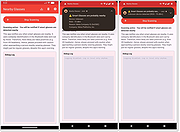 |
|
PDFgear v2.1.19 PDFgear v2.1.19 👉 Free all-in-one PDF editor, reader, converter, OCR tool and AI assistant. PDFgear is a free PDF editor and management suite for viewing, editing, converting, creating, annotating, signing, organizing and protecting PDF documents. It allows existing PDF text and images to be edited directly, includes OCR for scanned documents, supports batch conversions and provides PDFgear Copilot for working with documents using natural-language commands. PDFgear does not require an account, places no watermarks on exported documents and does not impose file-size or file-number limits on its desktop software. Features: • View and read PDF documents with multiple reading and navigation options • Directly edit, replace, add and delete existing PDF text • Change fonts, font sizes, styles and other text formatting • Add, replace, reposition and edit images and other PDF objects • Add text boxes, hyperlinks and customizable shapes • Highlight, underline and strike through text • Add notes, comments, stamps, watermarks and freehand drawings • Fill interactive PDF forms • Add signatures and certificate-based digital signatures • Secure eSign for signing documents with greater security and confidence • Request signatures from multiple parties • OCR scanned PDFs and image-based documents • Extract text from selected areas with OCR • OCR supports more than 30 languages during PDF conversion • Convert PDFs to Word, Excel, PowerPoint, TXT, images and other formats • Create PDF documents from multiple file formats • Batch convert multiple PDF documents • Merge and split PDF files • Rearrange, rotate, crop, extract, duplicate, insert and delete PDF pages • Add customizable page numbers to headers or footers • Compress PDF documents • View and manage PDF attachments • Redact sensitive information • Manage PDF properties • PDFgear Copilot accepts natural-language instructions for PDF tasks • AI tools can summarize, analyze, translate, rewrite and proofread document content • Search and replace text in PDF documents • Dark mode for PDF viewing • Process ordinary PDF editing tasks locally on the computer • No account required • No ... |
|
2,474 | Aug 20, 2026 PDF Gear Tech PTE. LTD. 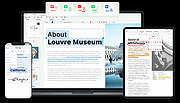 |
|
Twitter for iOS Twitter for iOS Official Twitter app. Follow your interests: instant updates from your friends, industry experts, favorite celebrities, and what’s happening around the world. Get short bursts of timely information on the official Twitter app for your iOS device. Real-time search reveals breaking news, while trending topics and maps show what’s happening now around the world. View trends, browse your interests and see suggested users in several categories, including fashion, entertainment and travel, or search to find out what people are saying about topics you care about, such as politics or big sporting events. Features: Browse interests, Find & follow friends, Tweet, Retweet, Favorite, Direct Message privately with your followers, share photos, videos and web pages, real-time search, view maps, trends, and follow. Change Info: This update includes enhancements to Tweets in the home timeline. Be a part of the moment •Tweets with Twitter photos, Vine videos, and other select content now show a preview in your home timeline. Tap the image to reveal the full screen version. Tweet a picture without text and let the image say it all Joining the conversation just got easier •You can reply, retweet, favorite, or follow someone straight from a Tweet in your home timeline Note: You can switch off Tweet previews in “Settings” |
|
36,156 | Nov 02, 2013 Twitter Inc. |
| Showing rows 1 to 9 of 9 | Showing Page 1 of 1 | 1 |
OlderGeeks.com Copyright (c) 2026
