|

|
Processed through Paypal No account required. |








Buy our over-priced crap to help pay the bills.



|
|
Processed through Paypal No account required. |
| Files | ||||
| File Name | Rating | Downloads | ||
 |
BATExpert v1.14.5.27 BATExpert v1.14.5.27 Monitor and evaluate the health of your laptop battery. BATExpert gives you a crystal-clear vision of your laptop battery health status right at your fingertips. Designed specifically for notebook and laptop computers, it displays important battery information in a simple interface and helps you monitor battery condition, usage, and performance. BATExpert decodes battery manufacturer information and provides real-time details about charge status, current power usage, battery chemistry, and other useful metrics. The program can also estimate the remaining time before a low-battery warning occurs and recommends a battery upgrade when appropriate. Features: • Clear laptop battery manufacturer data decoding • Displays current charge status • Shows current usage and charge rate • Displays battery type (chemistry) • Displays battery temperature when available • Estimates time remaining before low-level warning • User-friendly interface • Internationalization support • Battery upgrade recommendations when appropriate Supported operating systems: • Windows XP, Windows Vista, Windows 7, Windows 8, Windows 8.1, Windows 10, Windows 11 Supported languages: • English Changes: v1.14.5.27 04-23-23 • Updated ICS library to v8.70 • Updated OpenSSL to v3.1.0 • Added ReactOS detection in logs • Improved Windows Server 2003 detection Click here to visit the author's website. |
 |
10,983 | Jun 05, 2026 KC Softwares 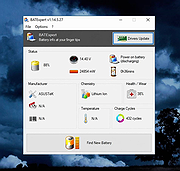 |
 |
Clear Disk Info v4.4.1.0 Clear Disk Info v4.4.1.0 👉 Monitor hard drive and SSD health information with a clean and easy-to-read interface. Clear Disk Info is a lightweight disk monitoring utility designed to display detailed SMART information for hard drives and SSDs. It helps users keep track of drive health, temperature, firmware details, power-on hours, transfer modes, and other important storage statistics in a clear and organized layout. The program supports multiple storage device types and provides quick access to essential diagnostic information for detecting potential drive problems before data loss occurs. Features: • Displays SMART health and diagnostic information for HDDs and SSDs • Shows drive temperature, health status, firmware, and serial numbers • Supports SATA, NVMe, and USB-connected storage devices • Monitors power-on hours, drive usage, and transfer modes • Clean and lightweight user interface with easy-to-read statistics • Provides real-time drive condition monitoring • Supports multiple drives simultaneously • Portable and installer versions available • Designed for fast access to essential disk health data Supported operating systems: • Windows 7, Windows 8, Windows 10, Windows 11 Supported languages: English Changes: v4.4.1 08-02-25 Refreshed the UI with a more modern font. Bug fixes Click here to visit the author's website. |
|
11,612 | May 19, 2026 Carifred 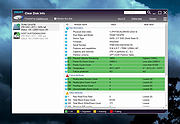 |
|
CrystalDiskInfo v9.9.3 CrystalDiskInfo v9.9.3 👉 Monitor and analyze the health and performance of your hard drives and SSDs. CrystalDiskInfo is a free hard drive health monitoring utility that provides detailed information about your storage devices, including HDDs, SSDs, and NVMe drives. It reads S.M.A.R.T. (Self-Monitoring, Analysis and Reporting Technology) data to help detect potential drive failures before they happen. CrystalDiskInfo displays temperature, health status, firmware version, serial number, interface, transfer mode, drive letters, and total host reads and writes for supported devices. It supports a wide range of storage interfaces and gives users a clear overview of drive condition through an easy-to-read interface with color-coded health indicators. CrystalDiskInfo is lightweight, easy to use, and ideal for anyone who wants to keep an eye on their system’s storage reliability and performance. Features: • Displays detailed S.M.A.R.T. information • Real-time drive temperature monitoring • Health status indicators with color coding • Supports HDD, SSD, and NVMe drives • Shows firmware, serial number, and interface details • Tracks total host reads and writes • Alert notifications for critical drive conditions • Lightweight and easy-to-use interface Supported operating systems: • Windows XP, Windows Vista, Windows 7, Windows 8, Windows 10, Windows 11 Supported languages: Abkhazian, Arabic, Armenian, Azerbaijani, Bulgarian, Catalan, Croatian, Czech, Danish, Dutch, English, Filipino, Finnish, French, Galician, German, Greek, Hebrew, Hungarian, Italian, Japanese, Korean, Lithuanian, Norwegian, Persian, Polish, Portuguese (Brazil), Portuguese (Portugal), Romanian, Russian, Serbian, Simplified Chinese, Slovak, Slovenian, Spanish, Swedish, Thai, Traditional Chinese, Turkish, Ukrainian, Vietnamese Changes: v9.9.3 10-11-26 Fixed: Transfer Mode Display for JMicron External Controllers Improved: SanDisk SSD SSD support Updated: Language files (Traditional Chinese) Click here to visit the author's website. |
|
10,666 | Oct 12, 2026 hiyohiyo  |
|
EpilepsyGuard v1.02 EpilepsyGuard v1.02 👉 Protects photosensitive users by reducing potentially harmful flashing on the screen. EpilepsyGuard is an open-source accessibility utility designed to help reduce the risk of photosensitive seizures while using a computer. It monitors the contents displayed on your screen in real time and automatically detects rapid flashing patterns that may exceed safe thresholds. When potentially hazardous flashing is detected, the program temporarily darkens or covers the affected area to reduce exposure while allowing you to continue using your computer. EpilepsyGuard is intended as an extra layer of protection for people with photosensitive epilepsy or sensitivity to flashing images while browsing the web, watching videos, playing games, or using other multimedia applications. It runs quietly in the background with minimal system impact and can be enabled or disabled at any time. ⚠️ Warning: EpilepsyGuard is not a medical device and cannot guarantee protection against seizures. It may not detect every flashing pattern or visual trigger, and should not be relied upon as your only means of protection. If you have photosensitive epilepsy or another light-sensitive medical condition, continue to follow your healthcare provider's recommendations and use appropriate precautions. If you experience symptoms, stop using the affected content immediately and seek medical advice. Features: • Continuously monitors the screen for potentially hazardous flashing patterns • Automatically reduces or obscures detected flashing regions • Designed to help reduce exposure to photosensitive seizure triggers • Runs in the background with low resource usage • Simple interface with quick enable and disable controls • Open source Supported operating systems: • Windows 10, Windows 11 Supported languages: • English Changes: v1.02 06-22-26 • Improved flash detection reliability • Bug fixes and stability improvements Note: This file has one hit on VirusTotal. We have confirmed this to be a false positive. The file is safe. Click here to visit the author's website. |
|
424 | Jul 02, 2026 SanicScript 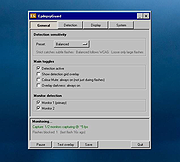 |
|
GSmartControl v2.0.2 GSmartControl v2.0.2 👉 Hard disk and SSD health inspection tool using S.M.A.R.T. data. GSmartControl is a graphical user interface for smartctl (from smartmontools) that allows you to inspect the S.M.A.R.T. data of hard disk drives and solid-state drives to determine their health status. It supports ATA and SCSI devices and provides detailed drive information, attributes, error logs, and self-test results. GSmartControl enables you to run various self-tests, including short, extended, and conveyance tests, and displays the results in an easy-to-read format. It also provides drive identification information, capabilities, and statistics to help diagnose potential hardware issues before failure occurs. Features: • View detailed S.M.A.R.T. attributes and drive information • Perform short, extended, and conveyance self-tests • Automatic detection of ATA and SCSI devices • Display error logs and self-test logs • Advanced drive information and capability reporting • Cross-platform support Supported operating systems: • Windows 7, Windows 8, Windows 10, Windows 11 • macOS • Linux Supported languages: English Changes: v2.0.2 02-24-25 Support GCC 11 (and Ubuntu 22.04) by using and vendoring fmt library (#77). Support an option of saving smartctl output to text instead of JSON (#76). Restored pre-2.0.0 runtime support for smartctl < 7.3 (based on Text parser); this is an unsupported, old method without NVMe, provided for compatibility only (#77). Restored pre-2.0.0 support for standard (non-extended) self-test log found in very old ATA drives; the new JSON parser did not support this previously (#79). Better support for temperature values in JSON parser; this fixes unreasonably large temperature values (#78). Add a tooltip explaining self-test "lifetime hours" wrapping behavior (#73). Windows: Fixed a crash on Windows 7 when opening drive information by using Windows 7-compatible librsvg (#71). Windows: Avoid using non-integer font sizes. This download is for the Windows 64bit portable ... |
|
6,592 | Jun 29, 2026 Alexander Shaduri 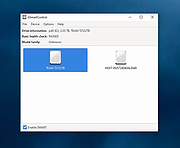 |
|
HDDScan v4.1 HDDScan v4.1 👉 Free hard drive and SSD diagnostic utility for testing storage devices, reading S.M.A.R.T. data, and monitoring drive health. HDDScan is a freeware diagnostic utility for hard drives, SSDs, RAID arrays, USB flash drives, and other supported storage devices. It can test drives for bad blocks and bad sectors, display and analyze S.M.A.R.T. attributes, run built-in S.M.A.R.T. tests, monitor drive temperature, display performance graphs during testing, generate identity reports, and adjust certain drive parameters such as AAM, APM, and PM. It also supports saving reports in MHT format, printing reports, and building command line tasks. Features: • Tests storage devices for bad blocks and bad sectors • Reads and analyzes S.M.A.R.T. attributes • Runs Short, Extended, and Conveyance S.M.A.R.T. tests • Monitors drive temperature • Supports verification, read, erase, and butterfly read tests • Displays performance graphs and response-time maps • Generates drive identity information reports • Supports AAM, APM, and power management controls on supported drives • Can start or stop spindle operation on supported drives • Saves reports in MHT format • Prints reports • Includes command line support • Supports IDE, SATA, SCSI, SAS, USB, FireWire, RAID volumes, flash drives, and supported SSDs Supported operating systems: • Windows XP SP3, Windows Server 2003, Windows Vista, Windows 7, Windows 8, Windows 10 Supported languages: • English Changes: v4.1 Features: Automatic Settings Preservation: Should help some drives "to remember" AAM/APM/PM setting after power cycle SMART Window will show "Drive State" at the top for easier "health" check Bugfixes: Command line "Administrator Permission" bugfix Click here to visit the author's website. |
|
770 | Apr 19, 2026 Artem Rubtsov 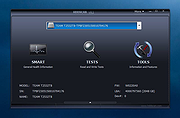 |
|
HWMonitor v1.68 HWMonitor v1.68 👉 Hardware monitoring tool that displays real-time system sensor data. HWMonitor is a hardware monitoring program that reads PC system health sensors to display voltages, temperatures, fan speeds, and power consumption in real time. It provides a clear and organized view of key hardware metrics gathered from onboard sensors, helping users monitor system stability and performance. HWMonitor supports a wide range of hardware including CPUs, GPUs, motherboards, and storage devices. It can read data from SMART-enabled hard drives, temperature sensors, and voltage rails, making it useful for diagnosing overheating issues or checking system performance under load. The interface is simple and lightweight, showing minimum, maximum, and current values for each sensor, allowing users to track changes over time without unnecessary clutter. Features: • Monitors temperatures, voltages, fan speeds, and power usage • Displays minimum, maximum, and current sensor values • Supports CPUs, GPUs, hard drives, and motherboards • Reads SMART data from storage devices • Lightweight and portable-friendly operation • Simple, easy-to-read interface Supported operating systems: • Windows XP, Windows Vista, Windows 7, Windows 8, Windows 10, Windows 11 Supported languages: English Changes: v1.68 09-14-26 PCI Express errors counters on AMD and Intel GPUs. New metrics on AMD Strix Point, Strix Halo and Kraken Point : NPU power, NPU clocks, NPU TOPS and TOPS per watt, NPU DRAM bandwidth usage, global platform power and DRAM read and write bandwidths. New HDD metrics (IOPS, average latency, NVMe controller link speed). Remembers devices & sensor types nodes state. This download is for the Windows x86/x64 version (very bottom of page). All other download assets are below: Other Windows: hwmonitor-arm64_1.05.zip Click here to visit the author's website. |
|
7,738 | Sep 16, 2026 CPUID 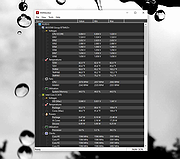 |
|
Universal Blood Pressure Manager v1.13.0 Universal Blood Pressure Manager v1.13.0 👉 Manage, track, and analyze blood pressure readings with a simple open-source logging tool. Universal Blood Pressure Manager is an open-source application designed to help users record and monitor their blood pressure readings. It provides a straightforward interface where users can log systolic and diastolic values, pulse rate, and additional notes for each measurement. Universal Blood Pressure Manager stores entries locally and allows users to keep a long-term history of their blood pressure readings. This makes it easier to track trends over time and share useful information with healthcare providers when needed. The program focuses on privacy, simplicity, and reliability while remaining lightweight and easy to use. Features: • Record systolic and diastolic blood pressure measurements • Log pulse rate and optional notes for each entry • Maintain a long-term history of blood pressure readings • Simple and easy-to-use interface for quick data entry • Local storage of data for privacy • Open-source project allowing community review and contributions Supported operating systems: • Windows 10, Windows 11 • Linux • macOS Supported languages: English Changes: v1.13.0 08-03-25 • Added the option to show the latest measurement in the title bar • Improved the database migration process • Updated translations • Minor improvements and fixes This download is for the Windows installer version (very bottom of page). All other download assets are below: Other Windows: ubpm_qt5-1.13.0-x86_64.exe(Try this version if the Qt6 version does not run properly on your system.) macOS: ubpm_qt6-1.13.0-x86_64+aarch64.dmg ubpm_qt5-1.13.0-x86_64+aarch64.dmg (Try this version if the Qt6 version does not run properly on your system.) Linux: ubpm_qt6-1.13.0-x86_64.AppImage ubpm_qt6-1.13.0-aarch64.AppImage ubpm_qt5-1.13.0-x86_64.AppImage ubpm_qt5-1.13.0-aarch64.AppImage (Try this version if the Qt6 version does not run properly on your system.) Click here to visit the author's website. |
|
700 | Mar 06, 2026 Thomas Lowe 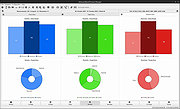 |
|
Windows Health v1.0 Windows Health v1.0 Scan and replace corrupted system files in Windows 10 and Windows 11 Great portable app for computer techs to keep on their flash drives! This app uses two Microsoft Windows utilities. 1) DISM that takes an inventory of and repairs the components, updates, drivers, and applications 2) SFC that scans and replaces corrupted system files. Click here to visit the author's website. |
|
2,686 | Sep 21, 2022 Chis Bonas 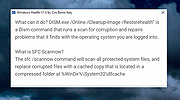 |
|
Workrave v1.10.54 Workrave v1.10.54 👉 Helps prevent repetitive strain injuries by reminding you to take healthy computer breaks. Workrave is a free and open-source program designed to help prevent and relieve Repetitive Strain Injury (RSI) and other computer-related health issues. It monitors keyboard and mouse activity and reminds users to take regular breaks from their computer to rest, stretch, and relax. The software provides configurable microbreaks, rest breaks, and daily usage limits to encourage healthier work habits. By tracking input activity and detecting idle time, Workrave can intelligently determine when breaks are needed and provide gentle reminders before enforcing them if necessary. During breaks, Workrave may display simple exercises or relaxation prompts to help reduce muscle tension and eye strain caused by prolonged computer use. Break timers and reminder behavior are fully customizable, allowing users to tailor break frequency, duration, and enforcement settings to their workflow. Workrave runs quietly in the background and integrates with the system tray, making it suitable for both home and workplace environments where long computer sessions are common. Features: • Monitors keyboard and mouse activity to detect continuous computer use • Reminds users to take microbreaks, rest breaks, and daily usage limits • Fully configurable break timers and durations • Gentle break reminders with optional enforced breaks • Microbreaks for short pauses and longer rest breaks for recovery • Tracks active and idle time to intelligently manage break timing • Optional exercises and stretching prompts during breaks • Postpone or skip options for break reminders • System tray integration and automatic startup options • Free and open-source software Supported operating systems: • Windows • Linux Supported languages: System language (Workrave uses the operating system's locale for its interface language). Changes: v1.10.54 10-16-25 Add support for GNOME Shell 49 (#636, Alessandro Astone) Note: This file has two hits on VirusTotal. We have confirmed these to be false positives. The file is safe. This download is for the Windows version (very bottom of ... |
|
4,489 | Mar 04, 2026 Raymond Penners & Rob Caelers 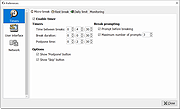 |
| Showing rows 1 to 10 of 10 | Showing Page 1 of 1 | 1 |
OlderGeeks.com Copyright (c) 2026
