|

|
Processed through Paypal No account required. |








Buy our over-priced crap to help pay the bills.



|
|
Processed through Paypal No account required. |
| Files | ||||
| File Name | Rating | Downloads | ||
 |
PDF24 Creator v11.29.1 PDF24 Creator v11.29.1 👉 Free and powerful PDF creation and management tool for Windows. PDF24 Creator is a full-featured PDF creation and management suite that lets you generate, edit, merge, split, compress, secure, and otherwise work with PDF documents directly on your Windows PC. It installs as a virtual PDF printer so you can create PDFs from almost any Windows application, and includes a toolbox of useful PDF utilities — all completely free of charge and without limits. Features: • Create PDF files from virtually any Windows application via virtual printer • Merge multiple documents into a single PDF • Split, delete, rotate, extract, and insert pages • Compress and shrink PDF files • Add digital signatures, encryption, watermarks, and metadata • Integrated PDF viewer and editor tools • Support for PDF/A, PDF/X and other PDF standards • Multiple PDF printer profiles for varied tasks • Works offline with all files staying local on your PC • Multilingual interface with wide language support The Tools: PDF Creator Easily assemble, create and modify PDF files with the Drag and Drop enabled user interface. • Merge or split PDF files • Add, remove, extract, rotate, sort and move PDF pages • Import and automatic conversion of documents (Word, Excel, images, etc. to PDF • Various preview modes for easy editing of PDF documents • Integrated viewer • Drag and Drop wherever possible • Follow up tools: Save, Print, Email, Fax, ... PDF Printer Print on this printer in order to create a PDF or use it as a universal PDF converter that converts any printable file to PDF. • Virtual printer for PDF creation • Multiple PDF printers for different tasks • Automatic saving ... |
 |
8,201 | Mar 03, 2026 Geek Software GmbH 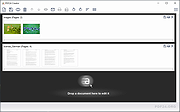 |
 |
Subtitle Edit v4.0.16 Subtitle Edit v4.0.16 👉 Free open-source subtitle editor for creating, editing, syncing, and converting subtitles. Subtitle Edit is a free and open-source subtitle editor that lets you create new subtitles from scratch, edit existing subtitles, synchronize subtitles that are out of sync with video, and convert between more than 300 subtitle formats. Features: • Create, edit, and synchronize subtitles • Convert between more than 300 subtitle formats • Adjust subtitle timing in several different ways • Make new subtitles from video/audio content • Visual subtitle syncing tools • Spell checking and text correction tools • Search and replace tools • Auto-translate support with multiple engines • Batch conversion capabilities • Offline, open-source application with local editing and playback Supported operating systems: • Windows 10, Windows 11 Supported languages: English, Bahasa Indonesia, Brezhoneg, Català, Čeština, Dansk, Deutsch, Español (Argentina), Español (España), Español (México), Euskara, Français, Hrvatski, Hungarian, Italiano, Korean (한국어), Nederlands, Norsk, Polish, Português (Brasil), Português (Portugal), Română, Slovenčina, Srpski, Suomi, Svenska, Türkçe, Vietnamese, Ελληνικά, Български, Македонски, Русский, Татарча, Українська, ქართული, עברית, العربية, فارسی, ไทย, 中文(简体), 中文(繁體), 日本語 Changes: v4.0.16 06-02-25 * IMPROVED: * Update Portuguese translation - thx Hugo Carvalho, Blackspirits * Update Persian translation - thx Majid * Add "Suggested Fix" column to Netflix quality-check CSV report - thx OmrSi * Update yt-dlp to 2026.03.17 (fixes youtube) * Warn instead of blocking when an auto-translate prompt is very long * FIXED: * Fix download of Hunspell spell-check dictionaries (now from LibreOffice/dictionaries) * Fix extract audio for selected lines in SMPTE - thx OmrSi Click here to visit the author's website. |
|
1,117 | Jun 04, 2026 Nikolaj Olsson 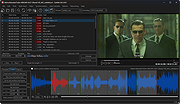 |
| Showing rows 1 to 2 of 2 | Showing Page 1 of 1 | 1 |
OlderGeeks.com Copyright (c) 2026
