|

|
Processed through Paypal No account required. |








Buy our over-priced crap to help pay the bills.



|
|
Processed through Paypal No account required. |
| Files | ||||
| File Name | Rating | Downloads | ||
 |
FileVoyager v26.9.6.0 FileVoyager v26.9.6.0 👉 A powerful dual-pane file manager and viewer for Windows. FileVoyager is a freeware Orthodox file manager (OFM) for Microsoft Windows that uses a dual-pane layout to make browsing, organizing, comparing, and transferring files easier. It can browse disks, folders, shares, archives, and FTP/FTPS locations in one unified interface, while also offering built-in viewers, archive handling, folder synchronization, file comparison, hashing, and media playback support. Features: • Dual-pane Orthodox file manager layout • Browse disks, folders, virtual folders, shares, archives, and FTP/FTPS locations • Multiple view modes, including report and thumbnail views • Rename, copy, move, link, delete, and recycle files • Pack and unpack ZIP, 7Zip, GZip, BZip2, XZ, Tar, and WIM archives • Unpack ARJ, CAB, XAR, Z, RAR, LZH, LZMA, ISO, WIM, and many other formats • Built-in file and folder comparison • Folder synchronization tools • Duplicate file finder • Advanced search and filtering • Quick preview for many file formats • Multimedia playback using installed codecs, Windows Media Player, and VLC support • Ebook and comic book viewing, including PDF, EPUB, MOBI, FB2, DJVU, CBR, CBZ, and XPS • Syntax highlighting for many source code formats • Hexadecimal and flat file viewing modes • Hash tool with VirusTotal-powered malware report • Dark Mode and customizable themes • Available as Setup or Portable editions • Optional VLC codec packages Supported operating systems: • Windows 10, Windows 11 • Should also run on Windows Vista, Windows 7, Windows 8.x, but these are not tested Supported languages: Arabic, Chinese Simplified, Czech, Danish, Dutch, English, French, German, Greek, Hungarian, Italian, Japanese, Korean, Polish, Portuguese, Portuguese (Brazil), Russian, Slovak, Slovenian, Spanish, Swedish Changes: v26.9.6.0 09-06-26 + New: Viewer: The main new feature in this release is folder analytics in the Viewer, with a dedicated panel providing key metrics and insights about a folder selected. + New: Browse: Added Archive & Unarchive commands in the Central toolbar, under Tools. ~ Chg: Global: Mask labels, visible in the various filter ... |
 |
5,800 | Sep 11, 2026 FileVoyager 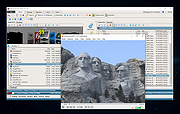 |
 |
Multi Commander v16.5 Multi Commander v16.5 👉 Dual-pane, multi-tabbed file manager for Windows power users. Multi Commander is a multi-tabbed file manager and Windows Explorer alternative using an efficient dual-panel layout. It includes standard file management tools such as copy, move, rename, and view, along with advanced tools for archive browsing, FTP/SFTP access, Registry browsing, file searching, batch renaming, scripting, plug-ins, and portable use. Features: • Dual-pane, tabbed file manager interface • Commander-style or Windows Explorer-style keyboard and mouse setup • View files in detail, list, or thumbnail modes • Browse local drives, network shares, FTP with SSL/TLS, SFTP/SCP, archives, Windows Registry, and Windows Portable Devices • Archive support for Zip, 7-Zip, Rar, Tar, gz, bz2, tar.gz, and tar.bz2 • Background file operations so the interface does not freeze • Copy/move filters, queues, auto-unpacking, auto-sorting, presets, and overwrite handling • Powerful Multi-Rename tool for batch renaming • Built-in file viewer with ASCII, UTF-8, Unicode, Binary, and Hex viewing • Search by file contents, attributes, size, date, regular expressions, duplicates, empty folders, and inside archives • Picture tools for converting, rotating, EXIF viewing/removal, and EXIF date adjustment • Audio tools for viewing audio properties and editing MP3 tags • Built-in scripting, extensions, plug-ins, and SDK support • Portable version available; unpack and run MultiCommander.exe Supported operating systems: • Windows Vista, Windows Server 2008 R2, Windows 7, Windows 8.x, Windows 10, Windows 11, Windows Server 2012 R2 • Note: The normal version does not work on Windows XP anymore. Multi Commander XP is available separately for Windows XP users. Supported languages: English, Bulgarian, Catalan, Chinese (Simplified), Chinese (Traditional), Czech, Dutch, Finnish, French, German, Hungarian, Italian, Japanese, Korean, Lithuanian, Norwegian, Polish, Portuguese (Brazil), Portuguese (Portugal), Romanian, Russian, Slovenian, Spanish, Swedish, Turkish, Ukrainian Changes: v16.5 09-11-26 ADDED - WebView and what formats should be opened in WebView can now be configured in Options in FileViewer. FIXED - Linked navigation now works again. Can be enabled from View mode popup. FIXED ... |
|
6,867 | Sep 25, 2026 Mathias Svensson 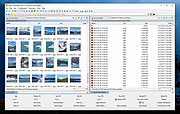 |
| Showing rows 1 to 2 of 2 | Showing Page 1 of 1 | 1 |
OlderGeeks.com Copyright (c) 2026
