|

|
Processed through Paypal No account required. |








Buy our over-priced crap to help pay the bills.



|
|
Processed through Paypal No account required. |
| Files | ||||
| File Name | Rating | Downloads | ||
 |
Eqonomize! v1.5.12 Eqonomize! v1.5.12 👉 Cross-platform personal accounting software for efficient household bookkeeping, budgeting, and financial tracking. Eqonomize! is a cross-platform personal accounting program focused on efficiency and ease of use for small households. It provides double-entry bookkeeping, support for expenses, incomes, transfers, scheduled recurring transactions, securities, loans, and budgeting. It also gives a clear overview of past and present transactions, along with charts, reports, and projected future account values. Features: • Double-entry bookkeeping for personal finances • Supports expenses, incomes, transfers, and security transactions • Includes scheduled recurring transactions with flexible recurrence options • Budgeting tools with monthly budgets and future account value prediction • Supports stocks, bonds, mutual funds, dividends, and reinvested dividends • Statistical reports with tables, line charts, bar charts, and pie charts • Transaction filtering by date, value, category, account, description, and payee or payer • Supports multiple currencies with selectable account currency and automatic updates • Imports and exports QIF files and imports CSV transaction data • Can save displayed data to HTML or CSV and charts to image formats such as PNG and JPEG Supported operating systems: • Windows 10, Windows 11 • Linux Ubuntu 16.04 or later, Debian, Ubuntu, Arch Linux Supported languages: Bulgarian, Czech, Danish, English, French, German, Hungarian, Italian, Dutch, Portuguese, Portuguese (Brazil), Romanian, Russian, Slovak, Spanish, Swedish Changes: v1.5.12 01-26-26 Add category division selection (subcategories, descriptions, payees/payers, or tags) in categories comparison chart Save tags not used by any transaction Add option to convert one or multiple expenses or incomes to transfers Allow multiple categories with the same name (in different parent categories) Show negative values in pie chart (accounts comparison excluded) Scroll to bottom when opening or updating ledger with ascending order enabled Add option to show transfer in ledger of other account Fix value axis in bar chart Fix/improve handling of various category combinations displayed separately in over time report Fix properties of existing transaction updated with default value when amount is zero Fix sorting of subcategories in ... |
 |
7,793 | Mar 10, 2026 Eqonomize Project 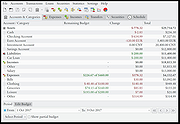 |
|
Fungible v1.6.4 Fungible v1.6.4 👉 A personal finance application that helps you track spending, budgets, and net worth with local data storage. Fungible is an open source personal finance manager that provides both a traditional terminal interface and a modern graphical desktop interface for managing your finances. It allows you to import transactions from financial institutions, categorize income and expenses, create budgets, monitor account balances, and visualize your financial health through charts and reports. Whether you prefer working from the command line or using the graphical interface, Fungible stores your financial data locally on your computer, giving you full control over your information while helping you organize day-to-day finances. Features: • Track checking, savings, credit card, investment, and other financial accounts • Import financial transactions from supported bank export formats • Categorize transactions with customizable categories • Create and monitor monthly budgets • View spending trends and financial reports • Track income, expenses, and overall net worth • Powerful transaction filtering and search tools • Local data storage for improved privacy and control • Cross-platform desktop application with Electron-based graphical interface • Open source software Supported operating systems: • Windows 10 or higher • macOS 13 Ventura or higher • Linux (64-bit distributions supported through official releases) Supported languages: • English Changes: v1.6.4 06-13-26 • Added a new Electron-based graphical user interface. • Added cross-platform desktop packaging and development release workflow. • Documented the filter panel and updated filter keys. • Fixed renderer sandbox and Plaid callback host issues. • Fixed stale result handling in GUI pattern matching. This download is for the Windows 64bit version (very bottom of page). All other download assets are below: macOS: fungible-1.6.4-mac-arm64.dmg fungible-1.6.4-mac-arm64.zip fungible-1.6.4-mac-x64.dmg fungible-1.6.4-mac-arm64.zip Linux: fungible-1.6.4-linux-amd64.deb fungible-1.6.4-linux-x86_64.AppImage Click here to visit the author's website. |
|
472 | Jun 19, 2026 Thomas Funk 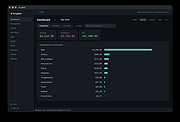 |
|
Microsoft Money Plus Sunset Deluxe v17.0.120.3817 Microsoft Money Plus Sunset Deluxe v17.0.120.3817 👉 Free personal finance management software for tracking accounts, budgets, and investments. Microsoft Money Plus Sunset Deluxe is a discontinued but still widely used personal finance application from Microsoft, released as a free version after the product line was retired. It allows users to manage bank accounts, track spending, create budgets, monitor investments, and generate detailed financial reports—all without requiring online services. This “Sunset” edition removes all online features such as automatic bank downloads and bill pay services, allowing the program to function indefinitely without activation or Microsoft services. It is especially useful for users who prefer a local, offline financial tracking solution or who need continued access to existing Money data files. Microsoft Money Plus Sunset Deluxe supports importing and working with existing Money files, providing a familiar interface for long-time users while maintaining core functionality for managing personal finances. Features: • Manage bank accounts, credit cards, and cash accounts • Track income, expenses, and spending categories • Create and monitor budgets • View financial summaries and reports • Manage investments and track portfolio performance • Import and use existing Microsoft Money data files • Offline functionality with no activation required • Simplified interface based on Microsoft Money Plus More Information: • Microsoft Money Plus Sunset Deluxe is provided as-is with no support or updates from Microsoft • All online services have been permanently removed and are not available • Designed primarily for users of earlier Microsoft Money versions needing continued access • Cannot download transactions, stock quotes, or perform online bill payments • No activation is required, and the software will not expire Supported operating systems: • Windows XP, Windows Vista, Windows 7, Windows 8, Windows 10, Windows 11 Supported languages: English Changes: v17.0.120.3817 Not Provided Click here to visit the author's website. |
|
17,573 | Jul 29, 2026 Microsoft Corp. 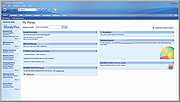 |
| Showing rows 1 to 3 of 3 | Showing Page 1 of 1 | 1 |
OlderGeeks.com Copyright (c) 2026
