|

|
Processed through Paypal No account required. |








Buy our over-priced crap to help pay the bills.



|
|
Processed through Paypal No account required. |
| Files | ||||
| File Name | Rating | Downloads | ||
 |
Burger Time Burger Time A remake of the classic Burger Time Game Move over the ingredients which will drop down to the next level until they reach the plate at the bottom. You must avoid the baddies (sausages/eggs/tomatoes) or stun them with pepper for a short while Keys: CTRL Throw pepper to stun enemy for a short time ARROW keys for movement |
 |
7,780 | Apr 25, 2015 pj_crozza 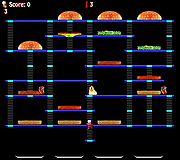 |
|
Chrono Mock v0.4.0 Chrono Mock v0.4.0 👉 Test how a Windows application behaves at another date without changing your computer’s clock. Chrono Mock runs an application with its own simulated date and time while Windows and your other programs continue using the real clock. It is designed for developers and testers checking things such as trial expiration, licence behaviour, reminders, certificate dates, month-end processing, and the Year 2038 boundary. Instead of changing the system clock and disrupting other software, you choose the application and the time it should see. The simulated clock can run normally, freeze, or move faster than real time. You can also jump forward or backward during a session to see how an application responds to a sudden clock change. Chrono Mock follows child processes and provides a separate time zone offset for the session. Its built-in audit reports which time sources it reached, which it missed, and whether the result works, works partially, or does not work. That verdict matters: an application may obtain time from a server or another source that a local tool cannot change. A date calculator helps prepare tests around trial deadlines, business days, holidays, quarter closes, and year-end changes. Chrono Mock offers a desktop interface and a command-line tool for scripts and automated testing. Both are portable. Support for native Windows applications is the most thoroughly tested; the developer marks several other application types, including .NET, Java, Python, and Electron, as experimental. Before testing an application at a future date, back up its data. The application may permanently save future-dated records or trigger licence rollback protection even after the session ends. Antivirus software may also flag the library Chrono Mock injects into applications. The developer documents these limitations and recommends checking each session’s audit. Features: • Runs a selected application at a specified date and time without changing the Windows ... |
|
97 | Oct 08, 2026 DonislawDev 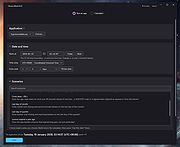 |
|
FolderTimeUpdate v1.75 FolderTimeUpdate v1.75 👉 Updates folder modified times based on the newest files inside them. FolderTimeUpdate is a simple Windows tool that scans all files and folders under a base folder you choose, then updates each folder's Modified Time according to the latest modified time of the files stored inside it. This can be useful after restoring backed-up folders when the backup program did not preserve the original folder modified times. Features: • Scans files and folders under a selected base folder • Updates folder Modified Time according to files inside the folder • Simulation Mode previews changes without applying them • Supports updating folder date/time from the command line • Can save update logs as text, tab-delimited, CSV, HTML, or XML • Supports choosing how folder modified time is calculated • Supports excluding folders from scanning or updating • Supports wildcard filtering for scanned files • Supports skipping hidden and system files • Supports Explorer context menu integration • Includes 32-bit and 64-bit downloads • No installation required Supported operating systems: • Windows 2000, Windows XP, Windows Vista, Windows 7, Windows 8, Windows 10, Windows 11 • 32-bit and 64-bit systems Supported languages: Arabic, Brazilian Portuguese, Bulgarian, Dutch, English, French, German, Greek, Hungarian, Italian, Japanese, Persian, Polish, Romanian, Russian, Simplified Chinese, Slovak, Spanish, Traditional Chinese, Turkish Changes: v1.75 Added option to change the sorting column from the menu (View -> Sort By). Like the column header click sorting, if you click again the same sorting menu item, it'll switch between ascending and descending order. Added 'Sort By' button to the toolbar. This download is for the Windows 64bit version (very bottom of page). If you need the Windows 32bit version, download here. Click here to visit the author's website. |
|
6,427 | Apr 30, 2026 Nir Sofer 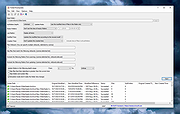 |
 |
Super Productivity v18.19.0 Super Productivity v18.19.0 👉 A privacy-focused task manager with time tracking and Pomodoro timer. Super Productivity is an open-source productivity app designed to help users manage tasks, track time, and improve focus using built-in techniques like the Pomodoro timer. It integrates with popular issue tracking platforms such as Jira, GitHub, and GitLab, making it especially useful for developers and teams. The application emphasizes privacy by storing all data locally with no required sign-up or cloud dependency. Features: • Task management with subtasks, attachments, and notes • Built-in Pomodoro timer and break reminders • Time tracking with detailed statistics and reports • Integration with Jira, GitHub, GitLab, and other issue trackers • Offline-first design with local data storage • Distraction blocking and focus mode • Daily schedule planning and timeboxing • Keyboard shortcuts and command palette • Data import/export and backup support • Cross-platform synchronization options (optional) • Customizable themes and dark mode • Open-source with no ads or tracking Supported operating systems: • Windows 10, Windows 11 • macOS 11 or higher • Linux (AppImage, Snap, Flatpak, Debian/Ubuntu) • Android • iOS Supported languages: English, German, Spanish, French, Italian, Portuguese, Russian, Chinese, Japanese, Korean Changes: v18.19.0 08-07-26 Highlights Added search to global settings and a ? keyboard shortcut cheat sheet (#9302, #9318). Added crash-safe local drafts for project notes (#8982). Added interval recurrence phrases such as @every 2 weeks and @every 2 fridays (#9328). Added URL scheme actions for creating and completing tasks (#9121). Completed translations across all locales (#9360). Security and sync Enforced encrypted-only SuperSync uploads when E2EE is required and stopped clients from accepting plaintext downloads when encrypted sync is expected (GHSA-vrc7-775g-ggqc, #8903, #9457). Added diagnostics and recovery guidance for encrypted-operation integrity failures (#9331, #9439, #9444). Prevented stale-key uploads after server state replacements (#8730, #9330). Resolved ... |
|
694 | Aug 12, 2026 Super Productivity Org 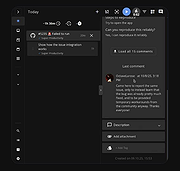 |
|
System Time 1.0 System Time 1.0 System Time is a free system time information utility for Microsoft Windows platform. System Time features: • Watch the amount of, CPU Idle time, Kernel Time, User Time • Watch the system's up time and the last boot date. • Watch the system date time, compare to the internet official date time and sync your PC with the internet time • Select the network time protocol pool • Enabling the network time protocol requires internet connectivity, if internet date time is not displayed or displayed incorrectly, disable internet date time using the check box, select a different NTP pool and enable internet date time again. System Time is a portable application, installation is not needed, just unzip and execute SysTime.exe, it can run from any folder or removable drive. Supported OS: Windows platform (32/64) |
|
6,036 | Feb 11, 2017 LeeLu Soft 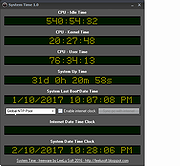 |
|
Warzone 2100 v4.7.0 Warzone 2100 v4.7.0 👉 A free and open-source 3D real-time strategy game set in a post-nuclear world. Warzone 2100 is a free and open-source real-time strategy game where you command The Project in a battle to rebuild civilization after nuclear devastation. It features a story-driven single-player campaign, LAN and online multiplayer, AI skirmishes, an extensive technology tree with over 400 technologies, and a flexible unit designer that lets you customize vehicles and tactics to fit your play style. Features: • Story-driven single-player campaign • LAN and Internet multiplayer with integrated lobby • AI bots for offline skirmishes and practice • Extensive tech tree with over 400 technologies • Flexible unit designer for custom combat strategies • Cross-platform multiplayer support • 100% free and open-source • No ads, no subscriptions, and no in-app purchases • Legacy “Pumpkin” v1.10 campaign balance option in v4.7.0 • New net lobby improvements for easier joining and hosting • Vulkan backend improvements and multiple graphics fixes • Additional “Reclamation” soundtrack content Supported operating systems: • Windows 7 or higher • Windows 10 or higher via Microsoft Store • macOS 10.14 or higher • Linux, Ubuntu 22.04, Ubuntu 24.04+ • FreeBSD Supported languages: • English, Arabic, Bulgarian, German, Spanish, French, Italian, Dutch, Polish, Portuguese, Portuguese (Brazil), Romanian, Russian, Turkish, Ukrainian, Simplified Chinese Changes: v4.7.0 04-07-26 General Highlights: Vulkan Backend Improvements Model & Graphics Fixes Additional new “Reclamation” soundtrack Add Weapon Stats flag for configuring Captured Units Teleport Fix mouse cursor display scaling on some OSes Fix disabled state of mouse key code Fix objects incorrectly darkened due to terrain darkness / satellite strike Campaign: “Pumpkin” v1.10 Campaign Balance Mod Updated Remastered balance, Additional Spawns 2.0 Add campaign balance descriptions help panel Fix Classic campaign Howitzer tree path Fix various guide topic issues Fix missing Intel message issues Multiplayer: All-new net lobby and hosting/joining revamp Easier joining via GameId Improved handling for difficult connections and firewalls IPv4 + IPv6 hosting support Expanded host lobby options Improved security, privacy, and host visibility Properly persist player mute option This download is for the Windows version (very bottom ... |
|
8,455 | Apr 08, 2026 Warzone 2100 Project 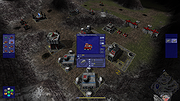 |
| Showing rows 1 to 6 of 6 | Showing Page 1 of 1 | 1 |
OlderGeeks.com Copyright (c) 2026
