|

|
Processed through Paypal No account required. |








Buy our over-priced crap to help pay the bills.



|
|
Processed through Paypal No account required. |
| Files | ||||
| File Name | Rating | Downloads | ||
 |
Core Temp v1.21 Core Temp v1.21 👉 Compact CPU monitoring utility for tracking processor temperatures, loads and other vital information. Core Temp is a small, lightweight processor monitoring utility designed to display the temperature of each individual CPU core in real time. It reads the Digital Thermal Sensors built into modern Intel, AMD and VIA x86 processors, providing accurate temperature information directly from the processor rather than relying on motherboard sensors. It can also display processor model information, frequencies, load levels, power-related data and minimum, maximum and average temperature readings. Core Temp offers customizable notification-area monitoring, logging, Mini-Mode and support for plug-ins that can extend its functionality. Features: • Monitors the temperature of individual CPU cores in real time • Reads temperatures directly from the processor's Digital Thermal Sensors • Supports Intel, AMD and VIA x86 processors • Displays processor identification and model information • Shows individual core load information • Displays processor frequency information • Tracks minimum, maximum and average temperature readings • Provides configurable notification-area sensor displays • Includes a battery status indicator for the notification area • Includes a compact Mini-Mode display • Adjustable user-interface zoom • Can log processor temperature and monitoring information • Supports multiple processors and multiple cores • Motherboard-independent temperature monitoring • Provides shared-memory data for other applications • Supports plug-ins and add-ons for expanded functionality • Lightweight design with a small system footprint Supported operating systems: • Windows XP, Windows 7, Windows 8, Windows 8.1, Windows 10, Windows 11 • Windows Server 2003, Windows Server 2008, Windows Server 2012, Windows Server 2016, Windows Server 2019, Windows Server 2022, Windows Server 2025 Supported languages: English, Abkhaz, Armenian, Bulgarian, Simplified Chinese, Traditional Chinese, Catalan, Czech, Danish, Dutch, Finnish, French, Galician, German, Greek, Hebrew, Hungarian, Italian, Japanese, Korean, Norwegian, Polish, Portuguese, Romanian, Russian, Slovak, Slovenian, Spanish, Swedish, Turkish, Ukrainian, Vietnamese Changes: v1.21 10-03-26 - New: Redesign the notification tray configuration dialog. Should now be more intuitive and flexible. - Fix: Notification tray icons issues; missing ... |
 |
5,443 | Oct 14, 2026 Arthur Liberman 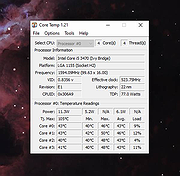 |
|
CPU Temp v1.3.1.0 CPU Temp v1.3.1.0 A free CPU temperature monitor for Windows. CPU Temp is a free and simple application for CPU Temperature monitoring, compatible with Windows 11 or earlier versions of Windows OS. CPU Temp seamlessly integrates, giving you real-time insights into your CPU's temperature, utilization, clock speed, power consumption, and other essential parameters of your processor. With its intuitive and customizable interface, CPU Temp presents a choice of over 40 different UI themes and color palettes. You can choose and select select UI appearance that resonates with your style, ensuring a tailored and immersive monitoring experience. CPU Temp Application Features CPU Temp uses a clear and intuitive interface to deliver an easy to use solution for CPU temp check, as well as other important CPU metrics. To the left, users will find a navigation bar split into distinct menu items, each correlating to specific functionalities within the application. Home view This is the main view of the CPU Temp Monitor application, and has the following items: • Vertical Tile Items: Located on the left, these tiles provide quick access to various CPU parameters. • Application Chart: Positioned at the center, chart control provides real-time statistics for the indicator represented by the tile item. • CPU Information section: Find a summary of important CPU information at the bottom of the home screen • Thermal Indicator: Conveniently situated next to the app header, this component offers a rapid glance at current thermal states for the CPU. Monitor view Shows detailed information about CPU other hardware sensors such as CPU and GPU temperature, load, clock and others. This information will provide you with comprehensive, real-time insights into PC hardware data. CPU Data Charts view This control offers a detailed view for CPU data. Depending on your platform, ... |
|
1,774 | Nov 15, 2023 CoderBag 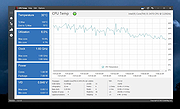 |
|
Delete ALL Temp Delete ALL Temp This script will delete temporary files in all user accounts including the Windows Temp folder. To run it, unzip it anywhere (not to a temp folder, obvies) and right click DELALLTEMP.cmd and run as administrator. Note: There will be no questions asked, the script will just begin. Also, while running you will see a lot of Access Denied errors. This is normal. These are just temp files the script cannot delete because they are being used by running processes. Click here to visit the author's website. |
|
3,633 | Apr 01, 2021 Kakihara73 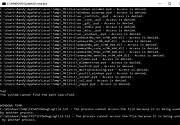 |
 |
Tweaking.com - Remove Temp Files 1.7.4 Tweaking.com - Remove Temp Files 1.7.4 This is more of maintenance than a repair. The windows temp folder can grow rather large when not emptied. It can also have files that windows tries to use instead of the proper ones. Also some viruses and infections will be in the temp folder. This tool is also a part of Windows Repair (All In One). |
|
9,882 | Sep 02, 2017 Tweaking.com 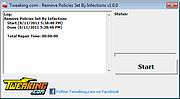 |
| Showing rows 1 to 4 of 4 | Showing Page 1 of 1 | 1 |
OlderGeeks.com Copyright (c) 2026
