|

|
Processed through Paypal No account required. |








Buy our over-priced crap to help pay the bills.



|
|
Processed through Paypal No account required. |
| Files | ||||
| File Name | Rating | Downloads | ||
 |
Better Windows Services v0.4.0 Better Windows Services v0.4.0 👉 Search, manage, and audit Windows services with a desktop app or command line tool. Better Windows Services gives administrators a searchable view of the local machine’s services and drivers. Its desktop app and command line tool use the same query language, so a search such as start:auto !status:running can find services set to start automatically that are currently stopped. Before starting, stopping, restarting, or changing a service’s startup type, the program shows a plan of the steps it will take, including affected dependent services. The command line can also save a snapshot of service settings and compare it with another snapshot or the live machine. The comparison separates configuration changes from ordinary changes in running state. Snapshots are available through the command line, not the desktop app. Features: • Search services and drivers by name, status, startup type, account, file, signature, publisher, dependencies, and other fields. • Preview service actions and their effects on dependent services before applying them. • Start, stop, restart, and change the startup type of services. • Offer a force stop that first requests a normal stop, then ends the process if necessary, with other services sharing that process identified in the preview. • Show details including triggers, required privileges, security descriptors, process information, and file signatures. • Export service lists from the desktop app. • Create and compare JSON snapshots with the command line tool to identify service configuration changes. • Provide JSON command output and exit codes for scripts. Supported operating systems: • Windows 10 version 1809 or later 64-bit, Windows Server 2019 or later 64-bit Supported languages: English Changes: v0.4.0 10-07-26 CHANGELOGBWS.txt Note: The GUI and CLI come in separate portable ZIP files. They include their own .NET runtime and work offline. Administrator rights are needed to make changes; viewing services without elevation may show fewer entries. 👉 This download is for the Windows 64bit GUI version (very bottom of page). All other download assets are below: Other ... |
 |
144 | Oct 08, 2026 DonislawDev 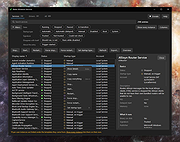 |
|
BootRacer v9.55 BootRacer v9.55 👉 Measure Windows boot speed and identify startup programs that slow your PC. BootRacer is a free utility for non-commercial use that accurately measures how long Windows takes to boot and helps identify startup programs that increase boot time. Unlike a simple stopwatch, it measures the actual Windows startup process while excluding password entry time, providing a more realistic view of system performance. BootRacer records each boot, tracks changes over time, and lets you compare results to determine whether your system is speeding up or slowing down. BootRacer also includes startup management tools that allow you to review, disable, delay, reorder, or customize startup applications so Windows can become usable more quickly. It displays detailed timing information for the boot process and startup programs, provides boot history with graphs and statistics, and can notify you when Windows has completely finished loading background services so you know when your computer is truly ready for use. Additional features such as service optimization and advanced system tweaks are available in the Premium edition. Features: • Measures true Windows boot time without including password entry delays • Monitors every boot and keeps a detailed boot history • Displays boot performance graphs and statistics • Identifies startup applications that slow Windows • Disable, delay, reorder, or customize startup programs • Shows the time consumed by individual startup applications • Compares current boot times with previous boots • Writes boot information to the Windows Event Log • Includes boot completion notifications when Windows is fully ready • Lightweight with minimal system resource usage • Free for personal, non-commercial use Supported operating systems: • Windows 2000, Windows XP, Windows Server 2003, Windows Vista, Windows 7, Windows 8, Windows 8.1, Windows 10, Windows 11 (32-bit and 64-bit) Supported languages: • English, Brazilian Portuguese, French, German, Hungarian, Italian, Japanese, Korean, Polish, Russian, Turkish, Ukrainian Changes: v9.55.2026.519 05-19-25 Fixed the timing race condition bug affecting applications launched from ... |
|
6,458 | Jun 26, 2026 Greatis Software 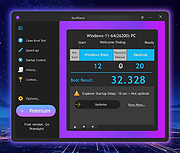 |
 |
DDS v2012-11-20-01 DDS v2012-11-20-01 👉 Generate detailed diagnostic logs for malware troubleshooting and system analysis. DDS is a lightweight diagnostic utility created by sUBs that gathers extensive information about a Windows computer without making permanent changes to the system. It is widely used by malware removal specialists and technical support forums to generate detailed reports containing running processes, startup entries, services, installed software, network settings, browser information, restore points, security software status, and numerous other system details. Rather than attempting to detect or remove malware, DDS focuses on collecting information that allows an experienced analyst to identify suspicious activity, unwanted startup items, rootkit indicators, or other system problems. When the scan is complete, DDS automatically creates two text reports, DDS.txt and Attach.txt, which can be uploaded to security forums or shared with a technician for analysis. The utility is completely portable, requires no installation, and performs no registry modifications or permanent file creation during its operation. Features: • Creates comprehensive DDS.txt and Attach.txt diagnostic reports • Lists active processes, services, drivers, and startup entries • Displays installed applications and Windows configuration details • Reports browser settings and Internet Explorer information • Shows antivirus, firewall, and security software status • Lists System Restore points and disk partition information • Includes optional MBR checking and extended search options • Portable executable requiring no installation • Makes no permanent files or registry changes • Designed for malware investigation and technical support Supported operating systems: • Windows XP, Windows Vista, Windows 7 (32-bit and 64-bit) Supported languages: • English Changes: v2012-11-20-01 • Latest publicly released version. Click here to visit the author's website. |
|
7,179 | Jun 30, 2026 sUBs 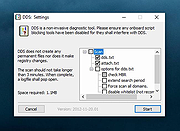 |
|
ESET SysInspector v2.1.5.0 ESET SysInspector v2.1.5.0 👉 Free PC diagnostic tool for inspecting system issues, suspicious files, processes, services, registry entries and network connections. ESET SysInspector is an easy to use diagnostic tool that helps troubleshoot a wide range of system issues. It captures critical and detailed information about your computer and is useful for tracking down malicious code, suspicious unsigned files, software problems, hardware incompatibilities, driver issues, broken registry entries and suspicious network connections. Features: • Captures detailed system information for troubleshooting • Helps inspect running processes and services • Identifies suspicious and unsigned files • Helps diagnose software issues and hardware incompatibility • Checks for outdated or malfunctioning drivers • Helps identify unpatched operating system issues • Reports broken registry entries • Helps detect suspicious network connections • Color-coded risk levels help prioritize severe issues • Processes and network tree view • Regular expression filtering for log results • Light and dark mode support Supported operating systems: • Windows 10, Windows 11, Windows Server 2016, Windows Server 2019, Windows Server 2022 Supported languages: Several languages Changes: v2.1.5.0 Improved: Error codes on app exit Improved: File details for registry subsection Improved: Filtering functionality Added: Option to copy registry path Added: Modal window for viewing registry Added: Selecting lines with typed letter Fixed: Handling Livegrid settings Fixed: Minor UI bugs Updated: Modules with the latest improvements This download is for the Windows 64bit version (very bottom of page). If you need the Windows 32bit version, download here. If you need the Windows ARM64 version, download here. Click here to visit the author's website. |
|
4,965 | May 19, 2026 ESET, spol. s r.o. 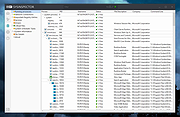 |
|
Microsoft Autoruns v14.3 Microsoft Autoruns v14.3 👉 See everything that starts automatically with Windows. Microsoft Autoruns is a powerful Sysinternals utility that shows what programs, drivers, services, browser add-ons, scheduled tasks, codecs, shell extensions, Winlogon entries, and other components are configured to run automatically during system boot, login, or when Windows applications start. Features: • Displays one of the most complete views of Windows auto-start locations • Shows startup programs, drivers, services, Explorer extensions, browser helper objects, toolbars, codecs, scheduled tasks, Winsock providers, and more • Hide Signed Microsoft Entries option helps focus on third-party items • View auto-start entries for different user accounts • Disable entries by unchecking them • Delete unwanted auto-start configuration entries • Jump directly to Registry or file system locations • Verify digital signatures • VirusTotal integration for hash checking • Includes Autorunsc command-line version with CSV, tab-delimited, XML, hash, signature, and offline Windows scan options Supported operating systems: • Windows Supported languages: Operating system language. Changes: v14.3 06-17-26 Not provided. Click here to visit the author's website. |
|
11,596 | Sep 16, 2026 Microsoft Corp.  |
|
PC Services Optimizer 2.2.385 PC Services Optimizer 2.2.385 PC Services Optimizer is an open source system tweaking solution that enables you to optimize Windows services in an easy, automatic and safe way based on the way you use your computer. It does not require any technical knowledge, as it provides easy to understand options to tune-up your system for better performance and security. Automatic TuneUp Automatic TuneUp tweaks your PC settings for best performance in an easy and safe way according to the way you use your computer. It will turn off unneeded Windows services without affecting the normal function, this will make your PC run faster and more secure. Manual TuneUp Manual TuneUp gives you the power to optimize Windows services in an easy, safe and advanced way without getting involved with Windows services functions and dependencies. Gaming Mode Gaming Mode will give your system an immediate performance boost. Unneeded Windows features will be temporary turned off to free up computer resources and concentrate computer power on programs you are currently using. Services Profiles PC Services Optimizer can save your services settings in profiles, enabling you to apply your different settings in seconds, saving you a lot of time specially when dealing with multiple computers or users. Services Manager Services Manager enables advanced users to master Windows services including third party services. It provides several tools for performing advanced functions for example you can install, start, stop, delete and specify the startup type of Windows services. Change Info: + Vista Services Optimizer name changed to PC Services Optimizer. + Added support for Microsoft Windows 8.1. + Added support for high DPI settings. + Added services snapshot creation notice. + Improved Live Update. + Fixed bug in Live Update. + Minor UI enhancements and bug fixes. |
 |
9,781 | Feb 19, 2014 Smart PC Utilities |
 |
Tweaking.com - Set Windows Services To Default Startup 2.8.8 Tweaking.com - Set Windows Services To Default Startup 2.8.8 This will set the Windows services to their default startup state. This will set the services startup by the "sc config" command and not by the registry. This tool is also a part of Windows Repair (All In One). Here is the current service list this repair sets. AeLookupSvc = demand Alerter = disabled ALG = demand AllUserInstallAgent = demand AppHostSvc = auto AppIDSvc = demand Appinfo = demand AppMgmt = demand aspnet_state = demand AudioEndpointBuilder = auto AudioSrv = auto AxInstSV = demand BDESVC = demand BFE = auto BITS = auto bthserv = demand CertPropSvc = demand ClipSrv = disabled COMSysApp = demand CryptSvc = auto CscService = auto DcomLaunch = auto defragsvc = demand DeviceAssociationService = demand DeviceInstall = demand DFSR = demand Dhcp = auto dmadmin = demand dmserver = auto Dnscache = auto Dot3svc = demand DPS = auto DsmSVC = demand DsRoleSvc = demand EapHost = demand EFS = demand ehRecvr = demand ehSched = demand EMDMgmt = auto ERSvc = auto EventLog = auto EventSystem = auto FastUserSwitchingCompatibility = demand Fax = demand FCRegSvc = demand fdPHost = demand fhsvc = demand FontCache = auto FontCache3.0.0.0 = demand gpsvc = auto helpsvc = auto hidserv = demand hkmsvc = demand HomeGroupListener = demand HTTPFilter = demand idsvc = demand IKEEXT = demand ImapiService = demand IPBusEnum = demand iphlpsvc = auto KeyIso = demand KtmRm = demand LanmanServer = auto LanmanWorkstation = auto lltdsvc = demand lmhosts = auto LPDSVC = auto LSM = auto Mcx2Svc = disabled Messenger = disabled MMCSS = auto mnmsrvc = demand MpsSvc = auto MSDTC = demand MSiSCSI = demand msiserver = demand napagent = demand NetDDE = disabled NetDDEdsdm = disabled Netlogon = demand Netman = demand NetMsmqActivator = auto NetPipeActivator = auto netprofm = demand NetTcpActivator = auto NetTcpPortSharing = disabled Nla = demand NlaSvc = auto nsi = auto NtLmSsp = demand NtmsSvc = demand p2pimsvc = demand p2psvc = demand PeerDistSvc = demand PerfHost = demand pla = demand PlugPlay = auto PNRPAutoReg = demand PNRPsvc = demand Power = auto ProfSvc = auto QWAVE = demand RasAuto = demand RasMan = demand RDSessMgr = demand RemoteAccess = disabled RpcEptMapper = auto RpcLocator = demand RpcSs = auto RSoPProv = demand RSVP = demand sacsvr = demand SamSs = auto SCardSvr = demand Schedule = auto SCPolicySvc = demand SDRSVC = demand SENS = auto SensrSvc = demand SessionEnv = demand ShellHWDetection = auto simptcp ... |
|
10,168 | Sep 02, 2017 Tweaking.com  |
| Showing rows 1 to 7 of 7 | Showing Page 1 of 1 | 1 |
OlderGeeks.com Copyright (c) 2026
