|

|
Processed through Paypal No account required. |








Buy our over-priced crap to help pay the bills.



|
|
Processed through Paypal No account required. |
| Files | ||||
| File Name | Rating | Downloads | ||
 |
Biniware Run v7.7.0.0 Biniware Run v7.7.0.0 Keep all important shortcuts in one place. Program Overview Biniware Run is a portable Windows productivity tool which provides you fast access to your favorite website addresses, files and folders from one single place. Just drag and drop any website address, file or folder inside the colored circle from your desktop and you can easily access all you are interested in by using this handy software. You can define categories, move, sort, import, export or customize your shortcuts anytime. Instead of searching for bookmarks in different web browsers, files or folders through your computer, make your work and browsing easier with Biniware Run. And the best thing is that this software is portable. Download one small executable file, execute it and start organizing your favorite shortcuts. Want to get rid of it? Simple. Just delete the file. Program Features ▪ Easy to use and highly customizable user interface. ▪ Drag and drop support to easily build your multilevel shortcuts structure. ▪ Alternative to the Quick Launch Toolbar with many new extra features. ▪ Dynamic discovery of files and folders for shortcuts to folders. ▪ Importing from HTLM bookmarks files exported with all web browsers is supported. ▪ Access your shortcuts on top of any application by using the customizable global keyboard shortcuts. ▪ The configuration is stored in XML format, making it easy to edit the file in any text editor. ▪ This is a portable software. You can move and execute it from any folder from your computer. ▪ Full support for standard user accounts. Elevated privileges are not required. ▪ And many, many more. Just try it ... |
 |
6,196 | Sep 30, 2025 Biniware.com 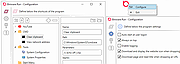 |
 |
ClickShield v1.2.1 ClickShield v1.2.1 👉 Helps block ClickFix phishing attacks and suspicious clipboard commands in Windows. ClickShield is a free Windows security utility designed to help protect against ClickFix and similar phishing attacks that attempt to trick users into executing malicious commands. These attacks commonly use fake CAPTCHA or verification screens that copy a command to the clipboard and instruct the user to paste it into the Windows Run dialog or Command Prompt. ClickShield monitors clipboard changes for suspicious commands, including PowerShell commands and Windows LOLBINs such as mshta, bitsadmin, wmic and regsvr32. When suspicious clipboard content is detected, it can alert the user and prevent the Run dialog from opening. Its LOLBIN Shield can also block selected Windows utilities from accessing the internet, adding another layer of protection against common ClickFix techniques. Features: • Monitors the Windows clipboard for suspicious text and commands • Helps protect against ClickFix and similar fake CAPTCHA phishing attacks • Detects suspicious PowerShell commands, including encoded commands • Detects commands involving commonly abused Windows LOLBIN utilities • LOLBIN Shield can block several Windows utilities from accessing the internet • Can prevent the Windows Run dialog from opening when suspicious clipboard content is detected • Provides alerts when potentially dangerous clipboard commands are found • Includes an option to completely disable the Windows Run dialog • Run dialog restriction can be useful for administrators managing employee computers • Designed to operate with minimal memory usage • Supports both 32-bit and 64-bit Windows systems Supported operating systems: • Windows 7, Windows 8, Windows 8.1, Windows 10, Windows 11 Supported languages: • English Changes: v1.2.1 09-04-26 [*] Fixes and Improvements: • The alert message now stays on top of all windows instead of launching on the browser. This way it protects itself from ClickFix attack variants that attempt to close it and CrashFix attacks that crash the browser. The alert message remains visible until the user closes it. • The alert ... |
|
647 | Sep 30, 2026 Emir Alp Kocak  |
|
If Alive Run v0.4.1 If Alive Run v0.4.1 A short, challenging 2D platformer made for speedrunning. You can beat this game in three minutes, but you won't. Start each level only able to run and jump. Collect power ups to increase your movement abilities. Switches will appear in later levels with special effects, experiment with them! Some levels may seem hopeless, but they can be beaten! If you're stuck, try a different approach. Instructions: (controller button/keyboard key) Up on the d-pad/M: Toggle Mini-map Down on the d-pad/F1: Toggle Stats Start button/Esc key: Pause Menu A button/space key: Jump (move) + X button/shift: Dash Hold jump for a higher (variable) jump height. A controller is highly recommended! Music credits: The River - Rolemusic Calahorra - Rolemusic Ambient Music - Marching Dream Face The Obelisk - ProvidedPlay Click here to visit the author's website. |
|
4,377 | Nov 26, 2021 ProvidedPlay 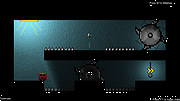 |
|
Run as Service v1.0.0.0 Run as Service v1.0.0.0 RunAsService is a command line tool that allows you to setup a regular console application to run as a service. Below you will find descriptions and examples of how to do this. This tool requires that .NET Framework 2.0 be already installed on your computer. If you do not have .NET Framework 2.0 this tool will display a message and not run. You probably already have the .NET Framework 2.0 but if you don't you can download it here: Microsoft Download Center IMPORTANT: Any services you install using this tool will require that this tool remain on that computer in the same location in order for those services to continue functioning. Therefore before installing any services you should make sure this tool is somewhere where it can remain permanently. If you do end up moving this tool use the 'fixservices' action to fix the existing services. (details on how to use 'fixservices' can be found below) RunAsService Typing just the name of the tool without specifying any parameters. Or specifying incorrect paramters will bring you to the help screen. RunAsService install [Name] [Display Name] PathToExecutable Name The name of the service, if none is specified the name will default to the name of the executable. You might choose to give it a different name than the executable to keep some kind of existing convention, make it friendlier or make it easier to use commands like 'net start' and 'net stop' Display Name ... |
|
6,063 | Nov 15, 2019 Luis Perez 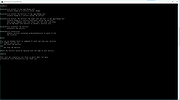 |
|
Run-Command v6.41 Run-Command v6.41 👉 Enhanced Windows Run dialog replacement with extended command execution features. Run-Command is a small but powerful alternative to the standard Windows Run dialog. It provides extended functionality for executing commands, opening programs, launching system tools, and accessing frequently used folders more efficiently. Designed as a portable utility, Run-Command enhances productivity by offering customizable favorites, command history, and quick access to administrative tools. It is lightweight, requires no installation, and is suitable for both everyday users and advanced system administrators. Features: • Alternative to the standard Windows Run dialog • Favorites menu for frequently used commands • Command history with quick recall • Run programs with administrative privileges • Drag & drop support • Portable – no installation required • Multilingual user interface • Small size and low system resource usage Supported operating systems: • Windows 7, Windows 8, Windows 8.1, Windows 10, Windows 11 • Windows Server 2012, Windows Server 2016, Windows Server 2019 Supported languages: • German, English, Greek, Russian, Simplified Chinese, French, Persian, Swedish, Romanian, Arabic (Iraq), Hungarian, Italian, Portuguese (Brazil), Dutch, Spanish (Venezuela), Indonesian, Polish, Traditional Chinese, Japanese, Taiwanese Chinese, Czech, Korean, Ukrainian, Portuguese (Portugal), Turkish, Thai, Filipino, Finnish, Norwegian, Bosnian, Croatian, Serbian, Bulgarian Changes: v6.41 05-06-26 • Improvements to the Run command as an alternative to the Windows Run dialog, including enhancements to the interpretation of Windows Run commands. • Updated language files, along with various minor adjustments and optimizations within the alternative Run dialog for MS Windows. This download is for the Windows 64bit version (very bottom of page). If you need the Windows 32bit version, download here. Click here to visit the author's website. |
|
10,836 | May 07, 2026 Nenad Hrg 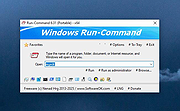 |
|
SuperTux v0.7.0 SuperTux v0.7.0 👉 Open-source 2D jump-and-run platformer inspired by classic Super Mario-style games. SuperTux is an open-source classic 2D jump'n run sidescroller game in a style similar to the original Super Mario games. Run and jump through multiple worlds, fight enemies by jumping on them, bumping them from below or tossing objects at them, grab power-ups, and play through Story Mode where Tux sets out to rescue Penny. The game also includes community-contributed levels and an integrated level editor for creating content. Features: • Classic 2D side-scrolling platform gameplay • Multiple worlds, enemies, power-ups, and objects • Story Mode starring Tux and Penny • Integrated level editor • Community-contributed add-on levels • Local multiplayer mode • New gameplay mechanics including keys, item pocket, and unlockable bonus islands via Tux Dolls • Revamped graphics, enemies, backgrounds, and music in v0.7.0 Supported operating systems: • Windows, macOS, GNU/Linux, Android, FreeBSD Supported languages: • SuperTux supports over 80 languages for its user interface (UI), including English, French, German, Spanish, Portuguese (Brazilian and European), Russian, and simplified Chinese. Changes: v0.7.0 03-15-26 Brand new sprites and abilities for Tux: slope sliding, strong buttjumping, rock rolling, and crawling Revamped graphics for most backgrounds, tiles, objects, and badguys Complete level design + story rework of the Story Mode, Revenge in Redmond, and Bonus Island I Not only new NPCs (e.g: Granito) and enemies (e.g: DiveMine, Fish, and Corrupted Granito), but also revamps for numerous enemies such as: GoldBomb, Igel, Ghoul, and both bosses (Yeti and Ghost Tree) New music Level editor revamp Local multiplayer mode New gameplay mechanics such as glinted enemies, keys, the item pocket, and unlockable bonus islands via Tux Dolls Many internal improves and code refactoring, such as moving to SimpleSquirrel Improvements to compilation/porting, including CMake refactor, Android revival, and Flatpak builds This download is for the Windows 64bit installer version (very bottom of page). All other download assets are below: Other Windows: SuperTux-v0.7.0-win32.msi SuperTux-v0.7.0-win64-portable.zip SuperTux-v0.7.0-win32-portable.zip macOS: SuperTux-v0.7.0-Darwin-x86_64.dmg SuperTux-v0.7.0-Darwin-arm64.dmg Linux: SuperTux-v0.7.0.glibc2.38-x86_64.AppImage SuperTux-x86_64.flatpak Android: SuperTux-v0.7.0-x86_64.apk SuperTux-v0.7.0-x86.apk SuperTux-v0.7.0-arm64-v8a.apk SuperTux-v0.7.0-armeabi-v7a.apk Click here to visit the author's website. |
|
687 | Mar 18, 2026 The SuperTux Team 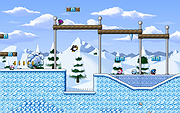 |
| Showing rows 1 to 6 of 6 | Showing Page 1 of 1 | 1 |
OlderGeeks.com Copyright (c) 2026
