|

|
Processed through Paypal No account required. |








Buy our over-priced crap to help pay the bills.



|
|
Processed through Paypal No account required. |
| Files | ||||
| File Name | Rating | Downloads | ||
 |
Betterbird v153.5.0esr-bb11 Betterbird v153.5.0esr-bb11 👉 Fine-tuned Thunderbird-based email client with exclusive features, fixes, and productivity improvements. Betterbird is a soft fork of Mozilla Thunderbird that adds exclusive features, bug fixes, and usability improvements while maintaining compatibility with Thunderbird. It can be installed alongside Thunderbird and can use the same profile, making it easy to switch between the two. Betterbird improves everyday email management with features including multi-line message view, full account colors, advanced searching, regular expression searches, searching encrypted messages, improved system tray integration, attachment handling, calendar and feed improvements, and numerous fixes not yet available in Thunderbird. Features: • Fine-tuned Mozilla Thunderbird-based email client • Multi-line message view similar to Outlook, Lotus Notes and Postbox • Full account colors support • Vertical tabs • Attachments displayed on top • Complex search terms • Regular expression searching • Search within encrypted messages • Improved Windows and Linux system tray integration • Minimize to tray and close to tray support • Can be installed alongside Thunderbird • Can use the same profile as Thunderbird • Advanced message and folder management • Improved calendar functionality • Improved feed handling • Enhanced compose and attachment handling • Windows portable version available • Native builds for Windows, Linux and macOS • Intel and Apple Silicon macOS builds available • Language packs work across all supported platforms Supported operating systems: • Windows 10 64-bit, Windows 11 64-bit • Linux Mint 22, Ubuntu 22, Debian 12 Bookworm, compatible 64-bit Linux distributions with GLIBC 2.35 or newer • Linux ARM64 distributions with GLIBC 2.36 or newer • macOS Catalina or higher on Intel x86-64 processors • macOS Catalina or higher on Apple Silicon ARM64 processors, including macOS Ventura, macOS Sonoma 14, macOS Sequoia 15 and later Supported languages: • English (US), English (GB), German, Dutch, French, Italian, Japanese, Spanish (Spain), Portuguese (Brazil), Portuguese (Portugal), Russian, Chinese (Simplified), Czech, Polish, Swedish, Ukrainian Changes: v153.5.0esr-bb11 10-13-26 Based on Thunderbird 153.5.0esr Fixed in this version: FIXED - Regression: Activity Indicator in Unified Toolbar and progress bar in ... |
 |
3,994 | Oct 16, 2026 betterbird.eu & Jorg Knobloch 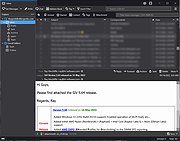 |
|
qBittorrent Portable v5.2.3 qBittorrent Portable v5.2.3 👉 Lightweight portable BitTorrent client with search, RSS, WebUI, and advanced torrent controls. qBittorrent Portable is the lightweight qBittorrent torrent client packaged as a portable app, so you can run it from a cloud folder, removable drive, or local folder without installing it on the PC. It includes a familiar interface, built-in search engine, support for BitTorrent extensions, WebUI remote control, RSS downloading with filters, bandwidth scheduling, IP filtering, IPv6 support, and torrent creation tools. Features: • Polished, familiar user interface • Well-integrated and extensible search engine • Simultaneous search across popular BitTorrent search sites • Category-specific search requests • Supports DHT, Peer Exchange, full encryption, Magnet URIs, and BitComet URIs • Remote control through a Web user interface • Advanced control over trackers, peers, and torrents • Torrent queueing and prioritizing • UPnP and NAT-PMP port forwarding support • Torrent creation tool • Advanced RSS support with download filters, including regex • Bandwidth scheduler • IP filtering compatible with eMule and PeerGuardian • IPv6 compliant • PortableApps.com format for easy portable use and automatic updates through the PortableApps.com Platform Supported operating systems: Windows 10/11 (64-bit Only) Supported operating systems: • Windows 10, Windows 11 64-bit only Supported languages: Multilingual, approximately 25 languages Changes: v5.2.3 07-07-26 BUGFIX: Fix MIME header encoding in email to require ASCII (quinot) #24382 BUGFIX: Fix potential invalid migration procedure (Chocobo1) #24502 BUGFIX: Resolve relative UI theme paths (TurboTheTurtle) #24514 BUGFIX: Clear transfer filters when sections collapse (TurboTheTurtle) #24517 BUGFIX: Fix potential deadlock when database transaction failed (Chocobo1) #24542 BUGFIX: Fix wrong torrent tracker conversion (Chocobo1) #24546 BUGFIX: Fix wrong encoding for Web Seeds (Chocobo1) #24593 BUGFIX: Use stricter parsing for Peer Address inputs (Chocobo1) #24595 BUGFIX: Revise regex expression for parsing HTML links (Chocobo1) #24597 WEBUI: Correctly escape CSS query selector so the UI won't break (vafada) #24539 RSS: Fix feeds not following the specified interval (vafada) #24553 SEARCH: Fix plugin counting when updating (Chocobo1) #24544 WINDOWS: Avoid using invalid file attributes when renaming files (Chocobo1) #24543 Note: This program will ... |
|
7,693 | Oct 02, 2026 qBittorrent Team & PortableApps.com 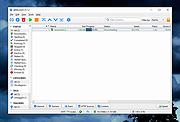 |
|
RSS Guard v5.2.3 RSS Guard v5.2.3 👉 Cross-platform open-source feed reader for RSS, ATOM, JSON and podcast feeds. RSS Guard is a lightweight yet powerful feed reader designed for reading and managing RSS, ATOM, JSON, and podcast feeds in one place. It provides a clean and organized interface that allows users to subscribe to multiple feeds, categorize them, and read articles efficiently. RSS Guard supports both local feed management and synchronization with several online services, making it suitable for users who want to keep track of news, blogs, podcasts, and other syndicated content across multiple devices. The application includes a built-in feed downloader, powerful filtering options, customizable article views, and a flexible plugin architecture. RSS Guard also features advanced feed management tools such as article labeling, filtering rules, and automatic feed updates. Its modular design and open-source nature allow for extensive customization and long-term flexibility, making it a strong choice for users who prefer a privacy-friendly alternative to cloud-based feed readers. Features: • Supports RSS, ATOM, and JSON feed formats • Built-in podcast support with episode management • Feed synchronization with supported online services • Customizable article viewer and reading layout • Powerful filtering and feed processing rules • Feed categories and organizational tools • Built-in feed downloader with automatic updates • Article labeling and tagging options • Plugin-based architecture for extended functionality • OPML import and export for feed migration • Notification system for new feed items • Open-source and privacy-focused design Supported operating systems: • Windows 10, Windows 11 • macOS • Linux Supported languages: English, Czech, German, French, Spanish, Italian, Dutch, Polish, Russian, Chinese, Japanese, Korean, Portuguese, Turkish Changes: v5.2.3 07-23-26 Added: Highlighting the Windows taskbar after feed-fetching errors can now be disabled in settings. Article and feed list titles now use available horizontal space by default. Feed fetching can now be paused or resumed from the tray icon menu. When paused and there ... |
|
5,977 | Jul 24, 2026 Martin Rotter 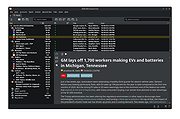 |
 |
SideSlide v6.50 SideSlide v6.50 👉 A powerful, customizable desktop workspace, launcher and information organizer that stays hidden until you need it. SideSlide is a free desktop assistant designed to keep your Windows desktop organized and clutter-free while providing instant access to programs, files, folders, websites, commands, RSS feeds, notes, reminders, pictures and other frequently used information. Its customizable workspace can dock to any screen edge and remain tucked away until needed, giving you a large organizational area without permanently consuming desktop space. The workspace uses flexible containers that can be resized, detached, folded, shrunk and arranged however you prefer. Containers can hold shortcuts, notes, RSS feeds, reminders and other content, allowing large collections of information to remain accessible without covering the desktop. SideSlide also includes extensive keyboard navigation and launching features for users who prefer working without the mouse. When the workspace is collapsed, SideSlide can display a Dock Strip containing useful system information and live weather. The workspace can quickly expand again when you need access to its contents. SideSlide can also be used portably from a USB drive. Its configuration files are kept together, and the portable version can continue working even when the removable drive letter changes. Features: • Fully customizable desktop workspace that remains hidden until needed • Dock the workspace to any edge of the screen • Dock Strip displays system information and live weather while the main workspace is collapsed • Create shortcuts to programs, files, folders, commands and websites • Add RSS news feeds directly to the workspace • Built-in RSS reader with filtering and Subject Tracker capabilities • Create resizable, detachable, foldable and shrinkable containers • Containers can extend beyond the visible screen area • Create colorful notes that can be searched, edited in bulk and individually customized • Encrypt notes and automatically re-encrypt them after editing • Create ... |
|
6,515 | Sep 02, 2026 Northglide 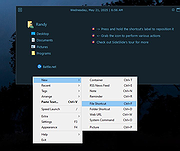 |
| Showing rows 1 to 4 of 4 | Showing Page 1 of 1 | 1 |
OlderGeeks.com Copyright (c) 2026
