|

|
Processed through Paypal No account required. |








Buy our over-priced crap to help pay the bills.



|
|
Processed through Paypal No account required. |
| Files | ||||
| File Name | Rating | Downloads | ||
 |
GIMP Photoshop Layout v2.0 GIMP Photoshop Layout v2.0 GIMP Photoshop Layout is an add-on for GIMP Portable (as well as standard GIMP on any operating system) that adjusts GIMP's standard dock/toolbox settings and sets GIMP to single window mode to more closely approximate the standard layout of Adobe Photoshop. Features As seen in the screenshot, the layout of the right-hand toolbox has been adjusted to more closely approximate the layout of Adobe Photoshop, making GIMP easier to use for users already familiar with that layout. Some items had to be moved (Brushes, for instance, since GIMP doesn't have a top toolbar). Others had to be combined due to lack of space. Support Here are a few tips for getting the add-on up and running: Installing (GIMP Portable): The add-on is installed just like any other portable app. Just select your GIMPPortable directory (which the installer should find automatically) and let it do the rest. Installing (Standard GIMP): There is also a zip download (here) which works with regular GIMP on Windows, Mac and Linux. In Windows, unzip it to your C:\Documents and Settings\[username]\.gimp-2.6 directory. On a Mac, the directory is home/.gimp-2.6/ (and it is hidden by default). On Linux, the directory is ~/.gimp-2.6/ and it may be hidden as well. You may wish to save a backup of your original layout by renaming it sessionrc-backupbeforepslayout. Uninstalling: To remove the plugin in GIMP Portable, simply run the uninstaller (linked just below the download button). Or delete sessionrc from your settings file and then rename sessionrc-backupbeforepslayout to sessionrc. System Requirements: Windows XP/Vista/7/8/10 License: Free / Open Source (GPL) Click here to visit the author's website. |
 |
5,630 | Feb 05, 2020 PortableApps.com/GIMP team 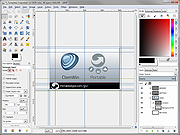 |
|
GIMP Portable v3.2.4 GIMP Portable v3.2.4 👉 Portable image editor for photo retouching, image composition and graphic creation. GIMP Portable is the portable version of the GNU Image Manipulation Program, a free and open source image editor for photo retouching, image composition, image authoring, painting, batch processing, rendering and image format conversion. It runs from a cloud folder, removable drive, local folder or the PortableApps.com Platform without needing a traditional installation. Features: • Portable version of GIMP for Windows • Runs from USB drives, cloud folders or local folders • Photo retouching and image editing • Image composition and authoring • Paint program capabilities • Expert-quality photo manipulation tools • Batch processing support • Image rendering and format conversion • Supports plug-ins and scripts • User plug-ins and scripts can be placed in the portable Data\GimpAppData folder • Optional English-only offline help add-on available • PortableApps.com Platform support for easier installs and automatic updates • Open source software under the GPL Supported operating systems: Windows XP, Vista, 7, 8, 10, 11 Supported languages: Multilingual, GIMP is available in more than 80 languages Changes: v3.2.4 04-19-26 GIMP 3.2.4 contains more bug fixes and UX updates. Highlights include fixes for accidental rasterizing of link, text and vector layers, text outline fixes, XCF compatibility fixes, fixes for uneditable text layers after reloading XCF files, image import plug-in security mitigations, OpenRaster export fixes, metadata export fixes, Open as Layers fixes, Wayland cursor fixes, image tab preview fixes, a new Windows WIA scanner plug-in, Welcome Dialog improvements, selection performance improvements, larger UI image support, floating layer/selection performance improvements and plug-in API updates. This download is for the Windows 10/11 version (very bottom of page). If you need the Windows 7/8 version, download here. If you need the Windows XP/Vista version, download here. Click here to visit the author's website. |
|
6,575 | Apr 30, 2026 GIMP Team & PortableApps.com 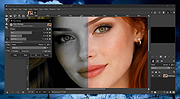 |
|
Gimp v3.2.4 Gimp v3.2.4 👉 Free and open source cross-platform image editor. GIMP is a cross-platform image editor available for GNU/Linux, macOS, Windows and more operating systems. It provides tools for graphic designers, photographers, illustrators, and scientists, with support for image manipulation, original artwork creation, graphic design elements, color management, scripting, customization, and third-party plug-ins. Features: • Advanced photo retouching tools including healing, clone, perspective clone, and content-aware fill workflows • Powerful layer-based editing with layer groups, masks, blend modes, and non-destructive editing techniques • Full support for high bit-depth images (8/16/32-bit per channel) for professional workflows • Extensive selection tools including free select, fuzzy select, foreground select, and intelligent scissors • Transform tools such as scale, rotate, shear, perspective, warp transform, and unified transform • Customizable brushes with dynamics support (pressure, velocity, randomness) for tablets and stylus input • Wide range of painting tools including pencil, paintbrush, airbrush, ink, MyPaint brushes, and gradient tools • Gradient editor and advanced gradient blending capabilities • Paths (vector) tool for precise curves, shapes, and text-on-path creation • Text tool with advanced typography support including kerning, hinting, and outline rendering • GEGL-based processing engine for high-quality image operations and non-destructive workflows • Extensive built-in filters and effects including blur, sharpen, distort, lighting, shadows, noise, and artistic filters • Support for external plug-ins such as G’MIC for hundreds of additional filters and effects • Color management with ICC profile support for accurate color reproduction across devices • Advanced color tools including levels, curves, hue-saturation, color balance, and exposure adjustments • Histogram display and analysis tools for precise tonal correction • Channel manipulation and alpha channel editing • Support for multiple file formats including JPEG, PNG, TIFF, PSD, WebP, HEIF, OpenRaster, and XCF native format • PSD import/export support for compatibility with Adobe Photoshop workflows • Multi-window and single-window interface modes for flexible workspace layouts • Fully customizable interface including dockable dialogs, tool groups, and keyboard shortcuts • Tabbed image ... |
|
9,566 | Apr 28, 2026 The Gimp Team |
| Showing rows 1 to 3 of 3 | Showing Page 1 of 1 | 1 |
OlderGeeks.com Copyright (c) 2026
