|

|
Processed through Paypal No account required. |








Buy our over-priced crap to help pay the bills.



|
|
Processed through Paypal No account required. |
| Files | ||||
| File Name | Rating | Downloads | ||
 |
Fan Control v275 Fan Control v275 👉 Highly customizable fan control software for Windows. Fan Control is a focused and highly customizable fan controlling software for Windows that lets you control CPU, GPU, and case fans using temperature-based logic. It supports guided setup, multiple profiles, theme customization, multiple temperature sources, several fan curve functions including custom graphs, mixed fan curves and sensors using max, min, or average logic, low resource usage, and advanced tuning options such as steps, start and stop percentages, response time, and hysteresis. Features: • Guided setup process on first launch • Save, edit, and load multiple profiles • Change the theme and color of the application • Multiple temperature sources including CPU, GPU, motherboard, and hard drives • Multiple fan curve functions, including a custom graph • Mix fan curves or sensors together using max, min, or average • Low resource usage • Advanced tuning with steps, start %, stop %, response time, and hysteresis • Extensive support for CPU, GPU, case fans, and other hardware such as AIOs • Plugin support for adding third-party temperature, speed, or control sensors Fan curve types • Auto: PI-ish type function. % will surf until temp is stable at load. • Linear : Temperature based linear function • Graph : Temperature based custom curve • Target: Temperature based that holds speed until target temperature is reached • Mix : Use two different curves and apply a mix function (Min, Max, Sum, Average) • Sync : Sync to an existing control • Flat: Set a fixed % Graph fan curve editor • Change the temperature range for finer control ... |
 |
7,181 | Aug 26, 2026 Rem0o 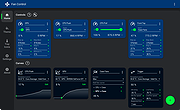 |
 |
NBFC - Notebook FanControl v1.6.3 NBFC - Notebook FanControl v1.6.3 NBFC is a fan control service for notebooks. It comes with a powerful configuration system, which allows to adjust it to many different notebook models. Windows Run the NBFC installer Start NoteBook FanControl.exe (by default located in C:\Program Files (x86)\NoteBook FanControl) Select a config. As soon as you hit the apply button, NBFC should take control over your notebook’s fans. There is no additional configuration required. The NBFC service will start automatically. If you want to adjust the selected config according to your needs, edit it in the Config Editor. 1.6.3 Most important changes: Support for Intel CoffeeLake, ApolloLake and AMD Ryzen CPUs (thanks @dan-and) Support for AMD Puma CPUs Support for many new notebook models ec-probe now supports colored output Improved settings file handling Lots of stability improvements and bugfixes Click here to visit the author's website. |
|
5,327 | Apr 16, 2019 Stefan Hirschmann 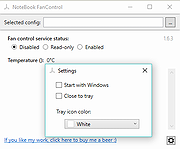 |
| Showing rows 1 to 2 of 2 | Showing Page 1 of 1 | 1 |
OlderGeeks.com Copyright (c) 2026
