|

|
Processed through Paypal No account required. |








Buy our over-priced crap to help pay the bills.



|
|
Processed through Paypal No account required. |
| Files | ||||
| File Name | Rating | Downloads | ||
 |
Firefox Environment Backup Extension (FEBE) 8.9.3.1 Firefox Environment Backup Extension (FEBE) 8.9.3.1 FEBE allows you to quickly and easily backup your Firefox extensions. In fact, it goes beyond just backing up -- It will actually rebuild your extensions individually into installable .xpi files. Now you can easily synchronize your office and home browsers. FEBE backs up and restores your extensions, themes, and (optionally) your bookmarks, preferences, cookies. and much more. Backup as little or as much of your Firefox environment as you wish. Perform backups on demand or schedule daily, weekly, or monthly unattended runs. Sequential backups can be stored in timestamped directories so you can restore back as far as you like. You may specify "User-defined" items to have FEBE backup Thunderbird, Greasemonkey scripts, or virtually any data on your computer - Firefox related or not. Version history (FEBE 8.0) November 11, 2016: Version 8.9.3.1 (1,375 kb) Fix for browser history restore. For Firefox v49.0 - v51.0a2 |
 |
7,621 | Aug 01, 2017 Chuck Baker 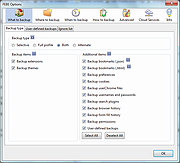 |
|
Link Shell Extension 32bit v3.9.2.9 Link Shell Extension 32bit v3.9.2.9 The NTFS file system implemented in NT4, Windows 2000, Windows XP, Windows XP64, and Windows7/8/10 supports a facility known as hard links (referred to herein as Hardlinks). Hardlinks provide the ability to keep a single copy of a file yet have it appear in multiple folders (directories). They can be created with the POSIX command ln included in the Windows Resource Kit, the fsutil command utility included in Windows XP or my command line ln.exe utility Thus, using standard Windows facilities Hardlinks can only be created at the command prompt, which can be tedious, especially when Hardlinks to multiple files are required or when one only makes occasional use of Hardlinks. Support for Junctions in standard Microsoft software offerings is even more limited than that offered for Hardlinks. Link Shell Extension (LSE) provides for the creation of Hardlinks , Junctions , Volume Mountpoints , and Windows7/8's Symbolic Links, (herein referred to collectively as Links) a folder cloning process that utilises Hardlinks or Symbolic Links and a copy process taking care of Junctions, Symbolic Links, and Hardlinks. LSE, as its name implies is implemented as a Shell extension and is accessed from Windows Explorer, or similar file/folder managers. The extension allows the user to select one or many files or folders, then using the mouse, complete the creation of the required Links - Hardlinks, Junctions or Symbolic Links or in the case of folders to create Clones consisting of Hard or Symbolic Links. LSE is supported on all Windows versions that support NTFS version 5.0 or later, including Windows XP64 and Windows7/8/10. Hardlinks, Junctions and Symbolic Links are NOT supported on FAT file systems, and nor is the Cloning and Smart Copy process supported on FAT file systems. Within this document ... |
|
9,886 | Nov 15, 2019 Hermann Schinagl 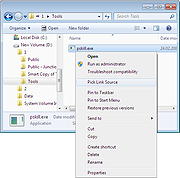 |
|
Link Shell Extension 64bit v3.9.2.9 Link Shell Extension 64bit v3.9.2.9 The NTFS file system implemented in NT4, Windows 2000, Windows XP, Windows XP64, and Windows7/8/10 supports a facility known as hard links (referred to herein as Hardlinks). Hardlinks provide the ability to keep a single copy of a file yet have it appear in multiple folders (directories). They can be created with the POSIX command ln included in the Windows Resource Kit, the fsutil command utility included in Windows XP or my command line ln.exe utility Thus, using standard Windows facilities Hardlinks can only be created at the command prompt, which can be tedious, especially when Hardlinks to multiple files are required or when one only makes occasional use of Hardlinks. Support for Junctions in standard Microsoft software offerings is even more limited than that offered for Hardlinks. Link Shell Extension (LSE) provides for the creation of Hardlinks , Junctions , Volume Mountpoints , and Windows7/8's Symbolic Links, (herein referred to collectively as Links) a folder cloning process that utilises Hardlinks or Symbolic Links and a copy process taking care of Junctions, Symbolic Links, and Hardlinks. LSE, as its name implies is implemented as a Shell extension and is accessed from Windows Explorer, or similar file/folder managers. The extension allows the user to select one or many files or folders, then using the mouse, complete the creation of the required Links - Hardlinks, Junctions or Symbolic Links or in the case of folders to create Clones consisting of Hard or Symbolic Links. LSE is supported on all Windows versions that support NTFS version 5.0 or later, including Windows XP64 and Windows7/8/10. Hardlinks, Junctions and Symbolic Links are NOT supported on FAT file systems, and nor is the Cloning and Smart Copy process supported on FAT file systems. Within this document ... |
|
9,932 | Nov 15, 2019 Hermann Schinagl |
 |
Shell WebP Converter v2.5.1 Shell WebP Converter v2.5.1 👉 Lightweight Windows shell extension for fast WebP image conversion directly from the right-click menu. Shell WebP Converter is a simple and efficient Windows shell extension that allows you to convert images to and from the WebP format directly from the Windows context menu. Once installed, it integrates seamlessly into File Explorer, enabling quick conversions without opening a separate application. Designed to be lightweight and easy to use, Shell WebP Converter supports bulk image processing and preserves image quality through configurable settings. It is ideal for users who regularly work with WebP images and want a fast, no-nonsense way to convert formats straight from the desktop. Features: • Adds right-click context menu integration in Windows Explorer • Convert images to WebP format • Convert WebP images to common formats such as PNG and JPEG • Batch conversion support for multiple selected files • Lightweight and fast performance • Simple, user-friendly operation • Maintains image quality with configurable compression options Supported operating systems: • Windows 10, Windows 11 Supported languages: English, Russian, Arabic, German, Spanish, French, Hindi, Hungarian, Italian, Japanese, Korean, Portuguese, Slovak, Turkish, Chinese Changes: v2.5.1 05-08-26 GUI fixes Note: This file has one hit on VirusTotal. We have confirmed this to be a false positive. The file is safe. Click here to visit the author's website. |
|
762 | Jun 27, 2026 SchwarzFuchs 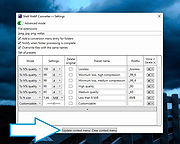 |
|
SmartSystemMenu v2.33.1 SmartSystemMenu v2.33.1 👉 Enhance Windows system menus with powerful window management features. SmartSystemMenu is a lightweight utility that extends the standard Windows system menu of application windows with a wide range of advanced window management tools. By right-clicking the title bar or using the system menu, users gain access to additional options that go far beyond the default Move, Size, Minimize, Maximize, and Close commands. SmartSystemMenu allows you to control window behavior, transparency, priority, alignment, and more, making it especially useful for power users who want finer control over their desktop environment. Features: • Adds extended options to the standard Windows system menu • Adjust window transparency levels • Set window priority (Real-time, High, Above normal, Normal, Below normal, Idle) • Resize and reposition windows with custom dimensions • Align windows to screen edges or predefined positions • Change window always-on-top state • Save and restore window positions • Take screenshots of application windows • Copy window text to clipboard • Multi-language interface • Portable version available Supported operating systems: • Windows 7, Windows 8, Windows 8.1, Windows 10, Windows 11 Supported languages: English, Russian, German, French, Spanish, Italian, Portuguese, Polish, Chinese (Simplified), Chinese (Traditional), Japanese, Korean, Turkish, Dutch, Czech, Hungarian, Ukrainian Changes: v2.33.1 03-20-26 Support of the SmartSystemMenu.xml file for previous versions Korean translation improvements Japanese translation improvements by @coolvitto Click here to visit the author's website. |
|
5,811 | Mar 23, 2026 Alexander Illarionov 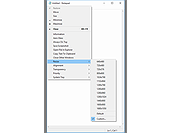 |
|
uBlock Origin Lite v2026.628.2035 uBlock Origin Lite v2026.628.2035 👉 Lightweight Manifest V3 content blocker that blocks ads, trackers, and other unwanted web content. uBlock Origin Lite is a lightweight, Manifest V3-based content blocker designed to efficiently block ads, trackers, cryptominers, and other unwanted web content while using minimal CPU and memory. Unlike the original uBlock Origin, uBlock Origin Lite relies on the browser's declarative filtering engine, allowing filtering to occur without a continuously running background process. This approach improves efficiency while remaining compatible with modern browser extension requirements. Users can select different filtering modes and enable additional filter lists through the extension's options page to increase protection. uBlock Origin Lite includes the standard uBlock Origin filter set by default, including EasyList, EasyPrivacy, Peter Lowe's Ad and Tracking Server List, and uBlock's own built-in filters. It is ideal for Chromium-based browsers that require Manifest V3-compatible extensions while also supporting Firefox and Safari versions built for the new extension architecture. Features: • Blocks advertisements, trackers, cryptominers, and malicious domains • Built on the Manifest V3 extension platform • Uses the browser's declarative filtering engine for low resource usage • No permanent background process required • Includes uBlock Origin default filter lists • Supports additional optional filter lists • Multiple filtering modes for different levels of protection • Fast startup with minimal CPU and memory consumption • Open source under the GPL-3.0 license • Available for Chromium-based browsers, Firefox, Microsoft Edge, and Safari Supported operating systems: • Windows 10, Windows 11 • macOS 13.7 or higher • Linux (via supported Chromium-based browsers or Firefox) • ChromeOS • iOS 18.6 or higher (Safari) • iPadOS 18.6 or higher (Safari) Supported languages: English Changes: v2026.628.2035 06-28-26 Updated filter lists. This download is for the Firefox version (very bottom of page). If you need the Google Chrome version, download here. If you need the Microsoft Edge version, download here. If you need the Apple Safari version, download here. Click here to visit the author's website. |
|
505 | Jul 05, 2026 Raymond Hill 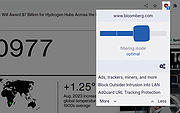 |
| Showing rows 1 to 6 of 6 | Showing Page 1 of 1 | 1 |
OlderGeeks.com Copyright (c) 2026
