|

|
Processed through Paypal No account required. |








Buy our over-priced crap to help pay the bills.



|
|
Processed through Paypal No account required. |
| Files | ||||
| File Name | Rating | Downloads | ||
 |
2Shoot_Dual_Intervalometer_ISO_Bracketing.zip 2Shoot Dual Intervalometer & ISO Bracketing v1.0.0 👉 A portable Windows tool for wireless interval shooting and ISO bracketing with supported Sony cameras. 2Shoot Dual Intervalometer & ISO Bracketing is a lightweight photography utility that controls supported Sony cameras from a Windows PC over Wi-Fi. It provides both an intervalometer and true ISO bracketing while keeping the interface simple and focused. Photographers can create timed shooting sequences, distribute a selected number of shots across a specified duration, or capture 3, 5, or 9 images at different ISO values while maintaining the same shutter speed and aperture. The program currently supports the Sony α1 (ILCE-1) and Sony α7 IV (ILCE-7M4), provides live camera information, works with autofocus or manual focus, and requires no traditional installation. Features: • Wireless control of supported Sony cameras over Wi-Fi • Interval Mode for setting the delay between consecutive photographs • Duration Mode for distributing a selected number of shots over a total duration • Time controls adjustable in 0.5-second steps • ISO bracketing with 3, 5, or 9-shot sequences • ISO bracket steps of 0.3 EV, 0.7 EV, or 1.0 EV • Uses the camera's current ISO as the center value of an ISO bracket • Displays the calculated ISO scale in real time • Keeps shutter speed and aperture unchanged during ISO bracketing • Automatically restores the camera's original ISO after a bracketing sequence • Supports RAW, RAW + JPG, and JPG operation • Supports autofocus and manual-focus shooting • Displays live ISO, shutter speed, and aperture information • Monitors actual shutter speed for interval timing checks • Automatically opens the destination folder after a successfully completed sequence • Automatically retries a camera connection up to two times after the initial attempt • Includes an Abort Connection control • Built-in Help and About windows • Supports Sony α1 (ILCE-1) and Sony α7 IV (ILCE-7M4) • Portable 64-bit Windows application with no traditional installer required Supported operating systems: • ... |
 |
77 | Sep 20, 2026 Cristoforo Bonissone 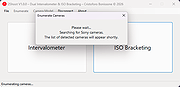 |
|
Agent DVR v7.9.2.0 Agent DVR v7.9.2.0 👉 A powerful, self-hosted video surveillance and monitoring platform. Agent DVR is a full-featured video surveillance application designed for local and remote monitoring of cameras and microphones. It supports a wide range of devices including IP cameras, USB webcams, and audio inputs, and provides advanced functionality such as motion detection, recording, alerts, and remote access through a web-based interface. Features: • Supports IP cameras, USB webcams, RTSP streams, and audio devices • Compatible with ONVIF devices for easy camera discovery and setup • Browser-based interface with no client software required • Remote access from anywhere via secure web portal • Motion detection with adjustable sensitivity, zones, and filters • AI object detection including people, vehicles, animals, and custom models • Facial recognition support (with configured AI services) • License plate recognition (via integrations) • Continuous, motion-triggered, and scheduled recording modes • Timeline-based playback with fast scrubbing and event markers • Multiple simultaneous camera streams with grid and custom layouts • PTZ control including presets, tours, and auto-tracking (supported cameras) • Audio recording, live listening, and two-way audio support • Alerts and notifications via email, SMS, push, webhook, and API triggers • Smart alerts based on AI detection events • Event logging with searchable history • User accounts with roles, permissions, and access restrictions • HTTPS support for secure connections • No port forwarding required using built-in remote access services • Local storage with configurable retention policies • Cloud upload support including FTP, SFTP, and third-party services • Automatic cleanup and disk management options • Multi-server support for distributed camera setups • Plugin system for extending functionality • Integration with home automation systems and external APIs • Support for hardware acceleration (GPU) to improve performance • Cross-platform support via .NET and Docker containers • Import/export configuration and backup settings • Supports multiple layouts, themes, and UI customization • Snapshot capture and image archiving • Privacy masking zones for sensitive areas • Time-lapse recording and export • Multi-language interface support (where available in ... |
|
4,579 | Aug 19, 2026 iSpyConnect.com 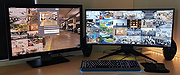 |
 |
Alsi lt9388 lt 9388 web camera drivers for Windows 2000/XP Alsi lt9388 lt 9388 web camera drivers for Windows 2000/XP 9388xp.exe |
 |
9,775 | Apr 08, 2009 Alsi |
|
Android Webcam System v1.0.6 Android Webcam System v1.0.6 👉 Turn an Android phone into a high-quality Windows webcam over USB or Wi-Fi. Android Webcam System is a free and open-source webcam solution that uses an Android smartphone as a webcam for a Windows computer. The system consists of the AWA Android app, which streams video from the phone, and the AWC desktop client, which receives the stream and provides a virtual webcam device that can be selected by compatible Windows applications. Everything operates locally without requiring a cloud streaming service. The project supports both USB and Wi-Fi connections. USB provides lower latency and improved stability without requiring Wi-Fi, while wireless mode lets the phone and computer communicate over the same local network. The Android app supports resolutions from 480p through 4K and allows switching between the phone's front and rear cameras. The virtual webcam can be used with programs such as Zoom, Microsoft Teams, Google Meet, Discord, OBS Studio and Skype, as well as other Windows programs capable of selecting a webcam device. Features: • Turns an Android smartphone into a Windows webcam • Includes AWA, a Kotlin-based Android camera and streaming application • Includes AWC, the desktop client that receives the phone's video stream • Creates a virtual webcam device for compatible Windows applications • Supports USB and Wi-Fi connections • USB mode offers lower latency and improved connection stability • Wi-Fi mode provides completely wireless operation over the local network • Supports 480p, 720p, 1080p and 4K video resolutions • Supports front and rear Android cameras • Displays real-time connection status • Provides desktop connection statistics • Designed for low battery usage on the Android device • Works with Zoom, Microsoft Teams, Google Meet, Discord, OBS Studio and Skype • Can be used by other applications that support standard webcam devices • Uses a fully local, serverless architecture • No cloud video relay is required • No advertisements • Free and open-source under the ... |
|
271 | Aug 09, 2026 Soubhagyajit Borah 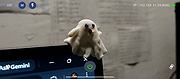 |
|
Camera Mouse 2018 v1.1 Camera Mouse 2018 v1.1 Camera Mouse is a free program that allows you to control the mouse pointer on a Windows computer just by moving your head. Clicking can be done by making the mouse pointer dwell over a spot on the screen (after first turning Clicking on in Settings). The program was developed at Boston College to help people with disabilities use the computer. The main audience for this program is people who do not have reliable control of a hand but who can move their head. People with Cerebral Palsy, Spinal Muscular Atrophy, ALS, Multiple Sclerosis, Traumatic Brain Injury, various neurological disorders use this program and its predecessors to run all types of computer software. Camera Mouse works as a mouse replacement system for Windows computers and tablets so it should work with just about any application program. For example people use Camera Mouse with entertainment programs, education programs, communication programs, web browsers, and so on. (See the Downloads page for some of the programs and websites that we have used with Camera Mouse.) Camera Mouse works best with application programs that require only a mouse and a left click and that do not have tiny targets. It's easier to use Camera Mouse with application programs that do not require extreme accuracy. What equipment is required? A Windows 10, 8.1, 8, 7, Vista, or XP computer or tablet and a built-in camera or standard USB webcam. We do our development work with a Microsoft LifeCam Studio and a Logitech HD Pro Webcam C920. However the much less expensive Microsoft LifeCam HD-3000 and Logitech HD C270 work well also. Camera Mouse should work with any built-in camera or USB webcam. This program is available for free download. Support for our work has come from the Philanthropy Committee of Mitsubishi Electronic Research Labs ... |
|
6,495 | Jul 02, 2020 Trustees of Boston College 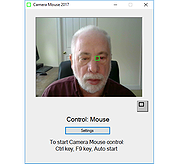 |
|
digiKam v9.1.0 digiKam v9.1.0 👉 Professional photo management with the power of open source. digiKam is an advanced open-source digital photo management application for importing, organizing, editing, and sharing photos and RAW files. It provides tools for managing large photo collections, editing metadata, tagging and rating images, handling RAW camera formats, previewing media, geolocation, batch processing, export tools, and AI-assisted photo workflows. Features: • Import, organize, and manage massive collections of photos, RAW images, and videos • Supports albums, tags, labels, ratings, comments, and hierarchical organization • Advanced metadata management including EXIF, IPTC, XMP, and GPS geotagging • Integrated map tools for assigning and editing geographic coordinates • Powerful RAW image processing using the Libraw engine • Built-in image editor with cropping, resizing, sharpening, curves, color correction, filters, and restoration tools • Includes Showfoto stand-alone image editor • AI-assisted face recognition and automatic face tagging • AI tools for image quality sorting, aesthetic detection, red-eye correction, and auto-rotation • Batch Queue Manager for automating large-scale image processing operations • Advanced search and filtering using metadata, tags, ratings, colors, and custom properties • Duplicate detection and similarity matching tools • Flexible file renaming with advanced rename templates and date formatting • Side-by-side comparison and new Survey tool for reviewing media collections • Enhanced preview system with exposure indicators, magnifier, gestures, OSD overlays, and color management • Slideshow tools with transition and transparency customization • Versioning support and non-destructive workflow options • Integrated export and sharing plugins for online services and remote storage • Database support using SQLite, MySQL, and MariaDB • Multi-core processing acceleration for thumbnail generation, AI tasks, and database operations • Supports hundreds of digital cameras and image formats Supported operating systems: • Windows 10 or later 64-bit • macOS Silicon 11.3 or later • macOS Intel 10.15 or later • Linux 64-bit AppImage, glibc 2.31 or later Supported languages: • Basque, Brazilian Portuguese, Bulgarian, Catalan, Chinese Simplified, Chinese Traditional, Croatian, Czech, Danish, Dutch, English, Esperanto, Estonian, Finnish, French, Galician, ... |
|
4,287 | Sep 28, 2026 digiKam Team 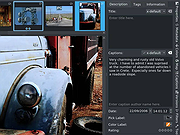 |
|
Lifetec lt9388 lt 9388 web pc camera drivers for Windows 2000/XP Lifetec lt9388 lt 9388 web pc camera drivers for Windows 2000/XP 9388xp.exe |
 |
10,043 | Apr 08, 2009 Lifetec |
|
Medion md9388 md 9388 lt9388 lt 9388 web pc camera drivers for Windows 2000/XP Medion md9388 md 9388 lt9388 lt 9388 web pc camera drivers for Windows 2000/XP 9388xp.exe |
|
9,812 | Apr 08, 2009 Medion |
|
Yowl v1.3.2 Yowl v1.3.2 👉 A MacBook theft alarm that sounds if someone tries to take your laptop and snaps a pic of the thief. Yowl is a menu-bar app for macOS that sounds an alarm when a MacBook is unplugged, moved, or its lid is partly closed. You choose which triggers to enable. When the alarm sounds, Yowl can play a siren, lock the screen, take photos, and send optional alerts and photos to your phone through ntfy. Photo capture and phone alerts are optional. Yowl is free and open source, with no accounts, analytics, or servers of its own. Features: • Runs from the macOS menu bar. • Triggers the alarm when the charger is unplugged. • Offers optional camera-based movement detection and a partial-lid-close trigger. • Sounds a siren at maximum volume, even if the Mac is muted or using headphones. • Can lock the screen when the alarm sounds. • Can optionally take photos, including images captured during the 10 seconds before the alarm. • Can optionally send an alert and up to three photos to your phone using a private ntfy link. • Saves captured photos on the Mac, keeping up to 40 recent images. • Uses a universal binary for Apple Silicon and Intel Macs. The lid trigger requires a hinge sensor and is unavailable on Intel Macs. • Requires macOS 14 or later. Supported operating systems: • macOS 14 or later Supported languages: English Changes: v1.3.2 10-08-26 Keep screaming with the lid closed: if installing the helper fails, Yowl now says why, instead of only showing "Helper: not installed". Cancelling the password prompt still reads as not authorised; anything else shows the underlying error (#1). The install now checks only Yowl's ... |
|
28 | Oct 12, 2026 nejcar20 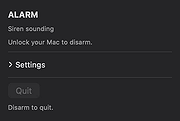 |
| Showing rows 1 to 9 of 9 | Showing Page 1 of 1 | 1 |
OlderGeeks.com Copyright (c) 2026
