|

|
Processed through Paypal No account required. |








Buy our over-priced crap to help pay the bills.



|
|
Processed through Paypal No account required. |
| Files | ||||
| File Name | Rating | Downloads | ||
 |
Auto Recycle Bin v1.15 Auto Recycle Bin v1.15 Auto cleanup of the recycle bin using selected settings By using this program, all items in your Recycle Bin will be monitored and deleted depending on your rules. You can set the Recycle Bin to empty when shutting down the Windows OS, or set it to delete large files after only a few hours. If items don’t take up much disk space, you can set the Recycle Bin to keep them for a month or other longer time frames. You can even set rules depending on the deletion date, extension of the file or its size. In other words - rules will provide automatic cleaning, so you will never need to worry about the Recycle Bin again. This is the main screen of the program, it displays size of recycle bin, usage, and basic rules for automatic cleanup. The fields are self-explanatory. This is the settings of the program. You can choose when you wan to process items in the recycle bin. There is 3 options: manual, automatic on startup and always running. The program supports multiple disks. If you have more than one disk on your computer you will see separate settings for each recycle bin on each disk. Click here to visit the author's website. |
 |
2,726 | Dec 05, 2022 CyRobo 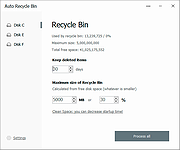 |
 |
CleanSweep2 v3.1 CleanSweep2 v3.1 👉 Remove selected Windows junk files and see how much disk space you reclaim. CleanSweep2 lets you select temporary files, caches, logs, and other cleanup targets. It estimates reclaimable space before cleaning and reports the space recovered afterward. A command-line edition supports selective cleaning, logging, silent operation, and scheduled runs through Windows Task Scheduler. Review your selections carefully before removing File History snapshots or the Windows.old folder. Features: • Select cleanup targets individually. • Remove temporary files, temporary setup files, and temporary internet files. • Clear Chrome and Microsoft Edge caches, thumbnail caches, and Microsoft Office cache. • Clean Windows Update logs, error reports, Defender logs, and Delivery Optimization files. • Empty the Recycle Bin or remove Event Viewer logs when selected. • Optionally remove File History snapshots and the Windows.old folder. • See estimated reclaimable space and the amount recovered. • Save logs and remember selections in the graphical edition. • Run selective or scheduled cleaning with the command-line edition. Supported operating systems: • Windows 7, Windows 8, Windows 8.1, Windows 10, Windows 11 Supported languages: English Changes: v3.1 03-12-26 FIX - Multiple file exceptions on load CHANGE - Default to manual check for updates Click here to visit the author's website. |
|
5,047 | Sep 28, 2026 Thomas Loupe 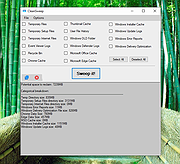 |
|
InstallerClean v3.3.0 InstallerClean v3.3.0 👉 Safely clean orphaned Windows Installer files and reclaim disk space. InstallerClean is a modern, open-source tool for cleaning unneeded files from the hidden C:\Windows\Installer folder. It scans for orphaned .msi and .msp files, checks them against the Windows Installer database, and lets you delete them to the Recycle Bin or move them to a folder you choose. Features: • Scans C:\Windows\Installer for unneeded installer and patch files • Detects orphaned MSI and MSP files • Detects superseded patches, including Adobe Acrobat patches • Uses the Windows Installer API instead of guessing by file names or dates • Shows needed and removable files with sizes • Delete sends files to the Recycle Bin • Move option lets you keep removed files in a safe folder • GUI and command-line versions included • No telemetry, no network activity, no background service, no scheduled task Supported operating systems: • Windows 10, Windows 11 Supported languages: Indonesian, German, English, Spanish, French, Italian, Dutch, Polish, Brazilian Portuguese, Vietnamese, Turkish, Russian, Ukrainian, Japanese, Simplified Chinese, Traditional Chinese, Korean Changes: v3.3.0 10-13-26 Added InstallerClean can now be shown in Traditional Chinese, written for Taiwan's usage with the words Windows itself uses there: every window, dialog, tooltip, button and screen-reader label, the command-line tool's text and the setup wizard. A Windows set to Traditional Chinese shows it automatically, and it can be picked from the main-window language menu. Like the other machine-drafted languages it is published beside the English in docs/translations/zh-Hant.md for anyone who reads it to check, and the README has a Traditional Chinese edition, which the app's README links open. Where the languages stand: Natively done Live machine-translated README only * English · Italian · Japanese · Dutch Simplified Chinese · Traditional Chinese · Russian · Spanish · Brazilian Portuguese · Polish · Turkish · Korean · French · German · ... |
|
1,148 | Oct 13, 2026 no-faff  |
|
WinBin2Iso v6.77 WinBin2Iso v6.77 👉 Convert BIN disc image files into ISO format quickly and easily. WinBin2Iso is a lightweight and portable utility that converts BIN CD, DVD, and Blu-ray image files into ISO format. The program is designed to handle large image files over 2GB while remaining extremely small and simple to use. Its straightforward interface allows users to select a BIN file, choose an output location, and create an ISO image in just a few clicks. Because the program is portable, it does not require installation and can be run directly from a USB flash drive or other removable media. Features: • Convert BIN image files to ISO format • Supports CD, DVD, and Blu-ray image conversion • Handles files larger than 2GB • Portable application with no installation required • Extremely small program size • Simple and easy-to-use interface • Low CPU and system resource usage • Drag-and-drop support • Multilingual user interface • Compatible with both 32-bit and 64-bit Windows systems Supported operating systems: • Windows XP, Windows Vista, Windows 7, Windows 8, Windows 8.1, Windows 10, Windows 11 • Windows Server editions • Supports 32-bit and 64-bit systems Supported languages: English, German, Italian, French, Spanish, Traditional Chinese, Danish, Polish, Turkish, Japanese, Korean, Arabic, Portuguese, Dutch, Swedish, Finnish, Icelandic, Irish, Afrikaans, Norwegian, Luxembourgish, Māori Changes: v6.77 06-22-26 • Improvements to the Win-Bin-2-Iso app for all Windows operating systems • Language file update in the Win-Bin-2-Iso application This download is for the Windows 64bit version (very bottom of page). If you need the Windows 32bit version, download here. If you need the Windows Unicode version, download here. Click here to visit the author's website. |
|
6,562 | Jun 23, 2026 Nenad Hrg 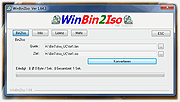 |
| Showing rows 1 to 4 of 4 | Showing Page 1 of 1 | 1 |
OlderGeeks.com Copyright (c) 2026
