|

|
Processed through Paypal No account required. |








Buy our over-priced crap to help pay the bills.



|
|
Processed through Paypal No account required. |
| Files | ||||
| File Name | Rating | Downloads | ||
 |
AutoRun LWMenu v1.6.8 AutoRun LWMenu v1.6.8 A free control menu, application launcher and portabilizer - all in one application! This is portable program that lets you control menus via autorun.inf files. It also serves as a portable enforcer for semi-portable programs that don't need installation but do otherwise leave leftovers forever (i.e. it portabilize non portable apps). Inspired by the late 2002 Net-burner's AMenu, only with a user-customized menu, unlimited buttons, control over special buttons, native support for "working folders", an ability to delete leftovers by the launched programs, and much more. You can even submit your own ideas. Usage All you have to do is launch AutoRun_x64.exe or AutoRun_x32.exe • This presents a menu based on an autorun.inf file in the same folder. One of the menu's options is to edit this file and thus control the menu. • For those who don't like menus, you can uncomment ;skiptobutton=x to choose a pre-defined button instead of opening the menu. For example, skiptobutton=4 will always launch button 4 without opening the menu. • For those who don't like tray icons, you can uncomment ;hidetrayicon=1 to run without it. • You can define registry values, folders and files to delete after the launched program exists. If that program expects certain registry values/folders/files to exist before it runs, you can have blank entries created automatically by appending the values with + (e.g. registry=+HKCU\Software\Test) or also use backuppath=some_folder (e.g. backuppath=. or backuppath=c:\folder\backup), which will automatically backup and restore before/after running the program. -For registry entries specifically, you can skip a whole backup and just create basic entries like registry=+HKCU\Software\advanced,accept,1 • If you like to just trick a non portable program, you can define (multiple) symlink=symlink|target to ... |
 |
2,793 | Jun 06, 2025 Lior Weissbrod 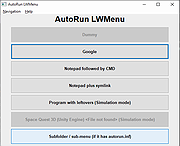 |
 |
Autorun Organizer v5.45 Autorun Organizer v5.45 Free startup manager for Windows with built-in antivirus scan through VirusTotal. Capabilities: • Turns on and off autorun elements • Removes autorun elements • Automatically controls disabled records • Batch processes autorun records • Rating of startup programs (frequency of disabling / deleting entries) • Switch between different Windows startup sections • Suspends running of programs • Shows a visual Windows boot up time diagram • Checks startup programs for viruses in VirusTotal (more than 60 antivirus programs) • Notifies you of new entries in Windows auto-start list • Quickly searches • Automatically detects erroneous records • Automatic update to newer versions of the utility System Requirements: Microsoft Windows 11 / 10 / 8 / 7 (32-bit and 64-bit) RAM: from 256 Mb Disk space: 50 Mb Administrator rights Changes: v5.45 26/09/2024 In the notification section (under the bell icon), you can now find news from the official program blog and educational articles. Tooltips, which appear in different parts of the program to help users learn how to use it most effectively, have been improved. A close button and a button to respond to program requests directly within the tooltip have been added. Click here to visit the author's website. |
|
4,806 | Sep 27, 2024 ChemTable Software 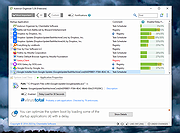 |
|
Shortcut Virus Removal Tool v2.3.0 Shortcut Virus Removal Tool v2.3.0 👉 Portable tool for removing shortcut virus infections from USB drives and recovering hidden files. Shortcut Virus Removal Tool is a portable USB malware cleanup utility for Windows designed to fix USB drives, external HDD / SSD drives, and computers affected by shortcut virus infections. It can remove shortcut virus traces, restore files hidden by malware, remove suspicious shortcuts and files, repair registry changes, undo unwanted malware changes, and delete autorun virus entries from USB drives. The developer says the tool works with a simple drive selection and Clean button workflow, and recommends running it as Administrator if needed. It also opens a log after cleaning and may place some restored files in a RECOVERED folder. Features: • Cleans shortcut virus infections from USB drives and external storage. • Recovers files hidden by malware. • Deletes suspicious files, scripts, and malicious shortcuts. • Repairs registry changes and undoes unwanted malware modifications. • Deletes autorun virus entries from USB drives. • Opens a cleanup log after completion so you can review recovered and deleted items. • Can recover some files into a RECOVERED folder on the USB drive. • Simple one-click cleaning workflow after selecting the target drive. Supported operating systems: • Windows XP or later, .NET Framework 4.0 required. Supported languages: • English, German, Turkish, Arabic, Indonesian Changes: v2.3.0 07-23-26 New Features: Added Vaccinate Computer feature. This feature vaccinates your computer from most of the shortcut virus and other USB disk viruses. Added Vaccinate USB feature. This feature vaccinates your USB and even if it's infected, shortcut virus and other USB disk viruses cannot run from the USB. Added Options menu. You can click it to show more options. About button is moved there. Fixes and Changes: A lot of problems with the translations has been fixed. Fixed a problem that caused the application to crash sometimes when you change the language to ... |
|
3,151 | Aug 20, 2026 Emir Alp Kocak 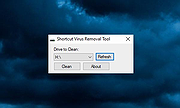 |
|
Startup Monitor 64 v4.175 Startup Monitor 64 v4.175 👉 A portable Windows utility that watches startup locations and alerts you when programs try to add themselves. Startup Monitor 64 is a portable Windows system monitoring utility designed to detect changes to startup folders, Windows Registry startup locations, scheduled tasks and other locations you choose to monitor. When a new or changed item is detected, Startup Monitor 64 presents it for review so you can decide whether it should be allowed or denied. On its first run, the program creates baseline snapshots of existing startup folders and scheduled tasks. Future scans compare the current system against this baseline along with separate Allowed and Denied lists. This helps distinguish legitimate existing startup entries from newly added or changed items. Startup Monitor 64 is not limited to traditional Windows startup locations. You can add your own folders and Registry paths, allowing the program to serve as a general-purpose change monitor for locations you want to keep an eye on. The program is fully portable. Configuration files, baselines, allowed and denied lists, and logs are kept inside an App folder within the program's directory. Features: • Monitors Windows startup folders for new or changed items • Monitors common Windows Registry startup locations • Monitors Windows Task Scheduler for newly added or changed scheduled tasks • Allows custom folders to be added to the monitoring list • Allows custom Registry paths to be monitored • Individual monitored locations can be enabled or disabled • Displays a review window when new or changed items are detected • Lets you approve detected items and add them to an Allowed list • Lets you deny detected items and remove them after confirmation • Maintains separate Allowed and Denied lists • Creates a persistent baseline of existing startup items on first run • Creates a baseline of existing scheduled tasks • Provides adjustable startup-location monitoring intervals from 1 to 60 seconds • ... |
|
268 | Sep 09, 2026 sl2365 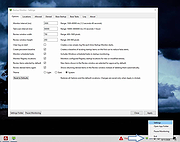 |
| Showing rows 1 to 4 of 4 | Showing Page 1 of 1 | 1 |
OlderGeeks.com Copyright (c) 2026
