|

|
Processed through Paypal No account required. |








Buy our over-priced crap to help pay the bills.



|
|
Processed through Paypal No account required. |
| File - Download Universal USB Installer v2.0.3.8 | ||||||||
| Description | ||||||||
|
Always scroll to the bottom of the page for the main download link. We don't believe in fake/misleading download buttons and tricks. The link is always in the same place. Universal USB Installer v2.0.3.8 👉 Create bootable USB drives for Linux distributions and system utilities with ease. Universal USB Installer is a straightforward Windows utility designed to help you create bootable USB flash drives for a wide variety of Linux distributions, antivirus rescue disks, system utilities, and other bootable ISO images. It guides you through the process step by step, making it accessible for beginners while still offering flexibility for advanced users. 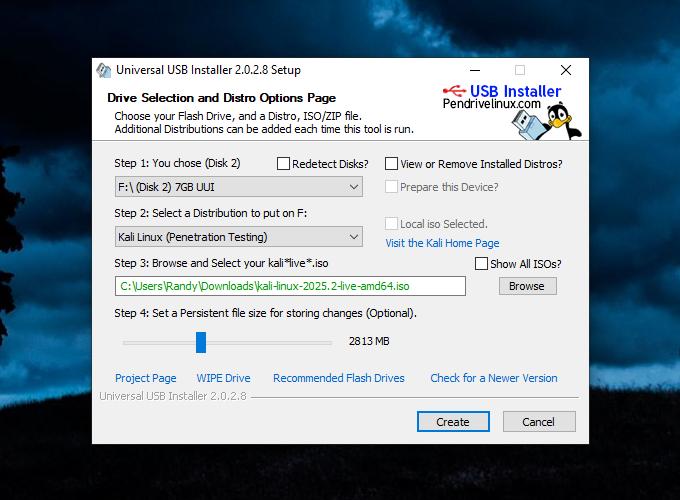 The program supports both BIOS and UEFI systems and can optionally format USB drives as FAT32 or NTFS depending on the selected distribution. Universal USB Installer can also be used to create persistent storage for supported Linux distributions, allowing saved changes and files to remain available between reboots. Features: • Create bootable USB drives from ISO files • Supports hundreds of Linux distributions and utilities • Optional persistent storage for supported Linux builds • Works with BIOS and UEFI systems • Automatic USB formatting options • Simple step by step interface Supported operating systems: • Windows 7, Windows 8, Windows 8.1, Windows 10, Windows 11 Supported languages: English Universal USB Installer- Easily Make Bootable USB Using this open source USB boot maker software is easy as 123. To create a bootable USB drive, you simply select your target flash drive, choose your distribution from the list, browse to the ISO file (or choose to download the ISO), and then click Create. Once finished, you should have a ready to run Live USB containing the Live operating system, Windows installation media, or system diagnostics utility, or advanced system cleaner tool you previously selected. 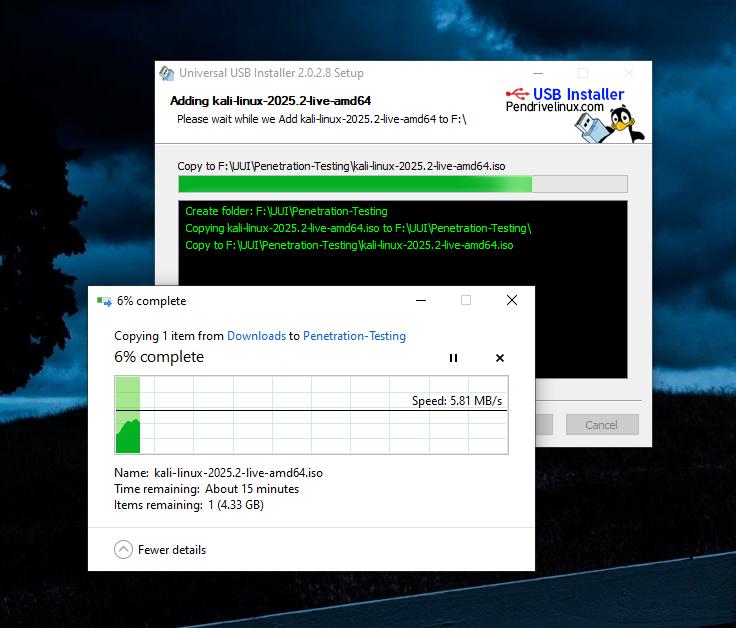 Some boot from USB tools use simple DD (Disk/Data Duplicator) copy and convert commands to directly burn ISO to USB. The DD method of copying, also commonly referred to as "Data Destroyer" works by overwriting the entire file system on a flash drive with that of a CD or DVD image. This process causes the drive to appear limited to the size of the chosen ISO file which can prevent you from continuing to use the drive for storage purposes. However, if the filesystem used by the CD/DVD image supports expansion, it may be possible to recover lost USB drive space by extending the space and creating another partition to use for storage. UUI offers a more practical method than DD through the use of an exFAT partition for storing bootable ISO files and block images, along with a separate hidden secondary FAT boot partition which is used to boot those files. This method allows your USB drive to appear to Windows as a regular exFAT formatted flash drive and enables you to continue using your removable device for traditional storage purposes. Persistence feature for saving changes Another key feature of this bootable USB maker is the use of persistent storage, where available. This persistence feature allows you to save changes and then restore those changes on subsequent boots. Ubuntu based Casper persistence works with FAT32, NTFS, or exFAT formatted drives. Starting with version 2.0.1.6, the USB drive is formatted with an exFAT filesystem, so an option to use a larger than 4GB casper-rw or live-rw persistent block file, (also known as an overlay image) is now possible. Currently supporting up to 40GB persistence. Drag and Drop ISO Files onto USB Drag and Drop ISO to USB functionality is supported so long as you don't need persistence, and do not need the tool to keep track of your installs for possible removal at a later point. 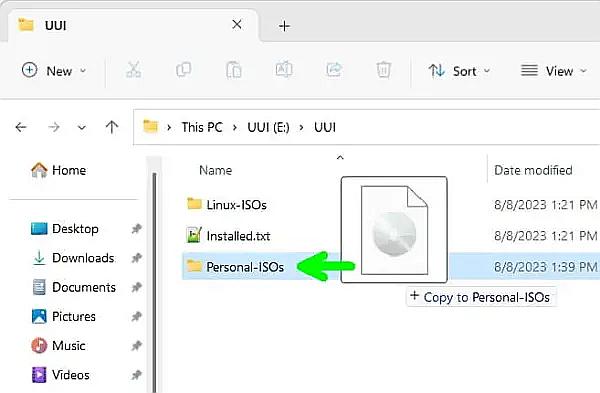 Instead of relaunching this Live Linux USB Creator to add more distributions, you can simply drag additional ISO, IMG, WIM, VHD(x), VDI.vtoy, and EFI files from any folder on your computer and drop them onto any folder under the UUI folder on your flash drive. You can also create your own folders within the UUI folder to use for storage. During bootup, the system will automatically populate the menu entries for those newly discovered items. Can you Secure Boot from USB? Yes, Secure Boot is supported from USB with UUI. Simply select "VTOYEFI" and then the option to "Enroll_This_Key_In_MokManager.cer" during startup. 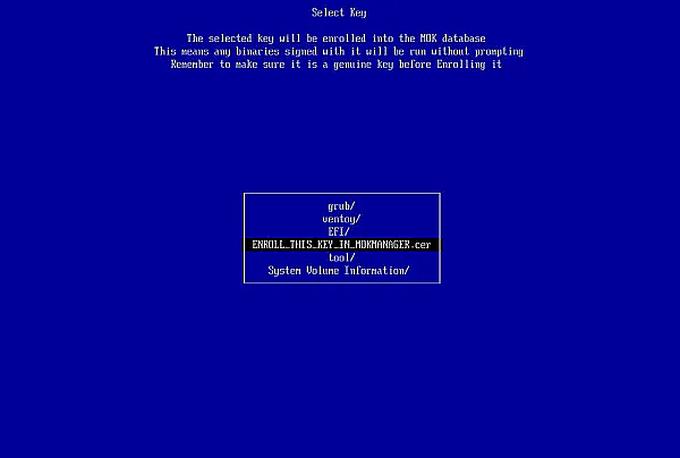 Essentials to Create Bootable USB Drives Important: UUI will show drives detected by Windows as either removable media (USB Drive) or a fixed (Local Disk). See the recommended list of some of the fastest and best USB flash drives to use with this tool. • Universal-USB-Installer-2.0.2.6.exe toolkit to make a bootable USB drive. • Windows 11, 10, 8, 7 operating system (or Linux with WINE) • 8 GB+ USB pendrive (fast SSD solid state USB thumb drive recommended) • Computer with a system BIOS/UEFI that can boot from USB. • Your favorite Windows or Linux ISO files and system tools. USB Bootable ISO files This USB boot maker software allows you to make a custom bootable USB drive from ISO files of the following Live Linux Portable Operating Systems, Windows Installation Media, Windows PE, System Diagnostic Tools, Cloning Tools, and Antivirus Utilities. Choose from a selection of Windows Installers and popular Live Linux distributions to put on your flash drive. It's easy as 123. Note that this ISO to USB boot list is not all inclusive. Almost any Live ISO file can be made to boot from USB. Ubuntu Live with persistence Ubuntu Live Xubuntu Live Kubuntu Live Lubuntu Live Edubuntu Live Ubuntu Live Server Installer Blackbuntu Ubuntu Secure Remix Ubuntu Studio Backbox Linux Mint with persistence Linux Mint Linux Mint Debian Edition Debian Live Debian Netinstall Debian Live The Debian Installer Fedora Linux with persistence Fedora Desktop Fedora OpenSUSE OpenSUSE 32/64 bit Linux Distros for Kids DouDouLinux Qimo 4 Kids 2.0 Sugar on a Stick Tiny Distros antix Puppy Linux (all variants) Slitaz Crunchbang DSL 4.4.10 Feather Linux Finnix GParted Live Wary Puppy Slacko Puppy Raspberry Pi OS Lite System Tools Clonezilla Parted Magic System Rescue CD Redo Backup Rescatux Trinity Rescue Kit Hiren's Boot CD (HBCD) Acronis Rescue CD Ultimate Boot CD Penetration Testing Kali Linux Backtrack Parrot Security OS BlackArch Linux Pentoo Security Onion DEFT Linux Anonymous Browsers Tails Whonix Subgraph OS Qubes OS (with Whonix integration) Other USB Bootable Distros amogOS AOMEI Android AntiX Antergos ArchBang ArchLinux with persistence ArtistX Aurora BackBox Baltix Linux BCCD Bodhi CentOS Chakra Deepin Linux Elementary OS Feather Linux GalliumOS GParted KNOPPIX Linux XP Like Mandriva Matriux OpenMandriva Pinguy OS Porteus Redo Backup Rescatux Slackware Slitaz System Rescue CD Trisquel Ultimate Boot CD Zorin OS Live Antivirus AVG Rescue CD Avira Rescue Disk Bitdefender Rescue CD Comodo Rescue Disk Dr.Web LiveCD F-Secure Rescue CD Kaspersky Rescue Disk Panda Safe CD Other USB Bootable Tools Falcon 4 Hiren's Boot PE Kon-Boot Sergei Strelec Install Windows from USB- Create Windows Bootable USB Windows 11, 10, 8, or 7 USB Installer Create a Windows 10 Bootable USB Create a Windows 11 Bootable USB Windows PE from USB Hiren Bootable PE Other Windows PE tools Try Unlisted Bootable ISO or IMG Try Unlisted Linux ISO/IMG files Changes: v2.0.3.8 07-13-26 Universal-USB-Installer-2.0.3.8: Updated to use Ventoy version 1.1.16 bootloader, fixing boot issues with old UEFI version firmware when secure boot is disabled. Fixed a bug where prepare/update reported success on the wrong disk num, though the correct disk was prepared/updated. Note: This file has one hit on VirusTotal. We have confirmed this to be a false positive. The file is safe. Click here to visit the author's website. Continue below for the main download link. |
||||||||
| Downloads | Views | Developer | Last Update | Version | Size | Type | Rank | |
| 15,300 | 40,788 | Pen Drive Linux | Jul 16, 2026 - 10:45 | 2.0.3.8 | 19.29MB | EXE |  , out of 123 Votes. , out of 123 Votes. |
|
| File Tags | ||||||||
| Universal USB Installer bootable linux iso pendrive multiboot installer recovery utility | ||||||||
Click to Rate File Share it on Twitter → Tweet
|


