|

|
Processed through Paypal No account required. |








Buy our over-priced crap to help pay the bills.



|
|
Processed through Paypal No account required. |
| File - Download PermaTop v1.4.0.2401 | ||||||||
| Description | ||||||||
|
Always scroll to the bottom of the page for the main download link. We don't believe in fake/misleading download buttons and tricks. The link is always in the same place. PermaTop v1.4.0.2401 👉 A Windows utility that allows you to pin windows. PermaTop is a Windows utility that lets you pin any window to the top of your screen. You can also save your favorite windows and have them automatically pinned whenever you launch PermaTop. PermaTop gives you great customization options to suit your preferences and workflow. 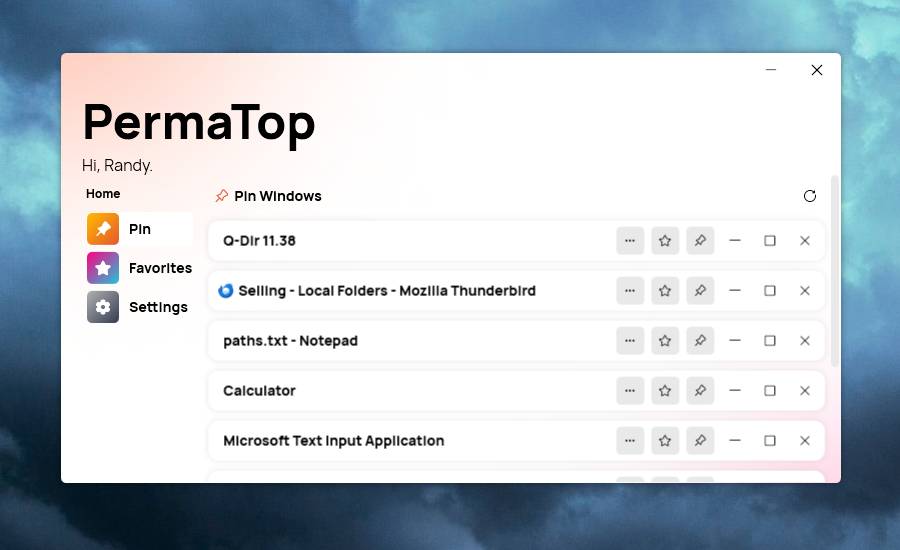 Features: • Pin windows: Easily pin any window to the top of your screen with a simple keyboard shortcut or a menu option. • Add windows to favorite: Save your favorite windows and have them automatically pinned whenever you launch PermaTop. • Great customization options: Customize the appearance, behavior and hotkeys of PermaTop to suit your preferences and workflow. Usage: • To use PermaTop, run the application from the Start menu or the desktop shortcut. You will see a PermaTop window with a list of all the opened windows on your system. To pin or unpin a window, click on the pin button next to its name. • To add or remove a window from favorites, you can click on the star icon next to the pin one. • To customize settings, simply click on the "Settings" button on the sidebar on the left. Usage cases: • You are watching a video tutorial on YouTube and you want to follow along with the steps in another application. You can pin the YouTube window to the top of your screen and switch to the other application without losing sight of the video. • You are working on a document and you need to refer to some notes or sources in another window. You can pin the notes or sources window to the top of your screen and scroll through the document without having to switch windows. • You are chatting with a friend on a chat app and you want to multitask with other applications. You can pin the chat window to the top of your screen and continue the conversation while doing other things. Supported operating systems: Windows 10/11 Supported languages: Multiple languages Changes: v1.4.0.2401 01-06-24 New e88103a Added translations (#39) d518f96 Added the possibility to launch the app on start (#39) 0435019 PermaTop starts minimized on start (#39) bd6afab Added information message (#39) Fixed 2239743 Fixed popup menu not visible in dark mode (#37) 866daaf Fixed Apply button in "Move to screen" not visible (#38) a0d98e0 Fixed a margin issue Updated 197ba01 Updated PeyrSharp.Env (#34) d0de9f4 Updated PeyrSharp.Core (#35) ba6c10b Made Apply button more consistent 27ad2b2 Updated copyright years (#40) d85d3ad Updated dependencies Note: This file has two hits on VirusTotal. We have confirmed these to be false positives. The file is safe. Click here to visit the author's website. Continue below for the main download link. |
||||||||
| Downloads | Views | Developer | Last Update | Version | Size | Type | Rank | |
| 728 | 2,423 | Leo Corporation | Jun 15, 2026 - 00:15 | 1.4.0.2401 | 4.02MB | EXE |  , out of 16 Votes. , out of 16 Votes. |
|
| File Tags | ||||||||
| PermaTop v1.4.0.2401 | ||||||||
Click to Rate File Share it on Twitter → Tweet
|


