|

|
Processed through Paypal No account required. |








Buy our over-priced crap to help pay the bills.



|
|
Processed through Paypal No account required. |
| File - Download Notetask v1.1.0 | ||||||||
| Description | ||||||||
|
Always scroll to the bottom of the page for the main download link. We don't believe in fake/misleading download buttons and tricks. The link is always in the same place. Notetask v1.1.0 A free, simple application for creating and organizing task lists. Notetask offers essential features for efficient task management, similar to Notepad in its simplicity and functionality. What is it?: Do you often save important ideas, to-do lists, phone numbers, or command-line snippets in random text files, hoping to find them later… only to forget where exactly you put them? No more wasted time searching — Notetask helps bring order to the chaos! All your notes can be stored locally on your device — no clouds, no third parties. This handy desktop app helps you organize your tasks, capture ideas, and manage your lists — with no more confusion! Notetask is a cross-platform application for managing task lists that include completion status, task description, and notes. Each task can have a due date and be marked as a favorite with a star. It uses its own storage text format based on Markdown. 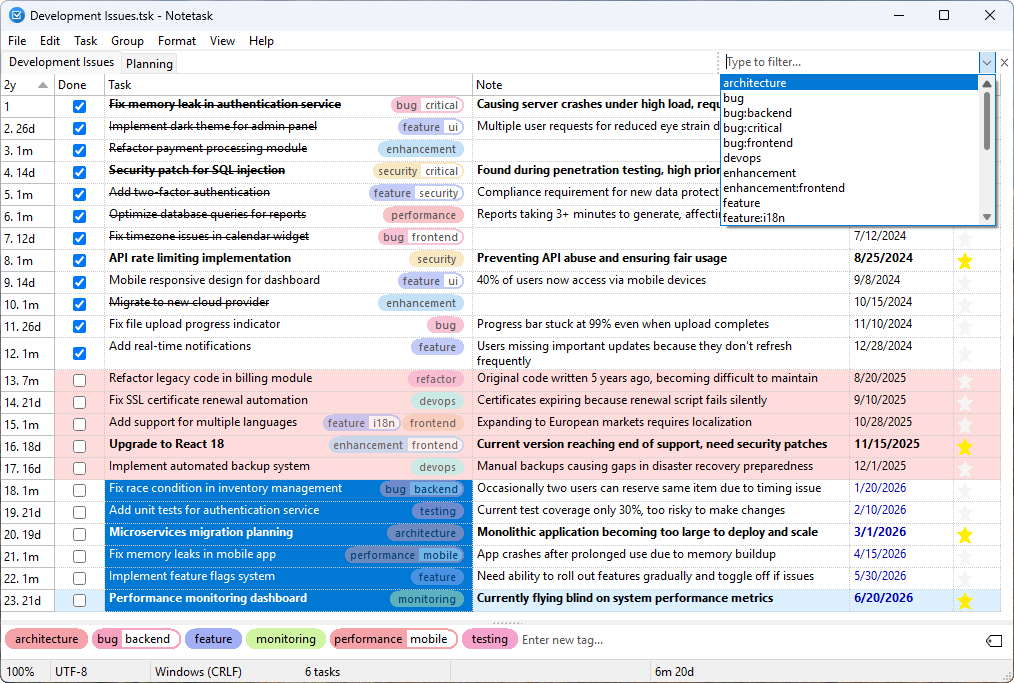 Notetask is designed to help you quickly organize a large number of small routine tasks. You can enter tasks directly in the app or paste raw text from the clipboard — such as a list of requirements or ideas — then sort them into groups, set durations or amounts, and start working right away. Perfect for managing project to-dos, bug lists, feature requests, and other ongoing tasks. Features: • Numbering — Tasks are numbered automatically based on their order of appearance in the file • Multiline — Tasks and notes with an option to submit or insert a line break when pressing Enter • Tags — task tag support with bulk tag editing, tag choice from existing items, auto or custom tag color, sorting, and optional tag suffixes • Filtering — filtering tasks across all fields and groups using an expression, with highlighting of matched items • Find & Replace — search and replace text within tasks and notes using a dialogs, with options for case sensitivity and scope selection • Zoom — zooming of tasks and notes with adjustable zoom via mouse, keyboard, menu, or status bar • Encrypt files — password-based encryption and decryption of task files for secure storage and sharing • Move tasks — single or multiple, within or between groups; task priority is set simply by its position in the list • Archive tasks — cross out archived items, which can be hidden or shown as needed • Grouping — each group on its own page, with full group management • Merge tasks — combine multiple tasks into one • Split tasks — split a single task into multiple tasks based on the selected column; each line break in the column becomes a new task, while all other columns are copied to each new task • Indent tasks — create subtasks and task hierarchies • Highlight — automatic background highlighting of overdue tasks, text highlighting of archived but incomplete tasks and blue text for tasks with a future due date • Copy tasks — copy selected tasks or fields in Markdown format • Paste tasks — insert individual fields or entire tasks from clipboard • Customize columns — toggle visibility of columns and interface elements (e.g., duration, note field, status bar) • Track duration — per-task (on/off) and total duration for all or selected tasks • Track amount — per-task quantities or prices and total amount for all or selected tasks • Status bar summary — shows totals of dates and amounts separately for completed and incomplete tasks Shopping list: Notetask allows you to keep a shopping list with item prices and see the total cost in the status bar, including the cost of purchased items. 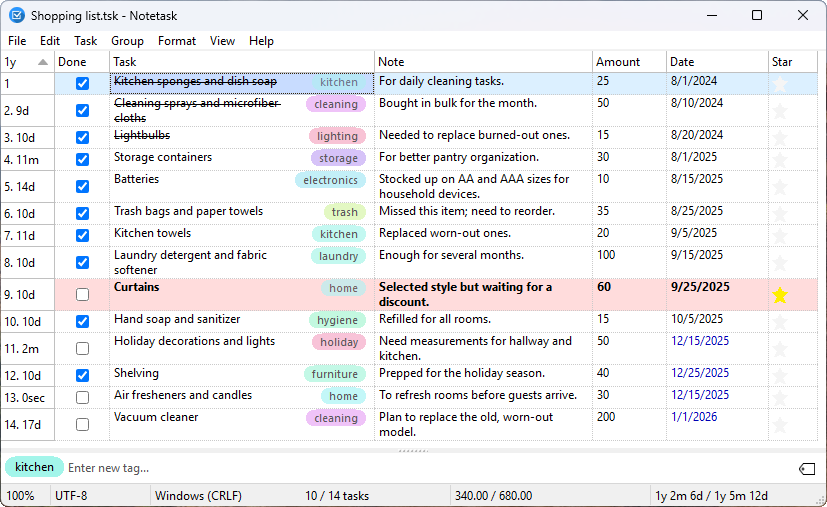 Notes: Suitable for note-taking with an optional general note field at the bottom of the application window, as well as support for paged grouping and all task management features. 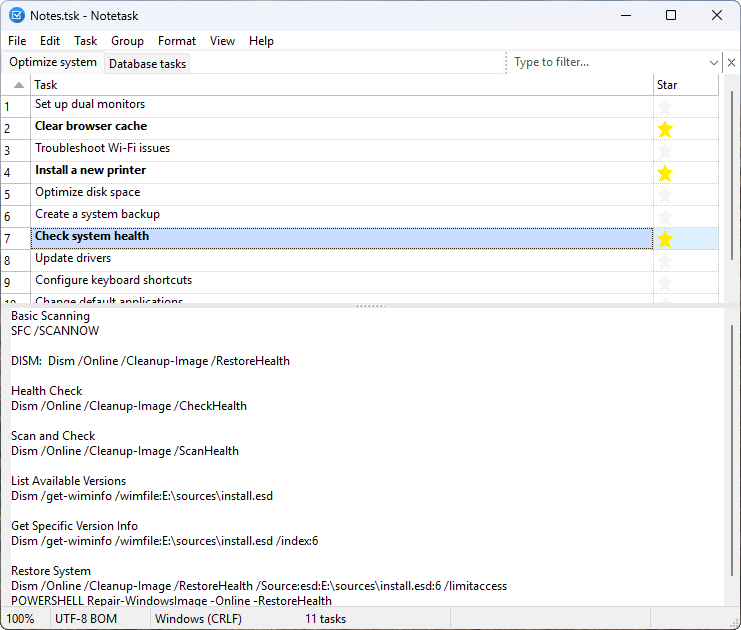 Personal Information: Suitable for storing personal information in encrypted files, with secure access and optional grouping for better organization. Highlights duplicate data. 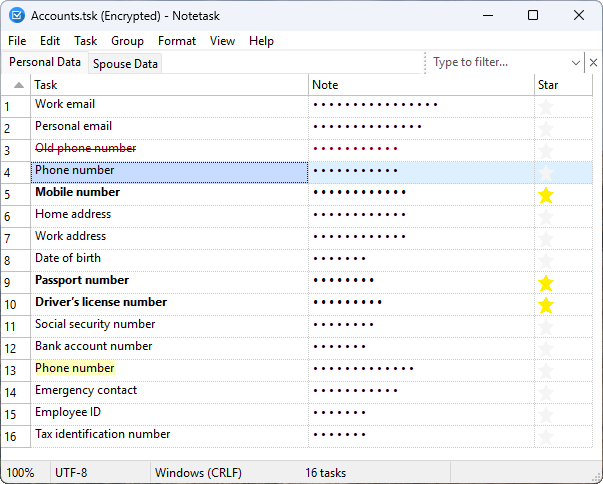 Supports advanced features such as executing selected comments, tasks, or the entire script from notes as console commands. 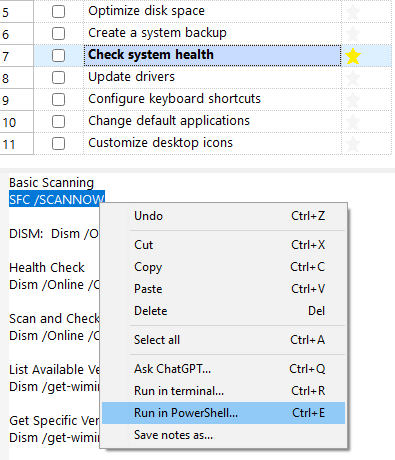 Encryption: Notetask can encrypts files using AES-256 in CBC mode with a key derived via PBKDF2-HMAC-SHA256. The derived 64-byte key is split into a 32-byte encryption key and a 32-byte HMAC key. Files are compressed using zlib before encryption, and a SHA-256 HMAC over the salt, IV, and ciphertext ensures integrity and authenticity. The user can save an encrypted binary file with password protection. If the password is left empty, the file is still encrypted but without password protection, storing only the compressed data in the encrypted format. To save an encrypted file, the corresponding format must be selected in the file save dialog. 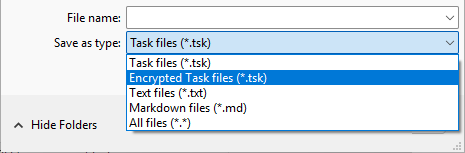 Shortcuts: Nearly all major features can be accessed through convenient keyboard shortcuts. View menu settings are saved individually based on filename. 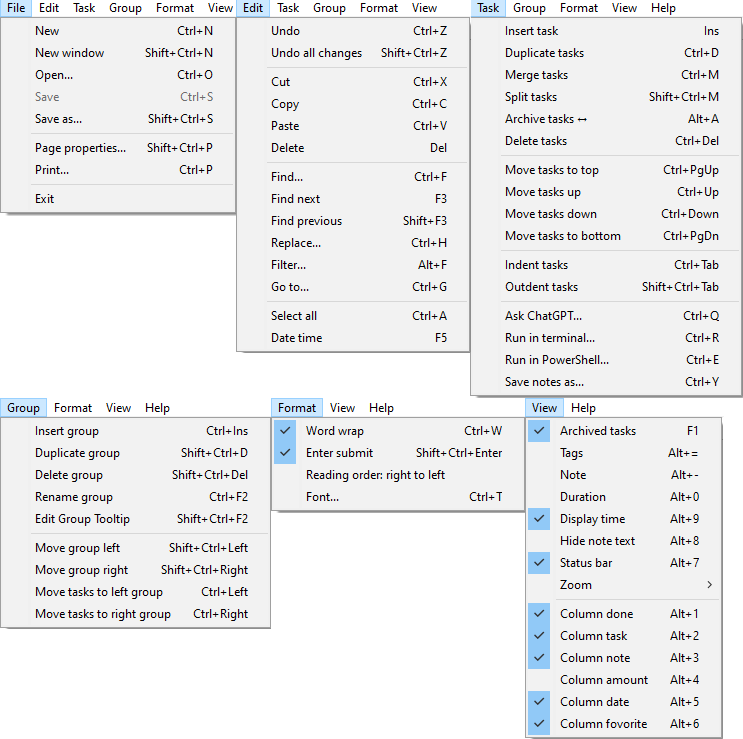 Summary: The status bar provides a concise, real-time overview of the current task list. These values are dynamically calculated based on either the full list of the current group or the currently selected tasks. Settings are configured through the context menu on the status bar. It displays: • Zoom Percentage allowing you to enlarge or reduce the view • Text encoding (e.g., UTF-8) and line ending style (e.g., CRLF) • Completed tasks / Total tasks • Total amount spent / Total amount for all tasks — useful for shopping lists or financial tracking • Elapsed time / Estimated total time — helps monitor progress on timed tasks.  Demo: 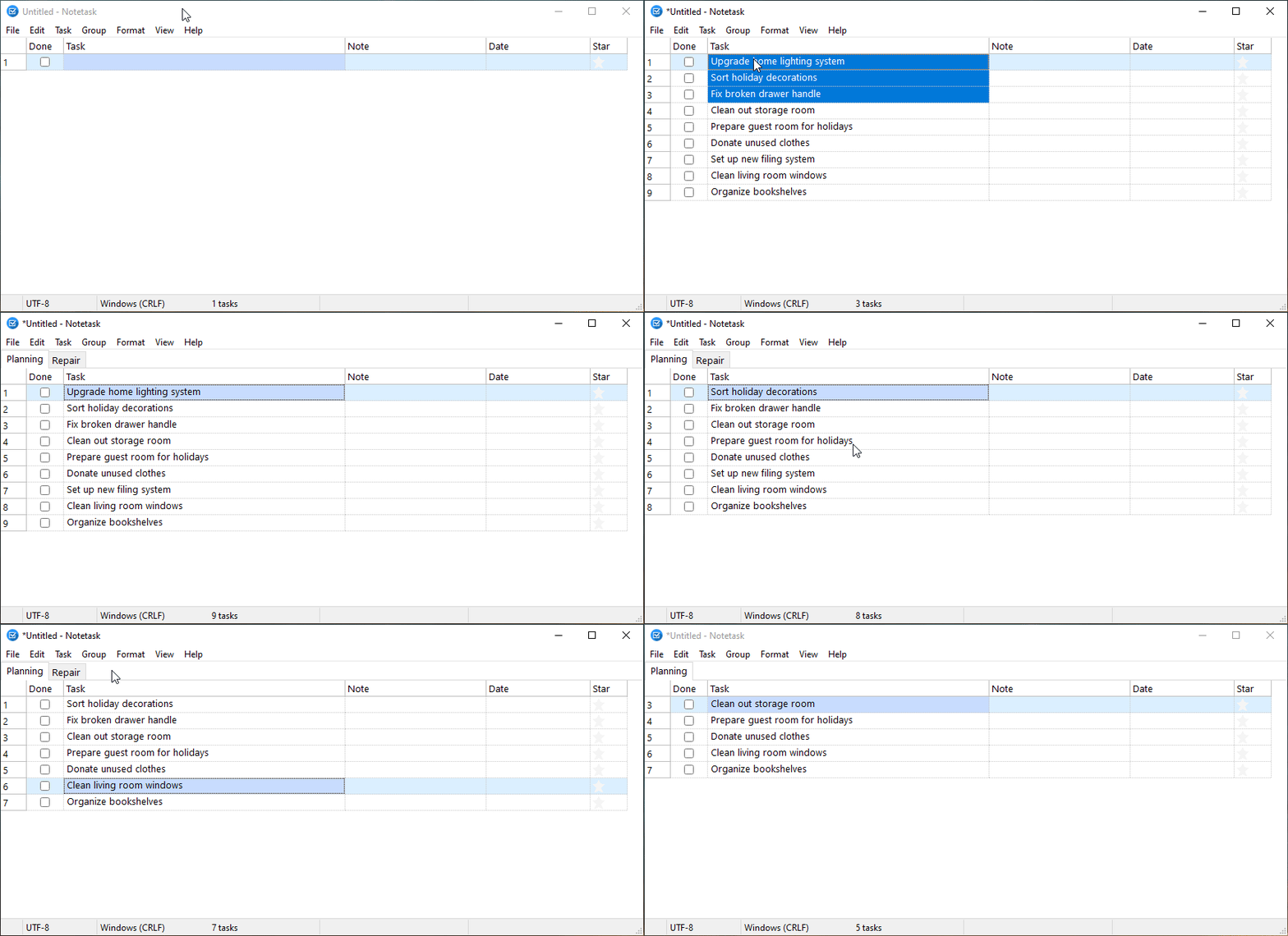 File Format: Notetask uses a simple plain text format based on Markdown (file extension .tsk), where each line represents a single task with the following structure: ## Group // TooltipLegend: All fields are optional. A task line may include any combination of them. • ## Group — the group title, marking the start of a set of related tasks• // Tooltip — tooltip with the group description• - [x] or - [ ] — task completion status ([x] = done, [ ] = pending)• Date — task date and optional timestamp in ISO 8601 format yyyy-MM-ddTHH:mm:ss• Amount — numeric value related to the task (e.g., cost, quantity), using a dot . as the decimal separator• ~~**Text**~~ — task description, bold if marked as favorite with a star, and crossed out if archived (inactive regardless of completion)• `tag` — tags are collected from any position in the task text when enclosed in backticks, and after saving the task they are stored immediately after the task text, separated by a space• // Note — comment or additional information about the task• #texttag — text tags can appear in the note or in the task, will be collected as suggestions for the filter, and may start with the characters # @ % + $• Example: 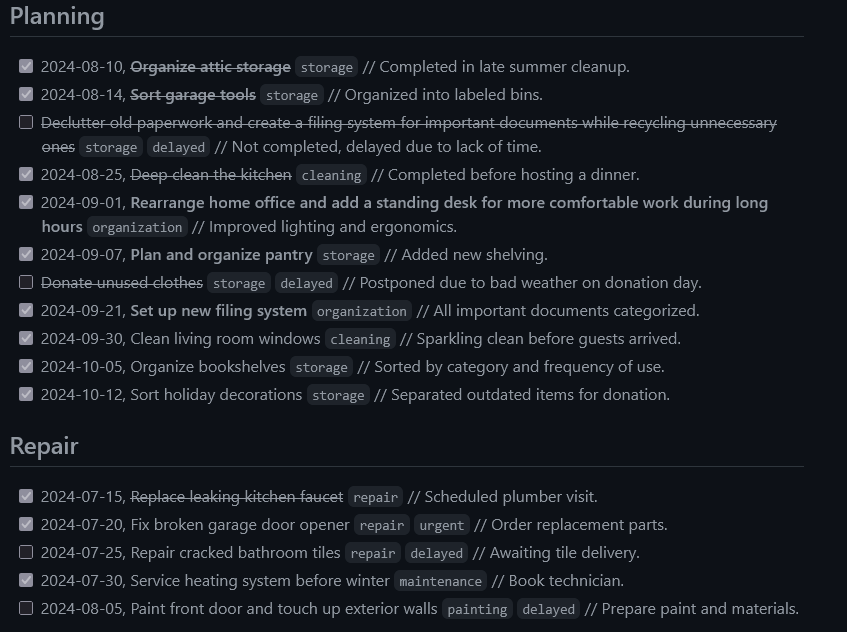 Supported operating systems: Windows XP to Windows 11 Linux This download is for the Windows 64 bit all users version (very bottom of page). All other download assets are below: Windows: notetask-1.1.0-x64.msi notetask-1.1.0-x86-allusers.msi notetask-1.1.0-x86.msi Linux: notetask-1.1.0.deb notetask-1.1.0.rpm notetask-1.1.0.tar.gz Click here to visit the author's website. Continue below for the main download link. |
||||||||
| Downloads | Views | Developer | Last Update | Version | Size | Type | Rank | |
| 650 | 2,097 | Alexander Tverskoy | Dec 11, 2025 - 14:03 | 1.1.0 | 12.99MB | MSI |  , out of 20 Votes. , out of 20 Votes. |
|
| File Tags | ||||||||
| Notetask v1.1.0 | ||||||||
Click to Rate File Share it on Twitter → Tweet
|


