|

|
Processed through Paypal No account required. |








Buy our over-priced crap to help pay the bills.



|
|
Processed through Paypal No account required. |
| File - Download ExtPassword! v1.05 | ||||||||
| Description | ||||||||
|
Always scroll to the bottom of the page for the main download link. We don't believe in fake/misleading download buttons and tricks. The link is always in the same place. ExtPassword! v1.05 Free tool to recover passwords stored on external drives plugged into your computer. ExtPassword! can decrypt and extract multiple types of passwords and essential information, including passwords of common Web browsers, passwords of common email software, dialup/VPN passwords, wireless network keys, Windows network credentials, Windows product key, Windows security questions. This tool might be useful if you have a disk with Windows operating system that cannot boot anymore, but most files on this hard drive are still accessible and you need to extract your passwords from it. 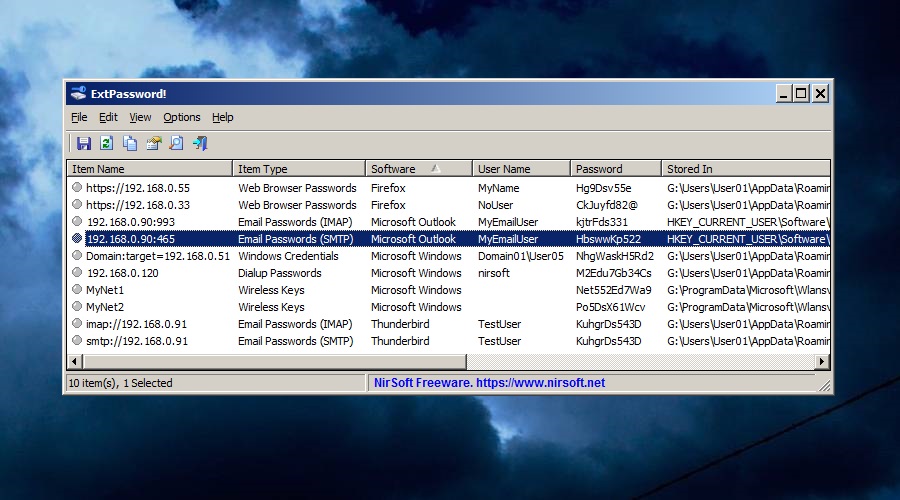 System Requirements And Limitations: • This tool works with any version of Windows, starting from Windows XP and up to Windows 11. Both 32-bit and 64-bit systems are supported. This is true for the running system and for the external disk. • This tool is just a small standalone .exe file that you can run on any system without installing anything. • Currently, this tool is designed to work with full disk only, and there is no option to choose specific folders to read. • You must provide read access to important system files on the external drive that are needed to extract and decrypt the passwords, especially the user profiles folder (e.g: X:\Users ) and the Registry hives folder (e.g: X:\Windows\System32\Config ) • You may need to run ExtPassword! as Administrator (Ctrl+F11) in order to allow it to read the files. Supported Software And Features: • Web Browsers: Chrome, Chrome Canary, Chromium, Microsoft Edge, Opera, Vivaldi, Yandex, Brave, Firefox, Sea Monkey, Pale Moon, Waterfox, Internet Explorer 11/10 (On Windows 10 only). • Email Clients: Microsoft Outlook (2007 - 2024), Thunderbird, Windows Mail App of Windows 10 and Windows 11 (Only POP3/IMAP/SMTP/Exchange accounts). • Dialup/VPN passwords of Windows operating system. • Wireless network keys of Windows operating system. • Windows Credential files ( %AppData%\Microsoft\Credentials ), which store passwords of remote computers on your network. • Security questions of Windows 10 and Windows 11. • If Microsoft account was used to login the external system, the ExtPassword! tool automatically tries to read and decrypt the Microsoft account cache file (located under C:\Windows\System32\config\systemprofile\AppData\Local\Microsoft\Windows\CloudAPCache\MicrosoftAccount ) and then use it to decrypt the DPAPI-encrypted passwords. • On Windows 10 - ExtPassword! can decrypt DPAPI passwords without typing the login password if the TBAL Primary key entry is stored as LSA secret (The entry name is M$_MSV1_0_TBAL_PRIMARY_{22BE8E5B-58B3-4A87-BA71-41B0ECF3A9EA} ). Windows 10 creates this entry for the last user that turned off the computer. Changes: v1.05: Updated to decrypt the version 3 of Chrome App-Bound Encryption. How to use ExtPassword!: ExtPassword! doesn't require any installation process or additional dll files. In order to start using it, simply run the executable file - ExtPassword.exe In order to ensure that ExtPassword! have read permission to all files needed to decrypt the passwords on the external drive, it's recommended to run ExtPassword! as Administrator. You can do it simply from Help menu -> Run As Administrator. The is also 'Run As Administrator' button in the Options window. After running ExtPassword!, the Options window is displayed. You have to choose the external drive that you want to scan. Optionally, type the login passwords you used on this system (every password on separate line). The login passwords are needed to decrypt some of the DAPI-encrypted passwords. You can also type the SHA1 hash of the password instead of the actual password. If you used a master password to decrypt the passwords of Firefox or other Mozilla products, you have to type your password in the master password text-box. After you fill the external drive information, press the OK button. After you press the OK button, ExtPassword! scans the external drive and displays the log on the main window. After the scanning process is finished, ExtPassword! switches to passwords list mode to show you all passwords and other information found on the external drive. If you cannot find the password you need, you can try to switch to the log screen by pressing F7, and try to figure out what is wrong. In the passwords list mode, you can select one or more passwords (or simply press Ctrl+A to select all of them) and then use the 'Save Selected Items' option (Ctrl+S) to export them to comma-delimited/tab-delimited/HTML/XML/JSON file. You can also copy the selected passwords to the clipboard (Ctrl+C) and then paste them into Excel or other spreadsheet application. License: This utility is released as freeware. You are allowed to freely distribute this utility via CD-ROM, DVD, Internet, or in any other way, as long as you don't charge anything for this and you don't sell it or distribute it as a part of commercial product. If you distribute this utility, you must include all files in the distribution package, without any modification. Disclaimer: The software is provided "AS IS" without any warranty, either expressed or implied, including, but not limited to, the implied warranties of merchantability and fitness for a particular purpose. The author will not be liable for any special, incidental, consequential or indirect damages due to loss of data or any other reason. Feedback: If you have any problem, suggestion, comment, or you found a bug in this utility, you can send a message to support@nirsoft.net. Warning: This file has a gazillion hits on VirusTotal. These are not false positives. This is a tool to hack your passwords and they are right to warn you. If a hacker was using it to steal your passwords, that would be bad. If you are using it to retrieve your passwords, that is fine. You will have to add an exception or disable your antivirus to use it. Click here to visit the author's website. Continue below for the main download link. |
||||||||
| Downloads | Views | Developer | Last Update | Version | Size | Type | Rank | |
| 747 | 2,555 | Nir Sofer | Dec 17, 2025 - 12:13 | 1.05 | 290.1KB | ZIP |  , out of 16 Votes. , out of 16 Votes. |
|
| File Tags | ||||||||
| v1.05 ExtPassword! | ||||||||
Click to Rate File Share it on Twitter → Tweet
|


